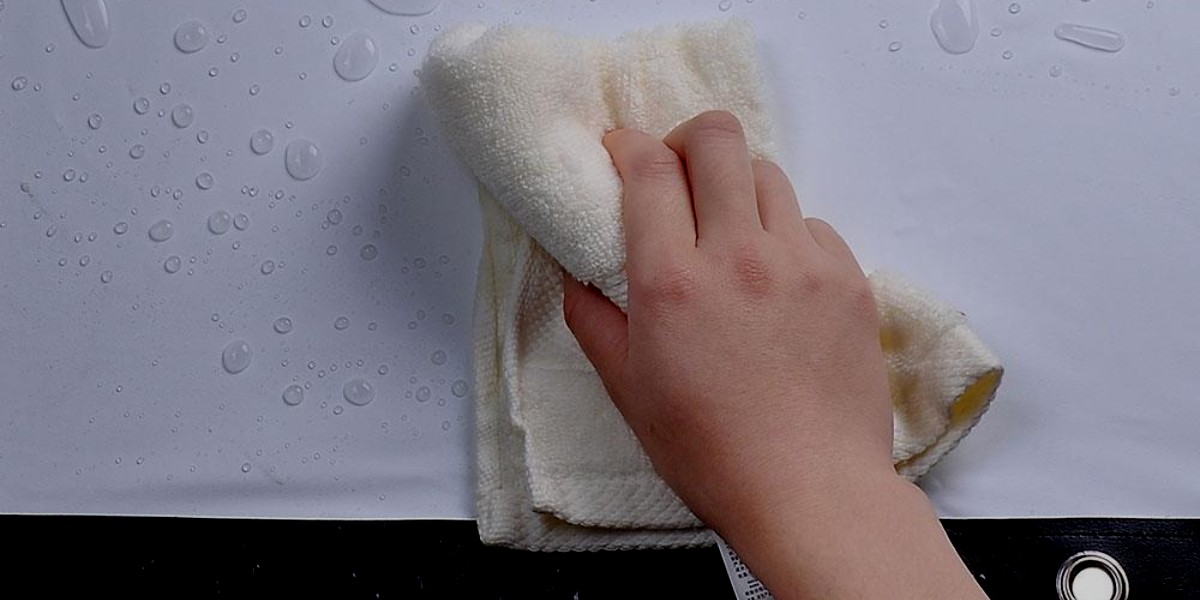
Updated August 29, 2026. The safest way to clean a projector screen is to start with the screen manufacturer’s care instructions, because projector-screen materials are not all cleaned the same way. For most screens, begin with the least aggressive method: remove loose dust gently, then use only the cleaning method approved for that exact material. Avoid assuming that alcohol, household glass cleaner, compressed air, a vacuum, or a generic “50/50 cleaning solution” is safe for every screen.
Quick answer: use a clean, soft brush or microfiber cloth for loose dust when the manufacturer allows it. For marks, many matte-white PVC/vinyl materials permit a lightly damp microfiber cloth with distilled water or a small amount of mild soap, but coated ALR/CLR, UST, high-gain and acoustically transparent materials can require different techniques. Never spray cleaner directly onto the viewing surface unless the manufacturer specifically instructs you to do so.
BrandLigo has not independently tested every screen material. The guidance below is based on current manufacturer care instructions from companies including Stewart Filmscreen, Elite Screens and Screen Innovations, plus conservative handling practices intended to reduce the risk of damaging an optical surface.
Before You Clean: Identify the Screen Material
The most important cleaning decision is not whether the screen is fixed, retractable or motorized. It is the viewing-surface material and coating. A matte-white vinyl surface may tolerate mild soap and water, while a structured ALR/CLR surface can have directional optical layers that should be wiped only in a particular direction. Some acoustically transparent materials are woven or perforated and should not be saturated.
- Matte white / basic PVC or vinyl: often the most forgiving, but confirm the exact material.
- ALR / CLR / UST screen: treat as a coated optical surface; follow its directional cleaning instructions.
- High-gain or specialty coating: minimize contact and use only manufacturer-approved products.
- Acoustically transparent: avoid clogging or deforming the weave/perforations.
- Motorized/retractable: the surface care may be similar to the material above, but it must be fully dry before retraction if the manufacturer requires drying time.
If you are specifically trying to determine whether your screen can be washed, see our separate guide: Can a projector screen be washed?
Step-by-Step: How to Clean a Projector Screen
1. Check the manufacturer’s care sheet
Find the model or material name before touching the screen. Screen Innovations, for example, publishes different cleaning methods for Maestro, Slate/Pure, Black Diamond and FlexGlass surfaces. Stewart Filmscreen separately publishes instructions for general materials and for its BlackHawk UST surface. That variation is exactly why one universal cleaning recipe is risky.
2. Remove loose dust with minimal contact
Start dry and gentle. Stewart recommends a soft dust brush for loose particles on many of its projection surfaces. Some manufacturers permit a soft-bristle vacuum attachment or compressed air for specific materials, but that is not a universal rule. Keep hard housings, nozzles and sharp objects away from the optical surface.
3. Spot-clean rather than washing the whole screen
If the manufacturer allows wet cleaning, put the approved liquid on the cloth or sponge rather than spraying the screen directly. Use light pressure and the fewest passes needed. Stewart’s general instructions emphasize a gentle “soaking and lifting” action instead of aggressive scrubbing.
4. Follow the surface direction on ALR/CLR and UST screens
Structured UST/CLR screens deserve extra care. Stewart’s current BlackHawk UST instructions say to clean in the direction of the screen’s linear structure and avoid circular or cross-direction scrubbing. Elite Screens similarly warns that its StarBright CLR material has a horizontal linear structure and should be wiped gently from left to right. Do not treat a UST/CLR surface like a plain white wall.
For more on why UST screens use different optical geometry, see Best Ultra Short Throw Projectors in 2026 and our Projector Screen Size Guide.
What Not to Use on a Projector Screen
- Do not use isopropyl alcohol by default. Some older advice recommends it, but Elite Screens explicitly warns against alcohol and other organic solvents for multiple screen materials, while Stewart warns against alcohol-based cleaners on its WallScreen materials.
- Do not use ammonia, acetone, benzene or abrasive cleaners unless your exact manufacturer explicitly approves a product containing them.
- Do not scrub. Repeated pressure can alter coatings, texture or optical uniformity.
- Do not spray liquid directly on the screen. Apply approved cleaner to the cloth/sponge when instructed.
- Do not use sharp tools to pick at paint, insects or debris.
- Do not retract a damp motorized screen. Follow the material’s stated drying time.
Cleaning Different Projector Screen Types
Matte white screens
Many common matte-white materials are washable, but the approved method depends on the brand. Elite Screens states that MaxWhite, CineWhite UHD 2 and several related materials can be cleaned with mild soap and water; CineWhite UHD 2 specifically allows a soft microfiber cloth. Do not extend that permission to every white screen without checking the material name.
ALR, CLR and UST screens
These surfaces can use microscopic or layered structures to control the direction of reflected light. Use the manufacturer’s exact motion and liquid guidance. If you are pairing a screen to a room with ambient light, our bright-room projector guide explains why screen type matters as much as projector brightness.
Acoustically transparent screens
Woven and perforated screens should be cleaned conservatively so the acoustic openings are not stretched, clogged or damaged. Screen Innovations, for example, provides material-specific instructions for its Maestro surfaces. Follow the exact screen maker rather than a generic projector-screen recipe.
Motorized and retractable screens
Extend the screen fully and keep cleaning liquid away from the roller, motor housing and electrical components. If wet cleaning is allowed, do not retract the material until it has dried for the period specified by the manufacturer.
How Often Should You Clean a Projector Screen?
There is no universal monthly schedule. Stewart’s general guidance says projection screens typically require little, if any, routine cleaning and that less contact is often better for preserving the optical surface. Remove visible loose dust when necessary and spot-clean marks only when they affect the viewing surface or the manufacturer recommends maintenance.
Projector Screen Cleaning FAQs
Can I use alcohol to clean a projector screen?
Do not use alcohol unless the exact screen manufacturer approves it. Elite Screens and Stewart both publish care instructions that warn against alcohol or organic solvents on specific materials. The old “50/50 water and isopropyl alcohol” rule is not safe as universal advice.
Can I use a Magic Eraser?
Avoid melamine foam and other abrasive cleaning pads unless the screen manufacturer explicitly permits them. They can alter an optical coating even when they do not leave an obvious scratch.
Can I vacuum the screen?
Only if the manufacturer permits it. Stewart allows a vacuum with a soft-bristle attachment as an option on some surfaces, while other materials may call for a brush, microfiber or compressed air. Never allow a hard vacuum nozzle to contact the image surface.
Can I wash an ALR or UST screen?
Some can be lightly wet-cleaned, but the technique is material-specific. For example, Stewart’s BlackHawk UST instructions use a very dilute dish-soap solution and require wiping in the direction of the screen structure. Check the care sheet before using liquid.
Manufacturer Cleaning References
- Stewart Filmscreen — General Screen Cleaning Instructions
- Stewart Filmscreen — BlackHawk UST Cleaning Instructions
- Screen Innovations — Fixed Screen Cleaning & Troubleshooting
- Elite Screens — CineWhite UHD 2 material care/specifications
If cleaning exposes wrinkles, placement problems or image geometry issues rather than dirt, see our Projector Throw Distance Guide or Ceiling Mount Installation Guide.


Leave a Reply