About Azure Resource Mover
Azure Resource Mover is Microsoft Azure's service for planning and orchestrating supported Azure resource moves from one Azure region to another. It is intended for planned relocation, not continuous disaster recovery. Resource Mover validates dependencies, prepares target resources, lets teams test a move before committing it, and keeps the source environment available through most of the workflow. It is most useful when a workload contains several related Azure resources and the move needs a controlled sequence rather than a collection of unrelated manual steps.
What is included
Service model
| Primary use | Orchestrates supported Azure resource moves between Azure regions |
|---|
Planning
| Dependency validation | Identifies and validates supported resource dependencies before a move |
|---|
Workflow
| Move stages | Prepare, initiate move, commit or discard, then optionally delete source resources |
|---|
Testing
| Discard option | Supports testing an initial move before final commit |
|---|
Support
| Current resource examples | VMs and disks, NICs, availability sets, VNets, public IP configurations, NSGs, load balancers, Azure SQL databases and elastic pools |
|---|
VM support
| Minimum documented VM size | At least 2 CPU cores and 1 GB RAM for supported Resource Mover VM scenarios |
|---|---|
| Azure Spot VMs | Not supported for the documented Resource Mover cross-region VM path |
| Existing Site Recovery replication | Must be disabled before Resource Mover prepares a VM move |
Pricing
| Resource Mover service fee | No additional charge; network bandwidth, target resources and other move-related usage can still be billed |
|---|
Migration
| Source environment | Source resources remain available through much of the workflow until cutover and cleanup |
|---|
What problems does Azure Resource Mover solve?
Resource Mover is built for organizations that need to relocate supported Azure resources because of a new region launch, data residency requirements, proximity to users, capacity needs, business changes, regional service availability, or region decommissioning. Microsoft provides a single move hub so administrators can see selected resources, unresolved dependencies, target settings, move states and cleanup work in one place.
The main value is coordination. A workload can depend on virtual networks, network interfaces, public IP configurations, security groups, load balancers, disks and databases. Resource Mover identifies supported dependencies and requires them to be resolved before the move proceeds. Teams can move a dependency with the workload or map the workload to an equivalent target resource when that is supported.
How does the cross-region move process work?
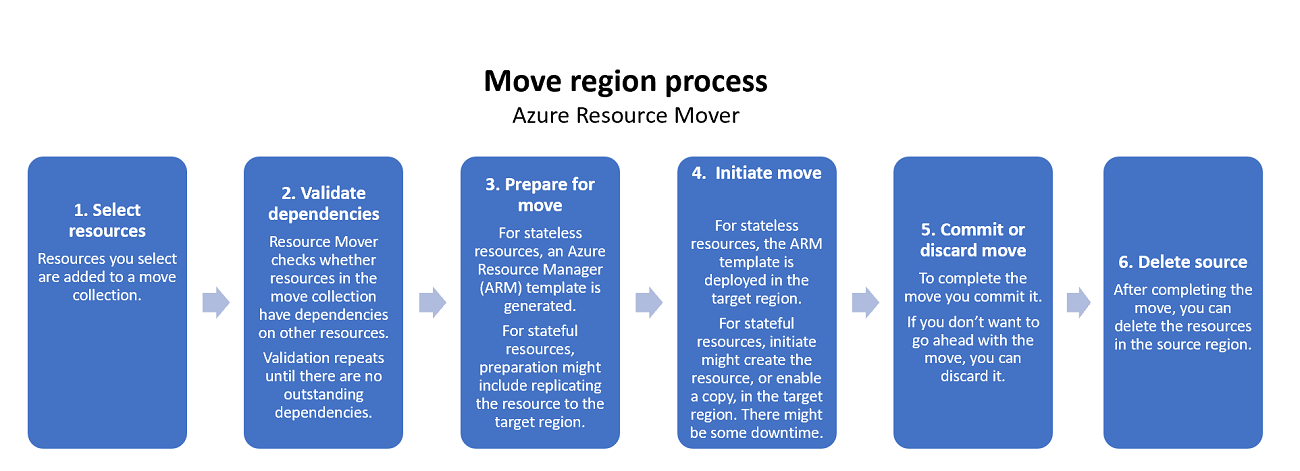
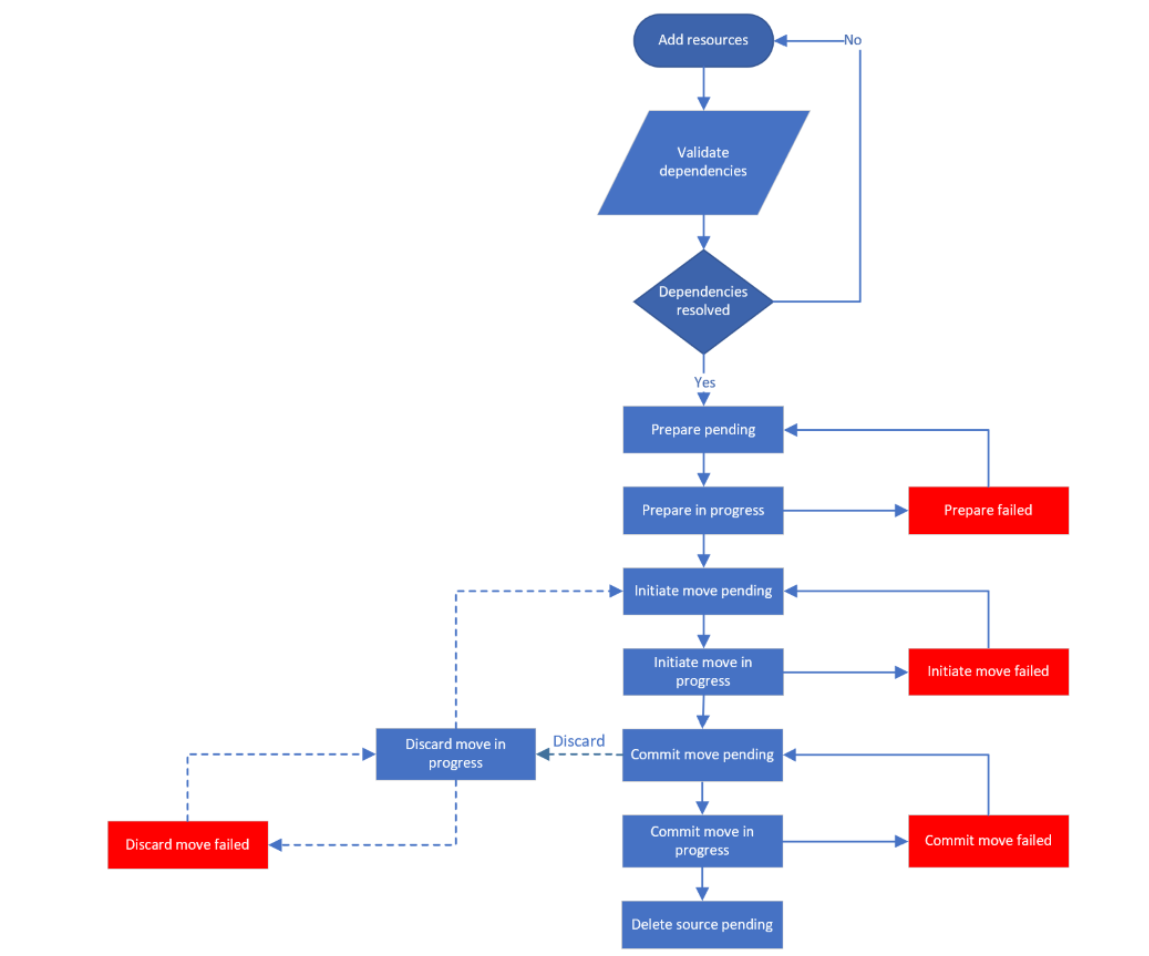
A move begins with a source region, target region and a move collection. Resources are added to that collection, dependencies are validated, and target settings are reviewed before preparation starts. Microsoft then guides the workload through preparation, initiate move, and a decision to commit or discard. After a successful commit, source resources can be deleted when the organization is ready.
The discard option is important for testing. It lets a team back out of an initial target deployment without treating the test as the final cutover. Resource Mover also creates or uses temporary migration resources for some scenarios, so cleanup after a completed move should include checking the move collection, cache storage, recovery resources and any source resources that are no longer needed.
Which Azure resources can Resource Mover currently move?
Microsoft's current overview lists Azure virtual machines and their disks, encrypted virtual machines and disks, network interfaces, availability sets, virtual networks, public IP configurations, network security groups, internal and public load balancers, Azure SQL databases and elastic pools among supported cross-region resources. Support is not universal, and the resource-specific support matrix should be checked before a migration plan is approved.
Public IP behavior is a useful example of why the matrix matters. Resource Mover can move a public IP configuration, but the original public IP address is not retained across regions. Azure Spot VMs are also not supported by the Resource Mover cross-region VM path. A resource that can move between resource groups or subscriptions through Azure Resource Manager is not automatically supported for a cross-region Resource Mover workflow.
What VM requirements should buyers check in 2026?
Microsoft's VM support matrix, updated in August 2026, states that supported VM sizes need at least two CPU cores and 1 GB of RAM. Availability sets are supported, and availability zones are supported when the target region supports the requested zone design. Windows and Linux support depends on the documented operating system and guest configuration matrix.
For Linux guests, Microsoft currently lists ext3, ext4, XFS and BTRFS file systems, LVM2 volume management and Device Mapper multipath software as supported. Teams should still review the full support table because disk, networking, encryption and operating system combinations can create additional requirements.
There is also an important Site Recovery limitation. Microsoft states that VMs already using Azure Site Recovery are not supported by the Resource Mover VM preparation path while that replication is active. Because Resource Mover uses Site Recovery technology in the backend for VM moves, existing replication must be disabled before the Prepare process begins.
Can Resource Mover move a VM to another subscription and region together?
Microsoft now documents a workflow that can move supported Azure VMs and their associated resources to another subscription and another region in one attempt. This can be useful when a relocation project is also reorganizing ownership, billing or subscription boundaries.
The destination subscription still needs sufficient quota for the target resources, and the account performing the setup needs the permissions required to create the Resource Mover managed identity and grant it access. For standard move collections, resources added to the same collection are expected to come from the same source subscription even when they are in different resource groups. Teams should therefore design the subscription and region move together instead of assuming arbitrary cross-subscription combinations can be mixed in one collection.
What should teams expect for downtime, testing and rollback?
Resource Mover keeps source resources available through much of the process, but Microsoft does not present every cross-region move as zero downtime. Stateful workloads can require replication, synchronization and a final cutover period. The exact interruption depends on the resource type, target settings and the stage at which traffic or writes are switched to the destination.
A discard action can remove target resources created by an initial move and return the workload to the move workflow. Commit is more consequential because it finalizes the target state. Teams should plan application validation, DNS or endpoint changes, health checks, user communication and a decision point for deleting source resources. A tested move plan is safer than treating Resource Mover as an automatic rollback system.
How much does Azure Resource Mover cost?
Pricing was checked on August 31, 2026. Microsoft states that Azure Resource Mover itself is available at no additional charge with an Azure subscription. The migration can still create billable usage, so the service being free does not make the project free.
Microsoft specifically warns about network bandwidth and data transfer charges. VM and other stateful moves can also create temporary resources, replication traffic, target storage or service-specific usage while source and destination environments overlap. Buyers should estimate target-region pricing, egress, temporary resources and the period during which both environments are running.
What permissions, quota and target-region checks are required?
The destination subscription needs enough quota to create the resources in the target region. Microsoft recommends checking target-region availability and pricing before starting the move. For PowerShell-driven move collections, the collection uses a system-assigned managed identity and Microsoft documents Contributor plus User Access Administrator permissions at the required scope. Creating and assigning that identity requires sufficient subscription permissions.
Operational planning should also cover target virtual networks, private endpoints, security rules, identities, secrets, monitoring, backup, policy and application configuration. A successful infrastructure move does not automatically update every application reference that contains a regional endpoint, IP address, DNS name or external dependency.
How is Resource Mover different from Azure Migrate and Azure Site Recovery?
Azure Resource Mover is focused on planned relocation of supported resources that already run in Azure. Azure Migrate is broader tooling for discovery, assessment and migration into Azure from on-premises and other environments. Azure Site Recovery is designed for disaster recovery through replication, failover and recovery workflows.
The products can appear in the same cloud program but solve different problems. Resource Mover may use Site Recovery technology for VM replication, yet the objective is a controlled regional relocation rather than ongoing disaster recovery protection. If the primary requirement is business continuity, repeated failover testing and recovery objectives, Site Recovery is the more relevant service.
What are the main limitations buyers should plan around?
The biggest limitation is resource coverage. Unsupported Azure services need a different relocation method, which can turn a single workload move into a mixed migration project. Public IP addresses are not preserved, Spot VMs are unsupported in the documented VM move path, and active Site Recovery replication must be resolved before Resource Mover prepares a VM.
Target-region capacity and service availability can also block a design that works in the source region. Encryption can add requirements such as destination key vaults or disk encryption sets. Microsoft also notes that some encrypted VM scenarios have specific restrictions, including unsupported hardware security module key combinations for certain cross-region moves. Review the resource-specific support matrix rather than assuming a general Resource Mover capability applies to every configuration.
Who should choose something else?
Choose another approach when required resources are not supported, when the migration starts outside Azure, or when the main objective is continuous disaster recovery rather than planned relocation. Azure Migrate is the better starting point for discovery and migration into Azure, while Azure Site Recovery is better suited to replicated failover and recovery.
A controlled rebuild can also be better for a small stateless workload that is already defined with Bicep, ARM templates, Terraform or another infrastructure-as-code system. If the destination architecture is intentionally changing, rebuilding can avoid carrying old network, security and operational decisions into the new region. Resource Mover is strongest when the goal is to move a supported existing Azure design with dependency awareness and a managed cutover workflow.
Reviews
No reviews yet
Nobody has reviewed Azure Resource Mover here yet.