About Azure Center for SAP solutions
Azure Center for SAP solutions is Microsoft's Azure service for deploying, registering and operating SAP systems as first-class workloads on Azure. It creates a Virtual Instance for SAP solutions, or VIS, that represents the SAP system and connects its application, database and infrastructure resources into one management view. It is aimed at teams running SAP on Azure that want a guided deployment path, a unified operational model and Azure-native health, quality and cost insights without turning the service page into a general SAP hosting overview.
What is included
Service model
| Primary resource | Virtual Instance for SAP solutions (VIS) |
|---|
Deployment
| New SAP systems | Guided deployment for single-server, distributed and distributed HA systems |
|---|
Registration
| Existing SAP systems | Supports documented SAP NetWeaver or ABAP systems on Azure that meet current topology and platform requirements |
|---|
Operations
| Standard start and stop | SAP application tier, individual application instances and HANA database; underlying VMs stay running |
|---|---|
| VM-aware start and stop | REST API version 2023-10-01-preview can start or stop SAP components with underlying VMs |
Quality
| Quality Insights | More than 100 checks against documented Azure and SAP reliability and performance best practices |
|---|
Identity
| Built-in roles | Azure Center for SAP solutions administrator, service and reader roles |
|---|
Networking
| Managed storage access | Public access or selected virtual networks with Microsoft.Storage service endpoints; private endpoint not currently supported |
|---|
Pricing
| VIS service charge | No billing charge for VIS resource types; underlying Azure resources and enabled services are billed separately |
|---|
What does Azure Center for SAP solutions do?
Azure Center for SAP solutions supports both new and existing SAP environments on Azure. For a new deployment, Microsoft provides a guided experience that creates the required compute, storage and networking components and helps automate SAP software installation according to Microsoft guidance. For an existing Azure-hosted SAP system, administrators can register the environment and create a VIS without rebuilding the workload.
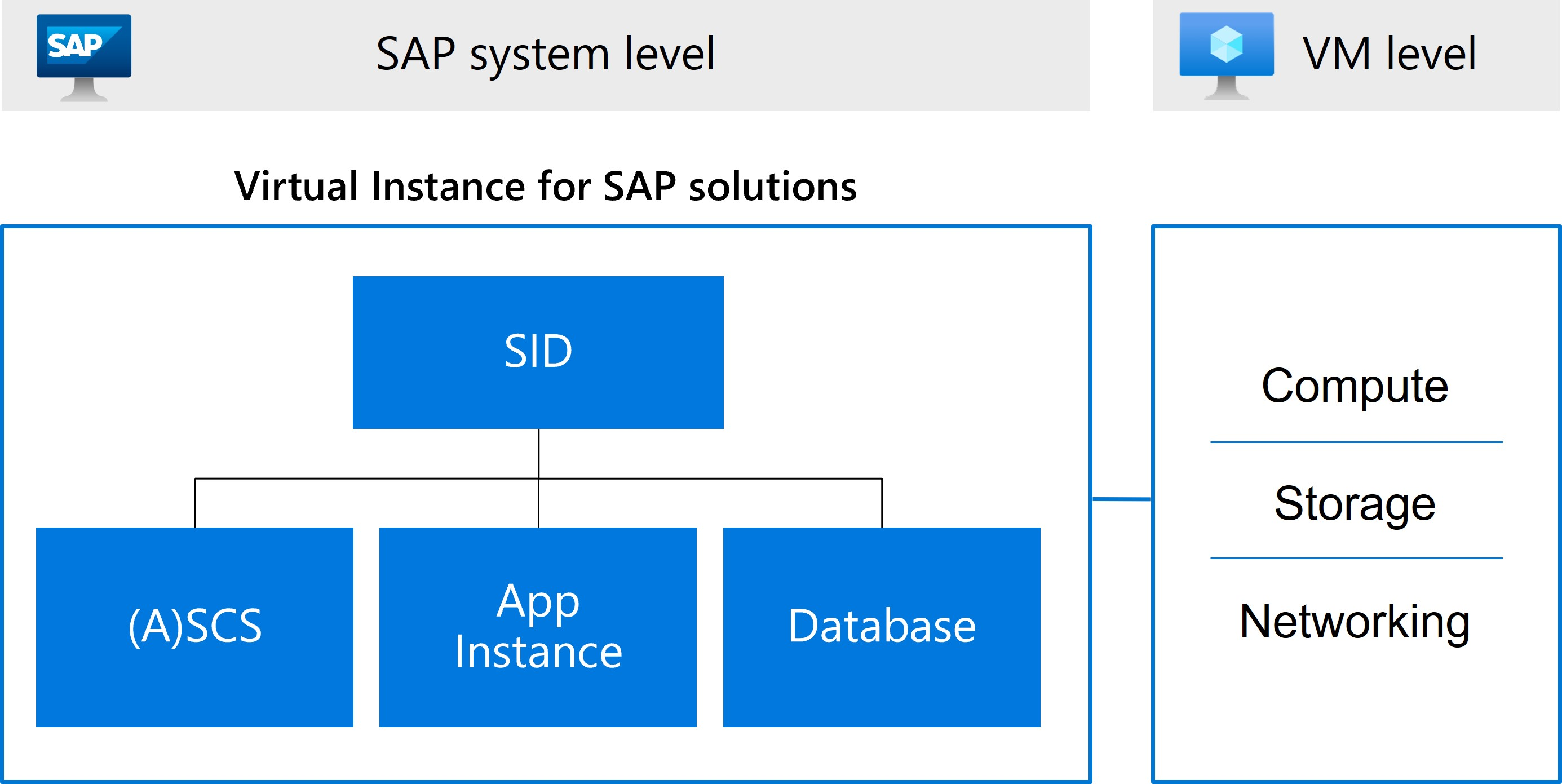
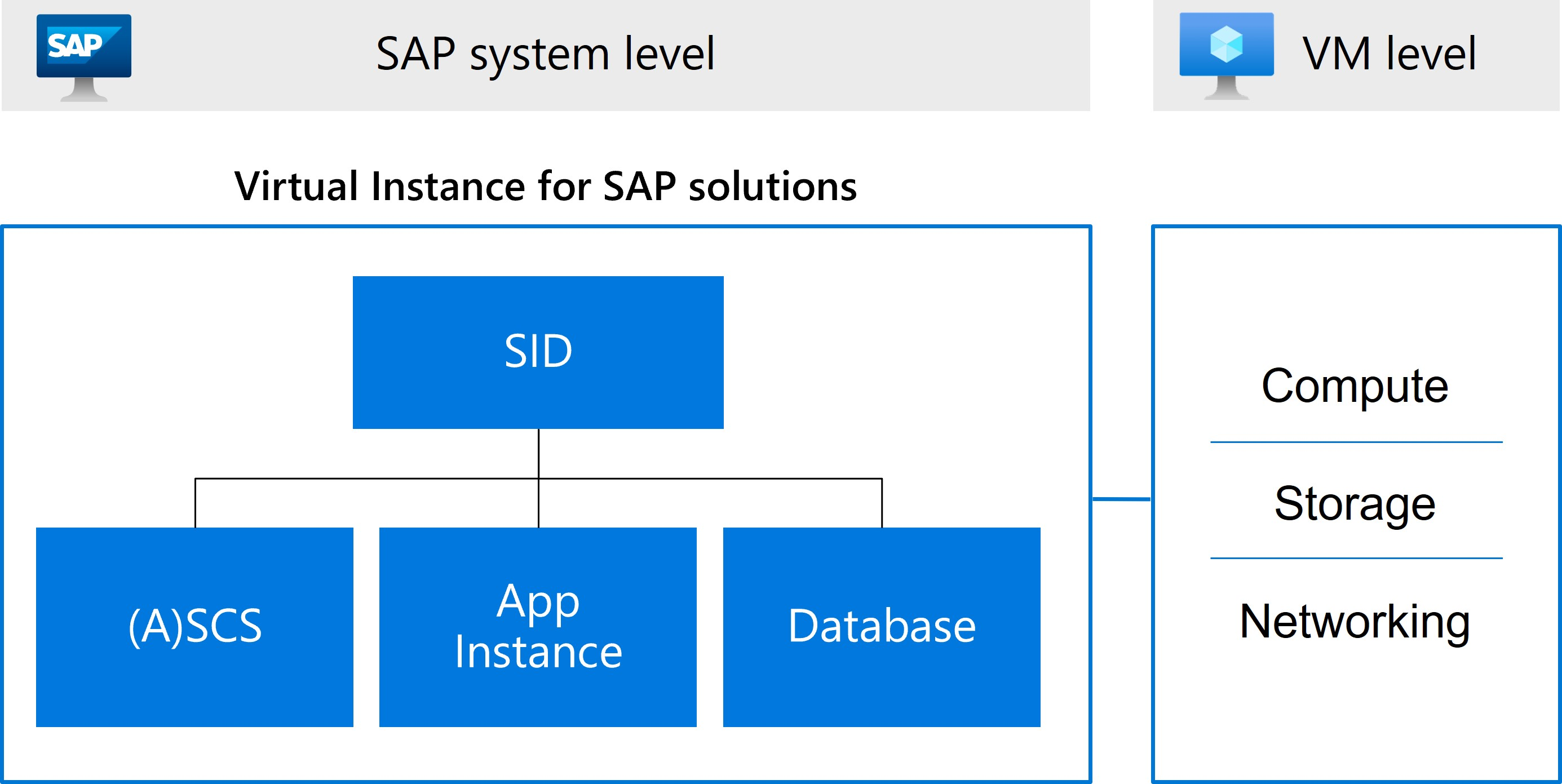
The VIS is a logical representation of the SAP system. Microsoft documents the SAP system identifier, ASCS instance, database instance and application server instances as parts of that model. After registration or deployment, teams can use the VIS to see system metadata, status and health, review infrastructure metrics, start and stop supported SAP components and access SAP-specific quality and cost views.
Which SAP systems can be registered?
Microsoft's current registration documentation supports SAP NetWeaver or ABAP stack systems running on Windows, SUSE or RHEL Linux, with databases including HANA, DB2, SQL Server, Oracle, Max DB and SAP ASE. It also supports systems with multiple application server instances on one VM and clustered application server architectures.
Important exclusions remain. Microsoft currently lists HANA Large Instance, HANA scale-out, MCOS and MCOD configurations, Java stack, dual ABAP and Java stack, systems spread across peered virtual networks, IPv6-based systems and multiple SIDs sharing the same set of VMs as unsupported for registration. Buyers should compare their exact SAP topology with the current support matrix before treating ACSS as a fit.
How does deployment and registration work?
For existing systems, Azure Center for SAP solutions discovers the SAP environment and creates VIS-related resources in the customer's subscription. Microsoft says these VIS resource types themselves do not carry billing charges. The service also creates a managed resource group and a managed storage account used for scripts and logs that support discovery, registration and management operations.
Registration requires the Microsoft.Workloads resource provider, appropriate Azure roles, a user-assigned managed identity and working connectivity between SAP components. The SAP services and host agents that Microsoft uses for discovery must also be available. These prerequisites make ACSS more than a simple dashboard: it needs deliberate identity, networking and VM preparation before onboarding succeeds.
What network access does registration require?
Microsoft's current registration guidance requires access from the SAP virtual network to Azure Storage, Azure Resource Manager and Microsoft Entra services. Customers can provide general outbound connectivity, use service tags, use region-scoped service tags, or allow the required regional IP ranges where documented.
Windows-based SAP systems have an additional operational requirement: ACSS runs Microsoft-signed PowerShell scripts through a VM extension, and Windows validates those signatures. Microsoft states that www.microsoft.com must be reachable for that validation. If a firewall is used, Microsoft documents an outbound rule to www.microsoft.com on port 80. Teams with tightly controlled egress should plan this before registration because ACSS functionality can fail when the signature-validation path is blocked.
How do start and stop operations work?
Microsoft's current March 2026 guidance lets administrators start and stop the SAP application tier, individual SAP application instances and HANA databases from a VIS through the Azure portal, PowerShell, Azure CLI and REST API. These standard start and stop actions affect SAP software components, not the underlying virtual machines. For a start operation to work, the related VMs must already be running and the sapstartsrv service must be running on the relevant hosts.
For highly available systems, Microsoft supports SUSE and RHEL Pacemaker clustering and Windows Server Failover Clustering for these operations. Stopping an HA SAP system through the VIS gracefully stops SAP instances in the correct order rather than triggering a Central Services failover. HANA HA start and stop requires a cluster management solution. Microsoft also documents a 300-second operation timeout; monitoring can continue to update the VIS status after the operation itself terminates.
Can Azure Center for SAP solutions stop the underlying VMs?
Microsoft also documents a separate REST API path that can start or stop SAP components together with their underlying Azure VMs. This VM-aware capability uses API version 2023-10-01-preview and requires the user-assigned managed identity associated with the VIS to have Virtual Machine Contributor or equivalent permissions.
This option should be used carefully when several SAP instances or SIDs share a VM. Microsoft notes that stopping one VIS or instance with VM deallocation does not automatically stop other SAP instances on that VM. For single-server deployments, Microsoft recommends stopping the SAP application tier first and then stopping the HANA database with VM deallocation enabled so both software layers are stopped before the VM is shut down.
What monitoring and quality features are included?
After a VIS is available, Azure Center for SAP solutions can show system status and health, infrastructure metrics and SAP-specific operational information. Microsoft's current Quality Insights workbook runs more than 100 quality checks against VIS resources. The checks assess whether the SAP environment follows documented Azure and SAP best practices for reliability and performance and surface recommendations, VM information and configuration findings.
The service can also show system-level cost analysis for supported resources associated with the SAP system. Microsoft's April 2026 cost-analysis guidance lists resources such as virtual machines, disks, load balancers, virtual networks, storage accounts, Azure NetApp Files, Azure Key Vault, Azure Monitor for SAP solutions and Azure Backup. Microsoft states that cost and usage data is typically available within 8 to 24 hours.
How does pricing work?
Pricing was checked on August 31, 2026 using current Microsoft documentation. Microsoft states that VIS resource types created for Azure Center for SAP solutions do not have billing or cost associated with them. The practical cost comes from the Azure infrastructure and additional Azure services that make up and support the SAP workload.
That means buyers should budget for resources such as virtual machines, disks, load balancers, storage, networking, backup, monitoring and any other services used by the SAP environment. Cost analysis in ACSS can group supported SAP-related resource spend around the VIS, but it does not replace detailed Azure cost management, reservations, licensing analysis or workload-specific capacity planning.
What security and access controls matter?
Azure Center for SAP solutions uses Azure RBAC to separate user duties from service permissions. Microsoft documents built-in Azure Center for SAP solutions administrator, service and reader roles. The administrator role can deploy infrastructure, install SAP, register existing systems, view health, perform supported start and stop actions and delete VIS resources. The service role is intended for the user-assigned managed identity that ACSS uses for deployment and management.
Using an existing user-assigned managed identity also requires the Managed Identity Operator role for the user assigning it to the VIS. Creating a new user-assigned identity during deployment or registration requires both Managed Identity Contributor and Managed Identity Operator permissions. Cost analysis additionally requires Cost Management Reader or equivalent permissions.
The service deploys a managed storage account for each registered SAP system. Microsoft currently supports public network access or access restricted to selected virtual networks. If restricted virtual network access is used, the required Microsoft.Storage service endpoints must be configured on related subnets. Private endpoints for this managed storage account are not currently supported in the documented registration scenario.
What are the main limitations?
Azure Center for SAP solutions is not a universal management plane for every SAP architecture. Its support depends on the SAP stack, operating system, database, network topology and deployment pattern. Unsupported configurations such as Java stack, dual stack, HANA scale-out, MCOS, MCOD, IPv6-based systems and systems distributed across peered virtual networks can rule out registration.
Operational controls have their own boundaries. Standard VIS start and stop actions do not start or stop the underlying VMs. VM-aware start and stop remains tied to a preview REST API. HANA HA operations require cluster management, and some shared-VM layouts need one-at-a-time handling to avoid stopping infrastructure that still hosts other SAP instances. Teams with tightly isolated networks or highly customized SAP layouts should validate prerequisites and operational workflows before relying on ACSS for production runbooks.
How is this different from Azure Monitor for SAP solutions?
Azure Center for SAP solutions is the broader SAP workload management experience. It represents the SAP system as a VIS, supports deployment and registration, exposes system status and health, provides operational actions and brings together cost and quality views.
Azure Monitor for SAP solutions is focused on monitoring telemetry for SAP systems and related infrastructure components. An organization may use monitoring alongside ACSS, but the products solve different problems. Buyers looking for workload registration, lifecycle operations and an SAP-aware Azure resource model should evaluate ACSS, while teams primarily seeking telemetry and observability should compare Azure Monitor for SAP solutions directly.
Who is Azure Center for SAP solutions best suited for?
The service is best suited for organizations already running or planning SAP on Azure that want a more unified way to deploy, register and operate supported SAP systems. It is especially relevant for enterprise SAP teams that need visibility across application, database and infrastructure layers and want Azure-native health, quality, lifecycle and cost context tied to the SAP system.
It can also help platform teams standardize how SAP workloads are represented and operated in Azure. The biggest value comes when the environment fits Microsoft's supported topologies and the team is willing to configure the required identities, network access, host services and operational permissions.
Who should choose something else?
Organizations running unsupported SAP topologies should not force Azure Center for SAP solutions into the design. Teams using HANA scale-out, Java-only or dual-stack systems, IPv6-only patterns, MCOS or MCOD configurations, or SAP systems distributed across peered virtual networks should review other Azure and SAP management approaches until Microsoft documents support for their architecture.
A team that only needs infrastructure monitoring may be better served by Azure Monitor for SAP solutions and Azure Monitor. A team not running SAP on Azure should also look elsewhere, because ACSS is specifically designed around SAP workloads hosted on Azure rather than acting as a general multi-cloud or on-premises SAP management platform.
Reviews
No reviews yet
Nobody has reviewed Azure Center for SAP solutions here yet.