About Azure Compute Fleet
Azure Compute Fleet is an Azure compute service for provisioning large groups of virtual machines from a pool of eligible VM sizes instead of requesting one fixed size at a time. It is designed for workloads that need fast access to capacity, want to combine Standard and Spot virtual machines, or need to optimize placement across different VM types and zones. Compute Fleet sits above the individual VM layer: it selects and launches virtual machines according to target capacity, pricing mix, allocation strategy and VM selection rules defined by the operator.
What is included
Capacity
| Target capacity | Up to 10,000 VMs or 100,000 vCPUs per fleet, subject to Azure VM and vCPU quotas. |
|---|---|
| Regional scope | Up to three regions per fleet; multi-region capability is currently preview. |
Availability
| Cloud scope | Available in Azure public cloud regions; sovereign cloud availability is more limited and should be checked before deployment. |
|---|
Modes
| Managed mode | Default mode that keeps the fleet in place to manage capacity over time. |
|---|---|
| Launch mode | Preview mode that provisions VMs, hands off lifecycle control and self-deletes the fleet object after about five hours. |
Pricing
| Service charge | No additional Compute Fleet service charge; customers pay for launched VMs and other consumed Azure resources. |
|---|
Spot
| Spot support | Supports Spot and Standard VM capacity in the same fleet with separate targets and allocation strategies. |
|---|---|
| Eviction behavior | Spot eviction does not automatically add Standard VMs to replace the lost Spot target. |
Allocation
| Standard VM strategies | Lowest price and prioritized. |
|---|---|
| Spot VM strategies | Price capacity optimized, capacity optimized and lowest price. |
Preview
| Attribute-based VM selection | Preview feature that can match VM sizes from requirements such as vCPU, memory, storage, network, RDMA, accelerators, architecture and CPU manufacturer. |
|---|
Limits
| Fleet quota | Up to 5,000 Compute Fleets per subscription in each region. |
|---|---|
| CPU architecture | Multiple CPU architectures cannot be mixed in a single Compute Fleet request. |
| Resource move | Compute Fleet resources cannot currently be moved between locations, subscriptions or resource groups. |
Integration
| Management interfaces | Azure portal, Azure Resource Manager workflows, REST APIs and Azure SDKs. |
|---|
What is Azure Compute Fleet used for?
Compute Fleet is aimed at workloads where capacity, price or VM availability can change faster than a team wants to manage manually. Microsoft lists scenarios such as stateless web services, big data clusters, continuous integration pipelines, financial risk analysis, log processing and image rendering. It can also fit batch and HPC patterns when an external scheduler needs many VM instances quickly.
The main value is flexibility across eligible VM sizes and pricing models. Instead of tying a request to one fixed VM size, a fleet can draw from multiple choices and use allocation rules to decide which instances to launch. That can improve the chance of obtaining capacity during constrained periods and can help teams use Spot capacity without building all placement logic themselves.
How do Managed mode and Launch mode differ?
Managed mode is the default. The fleet remains as the control object and can manage capacity over time. When Spot capacity is configured to be maintained, Compute Fleet can try to replace Spot VMs that are evicted. Microsoft also allows supported changes to a running Managed fleet, including target capacity and VM size selection.
Launch mode is currently in preview. It provisions VMs in one request and hands lifecycle control to the customer or an external orchestrator such as Karpenter, Slurm or a custom scheduler. The fleet object self-deletes after provisioning, typically after about five hours, while the provisioned VMs persist and continue to incur normal VM charges until separately removed. Launch mode requires preview feature registration and a minimum API version of 2026-04-01-preview.
How does Azure Compute Fleet select virtual machines?
For Standard VMs, Microsoft documents lowest-price and prioritized allocation strategies. Lowest price is the default and attempts to use the least expensive eligible pay-as-you-go VM first. Prioritized follows the customer-defined order.
For Spot VMs, Microsoft documents price-capacity-optimized, capacity-optimized and lowest-price strategies. Price-capacity-optimized is Microsoft's recommended Spot strategy because it considers both available Spot capacity and price. Capacity-optimized favors VM types with more available Spot capacity, while lowest-price favors the cheapest eligible option. Buyers using attribute-based VM selection should note that prioritized Standard allocation and price-capacity-optimized Spot allocation are not compatible with that preview feature.
What does attribute-based VM selection add?
Attribute-based VM selection is currently a preview capability. Instead of maintaining a fixed list of VM sizes, a team can define requirements that Compute Fleet resolves into suitable VM types before it applies the allocation strategy. Microsoft currently documents attributes including vCPU count, memory, memory per vCPU, local storage, data-disk count, network-interface count, network bandwidth, RDMA support, accelerator support, VM category, CPU architecture and CPU manufacturer.
This can reduce maintenance when newer VM generations become available, because matching sizes can enter the eligible pool without a manual SKU-list update. It is still not a general resource scheduler. Microsoft requires vCPU count and memory when VM attributes are used, target capacity remains expressed as VM instances, and the feature requires preview onboarding with API version 2024-11-01 or later.
What are the current capacity and regional limits?
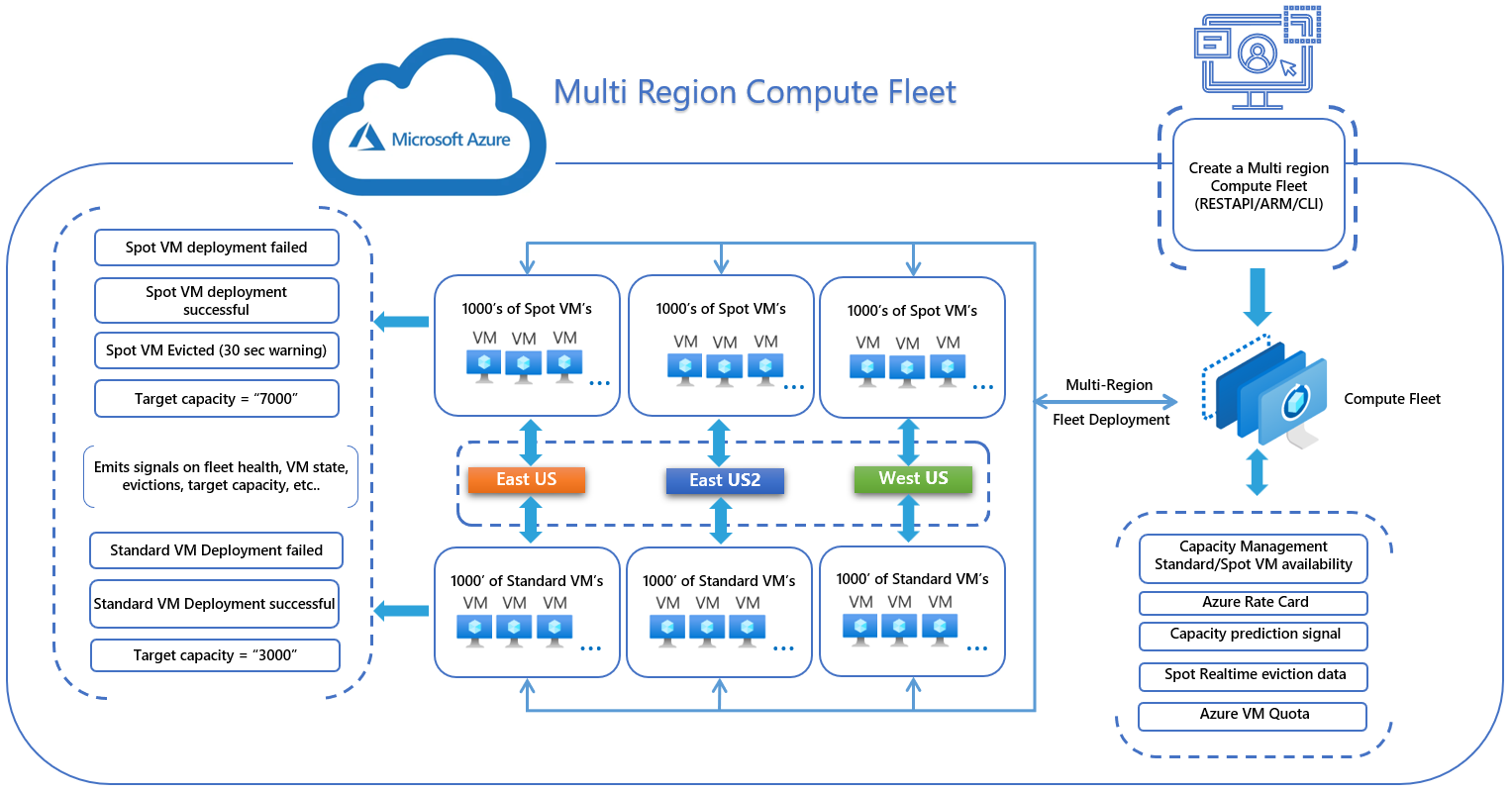
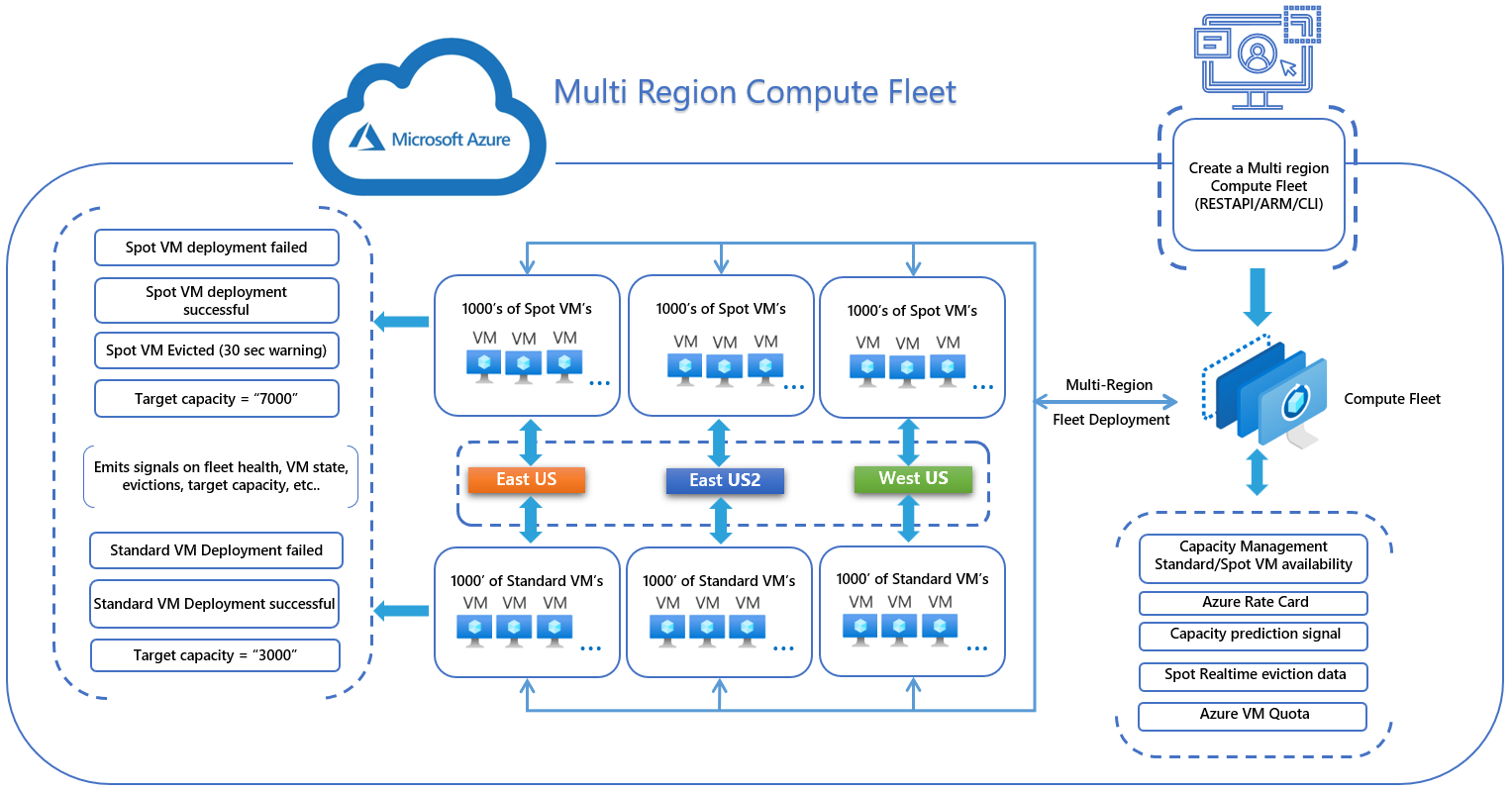
Microsoft's Azure Compute Fleet overview, last updated July 21, 2026, states that each fleet can target up to 10,000 virtual machines or 100,000 vCPUs, subject to underlying Azure VM and vCPU quotas. A subscription can create up to 5,000 Compute Fleets per region. A single fleet can span up to three regions when using the multi-region capability, which remains in preview.
Multi-Region Compute Fleet is available across Azure public cloud regions after preview onboarding and requires API version 2024-11-01 or later. Microsoft describes the feature as dynamically distributing capacity across regions and supporting automatic regional failover. These service limits do not override normal subscription, regional or VM-family quotas.
How does Spot capacity behave in a fleet?
A fleet can mix Spot and Standard capacity, with separate targets for each type. Spot can reduce compute cost, but Spot VMs can still be evicted when Azure needs the capacity back or when pricing conditions change. Compute Fleet improves placement options; it does not remove Spot interruption risk.
Microsoft also states that Spot eviction does not automatically cause extra Standard VMs to be deployed to make up the total fleet target. Spot and Standard targets are managed separately. Managed mode can be configured to maintain Spot capacity and attempt replacements after evictions, while Launch mode does not provide that ongoing replacement behavior after hand-off.
How long does a Compute Fleet request remain active?
Microsoft's current FAQ states that a standard Compute Fleet request remains active for up to 365 days unless it is deleted earlier. Deleting a Managed fleet deletes the VMs running inside that fleet. Launch mode behaves differently: its fleet object self-deletes after a short period, while the standalone VMs it created continue running until the customer removes them.
This difference matters for cost control. A finished workload does not stop billing by itself. Spot VMs continue to run until evicted or deleted, and Standard VMs continue to run until deleted. Teams using Launch mode should capture the created VM resource IDs promptly and make VM cleanup part of the external scheduler or workflow.
How is Azure Compute Fleet priced?
Pricing was checked on August 31, 2026. Microsoft states that there is no additional charge for Azure Compute Fleet itself. Customers pay for the virtual machines the fleet launches and for other Azure resources those workloads consume.
Final cost therefore depends on VM sizes, regions, Standard versus Spot mix, reservation or savings-plan eligibility, operating-system licensing and workload duration. Compute Fleet can help obtain lower-cost capacity, but it does not create one fixed subscription price for the service. Spot savings also come with eviction risk, so cost comparisons should include restart, checkpointing and interruption handling.
What deployment and operational details should teams plan for?
Compute Fleet is available through the Azure portal and Azure Resource Manager based workflows. Microsoft also provides REST APIs and SDK support for programmatic provisioning. The fleet configuration defines target capacity, eligible VM sizes or attributes, pricing priorities, zones and allocation behavior.
Teams should decide who owns the VM lifecycle before choosing a mode. Managed mode fits cases where the fleet should remain as the control object. Launch mode fits external orchestrators, but its configuration cannot be updated after submission. Microsoft recommends using the Fleet List VMs API in Launch mode to retrieve VM resource IDs and provisioning status before the temporary fleet object disappears.
What important service limitations should buyers know?
Microsoft's July 21, 2026 FAQ states that Compute Fleet does not support mixing multiple CPU architectures in a single fleet request. It also does not provide a built-in start and stop schedule, and a Compute Fleet resource cannot currently be moved between locations, subscriptions or resource groups. If a move is required, Microsoft recommends recreating the fleet from an Azure Resource Manager template.
For Launch mode, quota is validated before provisioning, the mode cannot be changed after creation, and capacity or VM configuration cannot be modified after submission. Attribute-based VM selection is a preview capability, and target capacity is still expressed in VM instances rather than directly as a vCPU or memory quantity.
How does Azure Compute Fleet differ from Virtual Machine Scale Sets?
Compute Fleet and Virtual Machine Scale Sets both work with groups of Azure compute instances, but their emphasis is different. Compute Fleet focuses on obtaining capacity across multiple VM sizes, zones and pricing models. It is especially useful when flexibility across sizes and Spot capacity matters.
Virtual Machine Scale Sets are a better fit when an application needs Azure-managed autoscaling, health repair and rolling updates for a long-running service. Microsoft's current guidance describes Scale Sets as a lifecycle orchestrator and Compute Fleet as a capacity-provisioning construct. That distinction is important because Compute Fleet should not be treated as a drop-in replacement for application-level autoscaling and health management.
Who is Azure Compute Fleet best suited for?
Compute Fleet is best suited to teams that need large or bursty pools of Azure VMs, can tolerate variation in exact VM size, or want to combine Standard and Spot capacity without maintaining their own placement engine. It is especially relevant for batch, analytics, rendering, CI, HPC and scheduler-driven workloads where capacity access matters more than preserving one specific VM shape.
It is less compelling for a small fixed deployment where a few individually managed VMs are simpler. Buyers should also make sure the workload can tolerate Spot interruption before using Spot as a major cost-control mechanism.
Who should choose something else?
Choose Virtual Machine Scale Sets when you want built-in autoscale, health repair and rolling update behavior for a long-running application tier. Choose Azure Batch when you want managed batch scheduling rather than a general capacity-provisioning layer. Choose Azure CycleCloud when the main problem is traditional HPC cluster orchestration around schedulers such as Slurm or PBS.
A small fixed deployment can also be simpler with individual Azure Virtual Machines. Compute Fleet adds the most value when workloads benefit from flexible VM selection, mixed Spot and Standard capacity, bulk provisioning or an external scheduler that can use a diverse pool of instances.
Reviews
No reviews yet
Nobody has reviewed Azure Compute Fleet here yet.