About Azure Local
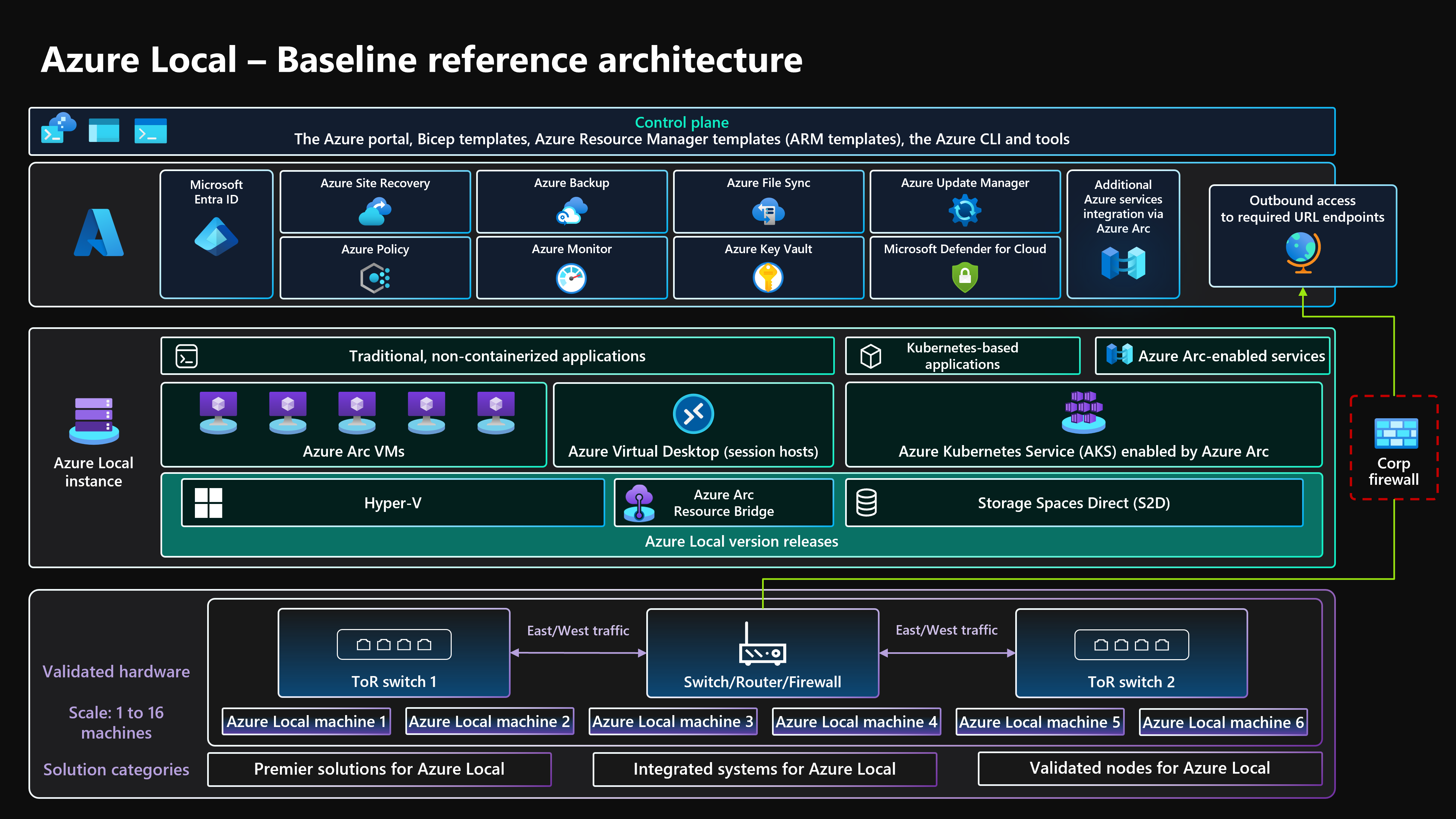
Azure Local is Microsoft's distributed infrastructure platform for organizations that need Azure-consistent operations on customer-owned infrastructure. It is designed for workloads that must stay close to users, equipment, regulated data, or local facilities while still using Azure management patterns. Microsoft positions Azure Local for virtual machines, containerized applications, selected Azure services, edge sites, datacenters, sovereign environments, and operational technology scenarios. Unlike a standard Azure region, Azure Local runs on validated physical systems in the customer's environment, so hardware selection, site readiness, lifecycle planning, local operations, connectivity model, and release management remain important buying considerations.
What is included
Deployment
| Infrastructure model | Customer-owned infrastructure using validated Azure Local hardware solutions or eligible supported configurations |
|---|
Connectivity
| Connected operation | Must successfully sync with Azure at least once every 30 consecutive days |
|---|---|
| Disconnected operation | Generally available from Azure Local 2602 with a locally hosted control plane for eligible disconnected environments |
Release
| Current new-deployment build | 12.2608.1003.8, available August 18, 2026, on OS build 26100.33296 |
|---|---|
| Support window | Each Azure Local release is supported for six months |
Scale
| Hyperconverged single-rack scale | Up to 16 nodes in a single rack in Microsoft's current connected-operations guidance |
|---|---|
| Disaggregated scale | Up to 64 nodes with SAN-based storage in supported configurations |
| Multi-rack scale | Up to 128 nodes per deployment in Microsoft's current connected-operations guidance |
Pricing
| Host pricing model | Per physical core on on-premises machines, differentiated by deployment model |
|---|---|
| Trial | 60-day free trial after registration |
Kubernetes
| AKS enabled by Azure Arc | Included at no extra charge with Azure Local release 2402 and later |
|---|
Licensing
| Azure Hybrid Benefit | Available for eligible L1 cloud-connected hyperconverged deployments without external storage; not available for L2 or L3 |
|---|---|
| Windows Server guests | Licensed separately unless covered by an applicable subscription or Azure Hybrid Benefit |
Hardware
| Hardware cost | Not included in the Azure Local software subscription |
|---|
What is Azure Local used for?
Azure Local is built for workloads that benefit from local execution but still need Azure-style governance and management. Microsoft documents local virtual machines, AKS workloads, Azure Monitor integration, external SAN support in eligible designs, Azure IoT Operations, Azure Site Recovery, and selected AI workloads. This makes the platform relevant to factories, branch sites, regulated datacenters, sovereign environments, edge locations, and other sites where latency, data locality, or connectivity constraints matter.
The practical value is not that every Azure cloud service runs locally. Azure Local provides a distributed infrastructure layer for selected Azure-aligned workloads while keeping the underlying hardware at the customer site. Buyers should confirm service availability, release status, hardware requirements, and whether a capability is supported in connected, disconnected, hyperconverged, or disaggregated deployments before standardizing on it.
How are connected and disconnected Azure Local deployments different?
Connected Azure Local systems use Azure as the management plane and maintain periodic connectivity for control-plane activities, updates, governance, and integration. Microsoft states that connected deployments must successfully sync with Azure at least once every 30 consecutive days. Temporary connectivity loss can be tolerated while running workloads continue on-premises, but organizations should not design a connected deployment around permanent isolation.
Disconnected operations are a separate model with a locally hosted control plane. Microsoft states that disconnected Azure Local can operate without ongoing connectivity to Azure or the internet, with updates, servicing, onboarding, identity, monitoring, and access control handled through supported local or staged workflows. Microsoft positions this model for sovereign, classified, regulated, and edge scenarios. Disconnected operations became generally available with Azure Local 2602 and require Azure Local 2602 or later, supported customer-owned hardware, operational readiness, an eligible agreement, and a documented business or regulatory need.
What changed in Azure Local in 2026?
Microsoft now uses a monthly Azure Local release train. Its current release information identifies build 12.2608.1003.8, available August 18, 2026, as the build used for new deployments. That release runs on OS build 26100.33296. Microsoft also documents separate feature, cumulative, and quality update concepts rather than one annual release model.
Release management is now an operational requirement rather than optional housekeeping. Microsoft states that each Azure Local release is supported for six months. Environments that fall outside that window are no longer in a supported state and may stop receiving the expected security, quality, and remediation coverage. Azure Arc resource bridge also requires solution updates within one year to keep certificates valid and Azure Local VM functionality working. Buyers should therefore include update testing, OEM validation timing, maintenance windows, and rollback planning in the operating model.
How does Azure Local scale and what deployment models are supported?
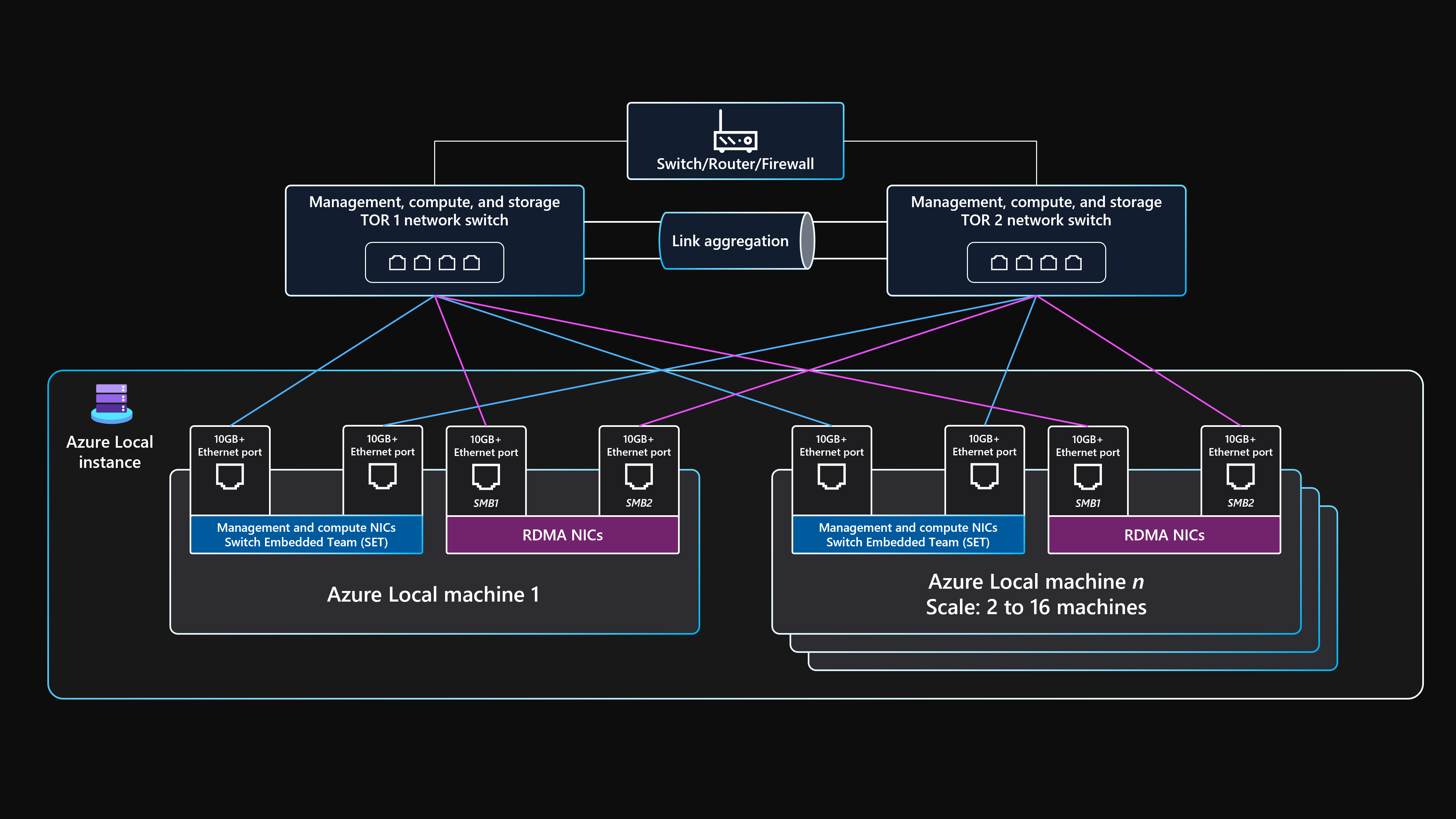
Azure Local supports single-node deployments, multi-node clusters, and larger multi-rack designs. Microsoft's connected-operations guidance describes hyperconverged clusters that can scale to 16 nodes on a single rack. It also documents disaggregated designs that separate compute and storage, with configurations up to 64 nodes with SAN-based storage, and multi-rack designs that can scale to 128 nodes per deployment.
These models solve different infrastructure problems. Hyperconverged systems are simpler when compute and storage should scale together. Disaggregated designs are better when compute and storage need to scale independently or when an external SAN is part of the architecture. Multi-rack deployments are intended for larger environments that need more capacity, fault-domain separation, and rack-aware resiliency. Buyers should size for workload, network fabric, storage design, failure domains, GPU requirements, and recovery objectives rather than treating node count as the only scaling decision.
What workloads can run on Azure Local?
Azure Local supports both traditional and cloud-native workloads. Microsoft documents Azure Local virtual machines and Azure Kubernetes Service workloads, together with selected services and integrations such as Azure Monitor, Azure IoT Operations, Azure Site Recovery, external SAN in supported configurations, and selected AI capabilities.
Disconnected operations support a subset of services rather than the entire Azure catalog. Microsoft's current disconnected documentation includes local virtual machines, Kubernetes, Azure Container Registry, Azure Policy, Azure Resource Manager, Azure Key Vault, Microsoft 365 Local, and selected data and AI services. That catalog should be checked directly for each deployment because connected support does not imply disconnected support.
How does Azure Local pricing work?
Pricing was checked on August 31, 2026. Microsoft prices Azure Local on a per physical core basis for the on-premises machines running the platform. Microsoft currently separates host service pricing by deployment model: hyperconverged deployments with no external storage, disaggregated or hyperconverged deployments that use external storage, and disconnected operations with a locally hosted control plane. Pricing for disconnected operations is handled through a Microsoft account representative.
Microsoft offers a 60-day free trial after registration. Hardware is not included in the Azure Local software subscription, so customers must budget separately for validated servers, networking, storage, support, datacenter space, power, and other Azure services or guest licenses they consume. Microsoft also states that AKS enabled by Azure Arc is included at no extra charge with Azure Local release 2402 and later. Windows Server guest licensing is separate unless covered by an applicable subscription or Azure Hybrid Benefit.
What should buyers know about Azure Hybrid Benefit and guest licensing?
Licensing can materially change the effective cost of Azure Local. Microsoft states that eligible customers using Windows Server Datacenter with active Software Assurance through Enterprise Agreement or CSP can use Azure Hybrid Benefit for qualifying Azure Local deployments. In the supported L1 hyperconverged model with cloud-connected management and no external storage, this can waive the Azure Local host service fee and Windows Server subscription.
That benefit does not apply uniformly to every deployment model. Microsoft's current pricing page says Azure Hybrid Benefit for Azure Local is not available for L2 deployments using external storage or for L3 disconnected operations. OEM licensing, Windows Server guests, paid Linux distributions, and additional services can also introduce separate charges. Buyers should model licensing against their exact hardware design and Microsoft agreement rather than assuming one core price applies everywhere.
What are the main operational requirements and limitations?
Azure Local keeps infrastructure in the customer's site, so the organization retains responsibilities that public cloud normally hides. These include hardware procurement, rack space, power, cooling, physical security, local networking, capacity planning, hardware replacement, site resilience, firmware and driver compatibility, and lifecycle operations. Microsoft provides the platform and Azure management integration, but a weak physical or network design can still limit reliability.
Connected deployments must meet the 30-day Azure synchronization requirement. Disconnected deployments avoid public-cloud dependency but require a locally hosted control plane, supported offline or staged operational processes, eligible agreements, and documented business or regulatory need. Service support also varies by release and connectivity model, and Microsoft now requires current release management within the documented support window. Teams should verify the Azure Local catalog, release train, network topology, external storage support, GPU support, and workload prerequisites before purchase.
How does Azure Local differ from Azure Arc and Azure Stack Hub?
Azure Local and Azure Arc are closely related but are not the same product. Azure Arc is a management and governance layer that extends Azure control-plane capabilities to resources outside Azure. Azure Local is the distributed infrastructure platform that supplies local compute, storage, networking, virtualization, and workload hosting. Arc-enabled services are part of how many Azure Local resources are managed, but Arc itself does not replace the local infrastructure platform.
Azure Stack Hub targets a different model with a more self-contained Azure-consistent cloud environment for specific regulated and disconnected scenarios. Buyers comparing these options should focus on service availability, hardware model, operational ownership, connectivity requirements, application compatibility, release lifecycle, and management experience rather than assuming they are interchangeable versions of the same product.
How does Azure Local compare with VMware-based infrastructure?
Azure Local can be relevant to organizations modernizing or replacing traditional virtualization platforms because it combines local virtual machines, Azure management, Kubernetes options, and Microsoft governance patterns. It may reduce tool fragmentation for teams already standardized on Azure, Windows Server, Azure Arc, Defender for Cloud, and Azure Monitor.
It is not a drop-in VMware clone. Migration planning still needs to cover VM compatibility, networking, storage, backup, disaster recovery, operational tooling, staff skills, licensing, and application dependencies. Organizations with mature VMware estates should compare total migration cost, hardware lifecycle, update operations, and the target operating model against VMware Cloud Foundation, Nutanix, and other hybrid infrastructure platforms rather than evaluating only the Azure Local host fee.
Who is Azure Local best suited for?
Azure Local is a strong fit for enterprises, public-sector organizations, industrial operators, retailers, healthcare providers, financial institutions, and distributed businesses that need Azure-style operations while keeping workloads at local sites. It is especially useful when latency, resilience, sovereignty, data locality, or restricted connectivity makes a public-cloud-only design impractical.
It also fits organizations that want a consistent Microsoft operating model across Azure regions, datacenters, branch locations, and edge environments. Teams already using Azure Arc, Azure Monitor, Defender for Cloud, AKS, Windows Server, and Azure governance services can reuse familiar controls, but they still need the staff, maintenance windows, OEM relationships, and processes to operate physical infrastructure and keep the platform inside Microsoft's supported release window.
Who should choose something else?
A small team that only needs standard web hosting, managed databases, managed Kubernetes, or virtual machines should usually start with public Azure services instead of buying and operating local infrastructure. Public cloud removes hardware procurement and site operations and is simpler when there is no latency, sovereignty, disconnected, or data-locality requirement.
Organizations that need broad hardware independence outside Microsoft's validated ecosystem, require a different virtualization stack, or already have deep operational investment in another hybrid platform should compare alternatives before committing. A managed SaaS product can also be a better fit when the business problem does not require infrastructure ownership. Azure Local is most valuable when there is a clear reason to operate compute and data locally and a team capable of maintaining the hardware and release lifecycle.
Reviews
No reviews yet
Nobody has reviewed Azure Local here yet.