About Azure Virtual Machine Scale Sets
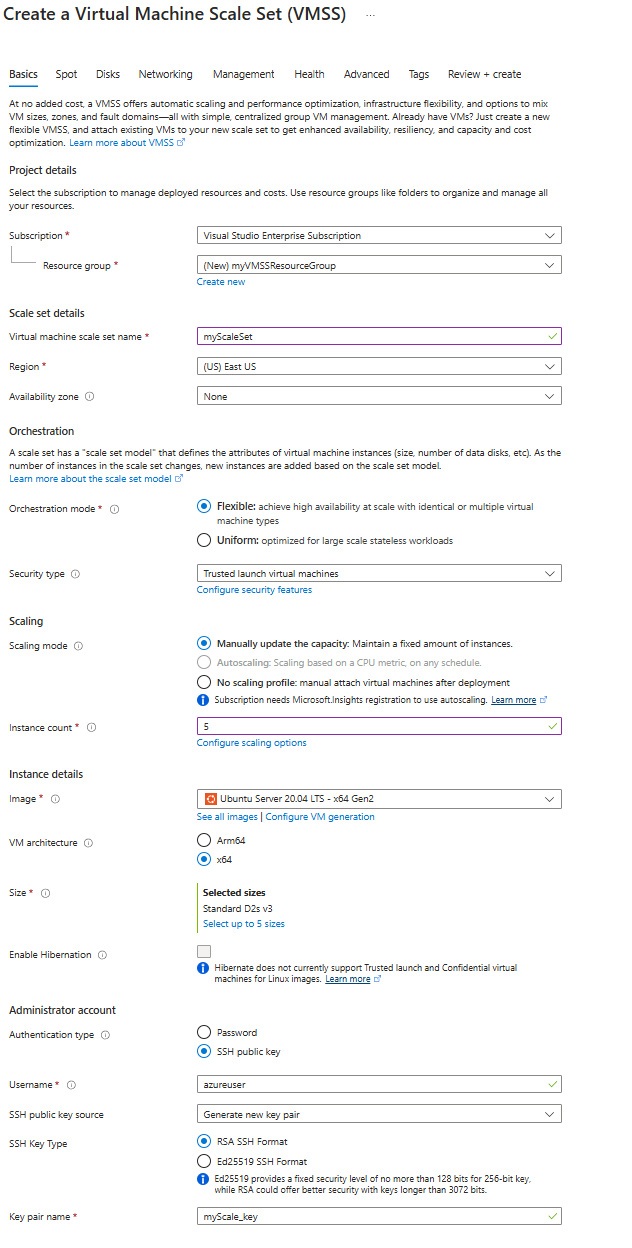
Azure Virtual Machine Scale Sets is an Azure compute service for running and managing groups of virtual machines that need consistent deployment, high availability, and horizontal scaling. A scale set can increase or decrease VM instance count as demand changes, place instances across fault domains or availability zones, and work with Azure Load Balancer or Application Gateway. It is most useful when an application needs several VM instances but the team does not want to manage each server as an unrelated resource.
What is included
Orchestration
| Recommended mode | Flexible orchestration is Microsoft's recommended mode for new deployments |
|---|---|
| Alternate mode | Uniform orchestration for standardized groups of identical VM instances |
Scaling
| Instance scaling | Manual, scheduled, metric-based, and predictive autoscale options |
|---|
Scale
| Documented maximum | Up to 1,000 VMs with standard marketplace or Azure Compute Gallery images |
|---|---|
| Managed image limit | Up to 600 VM instances when using a managed image |
Availability
| Placement | Supports fault-domain and availability-zone distribution where supported |
|---|
Networking
| Load balancing | Integrates with Azure Load Balancer and Azure Application Gateway |
|---|
Pricing
| Service charge | No incremental Virtual Machine Scale Sets service charge; underlying resources are billed |
|---|
What are Azure Virtual Machine Scale Sets used for?
Virtual Machine Scale Sets are used when an application or service needs multiple Azure VMs that can be managed as a group. Common patterns include stateless web tiers, application servers, background workers, high availability services, open-source databases, and other workloads that need horizontal scale. Microsoft also documents Flexible orchestration for stateful and quorum-based workloads where teams need more control over individual VMs.
A scale set reduces repetitive deployment work by applying a common configuration and scaling model across instances. It does not remove the need to design the application for redundancy, health checks, storage, networking, and safe updates.
How do Flexible and Uniform orchestration differ?
Microsoft currently recommends Flexible orchestration for new Virtual Machine Scale Sets. Flexible orchestration manages standard Azure IaaS VMs and supports identical or mixed VM types, including combinations of Spot and on-demand VMs. It also works with standard VM APIs and is suited to workloads that need instance-level control.
Uniform orchestration is optimized for large groups of identical VM instances managed from a common scale set profile. It remains useful for highly standardized stateless workloads. The orchestration mode is chosen when the scale set is created and Microsoft states that it cannot be changed later, so this decision should be made before production deployment.
How does autoscaling work?
Scale sets can change instance count manually, on a schedule, or through metric-based autoscale rules. Microsoft also documents predictive autoscale based on usage patterns. Teams can use scaling rules to add capacity when demand rises and remove unnecessary instances when demand falls.
Autoscale is only part of capacity planning. Applications should be tested for startup time, connection draining, session handling, database pressure, queue depth, and other dependencies before aggressive scale rules are enabled. A workload that cannot safely add or remove instances will not become resilient simply because the platform can change the VM count.
What availability and scale limits should buyers know?
Microsoft documents Flexible orchestration with high availability guarantees for up to 1,000 VMs, using fault domains within a region or an availability zone. Scale sets can also span availability zones where supported. Microsoft notes that a scale set by itself does not protect against a datacenter failure unless the VMs are actually distributed across availability zones.
For standard marketplace images and custom images from Azure Compute Gallery, Microsoft documents support for up to 1,000 instances. A scale set created from a managed image has a lower documented limit of 600 instances. Exact regional limits, quotas, VM SKU capacity, and fault-domain behavior should still be checked before deployment.
How do networking and load balancing work?
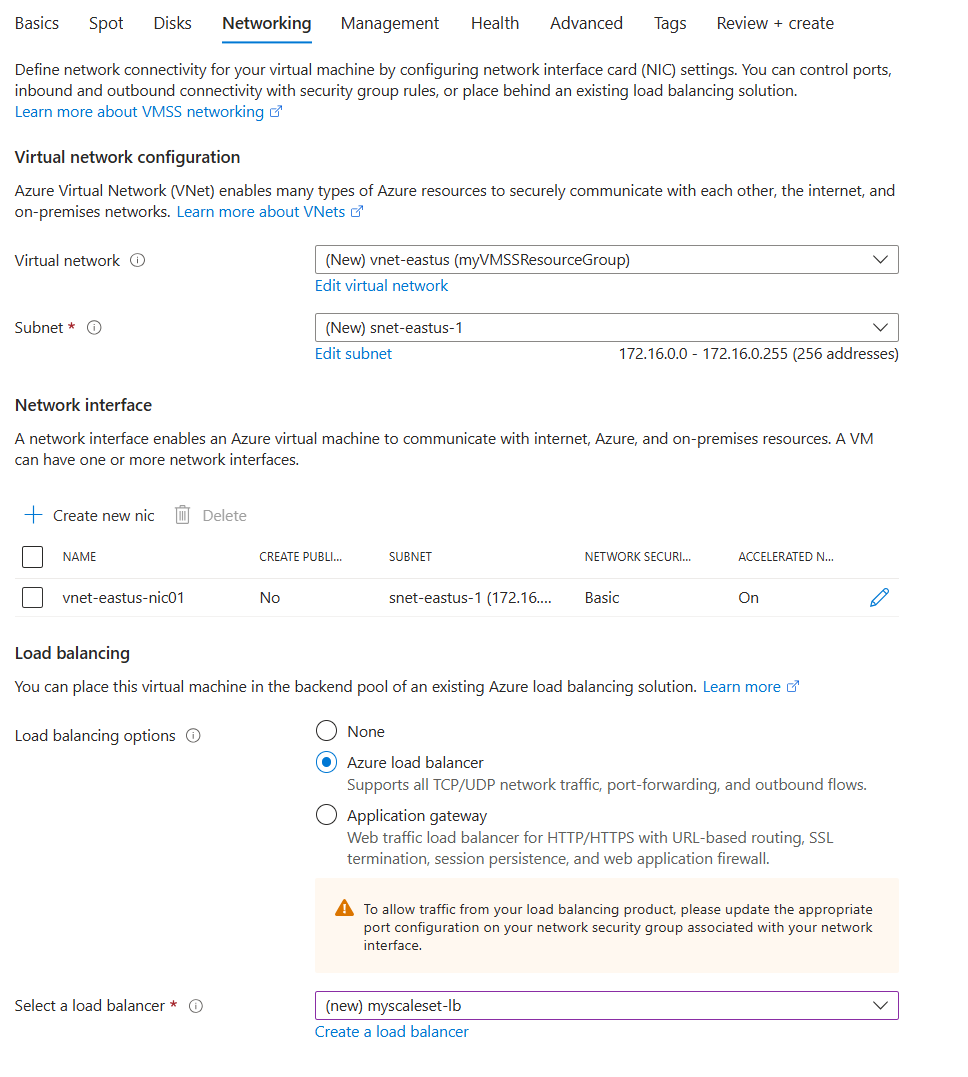
A scale set can integrate with Azure Load Balancer for Layer 4 traffic distribution or Azure Application Gateway for Layer 7 HTTP and HTTPS routing and TLS termination. Networking design still depends on the workload. Teams need to plan virtual networks, subnets, outbound connectivity, inbound access, network security groups, private connectivity, and health probes.
The load-balancing choice should match the application protocol and security requirements. A scale set is the compute orchestration layer, not a replacement for the networking services that send traffic to healthy instances.
How does Azure Virtual Machine Scale Sets pricing work?
Pricing was checked on September 3, 2026. Microsoft states that there is no incremental charge for the Virtual Machine Scale Sets service itself. Customers pay for the VMs they deploy and for underlying resources such as storage and networking. This means cost depends mainly on VM sizes, running instance count, disks, network usage, public IP resources, load-balancing choices, and other services attached to the architecture.
Autoscaling can reduce unnecessary compute spend when demand falls, but it does not guarantee lower total cost. Minimum instance counts, reserved capacity or savings plans, Spot VM use, storage, data transfer, and application performance all affect the final bill.
What are the main limitations and operational considerations?
The most important irreversible choice is orchestration mode because Microsoft says it cannot be changed after the scale set is created. Teams should also understand that Flexible and Uniform modes expose and manage VM instances differently, which can affect APIs, tagging, backup, recovery, and operational tooling.
Large scale does not remove application-level failure modes. Health probes, safe image updates, rolling deployment strategy, state management, data durability, quota planning, and regional capacity still require engineering work. VM Scale Sets are best treated as compute orchestration rather than a complete application platform.
How do Virtual Machine Scale Sets compare with AKS and App Service?
Virtual Machine Scale Sets are appropriate when a team wants VM-level control while still automating scale and availability. Azure Kubernetes Service can be a better fit when the workload is containerized and the organization wants Kubernetes scheduling, service discovery, and container orchestration. Azure App Service can reduce infrastructure work further for supported web applications and APIs.
The right choice depends on how much control the workload requires. Scale sets provide more infrastructure control than managed application platforms, but that also leaves more operating-system, image, patching, and application deployment responsibility with the customer.
Who should choose something else?
Teams that only need one or two stable VMs may not gain enough value from a scale set to justify another orchestration layer. A managed platform such as App Service, Container Apps, or AKS may also be a better fit when the application already matches those operating models and reducing VM administration is a priority.
Choose Virtual Machine Scale Sets when horizontal VM scaling, availability distribution, and VM-level control are central requirements. Choose a higher-level Azure service when the main goal is to reduce infrastructure management rather than control it.
Reviews
No reviews yet
Nobody has reviewed Azure Virtual Machine Scale Sets here yet.