About Azure Digital Twins
Azure Digital Twins is a Microsoft Azure platform service for modeling connected physical environments, assets, systems, and their relationships as a live graph. Teams define domain models with Digital Twins Definition Language, create individual twins from those models, connect the twins through relationships, and update the graph from device or business data. Microsoft positions Azure Digital Twins as one part of a wider IoT and data architecture, not as a complete device, analytics, or visualization platform by itself. It is distinct from Azure IoT Hub device twins and should be evaluated when the relationships among physical entities are central to the problem.
What is included
Modeling
| Model language | Digital Twins Definition Language (DTDL) |
|---|
Scale
| Twins per instance | 2,000,000 default; adjustable according to current Microsoft limits |
|---|---|
| Relationships per instance | 20,000,000 default; adjustable according to current Microsoft limits |
| Relationships per twin | 50,000 incoming and 50,000 outgoing; not adjustable |
| Models per instance | 10,000 default; adjustable according to current Microsoft limits |
Integration
| Device integration | Can integrate with Azure IoT Hub as part of a wider IoT solution |
|---|---|
| Event routing | Supports downstream event flows using Event Hubs, Event Grid, and Service Bus |
Analytics
| Historical analysis | Data history integration with Azure Data Explorer |
|---|
Visualization
| Graph interface | Azure Digital Twins Explorer is documented by Microsoft as preview and does not support private endpoints in the hosted experience |
|---|---|
| 3D visualization | 3D Scenes Studio is documented by Microsoft as preview |
Pricing
| Billing model | Consumption based on operations, messages, and query units |
|---|
What is Azure Digital Twins used for?
Azure Digital Twins is useful when a project needs a live model of a physical environment rather than a list of independent devices. Microsoft gives examples such as buildings, factories, farms, energy networks, railways, stadiums, and cities. A team can represent locations, equipment, people, or systems as modeled entities and connect them through relationships.
This makes the service valuable when physical context matters. A temperature reading can be tied to a room, floor, building, HVAC system, and maintenance process. Operators and applications can query those relationships instead of working only with isolated telemetry records.
How do DTDL models and the twin graph work?
Azure Digital Twins uses Digital Twins Definition Language, or DTDL, to define model types. Microsoft documents properties, components, and relationships as core parts of the model structure. Teams can build their own model sets and can also use published industry ontologies where an existing vocabulary fits the domain.
Digital twins are instances of those models. Relationships connect the twins into a graph that represents the wider environment. This graph structure is the main reason to consider Azure Digital Twins instead of storing unrelated device records in a conventional application database.
How large can an Azure Digital Twins graph become?
Microsoft's current Azure limits documentation lists a default limit of 2,000,000 digital twins in one Azure Digital Twins instance, and that limit is adjustable. The same documentation lists 20,000,000 total relationships per instance as an adjustable limit. A single twin can have up to 50,000 incoming relationships and 50,000 outgoing relationships, and those per-twin relationship limits are not adjustable.
Model and routing limits also matter. Microsoft currently lists 10,000 models per instance as adjustable, while one API call that does not use the Import Jobs API can import up to 250 models. Microsoft also lists 6 endpoints per instance as a fixed limit and 6 routes as an adjustable limit. Buyers planning very large graphs should review the current service limits before finalizing architecture because some limits can be raised only through support and others cannot be changed.
How does Azure Digital Twins connect to IoT and business systems?
Azure Digital Twins can work with Azure IoT Hub to bring device information into a wider model of an environment. Microsoft also documents APIs and integration patterns for bringing in business data and using Azure Functions for custom event processing and business logic.
Event routes can send changes downstream to services such as Event Hubs, Event Grid, and Service Bus. The service does not replace those components. A production solution may still require device ingestion, messaging, compute, storage, analytics, identity, monitoring, and networking. Cost and operational planning should therefore cover the complete architecture rather than only the Digital Twins instance.
How can teams query and historize twin data?
Azure Digital Twins provides a query API for retrieving information from the live twin graph. Queries can use twin properties, relationships, relationship properties, and model information. APIs and SDKs are also available for managing instances, models, twins, and relationships.
For historical analysis, Microsoft documents a data history capability that connects Azure Digital Twins with Azure Data Explorer so graph changes can be stored and queried over time. This is useful when teams need to compare current state with historical operational behavior instead of only asking questions about the live graph.
What visualization tools are available?
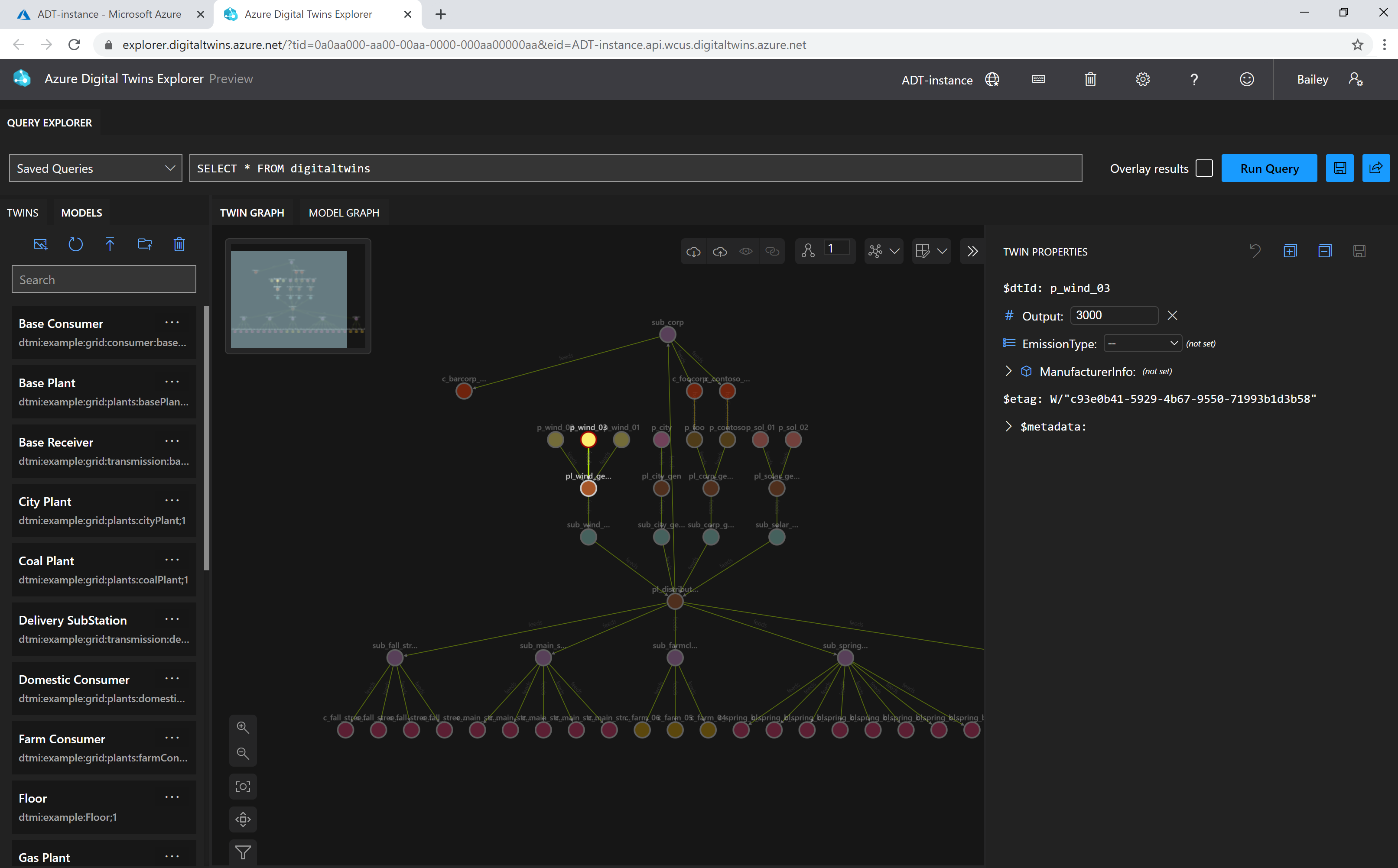
Microsoft currently documents Azure Digital Twins Explorer as a preview tool for visualizing and working with twin graphs. It can run queries, display twins and relationships, inspect models, and help manage graph data. Microsoft states that the hosted Explorer does not support private endpoints. If an Azure Digital Twins instance uses Private Link with public access disabled, Microsoft documents deploying the Explorer codebase privately in the cloud instead.
Microsoft also documents 3D Scenes Studio as preview. It connects an Azure Digital Twins instance with an Azure Storage container and lets teams map twin data into 3D scenes that can be viewed in the studio or embedded in custom applications. Because both visualization experiences are documented as preview, buyers should check current preview terms and support requirements before making them part of a critical production workflow.
How does Azure Digital Twins pricing work?
Pricing was checked against Microsoft's Azure Digital Twins pricing page on September 3, 2026. Microsoft currently bills the service through three usage dimensions: operations, messages, and query units. API calls count as operations, outbound event-route traffic can count as messages, and graph queries consume query units based on the work required to execute them.
Microsoft states that there is no upfront cost or termination fee and that an instance with no operations, messages, or query units during the billing period does not incur Azure Digital Twins usage charges. Connected services such as IoT Hub, Functions, Event Hubs, Azure Data Explorer, Storage, and networking can still generate separate charges, so buyers should estimate the whole solution.
What are the main limitations and planning considerations?
Azure Digital Twins is a platform component that requires solution design and development. Teams still need to build a useful domain model, maintain relationships, connect data sources, implement event processing, and decide how applications will consume the graph. A weak or overly complex model can make the environment difficult to operate even when the Azure service itself is healthy.
Service quotas can also shape design. Large graphs should be tested against twin, relationship, model, endpoint, and routing limits before production rollout. Region availability, identity design, private networking, downstream service costs, and the preview status of visualization tools should also be reviewed before deployment.
How is Azure Digital Twins different from IoT Hub device twins?
Microsoft distinguishes Azure Digital Twins from the device twins used by Azure IoT Hub. An IoT Hub device twin stores state and metadata associated with an individual device. Azure Digital Twins models broader environments and the relationships among people, places, assets, and systems.
The two services can work together. IoT Hub can provide device connectivity and telemetry that helps keep an Azure Digital Twins graph current. Buyers should treat them as complementary services when a solution needs both device management and an environment-level graph.
Who should choose something else?
A team that only needs device ingestion, device state, or device management may be better served by Azure IoT Hub without adding a full environment graph. A conventional relational, document, or graph database may also be simpler when the data is not tied to a live physical environment or when the organization already has an application model that meets the requirement.
Azure Digital Twins is most useful when physical context, relationships, and changing operational state are central to the problem. If the project is mainly business analytics, workflow automation, asset inventory, or dashboard reporting, buyers should compare the relevant Azure data, analytics, and integration services before adding digital twin modeling complexity.
Reviews
No reviews yet
Nobody has reviewed Azure Digital Twins here yet.