About Azure Managed Applications
Azure Managed Applications is an Azure service for packaging a complete cloud solution so customers can deploy it into their own Azure subscription while the publisher defines how the underlying resources are supported and governed. It is aimed at software vendors, managed service providers, system integrators, and internal platform teams that want repeatable deployment, clearer ownership, and a controlled operating model. The service differs from a plain deployment template because it can establish an ongoing management relationship after deployment.
What is included
Distribution
| Publishing options | Internal Azure service catalog or Microsoft Marketplace |
|---|
Resource model
| Resource provider | Microsoft.Solutions |
|---|---|
| Managed resources | Deployed into a managed resource group in the customer's Azure subscription |
Operating model
| Permission scenarios | Publisher managed, publisher and customer access, locked mode, or customer managed |
|---|
Access
| Just-in-time access | Supported for time-limited elevated publisher access with customer approval |
|---|---|
| JIT license requirement | Microsoft Entra ID P2 required for consumers using JIT access |
Governance
| Azure Policy | Azure Policy can audit managed application deployments |
|---|
Identity
| Managed identities | Managed identities for Azure resources are supported |
|---|
Marketplace
| Pricing model | Monthly management fee plus optional metered billing; Azure infrastructure and software charges remain separate |
|---|---|
| Plan limits | Up to 100 plans per offer, including up to 45 private plans |
| Private plan targeting | Up to 10 Azure subscription IDs entered manually or up to 10,000 by CSV; CSP reseller subscriptions are not supported for private plans |
| Technical configuration reuse | Reuse technical configuration is being deprecated; plans should manage technical configuration independently |
Lifecycle
| Deletion behavior | Deleting the managed application also deletes its managed resource group |
|---|
What is Azure Managed Applications used for?
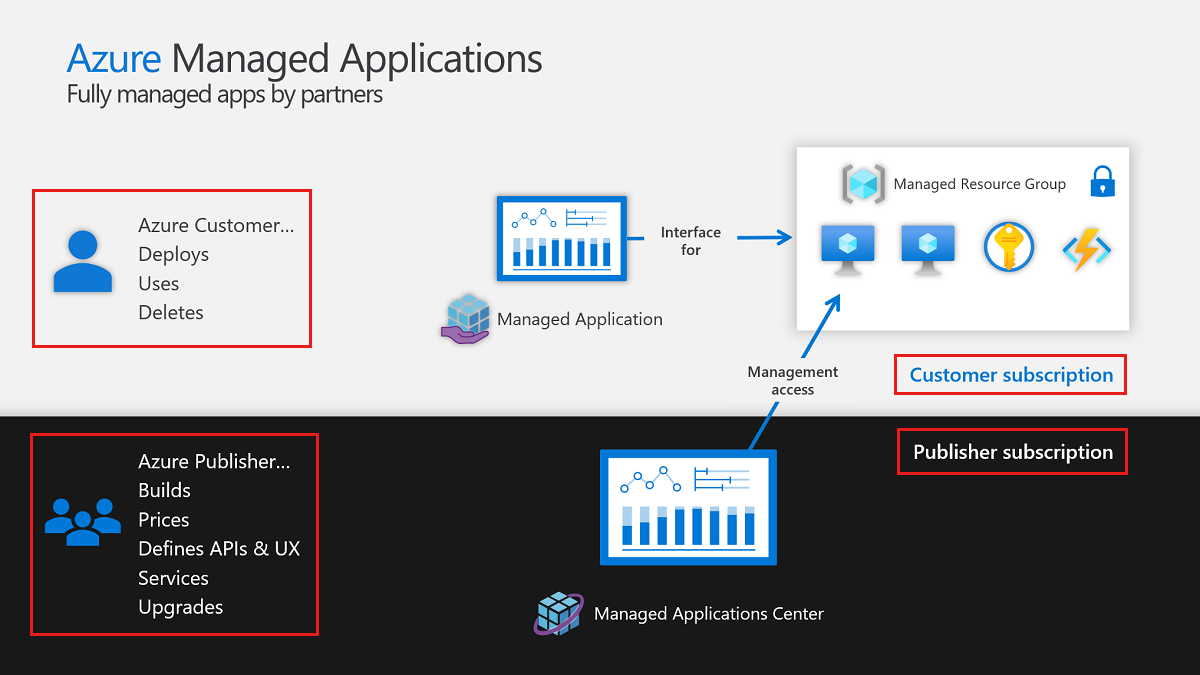
Azure Managed Applications is designed for solutions that contain multiple Azure resources and need more structure than a one-time deployment template. A publisher defines the application package, deployment experience, resources, and operating model. The customer deploys the application into an Azure subscription, while the infrastructure controlled by the application is placed in a managed resource group.
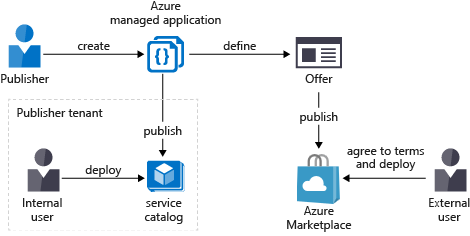
Microsoft supports two distribution paths. External publishers can distribute managed applications through Microsoft Marketplace. Internal platform or IT teams can publish approved managed applications to an internal service catalog for users in the same organization. This makes the service useful both for commercial managed offerings and standardized internal Azure solutions.
How are customer and publisher responsibilities separated?
Microsoft documents four permission scenarios for the managed resource group: publisher managed, publisher and customer access, locked mode, and customer managed. Publisher managed is the default. In that mode, the publisher can receive management access while a deny assignment limits what the customer can change in the managed resource group. Other scenarios can remove publisher access, remove the deny assignment, or give the customer full control.
The application resource itself and the managed resource group are different. The customer has full access to the application resource group that contains the Microsoft.Solutions/applications resource. The managed resource group contains the infrastructure used by the application, such as virtual machines, storage accounts, and networks. Buyers should review which roles the publisher receives, which customer actions remain available, how updates are handled, and how the application can be exited or deleted.
How does just-in-time access work?
Just-in-time access is intended for publishers that do not need permanent elevated access to the managed resource group. The publisher can request a specific role for a defined start time and duration, and the customer must approve the request before the elevated role becomes active. When the approved period ends, the elevated access expires.
Microsoft currently states that consumers need a Microsoft Entra ID P2 license to use JIT access. JIT must also be enabled for the managed application instance during deployment. This is an important buyer consideration because JIT can reduce standing privileged access, but it introduces an identity-license dependency and an approval workflow that should be planned before production use.
How are managed applications packaged and deployed?
Managed applications use Azure Resource Manager and the Microsoft.Solutions resource provider. The package defines the Azure resources to deploy and can include a portal interface that guides the customer through configuration. The deployed application is represented as a Microsoft.Solutions/applications resource, while the resources it controls are placed in the managed resource group in the customer's subscription.
The model is best suited to repeatable solutions where infrastructure, configuration, support, and operating ownership can be defined in advance. It is less suitable for highly bespoke projects where every deployment requires a different architecture or where the customer expects unrestricted control of every underlying resource from the start.
How does Microsoft Marketplace distribution work?
A publisher can distribute a managed application externally through Microsoft Marketplace or internally through an Azure service catalog. Marketplace distribution is intended for software vendors, managed service providers, and system integrators that want customers outside their organization to discover and deploy the solution. Internal service catalog distribution is aimed at IT teams that want to publish approved Azure solutions for their own users.
For Marketplace offers, Microsoft currently allows up to 100 plans per offer and up to 45 private plans. Private plans can target selected Azure subscription IDs, with up to 10 entered manually or up to 10,000 supplied by CSV. Microsoft states that private plans are not supported for Azure subscriptions established through a reseller in the Cloud Solution Provider program. A private plan can later be made public, but a published public plan cannot be changed back to private.
Microsoft also warns that the Reuse technical configuration feature for plans is being deprecated. Publishers that still reuse another plan's technical configuration should detach those plans and manage technical configuration independently going forward.
How does pricing work for Azure Managed Applications?
Pricing was checked on September 1, 2026 against Microsoft's current Marketplace documentation. Azure Managed Applications does not have one universal Microsoft list price because the publisher sets the commercial terms for each managed application plan. Microsoft supports a flat monthly management fee and optional usage-based metered billing dimensions for the managed service.
Microsoft requires the monthly and metered amounts to cover the management service only. Those charges cannot be used to bill for Azure infrastructure, software intellectual property, or add-ons that belong in the appropriate underlying offer. The monthly management fee can be set to zero with billing based only on metered usage. Buyers should therefore separate the publisher's management fee from the Azure resources deployed into their subscription and from any separately licensed software.
What governance and security factors should buyers review?
The main governance question is how much control the publisher and customer each have over the managed resource group. Azure Policy can audit managed application deployments, and managed identities for Azure resources are supported. Publishers can use deny assignments and allowed customer actions to protect supported configurations while still exposing selected operations such as restarting a virtual machine.
Customers should review the support boundary, publisher identities, role scope, update process, logging, network design, compliance requirements, and how the application handles sensitive data. Microsoft notes that restrictions for data operations are not supported uniformly across every Azure data provider, so a deny assignment should not be treated as a universal data-plane security control without validating the specific services inside the managed application.
What happens when the customer deletes a managed application?
Microsoft states that when the customer deletes the managed application, the managed resource group is also deleted. That behavior makes lifecycle planning important. Buyers should understand whether application data must be exported, backed up, or migrated before deletion and whether any dependent resources sit outside the managed resource group.
For publishers, the deletion behavior is another reason to document ownership and offboarding clearly. A managed application is not just a packaging mechanism; it creates a lifecycle boundary around the managed resources.
What are the main limitations?
Managed applications deliberately introduce a control boundary, and that can reduce customer flexibility. If the application is designed so the publisher maintains the underlying resources, customers may not be able to change every component directly. That can improve supportability, but it can be a poor fit for teams that require complete infrastructure ownership.
Publisher management settings also need careful planning. Microsoft's Marketplace guidance states that publisher management cannot be modified after a managed application plan is published live. JIT access has its own requirements, including Microsoft Entra ID P2 for the consumer. Marketplace publishers should also account for the deprecation of reused technical configuration between plans and the one-way visibility rule that prevents a published public plan from being changed to private.
How does Azure Managed Applications compare with ARM, Bicep, or Terraform?
ARM, Bicep, and Terraform automate infrastructure deployment, but they do not by themselves create the same managed application resource, managed resource group, Marketplace management-fee model, or formal publisher access relationship. They are often better when the customer should fully own and operate the resources after deployment.
Choose Azure Managed Applications when controlled operations, approved versions, publisher support, JIT or persistent management access, Marketplace distribution, or an internal service catalog are part of the requirement. Choose a standard infrastructure-as-code approach when the main goal is reproducible deployment without an ongoing publisher-controlled operating boundary.
Who should choose something else?
Choose something else if the customer needs unrestricted control of every underlying Azure resource, if deployments are highly bespoke, or if there is no need for an ongoing publisher or platform-team operating relationship. ARM, Bicep, Terraform, or another deployment approach may be simpler in those cases.
Teams should also choose another model if they cannot clearly define support responsibilities, publisher permissions, update handling, billing boundaries, and offboarding. A managed application is most valuable when the operational relationship is intentional and documented, not when it is added only to package a deployment template.
Reviews
No reviews yet
Nobody has reviewed Azure Managed Applications here yet.