About Azure IoT Hub
Azure IoT Hub is Microsoft's managed cloud service for connecting IoT devices to Azure and exchanging messages between devices and cloud applications. It sits in the Microsoft Azure family as a device connectivity and messaging service, not as a general event streaming platform or a complete edge application stack. Teams use it when they need per-device identity, secure device-to-cloud telemetry, cloud-to-device communication, message routing and device management at scale.
What is included
Service model
| Service type | Managed cloud IoT device connectivity and messaging hub |
|---|
Connectivity
| Supported protocols | HTTPS, AMQP, AMQP over WebSockets, MQTT and MQTT over WebSockets |
|---|
Identity
| Device authentication | Symmetric keys, X.509 self-signed certificates and X.509 CA-signed certificates |
|---|
Security
| Recommended production X.509 model | CA-signed X.509 certificates |
|---|
Messaging
| Device-to-cloud | Supported in Basic, Standard and Free tiers |
|---|---|
| Cloud-to-device | Supported in Standard and Free tiers; not included in Basic |
Device management
| Device twins and module twins | Supported in Standard and Free tiers; not included in Basic |
|---|
Routing
| Custom endpoints | Azure Storage, Event Hubs, Service Bus queues, Service Bus topics and Cosmos DB |
|---|
Capacity
| Level 1 daily messages | 400,000 messages per day per B1 or S1 unit |
|---|---|
| Level 2 daily messages | 6,000,000 messages per day per B2 or S2 unit |
| Level 3 daily messages | 300,000,000 messages per day per B3 or S3 unit |
Free tier
| Free allowance | Up to 8,000 messages per day and 500 device identities for proof-of-concept use |
|---|
Limits
| Device-to-cloud message size | Up to 256 KB |
|---|---|
| Cloud-to-device message size | Up to 64 KB |
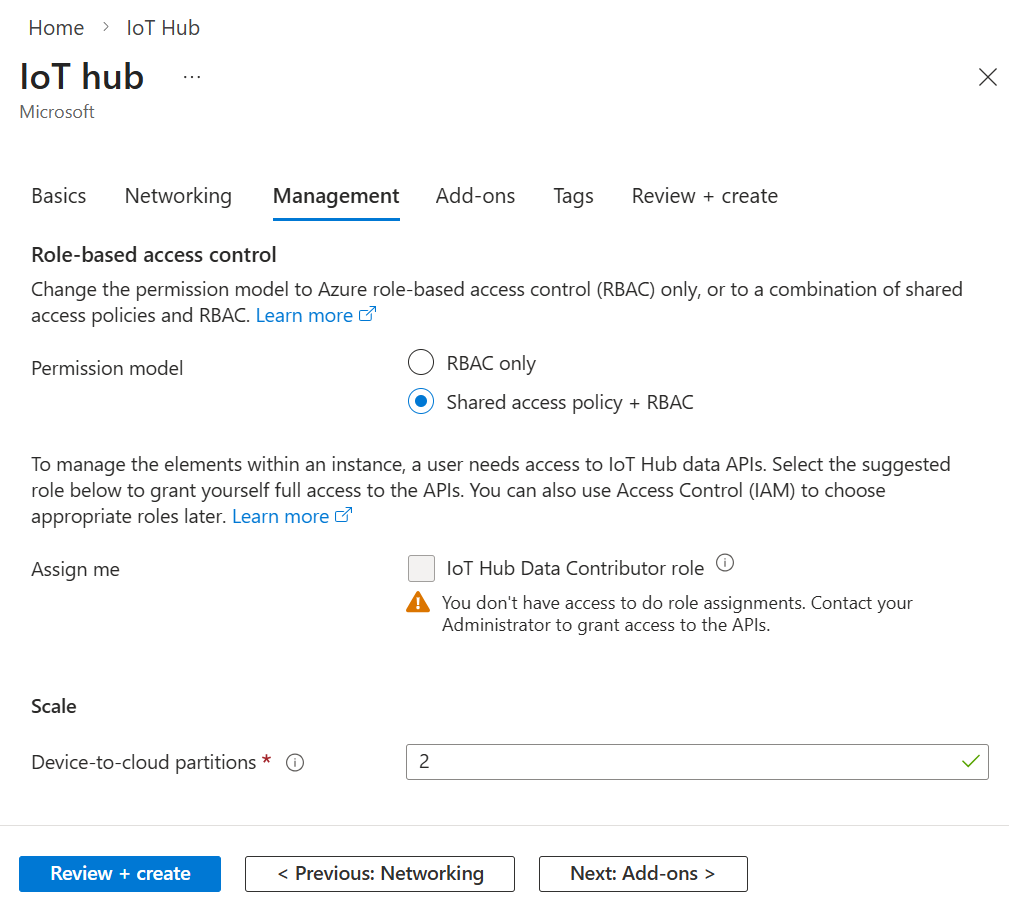
| Device-to-cloud partitions | Up to 32 for Basic and Standard hubs; fixed when the hub is created |
Availability
| Published SLA | 99.9 percent |
|---|
Subscription
| Default IoT hub quota | 50 IoT hubs per Azure subscription; increases available through support |
|---|
Lifecycle
| Basic to Standard | Supported in place |
|---|---|
| Standard to Basic | Not supported in place; requires a new Basic hub and device re-registration |
| Free to paid tier | Not supported in place |
Preview
| Azure Device Registry integration | Public preview; new IoT hubs only |
|---|---|
| Eligible IoT Hub tiers | Free and S1 only for ADR and certificate-management preview |
| Required provisioning service | Device Provisioning Service is required for all IoT Hub preview scenarios |
| Supported regions | East US, East US 2, West US, West US 2, West Europe and North Europe |
| Production guidance | Microsoft states the ADR and certificate-management public preview is not recommended for production workloads |
TLS
| Trusted root CAs | DigiCert Global G2 root CA and Microsoft RSA root CA 2017 |
|---|
Metering
| Direct methods | Standard only; request and response are each up to 8 KB and are metered in 4 KB blocks on paid tiers |
|---|---|
| File upload | Control messages count toward the daily allowance; customer-provided Azure Storage is billed separately |
What is Azure IoT Hub used for?
Azure IoT Hub acts as the central message hub between an IoT application and the devices attached to it. Microsoft documents support for device-to-cloud telemetry, file uploads from devices, request-reply methods for controlling devices, monitoring of device connections and failures, and routing of device data to other Azure services. IoT Hub is designed for devices that may be remote, intermittently connected, resource constrained or difficult to access physically.
The service is a good fit for connected equipment, industrial sensors, fleet and asset tracking, smart building systems and other solutions where a cloud application needs a reliable identity and messaging layer for many individual devices. It can route data to services such as Azure Storage, Event Hubs, Service Bus and Cosmos DB, while Event Grid can be used for event-driven fan-out.
How do devices connect and authenticate?
Every IoT hub has an identity registry for devices and modules that are allowed to connect. Microsoft supports symmetric-key authentication and X.509 certificate authentication between devices and IoT Hub. For production certificate scenarios, Microsoft recommends CA-signed X.509 certificates rather than self-signed device certificates. Device Provisioning Service can be paired with IoT Hub to automate onboarding at larger scale.
IoT Hub supports HTTPS, AMQP, AMQP over WebSockets, MQTT and MQTT over WebSockets for device connectivity. Communication is protected with TLS. Microsoft's current TLS guidance says devices should trust the DigiCert Global G2 root CA and Microsoft RSA root CA 2017. For service-side administration and data-plane access, Microsoft Entra ID and Azure role-based access control can reduce reliance on long-lived shared access keys.
What is the difference between Basic and Standard tiers?
The Basic and Standard tiers share core device-to-cloud telemetry, per-device identity, message routing, Event Grid integration, supported protocols, Device Provisioning Service support, monitoring and diagnostics. The main difference is that Basic is aimed at telemetry collection, while Standard adds capabilities required for richer two-way device control and management.
Microsoft's current pricing page lists cloud-to-device messaging, device management, device twins, module twins, IoT Edge and preview Device Streams as Standard or Free tier capabilities rather than Basic capabilities. Basic is therefore suited to solutions that mainly ingest device data. Standard is the better fit when the cloud must actively manage, command or synchronize state with devices.
How does Azure IoT Hub pricing work?
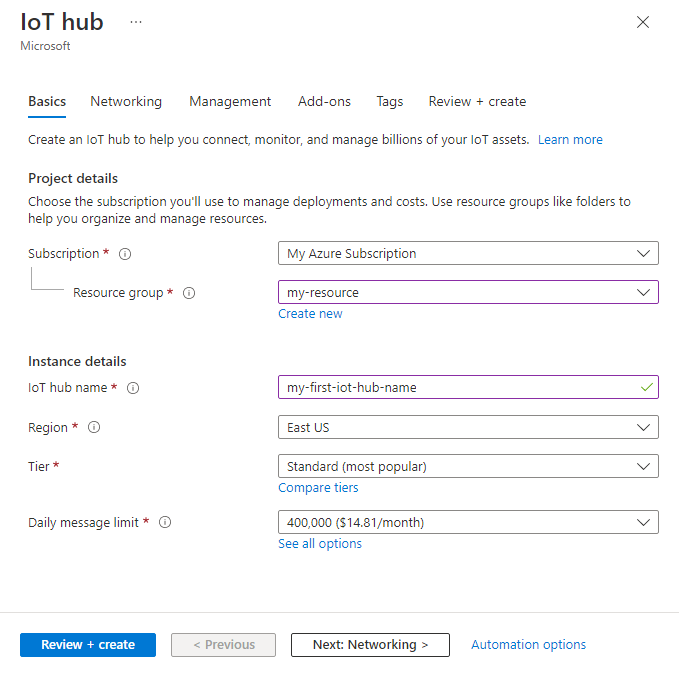
Pricing was checked on August 31, 2026 against Microsoft's Azure IoT Hub pricing page. Microsoft prices paid IoT Hub editions by hub unit and daily message capacity rather than using one flat family-wide price. Basic editions are B1, B2 and B3. Standard editions are S1, S2 and S3. Actual currency and regional rates vary, so buyers should use the Azure pricing calculator for their subscription and region rather than rely on a copied price.
The published message capacities are 400,000 messages per day per B1 or S1 unit, 6 million per B2 or S2 unit, and 300 million per B3 or S3 unit, using a 4 KB message meter. The Free edition allows up to 8,000 messages per day with a 0.5 KB meter and is intended for proof-of-concept use. Microsoft states that the Free edition supports up to 500 device identities and that the free edition cannot be upgraded to a paid edition.
Which IoT Hub operations affect message metering?
Buyers should model more than raw telemetry volume because several management operations also consume the message allowance. Microsoft's current pricing guidance says device twin reads, writes and queries in Standard are metered in 4 KB chunks. Direct methods are also Standard-only: both the request and response can be up to 8 KB, and each side is metered in 4 KB blocks on paid tiers. Jobs themselves are not billed as separate operations, but the twin writes and direct-method calls they trigger are metered normally.
File upload has a different pattern. IoT Hub counts the control messages that initiate an upload and report completion against the daily message allowance, while the customer supplies and pays for the Azure Storage account that holds the file. Microsoft states there is no separate IoT Hub charge for the file-transfer feature itself. This distinction matters for fleets that send large files, use frequent twin synchronization or rely heavily on remote commands, because message consumption can differ materially from a telemetry-only estimate.
What should buyers know about scaling, quotas and message sizes?
IoT Hub capacity depends on both the edition and the number of units. Adding units increases capacity within the selected edition, but daily message limits and operation throttles still matter. Microsoft documents HTTP 429 responses when throttling limits are exceeded, so device and service clients should use backoff and retry behavior rather than assume every burst will be accepted immediately.
Microsoft's current product page lists a default limit of 50 IoT hubs per Azure subscription, with higher quotas available through support. Device-to-cloud messages can be up to 256 KB, while cloud-to-device messages can be up to 64 KB. Paid-tier metering uses 4 KB blocks. The maximum device-to-cloud partition count for Basic and Standard hubs is 32 and is fixed when the hub is created. Basic can be upgraded to Standard, but Standard cannot be downgraded to Basic in place.
How does message routing and downstream integration work?
IoT Hub collects device data at its built-in endpoint and can route matching messages to downstream Azure endpoints. Microsoft documents custom routing to Azure Storage containers, Event Hubs, Service Bus queues, Service Bus topics and Cosmos DB. This lets teams keep IoT Hub focused on device identity and communication while using other Azure services for analytics, storage, workflow processing or long-term retention.
For real-time processing, a common design is IoT Hub for device connectivity followed by Event Hubs or Stream Analytics for high-volume processing. Logic Apps can automate business workflows, Machine Learning can apply models to device data, and Event Grid can distribute events to multiple subscribers.
What security and networking choices matter?
An IoT hub has a public DNS endpoint, so Microsoft warns customers not to put sensitive or personally identifiable information into hub names. During deployment, teams choose connectivity and access settings, including endpoint exposure and the minimum TLS version. Microsoft supports role-based access control for data-plane operations and recommends Microsoft Entra authentication for service access where possible.
For device identity, Microsoft documents symmetric keys, self-signed X.509 certificates and CA-signed X.509 certificates, with CA-signed X.509 recommended for production. Security design should include device credential lifecycle, certificate rotation where used, least-privilege service access, network restrictions, monitoring and incident response. IoT Hub secures the managed connectivity layer, but it does not remove the need to secure device firmware, provisioning, downstream services or physical devices.
What changed with Azure Device Registry and certificate management?
Microsoft's current IoT Hub documentation describes direct integration with Azure Device Registry and Microsoft-backed X.509 certificate management as public preview. These features are not an in-place upgrade for existing hubs. To use them, customers must create a new IoT Hub linked to an Azure Device Registry namespace. Existing IoT hubs continue to work without the integration.
The preview also has important eligibility boundaries. Microsoft states that IoT Hub with Azure Device Registry integration and certificate management is available only for Free and S1 tiers and currently supports East US, East US 2, West US, West US 2, West Europe and North Europe. All preview scenarios require Device Provisioning Service. Certificate management itself is optional, but it cannot be used without Azure Device Registry and DPS. Microsoft explicitly says the public preview is not recommended for production workloads.
How does the preview certificate-management flow work?
Certificate management in Azure Device Registry provides a Microsoft-managed cloud PKI for IoT Hub device operational certificates. Devices still need an onboarding credential to authenticate with Device Provisioning Service. After provisioning, Azure Device Registry can issue a short-lived X.509 operational certificate that the device uses to authenticate directly with IoT Hub.
Microsoft documents both Microsoft-root-CA-signed and external-root-CA-signed policy models. This can reduce the work of operating the issuing certificate authority while allowing organizations with an existing private PKI to keep their own root of trust. Buyers should distinguish onboarding credentials from operational certificates and should not treat the preview feature as a replacement for all device identity and supply-chain security controls.
What availability commitment does Microsoft publish?
Microsoft's current Azure IoT Hub product page states a 99.9 percent service-level agreement. An SLA is not a complete resilience design by itself, so production architectures should still consider retry behavior, downstream service availability, device reconnect logic, monitoring and how an application behaves during transient connectivity failures.
Teams with stricter recovery objectives should evaluate the entire IoT architecture rather than only the hub. Device firmware, provisioning, routing endpoints, storage, analytics and business applications can each introduce separate failure modes.
What are the main limitations and tradeoffs?
IoT Hub is specialized for IoT device connectivity. It is not the best substitute for a general enterprise message broker, a pure event-streaming backbone or an application database. Daily message quotas, edition-specific features, message-size limits, fixed partition choices and throttling rules mean capacity planning matters before a large fleet is deployed.
Tier changes are asymmetric because Standard can be reached from Basic, but Standard cannot be downgraded to Basic in place, and Free cannot be upgraded to Basic or Standard. The newer Azure Device Registry and certificate-management integration is still public preview, limited to new hubs, limited to Free and S1, dependent on DPS and restricted to six supported regions. Teams also need separate services for many downstream requirements such as long-term storage, analytics, dashboards and complex business workflows.
What are the main Azure IoT Hub alternatives?
Azure Event Hubs is a better fit when the main requirement is ingesting very large event streams from applications or systems rather than maintaining individual IoT device identities and device-management state. Azure Service Bus is better for durable enterprise queues and topics with brokered messaging semantics. Azure Event Grid is designed for event distribution and reactive architectures rather than persistent device sessions.
For edge-first deployments running on Kubernetes-enabled infrastructure, Azure IoT Operations may be a better architectural starting point. Microsoft documents IoT Hub as cloud-based and IoT Operations as edge-based, while Azure Device Registry is intended to provide a consistent device-management layer across those environments.
Who should choose something else?
Choose something else if the workload has no need for per-device identity, device twins, cloud-to-device control or IoT-specific lifecycle management. A web application producing a high-volume event stream may fit Event Hubs more naturally, while enterprise commands and transactions may belong in Service Bus.
Teams that need a simple hosted dashboard for a small number of devices should also compare whether a higher-level IoT platform reduces engineering effort. IoT Hub is a building block for custom solutions, so organizations still need to design the application, storage, analytics, monitoring and device lifecycle around it. Organizations that need the new Azure Device Registry and Microsoft-backed certificate features in production should wait for general availability or validate the preview support boundary carefully before making it a dependency.
Reviews
No reviews yet
Nobody has reviewed Azure IoT Hub here yet.