About Azure Data Box
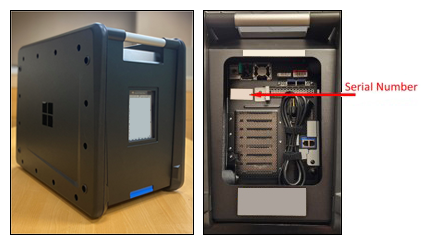
Azure Data Box is Microsoft's managed offline data transfer service for organizations that need to move large datasets into or out of Azure when network transfer would take too long, consume too much bandwidth, or is not practical. Microsoft ships a secure storage appliance to the customer, the customer copies data locally, and the device is returned so Microsoft can upload or export the data through Azure. The current next-generation Data Box line includes 120 TB and 525 TB usable-capacity options in supported regions, while older Data Box hardware is being retired as next-generation availability expands.
What is included
Device options
| Current usable capacities | 120 TB or 525 TB on next-generation Data Box devices, depending on SKU and regional availability |
|---|---|
| Raw capacities | 150 TB raw for Data Box Next Gen 120 and 600 TB raw for Data Box Next Gen 525 |
Lifecycle
| Retired hardware | Data Box Heavy is retired; the legacy 80 TB Data Box is being retired region by region as next-generation devices expand |
|---|
Connectivity
| Maximum network interface speed | Up to 100-GbE on next-generation Data Box hardware |
|---|
Performance
| Large-file transfer rate | Approximately 7 GB/s using SMB Direct over RDMA on 100-GbE, subject to source system and file characteristics |
|---|
Scale
| Maximum file count | Up to 500 million files on Data Box 120 and up to 1 billion files on Data Box 525 for import and export |
|---|---|
| Containers or shares | Up to 512 containers or shares in the cloud |
| NFS client connections | Up to 100 simultaneous client connections on an NFS share for next-generation devices |
Security
| Data-at-rest protection | RAID controller based hardware encryption plus AES 256-bit protection; optional software-based double encryption is documented |
|---|---|
| Media sanitization | Microsoft's current secure-erasure section states NIST SP 800-88 Revision 2 compliance and provides a Secure Erasure Certificate after cleanup |
Pricing
| Included standard use | Up to 10 days for Data Box 120 and up to 20 days for Data Box 525 under Microsoft's current standard-use terms |
|---|
When does Azure Data Box make sense?
Azure Data Box is aimed at large transfer jobs where physical transport is more practical than sending everything across a WAN or internet connection. Microsoft describes Data Box as especially suitable for transfers larger than about 40 TB when connectivity is limited, including one-time datacenter migration, large media or archive collections, seeding a backup repository before network-based incremental transfers, and exporting substantial Azure datasets for use elsewhere.
For smaller datasets or sites with fast, reliable connectivity, an online transfer tool may be simpler because it avoids ordering, receiving, loading, returning, and tracking a physical device. Data Box becomes more attractive as data volume grows, available bandwidth falls, or a migration window becomes too short for an online copy.
What Data Box device options are current?
Microsoft's current Data Box documentation describes next-generation devices with 120 TB or 525 TB of maximum usable capacity, depending on the SKU and regional availability. Data Box Next Gen 120 provides 150 TB raw and 120 TB usable capacity. Data Box Next Gen 525 provides 600 TB raw and 525 TB usable capacity.
The product family is also in a hardware transition. Microsoft states that Azure Data Box Heavy has been retired and is no longer available to order. Microsoft also says the older 80 TB Data Box will be retired in regions as next-generation devices become available there; after retirement, new orders for the 80 TB device are no longer accepted, while existing orders remain supported. Buyers should therefore plan around current regional inventory rather than assuming older hardware remains orderable.
How fast are the next-generation Data Box devices?
Microsoft documents up to 100-GbE network interfaces on next-generation Data Box hardware and an approximate transfer rate of 7 GB/s for large files when using SMB Direct over RDMA on 100-GbE. Both 100-GbE data ports can be used, although Microsoft notes that actual performance depends on the source system and file sizes.
Microsoft also reports performance gains in its next-generation data copy service compared with the earlier generation, including improvements for both small and large files and faster upload from the device into Azure. Those figures are best treated as platform capability rather than guaranteed migration throughput because local storage, file count, network design, protocol choice, cabling, and Azure-side processing can all affect end-to-end speed.
How does the Azure Data Box workflow work?
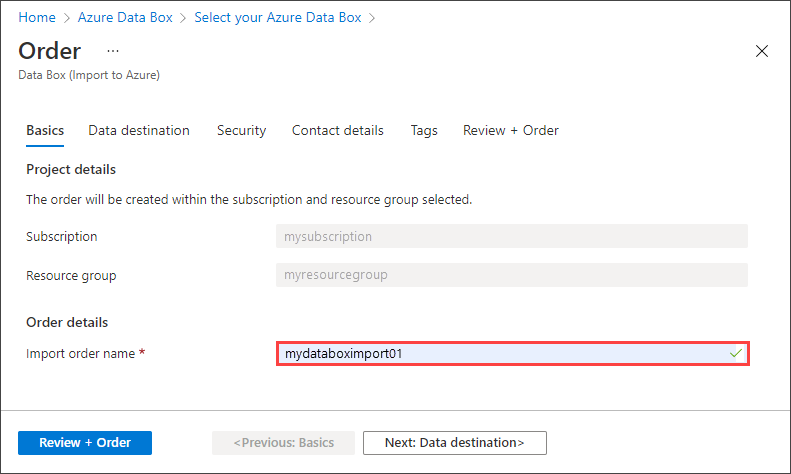
A typical import starts with an order in the Azure portal. The customer selects the transfer type, subscription, resource group, source and destination, device option, and shipping details. After delivery, the device is connected to power and the local network, configured through its local web interface, and exposed through shares that receive the dataset.
The customer copies data to the appliance, reviews copy logs, prepares the device for return, and ships it back. Microsoft then transfers the data from the device into the selected Azure storage destination. For export jobs, the direction is reversed: Microsoft stages the requested Azure data onto the device before shipment and the customer copies it into the local environment. The Data Box service tracks order state in the Azure portal.
What Azure destinations and limits should teams check?
Microsoft supports Azure storage accounts as destinations and documents managed disk creation from supported on-premises VHD files. For current next-generation devices, Data Box 120 supports up to 500 million files, while Data Box 525 supports up to 1 billion files for import and export. Microsoft documents a maximum of 512 containers or shares in the cloud and up to 100 simultaneous client connections on an NFS share.
Microsoft recommends using no more than three storage accounts with one Data Box job because additional accounts can affect performance, and all storage accounts used with the Data Box service should belong to the same Azure region. Azure Storage object, naming, and account limits still apply. Files or directories that exceed Azure Storage limits or violate naming requirements are not ingested.
How is Azure Data Box secured?
Microsoft's current security documentation describes hardware and service protections including tamper controls, secure boot, a hardware root of trust, TPM 2.0, RAID controller based hardware encryption, AES 256-bit protection for data at rest, and optional software-based double encryption for higher-security environments. Microsoft recommends SMB 3.0 with encryption when copying data across the local network.
Microsoft's dedicated secure-erasure section states that the current device sanitization process is compliant with NIST SP 800-88 Revision 2 and that customers receive a Secure Erasure Certificate through the Azure portal after cleanup. Some older summary text in Microsoft documentation still references NIST 800-88r1, so compliance teams should use the current secure-erasure details and certificate for audit evidence rather than relying on older overview wording.
How does Azure Data Box pricing work?
Pricing was checked on August 31, 2026. Microsoft's current Azure Data Box product page states that standard use of current Data Box devices has no service or shipping fee when the device is returned within the allotted usage period. Data Box 120 includes up to 10 days of use and Data Box 525 includes up to 20 days, with Microsoft-managed shipping included where available in the source region.
Charges can still apply beyond the included period. Microsoft lists extra-day fees, standard Azure Storage transaction charges, and egress charges for export orders. A lost or deliberately damaged device can also trigger a separate fee. Availability, taxes, agreement terms, storage charges, and bandwidth charges can vary, so buyers should verify the current regional pricing details for the planned source country and destination region.
What should buyers know about regions and cross-region transfer?
Data Box availability depends on the service region, the country or region where Microsoft ships the device, and the Azure destination. Microsoft states that physical device shipping stays within the applicable commerce boundary, but supported import workflows can directly upload from the source country to an Azure destination region in another geography using the Azure network.
Microsoft also documents important exceptions: the physical device is not shipped across commerce boundaries, cross-cloud transfer between different cloud providers is not supported, and cross-region export scenarios are not supported. Teams with multinational migrations should verify the exact source, destination, subscription, and device combination in the Azure portal before setting a cutover date.
What are the main limitations and planning risks?
Data Box is not an instant migration method. Teams need to account for device availability, shipping time, local copy time, return transit, datacenter processing, and final Azure upload. A physical workflow can be much faster than a constrained network for very large datasets, but it introduces logistics and chain-of-custody steps that an online transfer does not have.
File count can also matter as much as capacity. Millions of very small objects can reduce effective throughput and extend copy or ingestion time even when total terabytes fit easily. Teams should test a representative copy, validate logs, confirm naming compatibility, estimate how quickly local infrastructure can feed the device, and avoid scheduling a critical cutover until the order and regional availability are confirmed.
How does Data Box compare with online migration tools?
Data Box solves a different problem from Azure Storage Mover, AzCopy, Azure Migrate, or database-specific migration tools. Those services move or coordinate data over network connectivity, while Data Box physically transports a bulk dataset to or from Azure.
A hybrid approach is often practical. An organization can use Data Box for the initial bulk seed and then use online synchronization or migration tools for the final delta. This reduces the time spent pushing historical data across a constrained link while still allowing a controlled cutover for recent changes.
Who should choose something else?
Choose an online transfer approach instead when the dataset is modest, bandwidth is sufficient, data changes continuously, or the project cannot tolerate a physical shipping cycle. Azure Storage Mover or AzCopy can be more straightforward when large transfers are feasible over the network, while Azure Migrate is a better fit when the main problem is discovery, assessment, and workload migration planning rather than bulk data movement.
Data Box Disk may suit smaller offline import jobs because Microsoft offers one to five 8 TB SSDs per order, with about 35 TB usable across five disks, but Data Box Disk supports import rather than export. A database-specific migration service may be better when transactional consistency, schema conversion, replication, or application cutover matters more than raw volume. Data Box is strongest when the central problem is transporting a very large amount of data efficiently.
Reviews
No reviews yet
Nobody has reviewed Azure Data Box here yet.