About OMEN AI
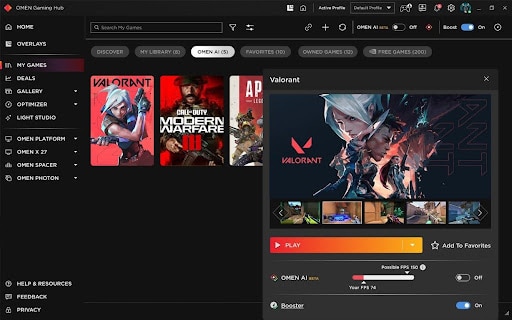
OMEN AI is the tuning layer inside OMEN Gaming Hub, the software that ships on HP's gaming machines. Its job is the one most players either skip or get wrong: choosing graphics settings. Rather than presenting sliders, it scans the machine, recommends a set of operating system, hardware and in-game settings for the title being played, and applies them when the user accepts.
HP announced it at CES 2025 and made the beta available on 6 January 2025, supporting exactly one game at launch. It requires OMEN Gaming Hub and Windows 10 build 19041.0 or higher. Since HP brought its gaming brands together at CES 2026, the software sits under the combined HyperX OMEN name alongside the hardware it tunes.
What it actually changes
Three layers, which is more than a graphics driver utility touches. HP describes OMEN AI as recommending operating system, hardware and in-game settings, tailored to the specific machine rather than to a class of machine. CE Pro reported that it watches monitor, CPU, GPU and RAM activity and adjusts to raise frame rate during play, and HP says it keeps adapting rather than deciding once.
That breadth is the interesting part. A GPU vendor's optimiser knows the graphics card and the display. Software written by the company that built the whole laptop can also reach thermal behaviour, power settings and background processes, because it knows what cooling the chassis has and what the machine is allowed to draw. Whether it uses that knowledge well is a separate question, but the access is real.
Which games it supports, and why that is the limit
This is the number that decides whether OMEN AI is useful to a given player. At launch the beta supported Counter-Strike 2 and nothing else. HP now lists Counter-Strike 2, League of Legends, Apex Legends, PUBG Battlegrounds, VALORANT, Overwatch 2, Fortnite and Dota, with Rainbow Six Siege and Delta Force described as coming, and promises regular additions.
Every title on that list is competitive multiplayer. That is a deliberate choice rather than an oversight: these are the games where frame rate matters more than visual fidelity, where the settings debate is fiercest, and where a per-game profile is worth building. It also means that a player whose evenings go on single-player games with heavy graphics is outside the covered set, and for them the feature currently does nothing.
What hardware it needs
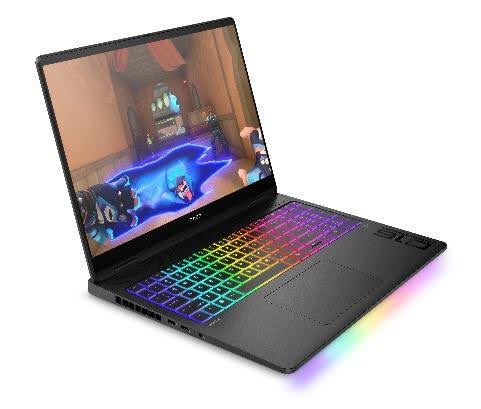
HP lists OMEN laptops with current generation Intel or AMD processors, Victus gaming laptops with NVIDIA RTX graphics, and OMEN desktops, with a stated floor of NVIDIA RTX 30 series graphics or the AMD equivalent. OMEN Gaming Hub has to be installed, which in practice means an HP gaming machine rather than any PC.
That is the real boundary. OMEN AI is not a utility somebody can download onto a self-built PC. It is a reason to buy HP gaming hardware, and should be weighed as one.
How it compares with the alternatives
The closest comparison is the game optimiser in the NVIDIA App, which does the same one-click job by matching the specific GPU, processor and display against NVIDIA's own dataset of real configurations. It covers a far longer list of games, and it works on any machine with an NVIDIA card rather than only on one manufacturer's hardware. On breadth it wins easily.
What it cannot do is touch the parts of the system that belong to the laptop maker. That is the space OMEN AI occupies. The two overlap enough that running both and letting them fight over the same settings is a genuine risk, and XDA's coverage of the NVIDIA optimiser notes readers hitting conflicts with other GPU control software. Pick one to be authoritative.
Manual tuning remains the third option and is still the right one for anyone chasing a specific frame target or a particular look. An automatic optimiser is aiming at a sensible compromise, not at the compromise one player has decided they want.
Who should use something else
Anyone not on HP gaming hardware. OMEN AI needs OMEN Gaming Hub, so on a self-built machine or another manufacturer's laptop the NVIDIA App or AMD's own software is the equivalent.
Players whose games are not on HP's supported list get nothing from it today. That list is worth checking before treating the feature as a reason to choose one laptop over another, because a promise of future titles is not the same as coverage now.
Players who tune deliberately, who know which settings they will not trade and what frame rate they are targeting, will do better by hand. This is built for the majority who never open the settings menu, not for the minority who have already read the benchmarks.
And anyone who strips vendor software off a new machine as a matter of habit should know they are removing this along with it. OMEN AI is not a standalone application that can be reinstalled on its own. It lives inside Gaming Hub, and the Hub is the thing that has to stay.
Reviews
No reviews yet
Nobody has reviewed OMEN AI here yet.