About HP EliteDesk 8
HP EliteDesk 8 is the volume business desktop in HP's commercial range, the deskbound counterpart to the EliteBook 8 notebook. It belongs to the naming system HP introduced in 2024, which retired the three-digit EliteDesk 800 and 600 numbers in favour of a single digit marking the tier. The 8 is the managed, security-hardened tier that corporate IT buys in quantity, sitting above the HP Pro desktops and below the Z workstations.
This is a product line rather than a single machine. It spans several chassis sizes and both Intel and AMD silicon, so it has no one processor, no one screen, no one price and no one set of ports. What holds it together is the management and security stack, and the expectation that every unit in a fleet can be imaged, locked down and serviced the same way.
Key specifications
Range
| Form factors | Mini, small form factor and tower |
|---|---|
| Generation suffix | i denotes an Intel build, a denotes an AMD build |
Security
| Endpoint security | HP Wolf Security for Business |
|---|
What the EliteDesk 8 name actually covers
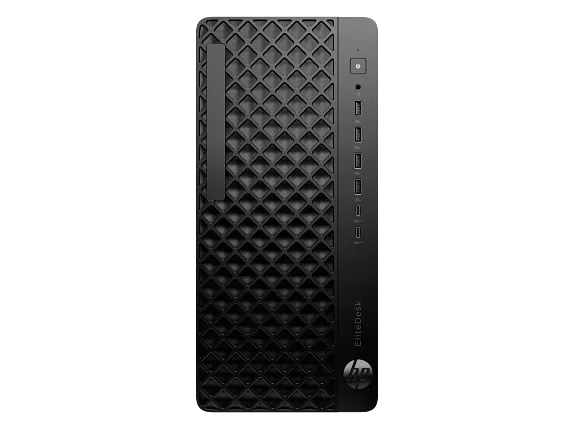
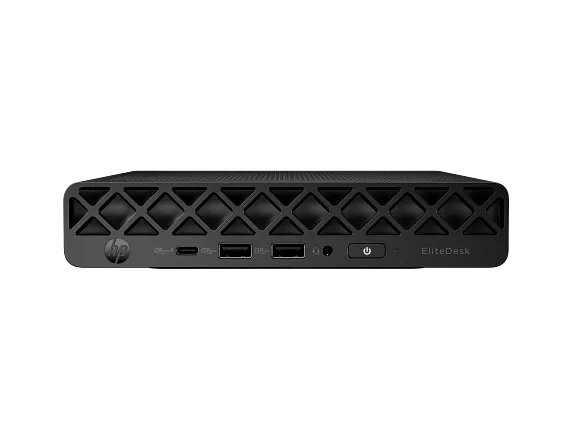
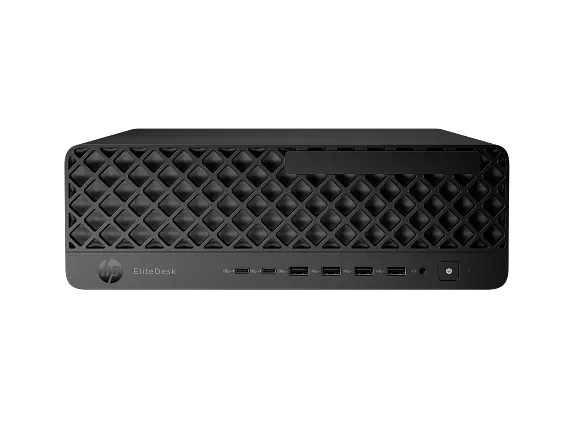
HP divides the line by chassis first and processor vendor second. Mini is a roughly one-litre box that mounts behind a display or under a desk. Small form factor is a slim desktop shell with room for a low-profile card. Tower is the expandable one, with drive bays and full-height slots, and it is the only shape in the line that treats a discrete graphics card as a normal fitting rather than an exception.
One naming trap is worth knowing before you order. The all-in-one HP shows alongside these machines is not an EliteDesk at all: it carries the name EliteStudio 8. A buyer who asks a reseller for an all-in-one EliteDesk will be quoted the EliteStudio instead, and the two sit on the same page of HP's own site, which is where the confusion starts.
Reading the G1i and G1a suffixes
The letter after the generation number tells you whose processor is inside. Builds ending in i, such as the EliteDesk 8 Tower G1i and the Mini G2i, are Intel machines, reaching up to Core Ultra 9 with an NPU HP rates at up to 50 TOPS. Builds ending in a, such as the Mini G1a and the SFF G2a, are AMD machines, using Ryzen AI PRO 300 series and Ryzen 200 series parts.
That suffix matters more than a letter usually does. The NPU rating decides whether a given unit clears the 40 TOPS bar Microsoft sets for Copilot+ features, and the entry configurations in both camps ship with slower NPUs than the flagship parts. Reviewers testing the top AMD build found it certified for Copilot+, but the name on the chassis is not by itself a guarantee of that feature set. Check the NPU figure on the specific configuration line, not the family.
Security and fleet management
The reason a business pays the EliteDesk 8 premium over a consumer tower is almost entirely here. HP ships the line with Wolf Security for Business, its endpoint protection layer, and describes the protection as starting at the hardware level rather than in the operating system alone. Preconfigured models have shipped with Wolf Pro Security included. A fingerprint sensor is available as an option rather than fitted as standard.
Alongside that sits full enterprise manageability, which in practice is the part that decides fleet purchases: consistent images, remote administration and a serviceable parts supply. HP publishes replacement parts for the line through its PartSurfer catalogue, which matters to any organisation that repairs rather than replaces.
What to weigh it against
The direct rivals are the Dell OptiPlex and the Lenovo ThinkCentre M series, and all three are bought the same way: by IT departments who care less about peak performance than about a machine behaving identically across three hundred desks. Comparison on raw speed is close to meaningless, since all three draw from the same Intel and AMD parts bins in the same quarter.
The axes that actually separate them are the modularity of the rear ports, the ease of opening the chassis, and the terms of the management software. HP's rear input and output on the Mini is modular, so video, networking and USB layouts can be changed at order time or later for a modest sum. Against that, reviewers have consistently flagged servicing friction: on the Mini, reaching the SSD means removing the display output card or the fan first, which is worse than rivals that put storage under a single panel on the underside.
Who should buy something else
Anyone buying one machine for themselves should look elsewhere. The line is priced and configured for volume purchase, list prices are high, and the value only appears through business channels and discounting. A single buyer at a consumer retailer is paying for management features they will never switch on.
Gamers and anyone doing GPU-accelerated professional work should also pass. The Mini and small form factor builds rely on integrated graphics, and reviewers testing the Radeon 860M in the Mini found it well behind discrete GPU systems on rendering and AI inference. If the workload is 3D, video effects or model training, the HP Z workstations exist for exactly that reason and the tower is the only EliteDesk shape that can host a serious card.
Finally, if the appeal is the AI branding alone, look carefully before paying for it. The NPU is only useful if the software your organisation runs actually calls on it, and an entry configuration may not clear the Copilot+ threshold anyway. A cheaper HP Pro desktop covers ordinary office work at lower cost.
Where to buy
Links go to the seller, not through us. We take no commission and these are not affiliate links, so the order below says nothing about who pays what. Prices and stock change constantly, so check on the day.
Reviews
No reviews yet
Nobody has reviewed HP EliteDesk 8 here yet.