About Microsoft To Do
Microsoft To Do is the personal task-management application in the Microsoft 365 family. It is designed for individual lists, daily prioritization, reminders and lightweight shared lists rather than full project planning. My Day gives users a focused daily view, while Outlook integration can turn flagged email into tasks and Planner assignments can surface alongside personal work. Microsoft stores To Do tasks in Exchange Online for supported Microsoft accounts, so organizations should consider mailbox licensing, account lifecycle and data governance when they use it for work.
What it does
Personal task management
| Lists and reminders | Create task lists, due dates, reminders, notes, steps and importance markers for individual follow-up. |
|---|
Daily planning
| My Day | My Day provides a focused daily task view while unfinished work remains in its original lists. |
|---|
Outlook integration
| Flagged email | Supported Microsoft-hosted accounts can surface flagged Outlook email as editable To Do tasks, with shared-mailbox limits. |
|---|
Microsoft 365
| Planner assignments | Assigned Planner work can surface in supported To Do task views alongside personal tasks. |
|---|
Data
| Exchange Online storage | For supported work and school accounts, To Do tasks are stored on Exchange Online services and synchronize with Outlook task experiences. |
|---|
What is Microsoft To Do used for?
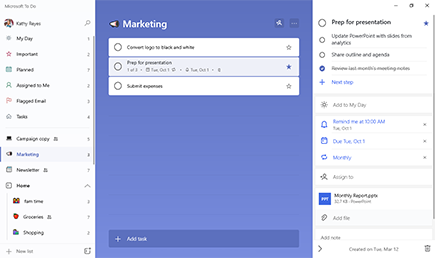
Microsoft To Do is built for personal task capture and day-to-day follow-through. Users can create task lists, add due dates and reminders, break larger items into steps, add notes, mark important work and use smart lists to find planned or completed tasks. The application is available across supported desktop, mobile and web experiences and is useful when a person needs one place to manage work that would otherwise be scattered across notes, email flags and memory.
The product is intentionally lighter than Microsoft Planner. It works well for private task lists, personal routines, simple shared lists and individual follow-up. Teams that need project boards, workload views, dependencies, milestones or portfolio controls should use Planner or another project-management product rather than trying to make To Do carry team planning it was not designed for.
How does My Day work in Microsoft To Do?
My Day is Microsoft's focused daily-planning view. Users choose the tasks they want to concentrate on today and can add suggested tasks based on existing lists. Microsoft says tasks added to My Day remain in their original task list, so using the daily view does not create a separate duplicate record.
My Day is deliberately temporary. It clears for a fresh start each day, while unfinished tasks remain in their source lists and can be suggested again later. This is useful for people who want a small daily working set without losing the larger backlog. It is less useful as a permanent reporting view because the purpose is short-term focus, not long-term project history.
How does To Do connect with Outlook and flagged email?
Microsoft integrates To Do with Outlook for supported Microsoft accounts. Tasks are stored on Exchange Online services, and users can manage To Do tasks from supported Outlook experiences. Flagged email can also appear as tasks when the user enables the connection and signs in with the same supported Microsoft account.
The flagged-email workflow has limits. Microsoft states that only supported Microsoft-hosted accounts can use the flagged email list, and flagged messages from shared folders or shared mailboxes are not supported. When a flagged message becomes a task, the user can rename it, add a due date or reminder, place it in My Day and open the original message from the task. Organizations should test mailbox and shared-mailbox workflows before relying on this feature for operational processes.
What is the difference between Microsoft To Do and Planner?
Microsoft's own comparison positions To Do around individual tasks and simple shared lists, while Planner is designed for visual teamwork and shared plans. To Do is the better fit for personal reminders, daily lists and individual follow-up. Planner is the stronger choice when a group needs shared ownership, boards, progress views and more structured project coordination.
The two products are connected rather than isolated. Assigned Planner work can appear in To Do through supported task views and connections, allowing a user to see team assignments beside personal tasks. That does not make the products interchangeable. Teams should still decide whether the source of truth is a Planner plan, a personal To Do list or another system so ownership and reporting stay clear.
What should organizations know about licensing and data?
Microsoft To Do is available with many Microsoft 365 work and school subscriptions and can also be used with supported personal Microsoft accounts. For work and school scenarios, To Do depends on Exchange Online services for task storage and synchronization. This means mailbox licensing, account status and organizational policies can affect access even though the user experiences To Do as a separate task application.
For business use, administrators should consider offboarding, retention and ownership. Personal task lists can contain business-sensitive details, but they are not a replacement for a governed project or ticketing system. If work must survive employee departure, support audit requirements or be visible to a team, a shared Planner plan, Microsoft List, ticketing platform or another controlled system may be more appropriate.
What are Microsoft To Do's main limitations?
To Do is intentionally simple, and that simplicity becomes a limitation for complex work. It does not provide the same project scheduling, dependency management, workload analysis, portfolio reporting or advanced shared planning controls available in premium Planner or specialist project-management systems. Shared lists are useful for basic coordination but should not be confused with full team project governance.
Feature behavior also depends on account type and connected Microsoft services. Outlook flagged email has eligibility limits, and enterprise workflows involving shared mailboxes may not map cleanly into To Do. Organizations should verify the exact account, client and mailbox configuration before promising a particular integration to users.
Who should choose something else?
Teams managing projects with many owners, dependencies, milestones or reporting requirements should choose Planner or a dedicated project-management platform instead of To Do. Service desks and engineering teams that need workflow states, queues, automation, audit history or structured records should use a ticketing or work-management system. Organizations centered on another productivity ecosystem may also prefer the task application already connected to their email, calendar and identity stack.
Microsoft To Do is a stronger fit for individuals who want a straightforward task list connected to Outlook and Microsoft 365. It is most useful when the job is personal prioritization and follow-up rather than formal project execution.
Reviews
No reviews yet
Nobody has reviewed Microsoft To Do here yet.