About Microsoft Teams
Microsoft Teams is the collaboration and communication application in the Microsoft 365 family. It combines chat, meetings, calling, channels, file sharing and app integrations in one workspace. Teams is designed for ongoing teamwork rather than one-off messaging: conversations, meetings and shared files can sit around a project, department or business process. Its value is strongest for organizations already using Microsoft 365 because Teams connects with services such as SharePoint, OneDrive, Outlook and Office apps, but licensing, governance and feature availability vary by plan and workload.
What it does
Communication
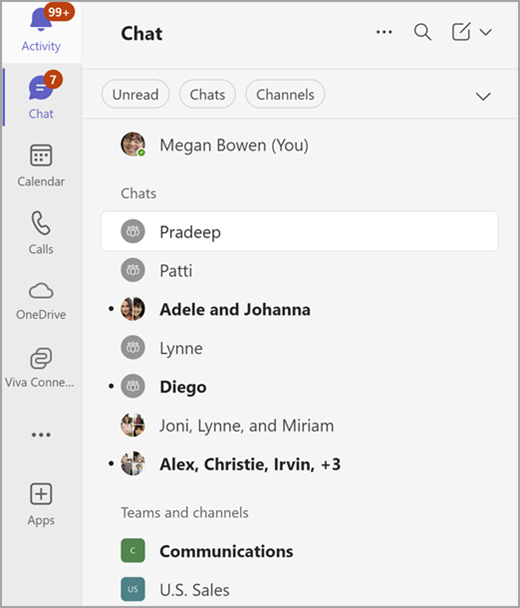
| Chat and channels | Direct chat, group chat, teams and standard, private or shared channels organize ongoing collaboration. |
|---|
Meetings
| Meetings and screen sharing | Teams supports scheduled and channel meetings with audio, video, screen sharing and meeting chat in supported configurations. |
|---|
Files
| Microsoft 365 file integration | Channel files are stored in SharePoint, while OneDrive supports personal and shared file workflows across Microsoft 365. |
|---|
Apps
| Extensibility | Teams supports apps including tabs, bots, message extensions and meeting experiences. |
|---|
AI
| Copilot and meeting assistance | Eligible users can access Copilot and supported AI-assisted meeting, recap and search experiences, subject to licensing and policy. |
|---|
What is Microsoft Teams used for?
Teams is used for day-to-day communication and collaboration inside organizations. Users can exchange direct messages, create group chats, organize work into teams and channels, schedule or join meetings, make calls and share files. Microsoft describes Teams as a workspace for real-time collaboration and communication, meetings, file sharing and app sharing.
A team groups people, content and tools around a business outcome. Channels then organize conversations and files by topic, project or discipline. This structure is useful when work needs a shared history instead of being scattered across separate email threads. It also means Teams requires some information architecture: too many teams and channels can become difficult to navigate without naming, ownership and lifecycle rules.
How do Teams channels and files work?
Microsoft supports standard, private and shared channels. Standard channels are open to the members of the parent team, private channels restrict access to selected team members, and shared channels can include selected people from inside or outside the team when the organization allows it.
Files shared in a standard Teams channel are stored in SharePoint, while personal or chat-based file workflows can involve OneDrive. This relationship matters for governance because Teams is not a separate file-storage system. Retention, permissions, sharing and content lifecycle can depend on the underlying Microsoft 365 services. Organizations planning a Teams rollout should therefore include SharePoint and OneDrive governance rather than treating Teams as an isolated chat application.
What meetings and calling capabilities does Teams provide?
Teams supports scheduled meetings, channel meetings, audio and video, screen sharing, meeting chat and related collaboration features. Microsoft currently documents Teams meetings that can scale beyond the fully interactive attendee group by placing additional participants into view-only mode for large events. Participants can also join a meeting from an invitation without belonging to the host organization, subject to the meeting configuration.
Calling is another Teams workload. Organizations can use Teams for internal calling and, with appropriate Microsoft Teams Phone licensing and telephony configuration, broader phone-system scenarios. Buyers should separate basic Teams meetings from telephony requirements because phone numbers, calling plans, operator connectivity, devices and compliance needs can introduce additional licensing and administration.
How does Copilot fit into Microsoft Teams?
Microsoft continues to expand Copilot capabilities in Teams. Current Microsoft support documentation includes Copilot for catching up on meetings, working with chats and files, and asking natural-language questions across supported Teams content. Microsoft also lists AI-assisted meeting features such as Facilitator and meeting recap experiences in supported configurations.
These capabilities are not universally included for every Teams user. Availability can depend on the Microsoft 365 subscription, Copilot license, Teams edition, administrator settings and the specific feature. Organizations evaluating Teams for AI-assisted meetings or search should verify current entitlements instead of assuming that all Copilot functionality is part of a standard Teams license.
What integrations and apps are available in Teams?
Teams can be extended with apps that appear as tabs, bots, message extensions and meeting experiences. Microsoft positions the Teams platform as a place where custom or third-party applications can bring workflows and enterprise data directly into chats, channels and meetings.
This extensibility can reduce context switching, but it also creates an administration question. Organizations should control which apps are allowed, review permissions and data handling, and decide whether a workflow belongs inside Teams or in a dedicated system. A heavily customized Teams environment can become harder to support if governance is weak.
What are the main limitations and deployment considerations?
Teams can become noisy when chat, channels, meetings and notifications are not structured well. Governance is important for team creation, guest access, external collaboration, retention, app approval and ownership. Organizations also need to understand where Teams data is stored across Microsoft 365 services instead of assuming all content lives inside one application.
Feature availability can vary by license, platform and administrator policy. Specialized telephony, advanced meeting capabilities and some AI features may require add-ons. Teams is also tightly connected to Microsoft's identity and collaboration stack, so migrations from another platform can involve user identities, files, channel structures, meeting policies, compliance controls and training rather than a simple application install.
Who should choose something else?
A very small team that only needs lightweight messaging may prefer a simpler chat tool. Organizations centered on Google Workspace, Slack or another collaboration ecosystem may find their existing platform easier to administer and integrate. Businesses with specialized contact-center, webinar, community or project-management requirements should also compare dedicated products instead of assuming Teams replaces every collaboration category.
Teams is a stronger fit when meetings, chat, channels, Microsoft 365 identity, Office documents and SharePoint or OneDrive files need to work together. The decision should be based on the full collaboration architecture, governance model and licensing requirements, not only on whether employees already know the Teams interface.
Reviews
No reviews yet
Nobody has reviewed Microsoft Teams here yet.