About Microsoft SharePoint
Microsoft SharePoint is the content, intranet and collaboration service in the Microsoft 365 family. It gives organizations shared sites for documents, lists, pages, knowledge and team information rather than treating every file as individually owned storage. SharePoint works closely with OneDrive, Teams and Microsoft 365 groups, so buyers should understand where content is stored, who owns it and how permissions, sharing and retention are governed before making it the center of an intranet or document collaboration strategy.
What is included
Content management
| Sites and pages | SharePoint supports team sites, communication sites and web pages for shared organizational content. |
|---|
Documents
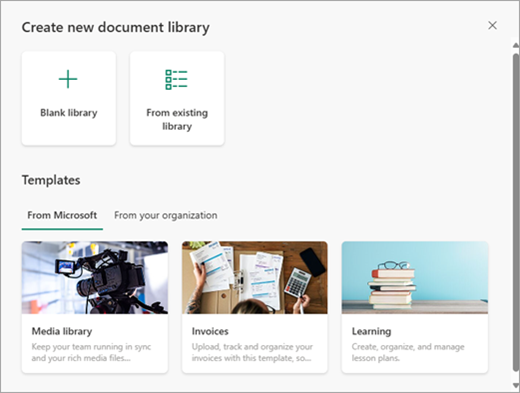
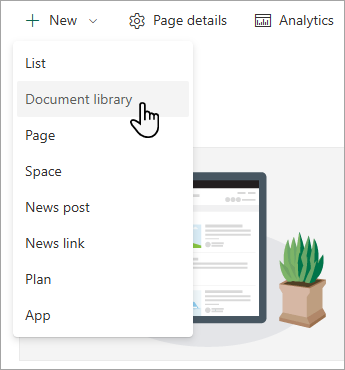
| Document libraries | Libraries store and organize shared files with supported collaboration, metadata, views, permissions and versioning capabilities. |
|---|
Microsoft 365
| Teams integration | Files shared in Teams channels are stored in SharePoint, linking Teams collaboration to SharePoint content governance. |
|---|
Sync
| OneDrive sync app | Supported SharePoint libraries can be synchronized to Windows and Mac devices through the OneDrive sync app. |
|---|
Administration
| Site storage management | SharePoint in Microsoft 365 can use pooled tenant storage with automatic site allocation or administrator-defined manual site limits. |
|---|
What is Microsoft SharePoint used for?
SharePoint is used to create team sites, communication sites, document libraries, lists and pages for shared organizational content. Microsoft describes SharePoint in Microsoft 365 as a service for sharing and managing content, knowledge and applications across an organization. A team can use it for project documents and internal reference material, while a larger company can use it for department sites, intranet publishing and controlled document repositories.
Its strength is shared ownership. Content can live in a site or library that belongs to a team or business function instead of one person's account. That makes SharePoint more suitable than personal cloud storage when information must survive role changes, be governed by site permissions or remain available to a wider group over time.
How do SharePoint document libraries and collaboration work?
Document libraries are one of SharePoint's core building blocks. Microsoft documents them as places where teams can securely store files, find them, work on them together and access them across supported devices. Libraries can use folders, columns, views, versioning and permission settings, and users can open supported Microsoft 365 documents in the browser or desktop apps.
SharePoint collaboration is closely connected to Microsoft 365. Files can be shared by link, opened in Word, Excel or PowerPoint, and synchronized to computers through the OneDrive sync app. Organizations should still design library structure and permissions carefully. A single large library with weak naming and ownership rules can become difficult to search, govern and maintain even when the underlying platform supports collaboration well.
How does SharePoint relate to Teams and OneDrive?
SharePoint, Teams and OneDrive overlap in everyday workflows but serve different roles. Microsoft describes OneDrive for work or school as an individual's document library, while a SharePoint team site is shared by a defined group. Teams adds chat, meetings and channel-based collaboration, but files shared in Teams channels are stored in SharePoint behind the scenes.
This relationship is important for governance and migration. An organization adopting Teams is also creating SharePoint content structures, and users may see the same file through Teams, SharePoint or a synchronized folder. Buyers should therefore plan Microsoft 365 file architecture as one connected system rather than purchasing or administering SharePoint, OneDrive and Teams in isolation.
What should buyers know about licensing, storage and administration?
SharePoint is available through Microsoft 365 and Office 365 plans that include the service, and Microsoft also documents SharePoint Online standalone plans. Exact features depend on the plan and tenant configuration, so buyers should verify current entitlement rather than assuming every Microsoft 365 subscription includes the same SharePoint capabilities.
Storage is administered at the tenant and site level. Microsoft's July 30, 2026 guidance says SharePoint storage is generally provided as a central pool that sites can draw from automatically, although administrators can switch to manual site limits. Organizations should monitor storage growth, external sharing, site ownership and lifecycle. Administration also extends to permissions, guest access, compliance and information architecture, so a SharePoint rollout can require more governance work than a simple shared-drive replacement.
What are SharePoint's main limitations and migration considerations?
SharePoint can support sophisticated collaboration, but that flexibility makes poor structure easy to create. Too many sites, libraries, custom permissions and duplicated content can make navigation and governance difficult. Teams migrating from file servers should not simply reproduce every old folder path. They should decide which content belongs in team sites, communication sites, OneDrive or another system, and identify owners for each destination.
Customization also needs restraint. SharePoint supports pages, web parts, lists, integrations and development options, but highly customized environments can become harder to maintain as Microsoft updates the cloud service. Organizations with complex records management, public web publishing, digital asset management or specialized document-control requirements should test whether SharePoint alone satisfies those needs or whether a dedicated platform is more appropriate.
Who should choose something else?
A small team that only needs personal file sync and simple sharing may find OneDrive sufficient without building a SharePoint information architecture. Teams focused mainly on chat and meetings may interact with SharePoint indirectly through Teams rather than managing sites as a separate destination. Organizations standardized on Google Workspace, Box, Dropbox or a specialist content platform may also prefer the system already tied to their identity and governance model.
SharePoint is a stronger fit when content needs shared organizational ownership, structured sites, document libraries, intranet pages and integration with Microsoft 365. The decision should be based on governance, content lifecycle, migration effort and user experience, not only on whether SharePoint is already included in an existing Microsoft subscription.
Reviews
No reviews yet
Nobody has reviewed Microsoft SharePoint here yet.