About Microsoft OneDrive
Microsoft OneDrive is the cloud storage and file sync service in the Microsoft 365 family. It gives individuals and organizations a place to store files in the cloud, sync them across supported devices, share them with other people, and work with Microsoft 365 apps without treating every file as a local-only copy. OneDrive serves both personal and work or school accounts, while its business use is closely connected to Microsoft 365 identity, SharePoint, collaboration and administration.
What is included
Storage and sync
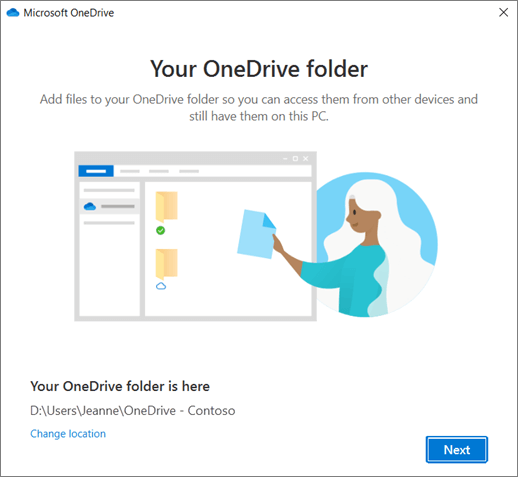
| Cloud file synchronization | The OneDrive sync app connects cloud files with File Explorer on Windows and Finder on macOS in supported environments. |
|---|---|
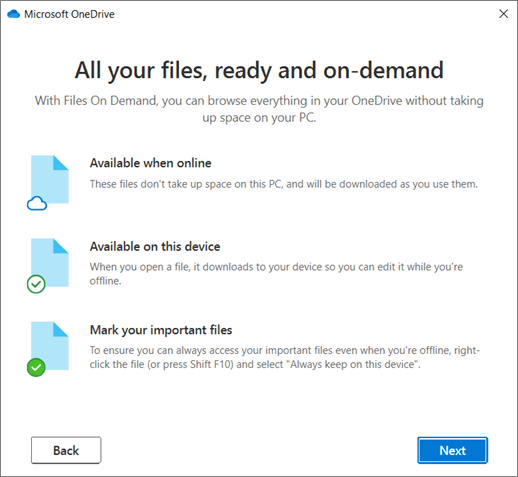
| Files On-Demand | Users can see cloud files without downloading every file locally and can mark selected files or folders for offline availability. |
Sharing
| File sharing | OneDrive supports sharing files and folders with other people, with permissions managed through supported Microsoft 365 sharing controls. |
|---|
Collaboration
| Microsoft 365 document collaboration | Files stored in OneDrive can support co-authoring in compatible Microsoft 365 apps such as Word, Excel and PowerPoint. |
|---|
Microsoft 365
| SharePoint integration | The OneDrive sync app can synchronize supported SharePoint libraries, connecting personal and team file workflows. |
|---|
What is Microsoft OneDrive used for?
OneDrive is used for personal cloud storage, work file storage, device-to-cloud synchronization, file sharing and backup of selected folders. Microsoft documents OneDrive as a way to keep files available from a computer, mobile device or the web, with changes synchronized between the local OneDrive folder and the cloud.
For organizations, OneDrive is primarily user-focused storage. It is useful for files a person owns or works on before they become broader team content. Shared team libraries and intranet content are more naturally associated with SharePoint. That distinction matters because OneDrive and SharePoint use related technology but serve different ownership and collaboration patterns.
How does OneDrive sync files across devices?
The OneDrive sync app can connect cloud files with File Explorer on Windows and Finder on macOS. When a user adds, changes or removes a synchronized file, the change can be reflected between the device and OneDrive while the user is online. Microsoft also supports syncing SharePoint libraries through the OneDrive sync app, which makes OneDrive part of a wider Microsoft 365 file experience rather than an isolated storage service.
Sync is convenient, but organizations should plan for bandwidth, file naming, path length, device management and conflict handling. Microsoft continues to update the sync client, so supported operating systems and deployment guidance should be checked before a large rollout.
What is Files On-Demand in OneDrive?
Files On-Demand lets users see cloud files in File Explorer without downloading every file to local storage. Online-only files appear in the file system but use little local disk space until opened. Users can also mark selected files or folders to stay available offline when they need guaranteed local access.
This is useful on laptops with limited storage or for users with large cloud libraries. It also creates an important tradeoff: an online-only file still depends on connectivity when it has not been downloaded. Teams with unreliable internet access should decide which working files must be kept locally rather than assuming every visible file is immediately available offline.
How do sharing and collaboration work in OneDrive?
OneDrive supports sharing files with other people and, in supported Microsoft 365 workflows, collaborating on Office documents. A user can keep a working file in OneDrive, share it with colleagues and use products such as Word, Excel or PowerPoint for co-authoring. Microsoft documents that permissions remain under the owner's control and can be managed through the sharing experience.
Organizations should still define rules for external sharing, sensitive data and ownership changes. A file that starts as one person's work may become important team content later. When ownership and long-term governance matter more than individual storage, moving the content into an appropriate SharePoint site or team library may be the cleaner model.
How does OneDrive fit with SharePoint and Microsoft 365?
OneDrive and SharePoint are closely related but should not be treated as interchangeable. Microsoft describes OneDrive for work or school as storage assigned to an individual licensed user, while SharePoint provides team sites, shared libraries and broader content-management structures. The OneDrive sync app can also synchronize SharePoint libraries to a user's device.
Inside Microsoft 365, this means OneDrive often handles personal work files and direct sharing, while SharePoint supports team-owned content. Teams can surface files that are ultimately stored in SharePoint or OneDrive depending on the scenario. Buyers should understand these relationships before planning permissions, retention, migration or collaboration architecture.
What are OneDrive's main limitations and deployment considerations?
OneDrive is not a complete document-management or shared-drive strategy by itself. Organizations with complex records management, team-owned content, large-scale intranets or structured publishing needs may require SharePoint or another content platform alongside it. Sync also introduces operational considerations around device storage, network usage, permissions and files that users expect to work with offline.
Platform support changes over time. Microsoft states that, as of August 15, 2026, OneDrive desktop apps on Windows 10 21H2 and earlier no longer receive new updates. Organizations supporting older devices should verify current system requirements before deployment. Features can also vary between personal and work or school accounts, plans and administrator policies.
Who should choose something else?
A team that mainly needs a centrally owned shared repository may prefer SharePoint or another team storage platform instead of putting important business content inside individual OneDrive accounts. Organizations standardized on Google Workspace, Dropbox, Box or another cloud ecosystem may also reduce complexity by using the storage service already tied to their identity and collaboration stack.
OneDrive is a stronger fit when users need Microsoft 365-integrated personal work storage, file synchronization, Office collaboration and controlled sharing across supported devices. The best choice depends on whether the content is primarily owned by an individual, a team or the organization, and how much governance, offline access and cross-platform support the workflow requires.
Reviews
No reviews yet
Nobody has reviewed Microsoft OneDrive here yet.