About Microsoft Bookings
Microsoft Bookings is the appointment scheduling service in the Microsoft 365 family. It supports personal booking pages for individual availability and shared booking pages for teams, departments and customer-facing services. Bookings connects with Outlook availability, can create Teams online meetings, and can send confirmation and reminder messages. The product is useful when an organization wants customers, clients or colleagues to choose available times without repeated email exchanges, but its fit depends on Microsoft 365 licensing, Exchange Online storage and how much scheduling complexity the business needs.
What is included
Scheduling
| Personal and shared booking pages | Microsoft supports personal booking pages for individual availability and shared booking pages for teams, departments and customer-facing services. |
|---|
Calendar
| Outlook availability | Bookings can use Outlook calendar availability to help determine when staff can accept appointments. |
|---|
Virtual appointments
| Teams meetings | Supported Bookings services can create Microsoft Teams online meeting links when the assigned staff member has the required Teams license. |
|---|
Administration
| Staff and services | Shared Bookings supports configured services, staff assignments, business hours, scheduling rules and customer-facing booking pages. |
|---|
Data
| Exchange Online storage | Microsoft states that Bookings stores customer, staff, service and appointment data in Microsoft 365 and Exchange Online shared mailboxes. |
|---|
Scale
| Staff limit | Microsoft documents support for up to 100 staff members on a Bookings page. |
|---|
What is Microsoft Bookings used for?
Microsoft Bookings is used to schedule and manage appointments with customers, clients and colleagues. A booking page exposes available times based on configured services, staff schedules and business hours, while the Bookings calendar gives staff a shared place to manage appointments. Microsoft also supports automated confirmation and reminder messages, which can reduce repetitive scheduling work and help attendees remember upcoming appointments.
Common scenarios include consultations, sales calls, support sessions, interviews, office hours, training appointments and service businesses where customers need to choose from available times. Bookings is not the same as a general team calendar. Its main purpose is to turn staff availability and service rules into a self-service scheduling experience.
What is the difference between Personal Bookings and Shared Bookings?
Microsoft documents both Personal Bookings and Shared Bookings. Personal Bookings is designed around one person's availability. A user creates meeting types, publishes a personal booking page and shares the link so other people can select an available time. This is useful for consultants, managers, recruiters or anyone who wants to reduce the back and forth involved in arranging one-to-one meetings.
Shared Bookings is designed for a team, department or business. Administrators can define services, add staff, configure business hours and availability, and publish a shared booking page. Customers can then choose a service and available staff according to the rules the organization sets. Shared Bookings is the better fit when appointments belong to a business process rather than one person's calendar.
How do Outlook and Teams work with Microsoft Bookings?
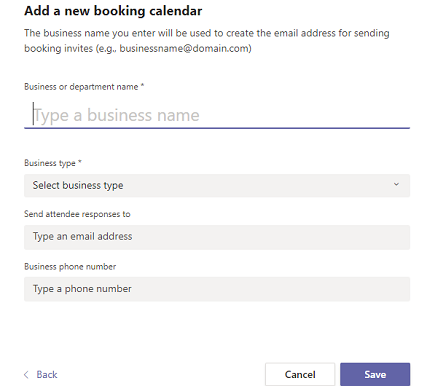
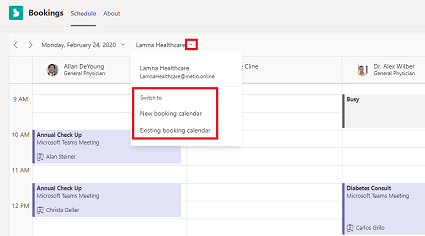
Bookings uses Outlook availability to help prevent appointments from being offered when staff are already busy. Microsoft also provides Bookings access through Outlook and Microsoft Teams in supported environments. Teams users can manage booking calendars, add staff and schedule appointments without leaving the Teams interface.
For virtual appointments, Bookings can create Microsoft Teams meeting links when the service is configured for online meetings and the assigned staff member has the required Teams licensing. This is useful for remote consultations and internal appointments, but buyers should separate Bookings licensing from Teams meeting entitlements. A Bookings page can exist without every advanced Teams capability being available.
What scheduling controls can organizations configure?
Shared booking pages can define services with a name, description, location, duration, staff assignments, reminders and other scheduling rules. Microsoft documents support for one-to-one services as well as group scenarios where one or more staff members can serve several attendees. A service can also collect custom information from customers and send tailored confirmation or reminder details.
Organizations should design these rules before publishing a booking page. Service duration, buffers, lead time, staff eligibility, time zones and maximum attendees affect what customers can book. Microsoft also documents a limit of up to 100 staff members on a Bookings page and recommends limiting the number of services on a shared booking page, so very large or highly complex scheduling operations should verify current service limits before rollout.
Where is Microsoft Bookings data stored and what should administrators know?
Microsoft states that Bookings data is stored within Microsoft 365 and Exchange Online. Shared Bookings uses Exchange shared mailboxes to store customer, staff, service and appointment details. This means Exchange compliance and retention policies can apply to Bookings data, and organizations should treat booking information as business data rather than as a separate lightweight web form.
This matters when a booking page collects personal information. Administrators should review what fields are requested, who can access booking calendars, how long records should be retained and what happens when staff leave the organization. A public booking page can make scheduling easier, but it also creates a customer data collection point that needs the same privacy and governance attention as other Microsoft 365 workloads.
Which Microsoft 365 plans include Bookings?
Microsoft's current Bookings documentation lists access across a range of Microsoft 365 and Office 365 subscriptions, including Microsoft 365 Business Basic, Business Standard and Business Premium, along with several enterprise, frontline and education plans. Exact feature availability varies by plan and cloud environment. Microsoft also notes that some functions, such as SMS appointment notifications in supported regions, can require additional licensing such as Teams Premium.
There is no single standalone price that accurately represents every Bookings deployment, so buyers should check the Microsoft 365 plan they already use before adding another subscription. Organizations evaluating Bookings mainly for one feature should compare the cost of the broader Microsoft 365 plan with specialist scheduling tools that may be sold independently.
What are Microsoft Bookings' main limitations?
Bookings is strong for appointment scheduling, but it is not a complete customer relationship management or field-service platform. It does not replace a CRM when the business needs lead pipelines, account history, complex sales workflows or detailed customer segmentation. It also does not replace specialist workforce scheduling when shifts, routes, resources or regulated staffing rules are central to operations.
Administration can become fragmented because Microsoft notes that shared booking calendars are maintained independently rather than through one consolidated management view. Organizations with many departments may need naming, ownership and lifecycle standards to prevent duplicated or abandoned calendars. Microsoft Graph exposes Bookings APIs, but API throttling and mailbox-specific limits also matter for custom integrations at scale.
Who should choose something else?
A small team that only needs people to pick a time on one person's calendar may prefer a simpler scheduling service or Personal Bookings rather than building shared booking calendars. Companies already centered on Google Workspace or another collaboration ecosystem may reduce administration by choosing a scheduling product tied to their existing calendars and identity system. Businesses that need payments, resource allocation, advanced CRM workflows, field-service dispatch or industry-specific booking rules should compare dedicated appointment platforms.
Microsoft Bookings is a stronger fit when the organization already uses Microsoft 365 and wants customer or internal appointment scheduling to work with Outlook availability, Exchange data governance and Teams meetings. The decision should be based on the full scheduling workflow, not only on whether a booking page can expose free time.
Reviews
No reviews yet
Nobody has reviewed Microsoft Bookings here yet.