About Family Hub
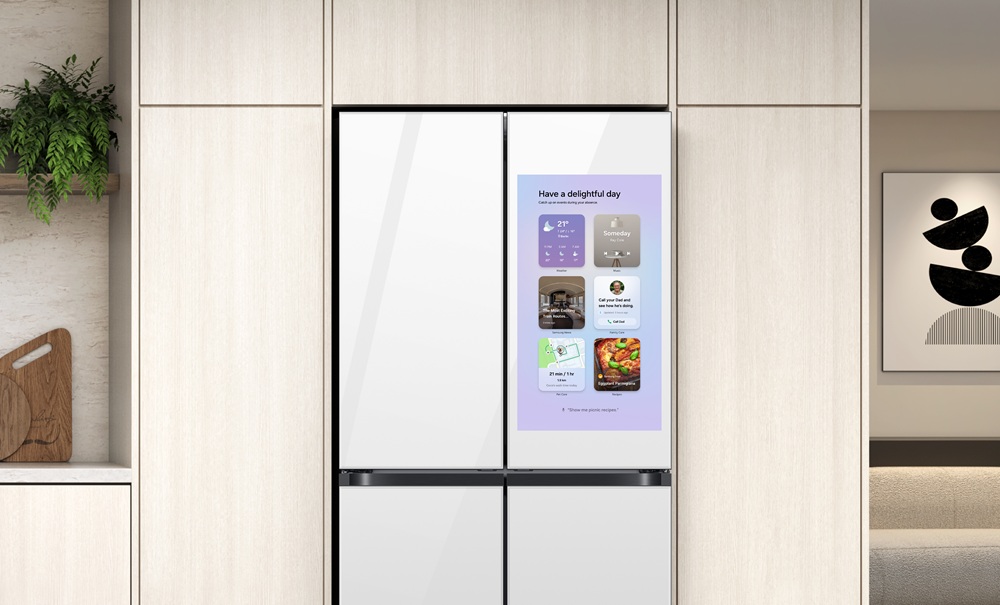
Family Hub is Samsung's name for a refrigerator with a touchscreen built into the door, and it has been the flagship of the company's fridge range for close to a decade. The screen carries shared calendars and notes, shows a live view from cameras inside the cabinet, plays music and video, and works as a wall-mounted control panel for SmartThings. On the 2025 lineup Samsung offers it as a 21.5 inch panel or a 32 inch one, and sells a separate 9 inch AI Home screen on fridges that are not Family Hub, which is a useful signal about where the line starts.
Family Hub is a feature rather than a single cabinet. Samsung has fitted it to 4-door, 4-door French door and side-by-side bodies, with the mix varying by region. Because it sits inside the Bespoke range, the finish is specified like cabinetry in the same way as the ovens and dishwashers alongside it. The refrigeration underneath is ordinary Samsung refrigeration and, by independent account, good. What the premium buys is the screen, and the screen is the part worth thinking hardest about.
Key specifications
Display
| Door screen | Family Hub touchscreen in the door; Samsung's 2025 lineup offers 21.5 inch and 32 inch versions |
|---|
What the screen and AI Vision Inside actually do
AI Vision Inside is the internal camera plus recognition. Samsung's own figures are modest and worth knowing before you weigh the feature: it recognises 37 fresh food items and can identify and suggest labelling for up to 50 packaged items commonly kept in a fridge. That is enough to track staples. It is not an inventory of a weekly shop.
The 2025 update, which Samsung began rolling out to Family Hub owners in October 2025, brought the One UI redesign shared with Samsung phones and televisions, Bixby Voice ID that recognises who is speaking and switches to that person's Samsung account, a Daily Board cover screen theme and Knox Matrix security. Samsung applied it to 2024 Family Hub models, excluding devices with hardware limitations.
One detail in that announcement deserves naming. Samsung introduced a widget pilot on the cover screen showing news, calendar, weather and curated adverts, and said users can disable the adverts in Settings. A fridge that can display an advert is a different proposition from one that displays a calendar. The option can be turned off, but you should know it exists before you buy.
How long the screen stays supported, and why that is the real question
The longest running criticism of Family Hub is not that the screen is bad. It is that a refrigerator outlives its software by years.
In August 2025 Samsung answered it directly. Expanding One UI to home appliances, the company committed to software updates for up to seven years after launch, starting from models launched in 2024, with eligibility opening in September 2025. The commitment carries its own limit in Samsung's wording: updates are provided excluding cases where hardware limitations, such as memory or chip performance, may restrict them.
Read the clock carefully, because it starts at the model's launch and not at your purchase. How-To Geek made exactly that point, opening with the line that people replace their fridges every seven years, right, and noting that refrigerators can easily last a decade or two with regular maintenance. Buy a two-year-old model on clearance and you have inherited five years, not seven.
iFixit's piece Smart Fridges Are Still a Dumb Idea supplies the practical version. It records earlier Samsung smart fridges whose software broke and stayed broken, with owners unable to use the Google Calendar app for over a year, and asks what happens when updates stop, or when an update bricks a fridge costing around 5,000 dollars. Seven years is a genuine commitment and longer than most appliance makers offer. It is still shorter than the fridge.
What independent testing has found
Consumer Reports tested the Family Hub 3.0 refrigerator and split its verdict cleanly. On refrigeration it praised great thermostat control and temperature uniformity and called the machine very quiet and energy efficient. On the screen it was blunt: the Family Hub does not execute any of its smart functions particularly well, with a slow and buggy touchscreen, a Meal Planner that failed to sync with the Shopping List and a Spotify app that could not reach the owner's library. Its conclusion was that a buyer could save 700 dollars on a nearly identical Samsung without the screen.
Reviewed reached the same place from another angle, complaining that answering whether you need milk took three separate apps that did not talk to each other, that the StickiBoard calendar allowed only six users at a time, and that the internal camera does not show the shelves on the doors. After a week the test household went back to their phones.
Both reviews are older, from the Tizen era before the One UI rewrite. Treat them as evidence about a pattern rather than about the current build: on this line the screen has repeatedly shipped ahead of the software behind it.
Who this is for
Family Hub earns its price in a narrow set of households. The first is one with a genuinely shared schedule where the kitchen is the room everyone passes through, so a calendar on the fridge door gets seen rather than opened. The second is a home already running SmartThings, where the panel becomes a fixed controller for lights, cameras and other appliances instead of one more app. The third is a Bespoke kitchen, where matching the fridge to the ovens and dishwasher is the one part of this purchase that cannot go out of date. Because the cooling itself tests well, you are not giving up refrigerator quality to get the screen. You are only paying for it.
What to weigh against LG InstaView, Bosch and Cafe
The direct rival is LG InstaView, and the two answer the same question in opposite ways. LG puts a glass panel in the door that lights up when you knock on it, so you can see inside without opening. Samsung puts a computer there. Tom's Guide compared them and gave LG the win in four of six categories, with LG starting at 1,899 dollars against 2,499 for Samsung. That piece is not uncritical of LG either: it quotes CNET calling the tap-to-view panel a niche convenience at best, and notes that LG's door-in-door compartments failed to hold temperature properly. Its summary applies to both machines, that the marquee features seem either extraneous or in need of refinement.
Bosch and Miele do not offer this at all, which is itself the argument: their fridges have nothing on them that can stop being supported. Cafe and GE compete on the design-led side with swappable hardware you can change later, against Samsung's finish fixed at purchase.
Who should buy something else
Buy the same Samsung without the screen if you expect to keep the fridge for twenty years. Consumer Reports found the non-smart equivalent cooled just as well and cost 700 dollars less, and the cabinet is the part of this appliance with the long life.
Buy elsewhere if you are not already in the Samsung ecosystem. Most of the panel's value is SmartThings control, and Tom's Guide places Bixby behind Alexa and Google Assistant.
Buy elsewhere if repairability is a priority. That is iFixit's whole point: a screen and a mainboard are failure modes a plain fridge does not have, and a bricked panel on an otherwise working appliance is an expensive kind of broken.
Buy elsewhere if you object to advertising on something you own. The 2025 update put a curated advert widget on the cover screen. It can be disabled, but the direction is now on the record.
And think twice about older or second-hand units. Samsung's seven-year commitment starts with models launched in 2024, so an earlier Family Hub has no published support window at all, and on any model the clock runs from launch rather than from the day you buy it. If a supported screen matters to you, buy the newest model in the line, not the best discount on the shelf.
Reviews
No reviews yet
Nobody has reviewed Family Hub here yet.