About Azure VMware Solution
Azure VMware Solution is Microsoft's managed VMware private cloud service for organizations that need to move, extend, or continue running VMware workloads in Azure without immediately redesigning every application. It provides dedicated Azure infrastructure with VMware vSphere, vCenter Server, vSAN, and NSX while Microsoft operates the underlying service platform. The strongest fit is usually an enterprise with a sizable VMware estate, a data center exit deadline, or workloads that are expensive or risky to refactor before migration. It is not a low cost substitute for ordinary Azure virtual machines, so buyers should evaluate host commitments, Broadcom VMware Cloud Foundation licensing, network design, migration tooling, capacity, and long term modernization plans before choosing it.
What is included
Platform
| VMware stack | vSphere, vCenter Server, vSAN, and NSX in a Microsoft managed Azure private cloud |
|---|
Capacity
| Minimum cluster size | 3 ESXi hosts per cluster |
|---|---|
| Maximum cluster size | 16 ESXi hosts per cluster |
| Maximum clusters | 12 clusters per private cloud |
| Maximum hosts | 96 ESXi hosts per private cloud |
| vCenter limit | 1 vCenter Server per private cloud |
Networking
| HCX site pairings | Up to 25 per private cloud |
|---|---|
| HCX service meshes | Up to 10 per private cloud |
| ExpressRoute throughput | Up to 10 Gbps with the documented gateway and FastPath configuration |
Licensing
| New deployments | Portable VMware Cloud Foundation subscription from Broadcom required |
|---|---|
| Legacy PAYG transition | License included pay as you go deployments must transition to portable VCF by October 31, 2026 to remain compliant |
Architecture
| Gen 2 networking | Supported Gen 2 private clouds attach directly to an Azure virtual network |
|---|
What does Azure VMware Solution provide?
Azure VMware Solution provides a VMware software defined data center environment inside Azure. Microsoft manages the service infrastructure while customers continue to use familiar VMware administration models and supported VMware tooling. Current Microsoft documentation describes private clouds that include VMware vSphere, vCenter Server, vSAN, and NSX.
The service uses dedicated host capacity rather than shared general purpose compute. That affects both architecture and cost. A private cloud contains one or more clusters, with at least three ESXi hosts per cluster. Microsoft currently documents a maximum of 16 hosts per cluster, up to 12 clusters per private cloud, and up to 96 ESXi hosts per private cloud.
Who is Azure VMware Solution best suited for?
Azure VMware Solution is best suited to organizations that already operate substantial VMware estates and need a lower change migration path. Common scenarios include data center exits, hardware refresh avoidance, merger driven consolidation, disaster recovery designs, and migrations where application teams cannot refactor immediately.
It can also support a phased modernization strategy. A company can first move workloads into a familiar VMware environment in Azure, then selectively adopt native Azure services for monitoring, backup, databases, analytics, security, or application modernization. This staged approach can reduce migration risk, but it only makes sense when the business value of preserving VMware compatibility justifies dedicated host economics and continued VMware licensing.
How do private clouds, clusters, and host sizes work?
Azure VMware Solution private clouds contain one or more vSphere clusters. Microsoft currently requires at least three ESXi hosts per cluster and supports up to 16 hosts per cluster. A private cloud can contain up to 12 clusters and up to 96 ESXi hosts, with one vCenter Server per private cloud.
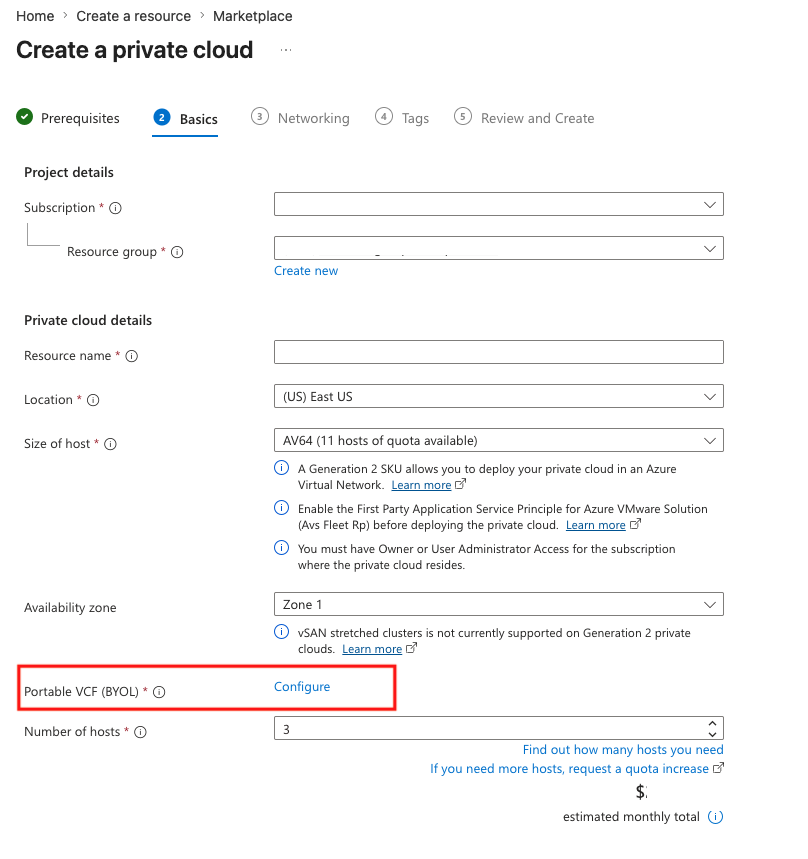
Microsoft's current pricing page lists VCF BYOL host options including AV36, AV36P, AV48, AV52, and AV64, subject to region and availability. Buyers should verify the regional matrix because host families and generations are not available everywhere. Capacity is purchased in host increments, so small estates can have poor utilization compared with services that scale at the VM, container, or request level.
What is different about Azure VMware Solution Gen 2?
Azure VMware Solution Gen 2 changes the network attachment model for supported deployments. Microsoft's current documentation describes Gen 2 private clouds as deploying directly inside an Azure virtual network rather than relying on the same ExpressRoute based attachment model used by Generation 1.
Gen 2 is associated with AV64 deployments in supported regions and removes the requirement to first deploy a starter cluster using AV36, AV36P, AV48, or AV52 before adding AV64. A Gen 2 AV64 cluster still requires at least three hosts. Azure virtual network peering is available directly, which can simplify connectivity to other Azure services. Because Gen 2 availability remains regional, buyers should confirm support before using it as a design assumption.
What changed with VMware Cloud Foundation licensing?
Broadcom VMware Cloud Foundation licensing is now a central buying requirement. Microsoft's current licensing reference states that new Azure VMware Solution deployments must use a portable VCF subscription purchased directly from Broadcom. Microsoft stopped including a VCF license or subscription with new Azure VMware Solution node purchases on November 1, 2025.
Existing license included pay as you go deployments have an important deadline: Microsoft states that they must transition to portable VCF by October 31, 2026 to remain compliant. Customers with active reserved instances for license included hosts have a later transition date of August 30, 2027, unless the reservation expires earlier. Buyers should track VCF core entitlements, subscription expiration, and reservation timelines as part of normal capacity planning.
How does portable VCF compliance work?
Microsoft's current reference allows portable VCF to be applied separately to each Azure VMware Solution private cloud. The same VCF key can be used across multiple private clouds if licensed cores are split correctly, but total registered cores cannot exceed the Broadcom entitlement.
Azure VMware Solution does not bind a license to one specific host or cluster. Instead, the entitlement is registered at private cloud level and Azure tracks the configured VCF cores. Expired or insufficient Broadcom licensing can make a BYOL environment noncompliant, so operations teams need a process for renewals, capacity changes, and license registration when hosts are added.
How does Azure VMware Solution pricing work?
Pricing was checked against Microsoft's current Azure VMware Solution pricing page on September 6, 2026. The service is priced primarily by dedicated node or host capacity, with rates depending on host SKU, region, billing offer, and reservation option. Microsoft's current pricing page lists hourly charging and reservation choices that vary by host family, including one year, three year, and in some cases five year terms.
The Azure host price does not include the portable Broadcom VMware Cloud Foundation subscription required for current AVS sizes. Additional costs can come from networking, public IP use, ExpressRoute, backup, monitoring, migration tooling, data transfer, and other Azure services used around the private cloud. Buyers should model the full environment rather than comparing only the node meter with an on premises server purchase.
What networking and connectivity limits matter?
Networking is a core design dependency. Generation 1 private clouds use Microsoft managed ExpressRoute connectivity for Azure integration, while Generation 2 uses direct Azure virtual network attachment. On premises connectivity can use supported ExpressRoute patterns, including Global Reach where appropriate.
Microsoft currently documents up to 25 HCX site pairings and 10 HCX service meshes per private cloud. It also documents a maximum of four Azure VMware Solution private clouds linked from a single location to one Azure virtual network gateway through Azure ExpressRoute, subject to the gateway's actual limits. Maximum Azure VMware Solution ExpressRoute throughput is documented at 10 Gbps when the required gateway and FastPath configuration are used. Address ranges must not overlap with Azure or on premises networks, so IP planning should be completed before deployment.
How does migration work?
Azure VMware Solution is designed to reduce application change during migration. VMware HCX is commonly used for migration and network extension scenarios, while Azure Migrate can help assess VMware estates and migration readiness before workloads move.
A production migration plan should still include dependency discovery, network mapping, performance baselines, test migrations, rollback procedures, identity and DNS validation, firewall rules, data protection, and post migration cost review. Rehosting a VM can accelerate a data center exit, but it does not automatically improve application architecture, licensing efficiency, or long term cloud operating cost.
What reliability and capacity limits should buyers plan around?
Microsoft currently documents a minimum of three ESXi hosts per cluster and a maximum of 16. A private cloud can contain up to 12 clusters, up to 96 ESXi hosts, and one vCenter Server. These are service limits rather than suggested operating targets.
The platform uses VMware high availability, vSAN resilience, and redundant Azure infrastructure, but application level resilience remains the customer's responsibility. Teams should plan vSAN headroom, failure domains, maintenance behavior, storage policies, backup, recovery objectives, and cluster expansion before treating the environment as a simple lift and shift target.
What are the main limitations and tradeoffs?
The first tradeoff is cost granularity. Azure VMware Solution uses dedicated hosts and a minimum cluster size, so it is often a poor fit for small VMware estates or workloads that could run efficiently on ordinary Azure VMs, managed databases, App Service, Container Apps, or other Azure platform services.
The second tradeoff is operational continuity with VMware. That continuity is useful during migration, but it can also delay modernization if there is no plan beyond relocation. Teams still need VMware skills, Azure networking knowledge, capacity management, backup and recovery design, and a current Broadcom licensing process.
Regional host availability, quota, deployment lead time, network design, and licensing deadlines all require advance planning. Buyers should also remember that portable VCF licensing is now a separate commercial dependency from the Azure infrastructure bill.
Who should choose something else?
Choose Azure Virtual Machines when you need infrastructure as a service but do not need a full VMware software defined data center. Choose Azure Kubernetes Service or Azure Container Apps when the real goal is container modernization. Choose App Service or Azure Functions when applications can move to a managed platform model. For database heavy workloads, a managed Azure database can remove more infrastructure responsibility than carrying the existing VMware stack forward.
Azure VMware Solution is strongest when preserving VMware compatibility has clear business value. It is less compelling when the workload estate is small, the organization has already committed to cloud native redesign, or dedicated host economics are difficult to justify. A migration program should compare the cost and risk of rehosting in Azure VMware Solution with replatforming and refactoring alternatives rather than assuming the least disruptive technical path is automatically the best long term choice.
Reviews
No reviews yet
Nobody has reviewed Azure VMware Solution here yet.