About Azure Virtual Desktop
Azure Virtual Desktop is Microsoft's Azure service for delivering virtual Windows desktops and individual RemoteApp applications from centrally managed host pools. It supports pooled multi-session environments for shared capacity and personal desktops for users who need a dedicated session host. The service is useful for remote and hybrid work, contractor access, application delivery, desktop replacement, and organizations that want Windows 11, Windows 10, or supported Windows Server desktops without operating a traditional on-premises Remote Desktop Services control plane. Azure Virtual Desktop does not have one flat product price. Buyers need to account for user access rights plus the Azure infrastructure used for session hosts, storage, profiles, networking, monitoring, and related services.
What is included
Desktop delivery
| Desktop models | Pooled multi-session and personal desktops |
|---|
Application delivery
| Published resources | Full desktops and RemoteApp applications |
|---|
Session hosts
| Supported client OS | Windows 11 Enterprise, Windows 10 Enterprise, and supported Windows Server session hosts |
|---|
Management
| Host pool approaches | Standard management or session host configuration management |
|---|
Cost
| Pricing model | User access rights plus Azure infrastructure consumption |
|---|
Identity
| Access control | Microsoft Entra ID, Azure RBAC, and supported Active Directory scenarios |
|---|
Profiles
| Profile technology | FSLogix supported for pooled and personal desktop scenarios |
|---|
Optimization
| Cost controls | Autoscale and Start VM on Connect supported in eligible configurations |
|---|
How does Azure Virtual Desktop work?
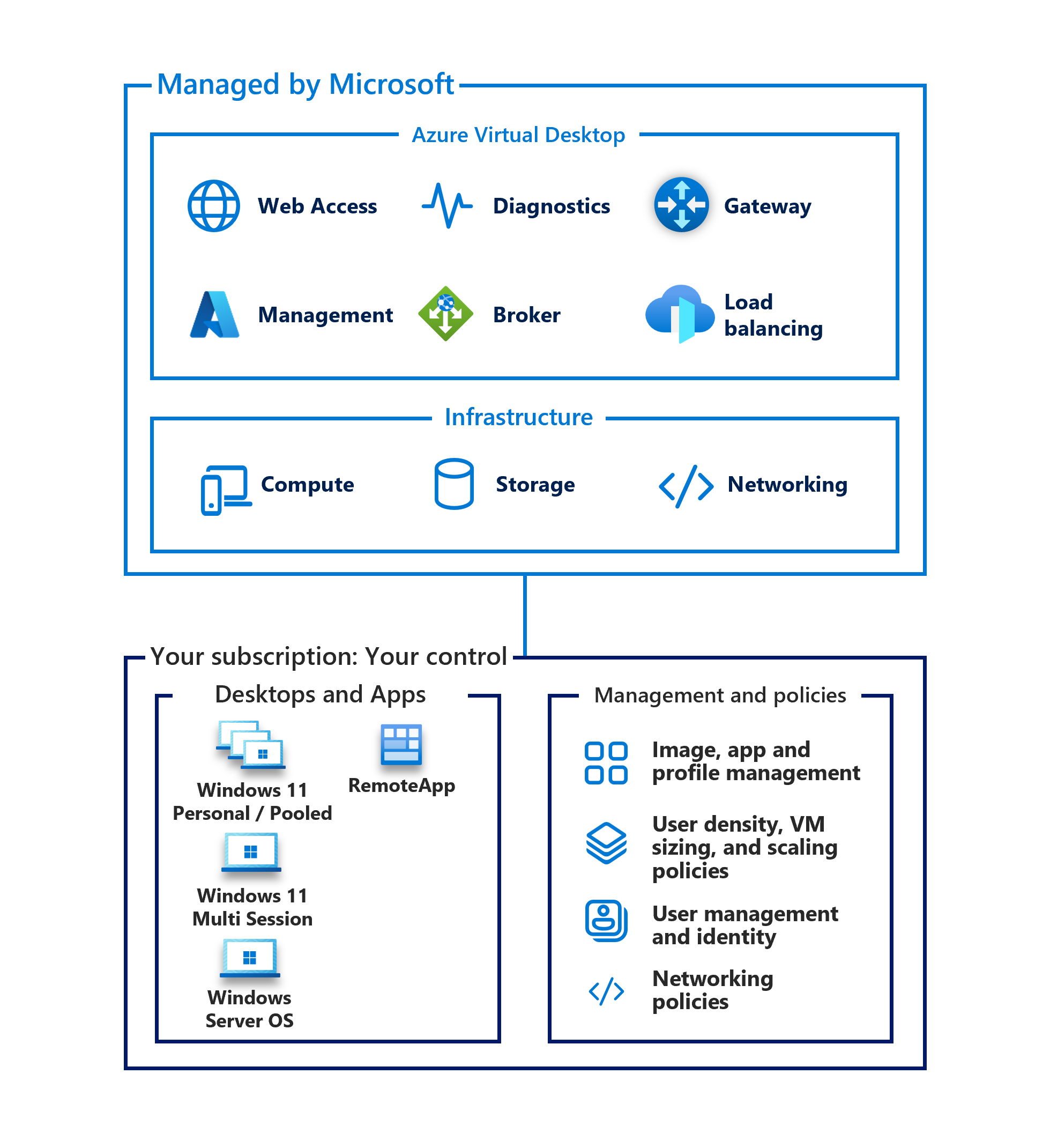
An Azure Virtual Desktop deployment is built around host pools, session hosts, application groups, and workspaces. A host pool is a collection of session host virtual machines that deliver the same workload. Pooled host pools can share session hosts across multiple users, while personal host pools assign a desktop to an individual user. Application groups control whether users receive a full desktop or selected RemoteApp applications, and workspaces present those assigned resources to users through supported clients such as Windows App.
Microsoft supports two host pool management approaches. Standard management gives administrators direct control over creating, updating, and scaling session hosts. Session host configuration management is available for pooled Azure host pools and lets Azure Virtual Desktop manage the session host lifecycle from a persistent configuration. That management approach is selected when the host pool is created and cannot later be switched to the other model, so teams should decide how much automation and direct infrastructure control they need before deployment.
Who is Azure Virtual Desktop best suited for?
Azure Virtual Desktop fits organizations that need centrally managed Windows desktops or applications for employees, contractors, seasonal staff, call centers, developers, or external customers. Pooled Windows 11 or Windows 10 multi-session can improve infrastructure utilization when users have similar application requirements, while personal desktops suit users who need stronger isolation, administrative rights, persistent machine-level changes, or applications that do not work well in multi-session environments.
It is also useful for application streaming. Organizations can publish RemoteApp applications without exposing a complete desktop. Microsoft supports external commercial access through per-user access pricing, which is separate from the eligible Windows and Microsoft 365 licensing used for internal users.
How does Azure Virtual Desktop pricing work?
Pricing has two major parts: user access rights and Azure infrastructure. For internal users, eligible Microsoft 365, Windows Enterprise, Windows Education, Windows VDA, or qualifying Windows Server RDS licensing can provide Azure Virtual Desktop access rights. For external commercial users, Microsoft offers per-user access pricing through an enrolled Azure subscription. Infrastructure charges remain separate in either case.
The infrastructure bill can include virtual machines, operating system and data disks, profile storage such as Azure Files, networking, backup, monitoring, security services, and outbound data transfer. Cost depends heavily on VM size, user density, hours of operation, storage design, and whether workloads use pooled or personal desktops. Organizations should model real concurrency and application demand rather than multiplying a desktop VM by every licensed user. Features such as autoscale and Start VM on Connect can reduce wasted compute when session hosts do not need to run continuously.
What should buyers know about licensing?
Licensing is one of the most important design checks. Microsoft currently lists eligible internal-use licensing such as Microsoft 365 E3, E5, A3, A5, F3, Business Premium, Windows Enterprise E3 or E5, Windows Education A3 or A5, and Windows VDA per user for supported Windows client session hosts. Windows Server session hosts use Remote Desktop Services licensing requirements instead.
External commercial use follows a different model. Microsoft provides per-user access pricing for external users, and that access charge does not replace licenses for products such as Microsoft 365 Apps, Defender, or other software used inside the desktop. Buyers should separate desktop access rights from application licensing, infrastructure consumption, and any external-user commercial scenario before comparing costs.
How do pooled and personal host pools differ?
Pooled host pools share session hosts across users and can use breadth-first or depth-first load balancing. Breadth-first distributes users across available hosts to spread load. Depth-first fills hosts more aggressively, which can make it easier to power down unused capacity and reduce cost. Administrators set a maximum session limit based on application performance, VM size, and user behavior.
Personal host pools assign users to dedicated session hosts. Assignment can be automatic or direct, and personal desktops are often chosen when users need dedicated resources or machine-level persistence. Pooled environments usually depend more heavily on profile technologies such as FSLogix and consistent image management because a user can reconnect to a different session host.
What are the main operational and security considerations?
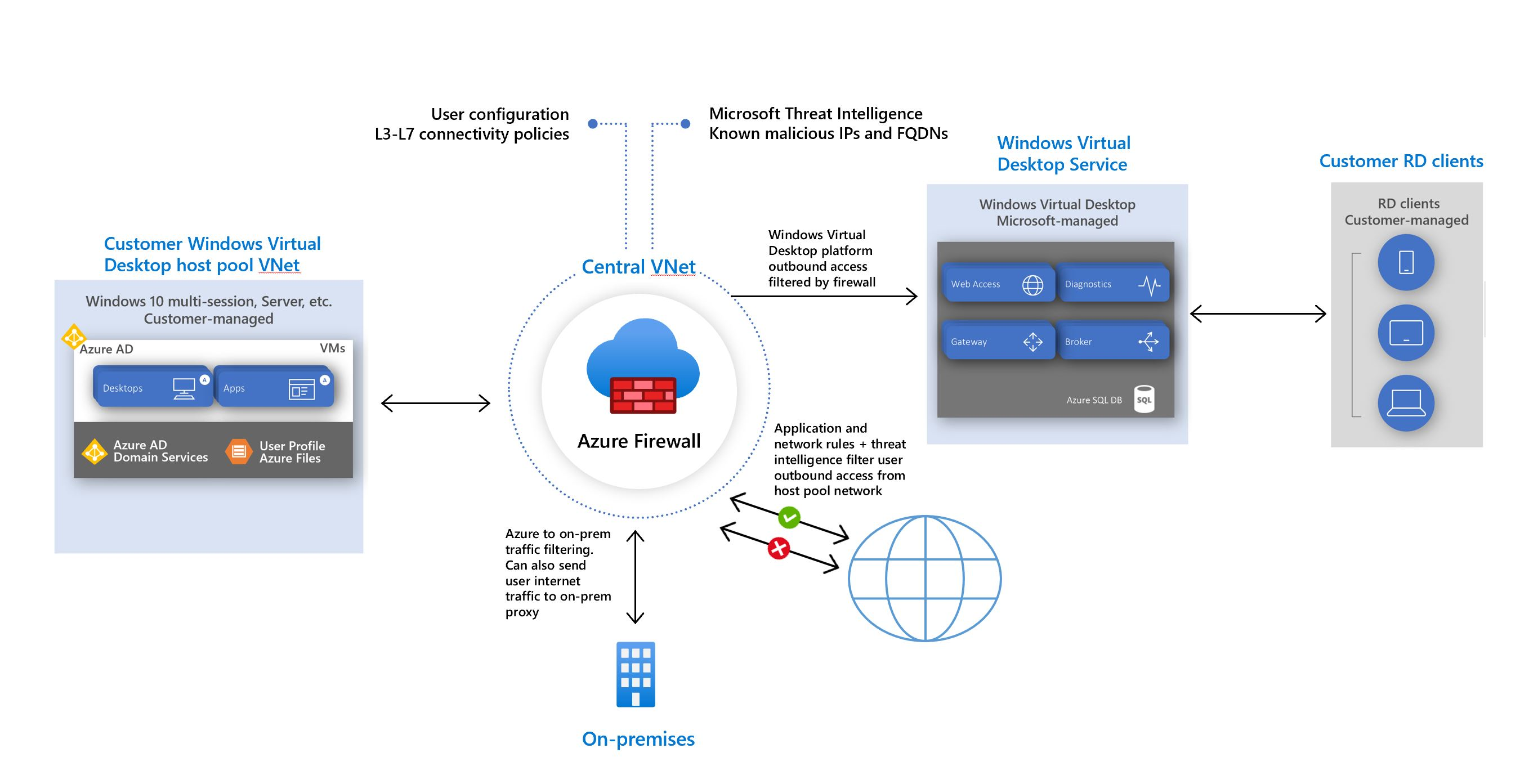
Azure Virtual Desktop reduces the need to expose Remote Desktop ports directly to the public internet, but customers still manage the security and lifecycle of session host operating systems, applications, identities, profiles, and network access. Microsoft Entra ID, Azure RBAC, Conditional Access, multifactor authentication, network controls, endpoint security, and monitoring can all become part of the design.
Session host image management is a major operational responsibility. Teams should define how images are patched, how applications are updated, how profile containers are protected, and how changes are tested before broad rollout. Microsoft also supports diagnostics to Log Analytics, storage, or Event Hubs. Reliability depends on the architecture of the session hosts, identity dependencies, storage, network path, and the Azure region design rather than on the control plane alone.
What current 2026 changes matter?
Azure Virtual Desktop has continued to change during 2026. Microsoft made Automated Host Pools available in June 2026, providing a session host configuration approach for maintaining a more homogeneous pooled environment. In July 2026, redundant TCP paths for RDP Multipath became generally available, improving session resilience by allowing connections to switch paths when network quality degrades. Microsoft also expanded Remote Help support for RemoteApp sessions.
Microsoft's 2026 documentation also continues to expand hybrid scenarios, including preview support for Azure Virtual Desktop session hosts on Arc-enabled servers, and it now supports App Attach on Windows Server 2022 and Windows Server 2025. Buyers should check feature availability, client support, preview status, and regional support before basing a production design on a recently introduced capability.
Who should choose something else?
Azure Virtual Desktop may be more platform than a small organization needs if a SaaS application or ordinary managed laptop can meet the requirement with less administration. Teams that want a highly packaged desktop-as-a-service experience with less Azure infrastructure design should compare Windows 365 Cloud PC, which uses a different management and pricing model. Organizations that only need secure administrative access to Azure virtual machines should consider Azure Bastion instead of building a full virtual desktop environment.
Azure Virtual Desktop is also not automatically cheaper than physical PCs or other VDI platforms. Costs can grow when personal desktops run continuously, VM sizes are oversized, profiles are poorly designed, or licensing assumptions are wrong. A proof of concept should measure login time, application performance, user density, profile behavior, network latency, support effort, and actual monthly Azure consumption before a large migration.
Reviews
No reviews yet
Nobody has reviewed Azure Virtual Desktop here yet.