About Azure Translator
Azure Translator is Microsoft's cloud translation service for applications, websites, documents, automation workflows, and AI experiences that need multilingual text processing through APIs. It sits under Microsoft Azure and is now presented within Microsoft Foundry Tools. The service supports purpose-built neural machine translation, newer large language model translation options, document translation, language detection, transliteration, dictionary operations, and custom translation workflows. Buyers should evaluate the API version they plan to use, supported languages, document formats, request limits, data location, model choice, migration effort, and whether character-based or token-based billing fits the workload.
What is included
Translation
| Current text API | 2026-06-06 GA, with standard NMT or supported LLM model selection |
|---|---|
| Document API | 2026-03-01 GA for synchronous and asynchronous document translation |
Limits
| Standard text request | Up to 1,000 array elements, 50,000 characters per element for standard NMT |
|---|---|
| LLM text request | Up to 50 array elements, 5,000 characters per element |
| F0 standard throughput | 2 million characters per hour |
| S1 standard throughput | 40 million characters per hour |
Documents
| Asynchronous batch | Up to 40 MB per document, 1,000 files, 250 MB total, and 10 target languages |
|---|---|
| Synchronous translation | One file up to 10 MB and one target language |
Customization
| Custom model throughput | 3,600 characters per second per custom model |
|---|---|
| Adaptive LLM translation | Up to five reference translations or an adaptive dataset index |
Pricing
| Free tier | F0 includes 2 million characters per month for supported standard translation and custom translation training usage |
|---|
Security
| Authentication | Resource API key and Microsoft Entra ID supported by the 2026-06-06 text API |
|---|
What can Azure Translator do today?
Azure Translator supports real-time text translation, language detection, transliteration, bilingual dictionary operations, document translation, and custom translation workflows. Microsoft now lists Text Translation API version 2026-06-06 as generally available. That release adds a choice between standard neural machine translation and supported large language models for individual translation requests, along with adaptive custom translation and additional controls for tone and gender-sensitive output.
Document Translation is also a separate production capability. Microsoft lists version 2026-03-01 as generally available and documents support for translating regular documents, standalone image files, and text embedded in supported Word and PowerPoint files while preserving layout where supported. This makes Translator relevant to both application-level strings and larger localization or document-processing workflows.
What changed in Text Translation 2026-06-06?
The 2026-06-06 Text Translation API is not just a small version bump. Microsoft documents breaking changes compared with v3, including revised request and response JSON contracts. Teams moving an existing integration should treat the migration as an application change that needs payload, parser, error-handling, quality, and load testing before production rollout.
The same release introduces model selection. Standard neural machine translation remains available for predictable, high-volume translation. A supported large language model can be selected when a workflow needs richer contextual handling or adaptive output. LLM-based translation requires a Microsoft Foundry resource and uses different processing and billing behavior, so it should not be treated as a drop-in cost equivalent to standard NMT.
How do NMT and LLM translation differ?
Standard NMT is the clearer default when translation itself is the primary task and teams want a dedicated translation service with character-based metering, mature language APIs, and established production limits. It is well suited to user-interface strings, support content, product text, messages, and large recurring multilingual workloads.
LLM translation is useful when output needs more contextual or stylistic control. Microsoft documents tone variants such as formal, informal, and neutral, gender-specific output controls, and adaptive custom translation using reference translations or an adaptive dataset index. LLM requests have lower per-request limits than standard NMT and are billed according to model input and output tokens through Azure OpenAI pricing. Buyers should test quality and total cost for their own language pairs rather than assuming an LLM is automatically better.
How do text translation and document translation differ?
Text translation is best for strings and payloads an application can send directly to the translation API. Microsoft documents a maximum standard Translate request size of 50,000 characters per array element, with up to 1,000 array elements for standard NMT in the 2026-06-06 API. LLM translation has lower request limits: up to 50 array elements with a maximum size of 5,000 characters per element.
Document Translation is designed for files. Current asynchronous batch limits include documents up to 40 MB, up to 1,000 files, up to 250 MB of total content per batch, and up to 10 target languages. Synchronous document translation supports one document up to 10 MB and one target language. Secured documents with encrypted passwords or restricted copy access are not supported.
What is new in Document Translation 2026-03-01?
Microsoft lists Document Translation API version 2026-03-01 as generally available. It adds image translation for standalone JPEG, PNG, BMP, and WebP files and improves PDF handling by using Azure Document Intelligence to help preserve layout and structure. Microsoft also documents translation of text embedded in images within supported Word and PowerPoint files for batch scenarios.
The API supports both synchronous single-document translation and asynchronous batch translation. The synchronous path avoids an Azure Blob Storage dependency for one file, while larger batch workflows use Blob Storage containers for source and translated content. Teams should still verify supported formats, glossary behavior, and formatting fidelity with representative documents before adopting it for production localization.
How does Azure Translator pricing work?
Pricing was checked on August 29, 2026. Microsoft continues to list an F0 free tier that includes 2 million characters per month across supported standard translation and custom translation training usage. The S1 tier uses pay-as-you-go pricing, and commitment tiers are available for organizations with predictable high-volume standard translation needs.
Standard NMT text and document translation are billed by characters. Custom Translator introduces separate charges for custom translation, training, and hosted custom models depending on the offer. LLM-based translation follows Azure OpenAI token billing instead of the standard Translator character meter. Microsoft also lists image document translation as a separate image-based meter. Because actual rates vary by agreement, currency, region, and purchase context, buyers should model source characters, target-language count, document volume, image volume, and LLM token usage in the Azure pricing tools rather than relying on one universal price.
What service limits should production teams plan for?
Microsoft's current service-limits page lists standard translation throughput of 2 million characters per hour for F0 and 40 million characters per hour for S1. Custom Translator models are limited to 3,600 characters per second per model. Microsoft recommends consuming hourly quota evenly because a workload can receive quota errors if too much of the hourly allowance is sent in a short burst.
For asynchronous Document Translation, current limits include 40 MB per document, 1,000 files, 250 MB total batch content, 10 target languages, and a 10 MB glossary. Synchronous Document Translation supports one file up to 10 MB, one target language, a 1 MB glossary, and a translated-character limit of 6 million characters per minute. These are service limits, not promises of end-to-end application latency, so production teams should still load test realistic payloads and language pairs.
How can developers integrate and secure Azure Translator?
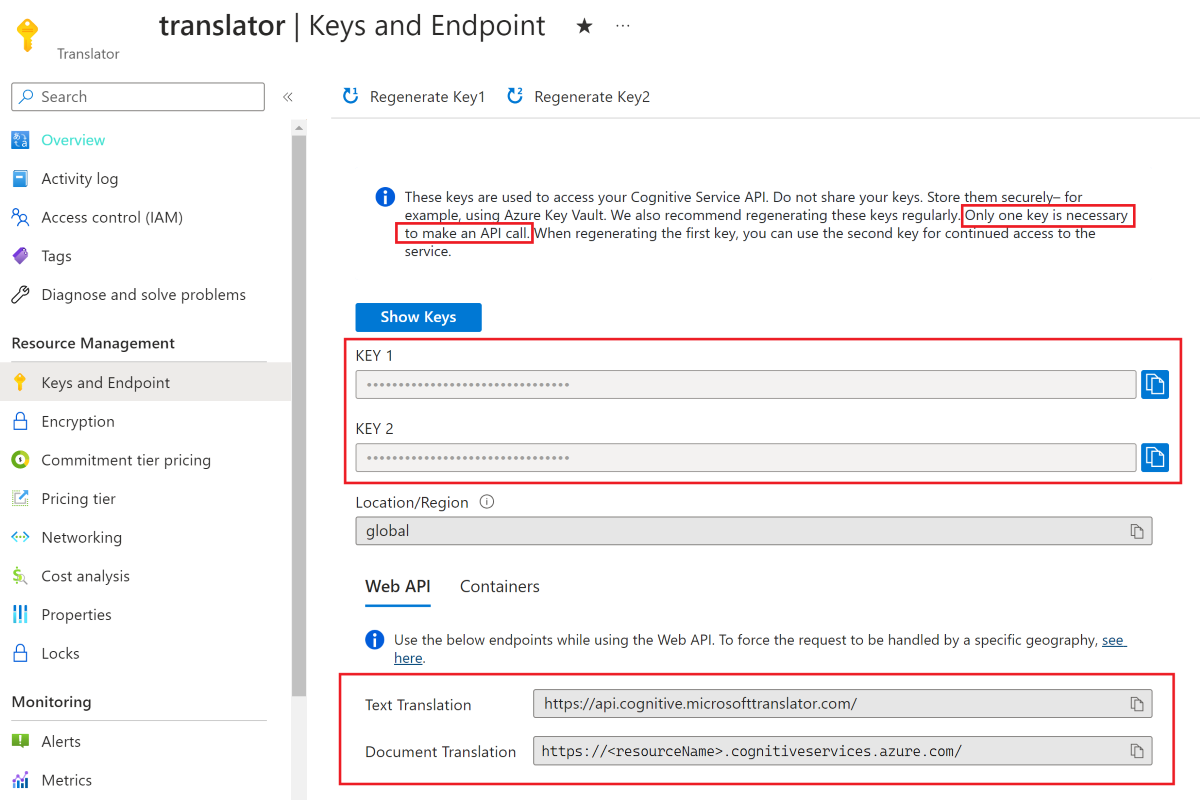
Developers can call Translator through REST APIs and supported SDKs. A Translator resource provides the endpoint and authentication configuration needed for API calls. The 2026-06-06 text API supports resource keys and Microsoft Entra ID authentication. For production applications, credentials should be protected and rotated rather than embedded in source code.
Data-location behavior depends on the endpoint and model path. Standard translation can use global or regional resource endpoints, while specific regional arrangements are available for some locations. When LLM translation is used, the deployment choice for the model, such as global, data zone, or regional, affects where model processing occurs. Organizations with residency or network requirements should validate their resource region, endpoint, Foundry deployment, and private-network design before rollout.
When should a team use Custom Translator or adaptive translation?
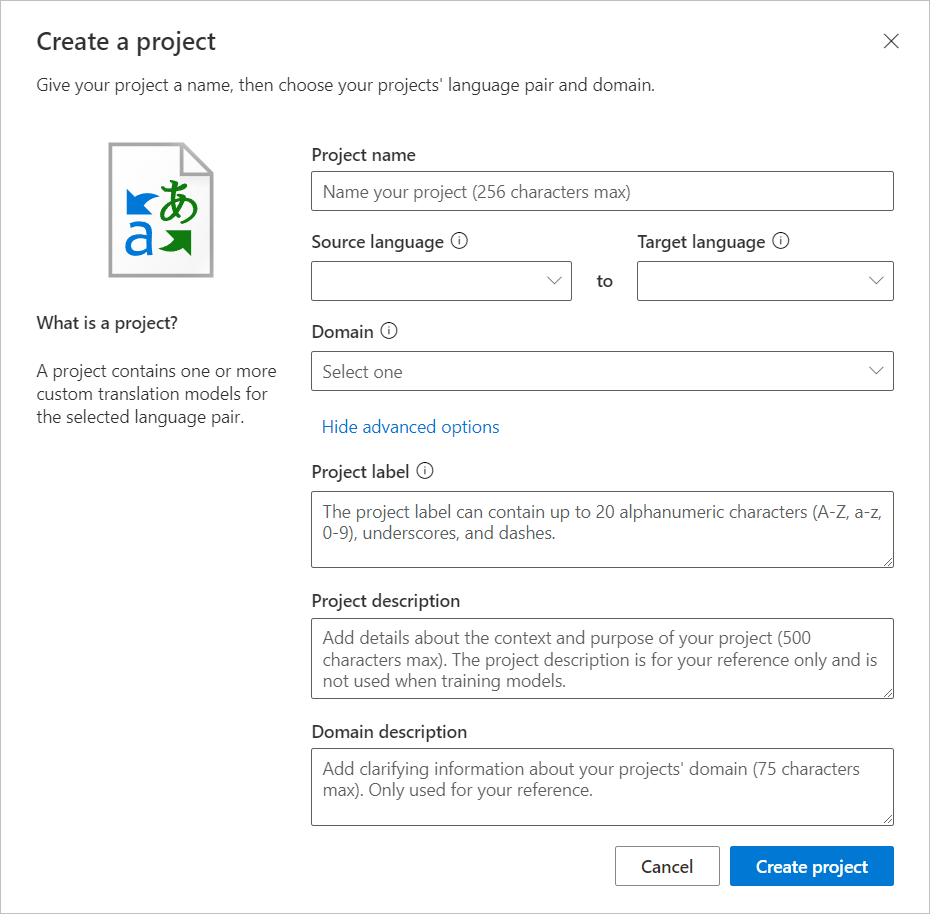
Traditional Custom Translator is useful when an organization needs domain terminology and preferred phrasing to be reflected consistently in a translation model. It involves project creation, bilingual training material, model training, evaluation, deployment, and ongoing model management. That approach can make sense for stable specialized terminology and repeated high-volume translation.
The newer adaptive custom translation path in Foundry is aimed at LLM-based translation. Microsoft documents the ability to provide up to five reference translations or an adaptive dataset index so the model can follow similar terminology or style. Teams should compare the operational effort, quality, latency, and billing of these two customization paths instead of assuming the newer LLM option replaces every Custom Translator scenario.
What are the main limitations and migration risks?
Machine translation should not be treated as guaranteed human-equivalent localization. Quality varies by language pair, context, model, source wording, and domain. Legal, medical, regulatory, safety-critical, and important public-facing material may still require qualified human review. Document translation can also lose fidelity in unusual layouts, unsupported content, or protected files.
The biggest current technical migration issue is the 2026-06-06 Text Translation API. Microsoft explicitly states that it includes breaking changes from v3. Teams with existing v3 integrations should not switch version numbers without testing request schemas, response parsing, authentication, model selection, error handling, monitoring, and translation quality. LLM use also introduces model capacity, deployment, token billing, and data-processing considerations that do not exist in the same way for standard NMT.
How does Azure Translator differ from Azure OpenAI translation workflows?
Azure Translator is a dedicated translation service with language-focused APIs, NMT, document translation, transliteration, dictionaries, service quotas, and purpose-built custom translation options. It is usually the clearer service when translation is a repeatable production capability and buyers want established translation-specific controls.
Azure OpenAI and broader Foundry model workflows make more sense when translation is part of a larger generative task involving reasoning, rewriting, summarization, conversational context, or tool use. The distinction is less absolute now because the 2026-06-06 Translator API can call supported LLM deployments, but Translator still supplies the translation-specific API surface and service behavior. Teams should choose based on the application contract they want to operate, not only on which underlying model can produce translated text.
Who should choose something else?
Choose another option if the primary requirement is human-certified translation, full localization project management, desktop-only offline translation without Azure consumption billing, or a broader generative AI workflow where translation is only one minor step. A localization platform may be more suitable when translation memory, reviewer assignment, screenshots, release workflows, and language-vendor management matter more than an API.
Organizations standardized on another cloud provider should compare its native translation service if reducing operational complexity is more important than Azure integration. Teams with very occasional end-user translation needs may not need a custom API integration at all. Azure Translator is strongest when multilingual processing is a repeatable application capability that benefits from Azure APIs, production scaling, document processing, security controls, customization, or integration with Microsoft Foundry.
Reviews
No reviews yet
Nobody has reviewed Azure Translator here yet.