About Azure Stream Analytics
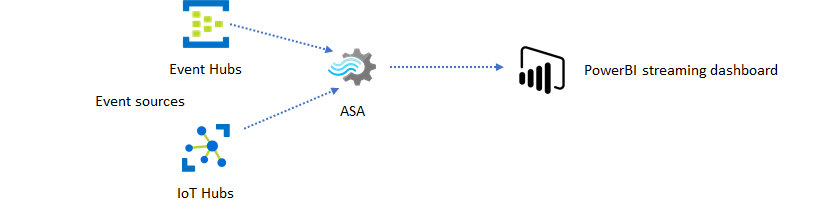
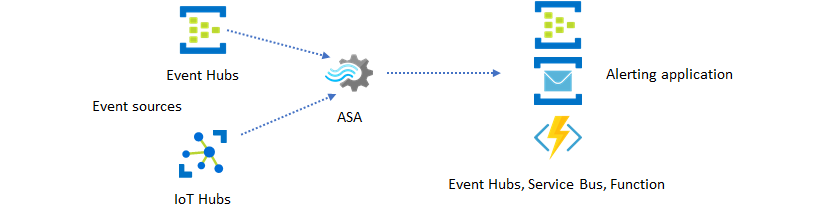
Azure Stream Analytics is a fully managed Azure service for processing fast-moving event streams in real time. It sits between event sources and downstream applications or data stores: a job reads one or more inputs, applies SQL-based stream-processing logic, and continuously writes results to outputs. Microsoft positions it for telemetry, IoT, clickstream, anomaly-detection, geospatial, alerting, and near-real-time transformation workloads where teams want managed processing without operating a streaming cluster.
What is included
Processing
| Service model | Fully managed real-time stream processing service |
|---|---|
| Query model | SQL-like streaming query language with temporal and geospatial operators |
Integration
| Primary inputs | Azure Event Hubs, Azure IoT Hub, Azure Blob Storage, Azure Data Lake Storage Gen2 |
|---|
Scale
| Current per-job input limit | 60 inputs |
|---|---|
| Current per-job output limit | 60 outputs |
| Current per-job function limit | 60 functions |
Reliability
| Zone redundancy | Automatic in Azure regions that support availability zones |
|---|
Pricing
| Recommended pricing structure | Streaming Unit V2 pay-as-you-go model |
|---|
How does Azure Stream Analytics work?
A Stream Analytics job has three core parts: inputs, a query, and outputs. Inputs bring in events or reference data, the query filters, joins, aggregates, enriches, or detects patterns, and outputs send the processed result to another Azure service or application. Microsoft manages the underlying worker infrastructure, job placement, patching, and recovery, while the customer chooses the job logic and the amount of streaming-unit capacity.
This design makes Stream Analytics different from Azure Event Hubs. Event Hubs is primarily an event-ingestion and streaming broker, while Stream Analytics is the compute layer that processes the events. The two services are frequently used together, but they solve different parts of a streaming architecture.
Which inputs and outputs does Stream Analytics support?
Microsoft documents first-class inputs from Azure Event Hubs, Azure IoT Hub, Azure Blob Storage, and Azure Data Lake Storage Gen2. Jobs can also use static or slowly changing reference data to enrich live events, such as joining telemetry with lookup information.
Outputs can feed services such as Azure SQL Database, Azure Data Lake Storage, Azure Cosmos DB, Power BI, and Event Hubs. This makes the service useful when a team needs to transform data in motion before it reaches a dashboard, operational database, lake, alerting workflow, or another streaming stage.
What can the Stream Analytics query language do?
Stream Analytics uses a SQL-like query language designed for event streams. Microsoft supports windowed aggregations, temporal joins, temporal analytic functions, geospatial processing, pattern matching, anomaly detection, and multiple time windows in the same query. The service can also account for late and out-of-order events.
Cloud jobs can extend queries with JavaScript user-defined functions and aggregates. C# customization is supported for IoT Edge scenarios, and Microsoft also documents integration with Azure Machine Learning functions. Teams that need extensive Python or Java processing should compare Spark Structured Streaming or Apache Flink instead of forcing that logic into Stream Analytics.
How does Stream Analytics scale?
Compute is represented by Streaming Units, which combine memory and compute resources for a running job. Microsoft recommends the newer SU V2 structure, while SU V1 is marked for deprecation in current documentation. Standard V2 jobs can start with fractional capacity, while Dedicated V2 clusters are intended for organizations that want isolated cluster capacity shared across their own jobs.
Partitioning is important for higher throughput because it lets compatible queries execute in parallel. Microsoft also supports custom autoscale rules for eligible running jobs, allowing capacity to increase or decrease in response to metrics such as streaming-unit utilization. Capacity planning should still include headroom for event spikes and downstream bottlenecks.
How reliable is Azure Stream Analytics?
Stream Analytics uses built-in checkpoints so jobs can recover state after worker failures or job reassignment. Microsoft states that the service handles many transient faults automatically and replays events from checkpoints when needed. End-to-end exactly-once behavior still depends on the capabilities of the selected output destination.
In Azure regions that support availability zones, Stream Analytics jobs are automatically distributed across zones without a separate zone-redundancy charge. A regional outage is different: Stream Analytics does not provide native multi-region replication, so mission-critical designs that require regional failover need separately deployed jobs, duplicated input routing, and a plan for reconciling outputs.
How is Azure Stream Analytics priced?
Pricing checked: August 28, 2026. Microsoft prices Stream Analytics mainly by provisioned Streaming Units and the selected V1 or V2 structure. V2 is the recommended model. Standard V2 uses pay-as-you-go job capacity and supports fractional starting capacity, while Dedicated V2 requires a dedicated cluster with a higher minimum capacity. Microsoft applies tiered pricing to aggregated V2 consumption.
Actual monetary rates vary by region, currency, agreement, and capacity, so a single monthly dollar figure would be misleading. Buyers should estimate the number of running jobs, required streaming units, execution duration, private networking needs, and any charges from connected services such as Event Hubs, storage, databases, or IoT Hub.
What security and networking controls matter?
Microsoft states that incoming and outgoing Stream Analytics communications are encrypted and that TLS 1.2 is supported. Built-in checkpoints are encrypted as well. The service processes incoming events in memory rather than acting as a general data store.
Virtual Network support is available for supported Stream Analytics cluster scenarios, and access to connected inputs and outputs still depends on the security model of those services. Buyers should plan identity, network isolation, diagnostic logging, resource permissions, and downstream data access as part of the full pipeline rather than treating the Stream Analytics job as the only security boundary.
What current service limits should buyers check?
Microsoft's current Azure service-limits documentation lists hard limits of 60 inputs, 60 outputs, and 60 functions per Stream Analytics job. It also lists up to 1,500 jobs per region for a subscription and a 5 GB reference-data blob limit when using one or more streaming units. Quotas can change, and some capacity limits may require Microsoft support for increases.
These limits matter most in designs that try to combine many unrelated pipelines into one job. Splitting workloads can improve operational isolation, deployment safety, and ownership, although more jobs can also increase management and cost. Teams should model event volume, partitioning, state size, output throughput, and failure domains before production deployment.
Who should choose something else?
Choose Azure Event Hubs without Stream Analytics when the main requirement is durable event ingestion and fan-out rather than managed SQL-style processing. Consider Spark Structured Streaming or Apache Flink when portability across clouds or on-premises environments matters, or when the processing logic needs languages and libraries that Stream Analytics does not support well.
Azure Data Explorer can be a better fit when the primary goal is interactive exploration and querying of large retained telemetry or log datasets rather than continuous transformation of events in motion. Small teams should also consider whether a simpler application-level consumer is enough. Stream Analytics is most compelling when managed continuous processing, temporal SQL, Azure-native connectors, and low operational overhead are more valuable than maximum framework flexibility.
Reviews
No reviews yet
Nobody has reviewed Azure Stream Analytics here yet.