About Azure Storage Mover
Azure Storage Mover is a managed Azure migration service for moving files and folders from supported on-premises and cloud storage sources into Azure Storage. It is designed for teams that need a controlled way to plan, run, monitor, and repeat storage migrations without building their own transfer orchestration. The service is especially relevant for file share migrations to Azure Files or Azure Blob Storage, including projects that need to preserve useful file metadata or reduce cutover downtime.
What is included
Migration
| Primary purpose | Managed file and object migration into Azure Storage |
|---|---|
| Supported source examples | SMB, NFS, Azure Blob, AWS S3, and selected preview cloud sources |
Operations
| Management model | Projects, endpoints, migration jobs, progress, and results in Azure |
|---|
Agent
| Agent environments | Windows Hyper-V and VMware for current agent-based scenarios |
|---|
Scale
| Cloud-to-cloud object limit | Up to 500 million objects per migration job in current documentation |
|---|
Pricing
| Service charge | No separate Storage Mover feature charge; standard Azure resource charges apply |
|---|
What is Azure Storage Mover best used for?
Azure Storage Mover is best suited to structured migrations where a team needs to move file data into Azure Storage and keep migration jobs visible from one Azure resource. Microsoft currently supports scenarios that include SMB and NFS sources, supported Azure Blob migrations, and selected cloud-to-cloud migrations such as AWS S3 to Azure Blob Storage. The exact supported source and target combinations matter because not every protocol and destination can be paired.
A common use case is moving an on-premises file share to Azure Files. Storage Mover can also help with repeated migration runs before final cutover, so teams can transfer most data earlier and then copy later changes closer to the production switch. Microsoft also documents using Azure Data Box for the first large offline transfer and Storage Mover for the online catch-up phase.
How does Azure Storage Mover work?
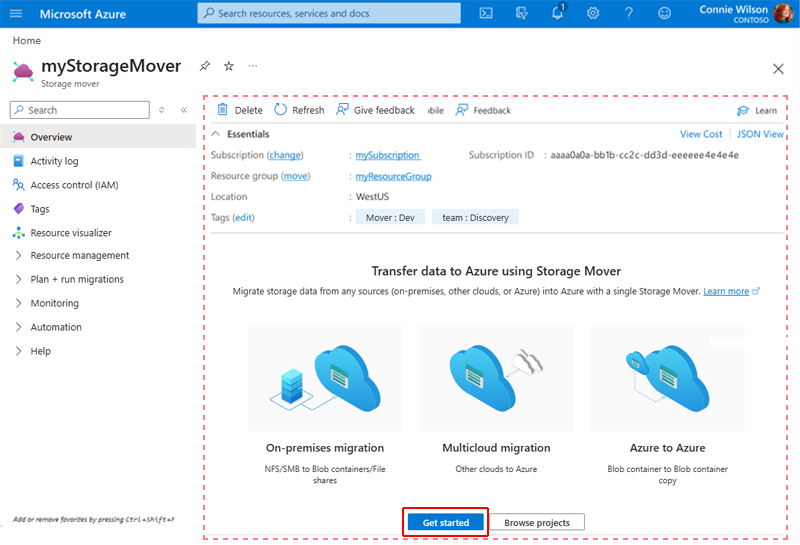
The service separates migration management from data transfer. A Storage Mover resource holds migration projects, source and target definitions, job settings, progress, and results. For agent-based scenarios, a Storage Mover agent runs near the source data and sends files directly to the Azure target. Microsoft also supports agentless scenarios for selected migration types.
For agent-based file migrations, the agent is deployed as a virtual machine in the source environment and registered with Azure. Microsoft currently supports the agent on Windows Hyper-V and VMware virtualization hosts. Teams then create source and target endpoints, group related work in projects, define migration jobs, and run those jobs through the Azure portal, PowerShell, or CLI.
Which source and target combinations are supported?
Microsoft's current service overview lists support for several combinations rather than one unrestricted copy engine. SMB 2.x and 3.x sources can be migrated to Azure Files SMB and to supported Azure Blob containers. NFS 3 and 4 sources can target Azure Files NFS 4.1, and Microsoft also documents NFS migrations to Azure storage scenarios. Cloud-to-cloud support includes AWS S3 to Azure Blob Storage, and Microsoft has added other selected source scenarios over time.
Teams should check the current support table before planning a migration because protocol version, destination type, namespace settings, private connectivity, and preview status can change what is supported. For SMB migration to Azure Files, Storage Mover can preserve folder structure and metadata such as timestamps, ACLs, and file attributes when the target supports that fidelity.
What are the agent and network requirements?
For agent-based migrations, Microsoft recommends sizing the migration agent according to the number of files and folders being scanned and transferred. Current guidance starts at 4 virtual CPU cores and 8 GiB of memory for smaller supported migrations and scales upward for larger namespaces. Microsoft has tested configurations with tens of millions of namespace items and publishes performance targets rather than promising one fixed transfer rate.
The agent requires outbound HTTPS connectivity to Microsoft and Azure service endpoints. For file migrations, the agent also needs network access to the source share and the Azure target path used by the job. SMB credentials can be stored in Azure Key Vault for supported scenarios. The need to deploy and maintain an agent VM is an important operational consideration for on-premises migrations.
How does pricing work?
Pricing was checked on August 28, 2026. Microsoft currently states that Azure Storage Mover features are provided without a separate Storage Mover service charge. Standard Azure charges still apply for the resources involved in the migration, including Azure Storage, transactions, networking, private connectivity where used, and any infrastructure required to run the migration agent.
This means the service can be inexpensive from a software licensing perspective but the overall migration is not necessarily free. Large datasets can generate storage transaction charges and network costs, and the target Azure storage service begins generating its normal ongoing charges once data is stored there. Teams should estimate both one-time migration costs and the steady-state storage design.
What should teams know about scale and performance?
Storage Mover performance depends on source storage speed, namespace size, agent resources, network capacity, and the Azure target. Microsoft publishes tested results rather than a single guaranteed transfer speed. Its current guidance includes supported agent sizing examples for migrations ranging from about one million to one hundred million files and folders.
For cloud-to-cloud migration, Microsoft currently documents up to 500 million objects per migration job and a default limit of 10 concurrent jobs per subscription for that feature, with support requests available for higher concurrency. Archived AWS objects such as Glacier or Deep Archive objects must be restored before Storage Mover can migrate them. These limits make planning important for very large estates.
How does Storage Mover compare with Azure Data Box and AzCopy?
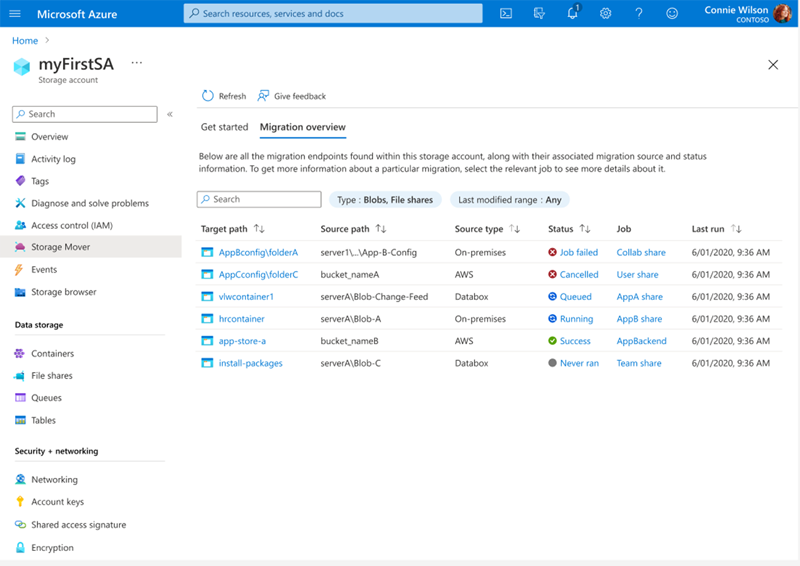
Storage Mover is an orchestration service, not simply a copy command. It keeps migration projects, jobs, endpoint definitions, progress, and results together and is useful when many file shares or repeated runs need centralized control. AzCopy can be a better fit for direct command-line transfers where a team does not need the same migration project model.
Azure Data Box addresses a different problem: moving a large initial dataset when network bandwidth is limited or an offline transfer is preferable. Microsoft specifically documents combining Data Box with Storage Mover, using Data Box for the bulk transfer and Storage Mover for online catch-up before cutover. These tools can therefore complement each other rather than compete directly.
What are the main limitations and operational tradeoffs?
Storage Mover does not make every storage source automatically compatible with every Azure target. Teams need to verify the current source-target matrix, protocol requirements, authentication method, and namespace behavior. SMB 1.x sources are not supported in the current file migration guidance, and some cloud source scenarios remain preview features.
Agent-based migrations add infrastructure and networking requirements in the source environment. Performance can also be limited by small-file workloads, source storage latency, network throughput, or target storage behavior. Migration success should be verified from job results and copy logs rather than assumed from a completed high-level task status.
Who should choose something else?
A team should choose a simpler transfer tool if it only needs a one-off copy between well-connected storage locations and does not need centralized migration projects, repeated catch-up runs, or agent-based discovery and control. AzCopy or service-specific migration methods can be easier in those cases.
Organizations moving databases, virtual machines, applications, or whole server estates should use migration tooling designed for those workloads rather than treating Storage Mover as a general Azure migration platform. Azure Migrate, database migration services, Azure Site Recovery, and workload-specific tools solve different problems. Storage Mover is strongest when the migration unit is file and object data destined for Azure Storage.
Reviews
No reviews yet
Nobody has reviewed Azure Storage Mover here yet.