About Azure Static Web Apps
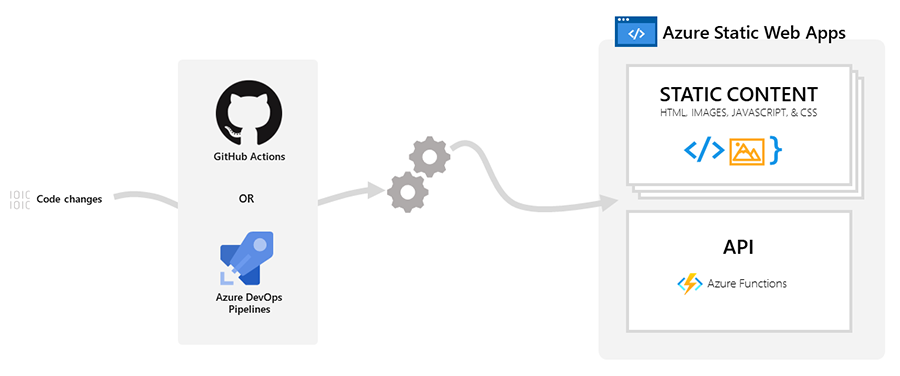
Azure Static Web Apps is an Azure hosting service for front-end web applications and static sites that are built from a source repository and deployed through an integrated workflow. It is designed for projects where the browser-delivered application is mostly HTML, CSS, JavaScript, WebAssembly, or framework output, while optional back-end APIs can run through Azure Functions or linked Azure services. Microsoft distributes the static content globally, manages SSL certificates, supports custom domains, and can create preview environments for pull requests. The service is a different fit from Azure App Service because it is optimized around repository-driven static and serverless architectures rather than a continuously running web server.
What is included
Deployment
| Repository integration | GitHub and Azure DevOps |
|---|
Hosting
| Static content delivery | Globally distributed |
|---|
Security
| SSL certificates | Included and automatically renewed |
|---|
Identity
| Built-in providers | Microsoft Entra ID and GitHub |
|---|
API
| Managed back end | Azure Functions |
|---|
Plans
| Production tier | Standard |
|---|
Limits
| Included bandwidth | 100 GB per subscription per month |
|---|---|
| Request size limit | 30 MB |
| Preview environments | 3 Free; 10 Standard |
What workloads fit Azure Static Web Apps?
Azure Static Web Apps is best suited to modern front-end applications, documentation sites, marketing sites, dashboards, portals, and full-stack applications where the front end can be built into static assets. Microsoft documents support for common front-end ecosystems including Angular, React, Svelte, Vue, Blazor WebAssembly, Gatsby, Hugo, VuePress, Next.js, and Nuxt.js, depending on how the application is built and whether server-side rendering is required.
The service becomes especially useful when the development team already works in GitHub or Azure DevOps. A branch can be connected to the Azure resource so commits and accepted pull requests trigger builds and deployments. That reduces the need to maintain a separate hosting pipeline for the static front end. Teams that require a traditional application server, long-running background processes, or unrestricted server-side runtimes should evaluate App Service, Container Apps, or another compute service instead.
How do deployment and preview environments work?
Azure Static Web Apps connects the application to a GitHub or Azure DevOps repository. The deployment workflow builds the application, publishes the output, and can also deploy an integrated API. Pull requests can create temporary preview environments so reviewers can test a proposed change before it reaches production. This makes the service useful for teams that want deployment state to follow the code review process.
Preview environment capacity depends on the plan. Microsoft's current quota documentation lists three preview environments for the Free plan and ten for Standard. The same quota page lists a limit of 15,000 files per app environment. Teams with very large generated sites should check the built output before migration rather than assuming every static site will fit unchanged.
How do APIs work with Azure Static Web Apps?
Static Web Apps can provide managed serverless API endpoints through Azure Functions. The front end reaches those functions through the /api route, and the platform handles routing so the front end does not need a separate CORS configuration for the integrated API. Microsoft also supports bringing an existing Azure Functions app on the Standard plan.
For teams that need a different back end, Standard can link supported APIs hosted in Azure API Management, Azure App Service, or Azure Container Apps. Only one back-end API type can be configured for a static web app environment at a time. Microsoft also documents a 45-second maximum duration for API requests, HTTP-only API access, and no WebSocket support through this integrated API path. Those constraints matter for long-running requests, real-time bidirectional connections, and specialized back-end protocols.
What authentication and authorization options are available?
Azure Static Web Apps includes authentication integration with Microsoft Entra ID and GitHub. Microsoft states that these preconfigured providers can be used without extra provider setup. Signed-in users can be associated with built-in and custom roles, and route rules in staticwebapp.config.json can restrict access to application paths.
Custom authentication is a Standard-plan capability, while the Free plan does not include that feature in Microsoft's current pricing table. Teams that need tenant-specific identity behavior can configure a custom Microsoft Entra ID provider. The preconfigured Entra provider allows Microsoft accounts more broadly, so organizations with strict tenant boundaries should not assume the default provider automatically enforces a single corporate tenant.
What are the current plans, quotas, and pricing model?
Pricing was checked on August 28, 2026. Microsoft currently offers a Free plan for hobby and personal projects and a Standard plan for general-purpose production applications. The Free plan has no service charge and no SLA. Standard is billed based on the app plan, with Microsoft's pricing page stating that usage is billed per second and metered hourly. Actual rates vary by agreement, purchase date, currency, and region, so BrandLigo does not present one universal monthly number.
Both Free and Standard currently include 100 GB of bandwidth per subscription each month. Free does not support bandwidth overage; if the quota is exceeded, the site can stop being served until the quota period resets. Standard supports paid overage. Microsoft currently lists up to 10 apps per subscription on Free and 100 on Standard, with support available if a Standard subscription needs more. App storage is also limited: Free lists 500 MB total across environments and 250 MB for one deployment, while Standard lists 2 GB total and 500 MB per deployment. The current quota page lists a 30 MB request-size limit for both plans.
How do custom domains, SSL, and network controls differ by plan?
Both plans include automatically managed SSL certificates and support custom domains. Microsoft's pricing table currently lists two custom domains per Free app and five on Standard, while the quota documentation lists six custom domains for Standard. Because these Microsoft pages are not fully aligned, buyers should confirm the portal limit for their subscription before planning a multi-domain production setup.
Standard adds controls that are more relevant to business applications, including private endpoint support and allowed IP range restrictions. The quota page currently lists one private endpoint and up to 25 allowed IP range restrictions per Standard app. These features make Standard the more appropriate baseline for applications that need tighter network access controls, but teams with advanced network architecture should still verify whether Static Web Apps supports the exact private connectivity pattern they need.
How is Azure Static Web Apps different from Azure App Service and Azure Front Door?
Static Web Apps is optimized for code-repository-driven static front ends and optional serverless or linked APIs. Azure App Service is a broader application hosting platform for web applications and APIs that need managed server runtimes, application processes, and more conventional server-side hosting. A project that depends on a persistent server process or full server framework usually fits App Service better.
Azure Front Door serves a different layer. It provides global edge delivery, acceleration, routing, and security capabilities across back ends. Microsoft now offers an enterprise-grade edge option for Standard Static Web Apps that uses managed Azure Front Door capabilities. Teams that already operate multiple origins or need advanced cross-service routing may still prefer to design Front Door independently rather than treating Static Web Apps as the center of the network architecture.
What limitations should buyers evaluate before migration?
Static Web Apps reduces hosting administration, but its managed model introduces limits. Large static artifacts can exceed storage or file-count quotas. Integrated APIs are constrained to the platform's supported back-end model, the /api route, HTTP requests, and a 45-second request duration. WebSockets are not supported through the integrated API path. Bring-your-own API back ends cannot be attached to pull-request environments according to Microsoft's current API documentation.
The service is also closely tied to build and deployment workflows. Teams should test build tooling, environment variables, redirects, authentication rules, custom headers, and framework output before replacing an existing host. Applications that rely heavily on server-side rendering, long-running server processes, specialized networking, or custom runtime behavior may require App Service, Container Apps, Functions, or a hybrid architecture.
Who should choose something else?
Choose another Azure service when the application needs a continuously running server, unrestricted server runtime behavior, long-running API requests, WebSockets through the same integrated back-end path, or more storage than Static Web Apps quotas allow. Azure App Service is often a better fit for conventional web applications and APIs. Azure Container Apps can be a better fit when the application is containerized and needs more control over the runtime. Azure Functions can be used directly when the main requirement is event-driven or serverless back-end execution rather than static hosting.
Teams serving only static files from an existing object-storage and CDN architecture may also find that Azure Blob Storage with an edge delivery service better matches their operational model. Azure Static Web Apps is strongest when source control, front-end hosting, preview deployments, authentication, routing, and optional APIs are valuable as one managed developer workflow rather than as separately assembled components.
Reviews
No reviews yet
Nobody has reviewed Azure Static Web Apps here yet.