About Azure SignalR Service
Azure SignalR Service is Microsoft's managed real-time messaging service for applications that need to push updates to connected users with low latency. It offloads persistent connection management, scale-out, and fan-out from application servers so teams can focus on application logic instead of operating WebSocket infrastructure. Typical use cases include chat, live dashboards, collaboration, notifications, gaming updates, and device or process status. It is best evaluated as a real-time connection layer, not as a durable queue, event log, or long-term data store.
What is included
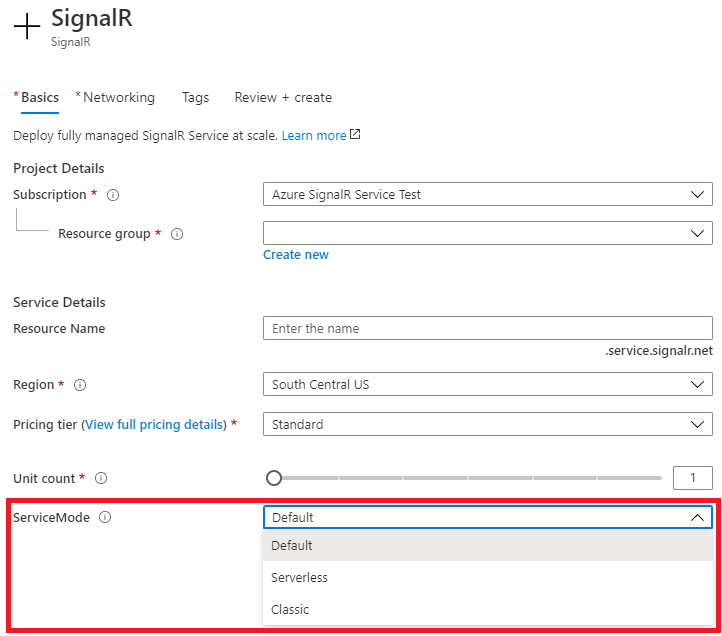
Service modes
| Modes | Default, Serverless, and Classic; Classic is retained mainly for backward compatibility and is not recommended for new applications. |
|---|
Pricing tiers
| Tiers | Free, Standard, and Premium. |
|---|
Scale
| Connections per paid unit | Up to 1,000 concurrent client connections per Standard or Premium unit. |
|---|---|
| Standard and Premium_P1 maximum | Up to 100 units per service instance. |
| Premium_P2 scale | 100 to 1,000 units per instance in documented large-instance steps, supporting up to one million concurrent connections when connection quota is the primary sizing factor. |
Quota
| Paid units per subscription per region | Default 150 total units; Microsoft documents this as a soft quota that can be increased through support. |
|---|
Messages
| Included messages | Free: 20,000 per unit per day. Standard and Premium: first 1,000,000 messages per unit per day included. |
|---|
Reliability
| Published SLA | Standard 99.9 percent; Premium 99.95 percent. |
|---|---|
| Availability Zones | Premium supports automatic zone-redundant deployment in eligible regions. |
| Geo-replication | Premium only; up to eight replicas per primary SignalR Service resource. |
Scaling
| Autoscale | Premium supports Azure Monitor autoscale based on service metrics or schedules. |
|---|---|
| Typical autoscale response | Microsoft says autoscale commonly takes about three to five minutes after triggering. |
Tier changes
| Downtime behavior | Standard_S1 to Premium_P1 and Premium_P1 to Premium_P2 are documented without downtime; Free to or from paid tiers can cause downtime because the public IP changes. |
|---|
What problems does Azure SignalR Service solve?
Real-time applications need to keep large numbers of clients connected and deliver updates when server-side state changes. Self-hosted SignalR can provide this behavior, but the application team must also operate the connection infrastructure and scale-out path. Azure SignalR Service moves much of that connection handling into a managed Azure service.
The service is useful when browsers, mobile apps, or other clients need server-pushed updates without frequent polling. Common patterns include chat, collaboration, live monitoring dashboards, multiplayer or audience experiences, instant notifications, and status updates. Buyers should still design durable business state separately because SignalR Service does not turn a real-time connection into a durable message store.
How do Default, Serverless, and Classic modes differ?
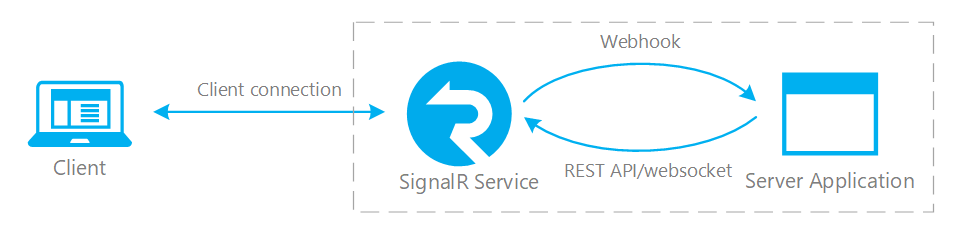
Microsoft currently supports Default, Serverless, and Classic service modes. Default mode is the natural fit for an application that already has SignalR hub servers. Clients and hub servers connect through SignalR Service, which acts as the managed connection proxy.
Serverless mode removes the requirement for continuously connected hub servers. Microsoft documents Azure Functions, REST APIs, the management SDK, and upstream endpoints as the main building blocks for this model. Classic mode is retained mainly for backward compatibility. Microsoft recommends using Default or Serverless for new applications and redesigning older mixed-mode applications where practical.
What tiers and connection limits apply in 2026?
Microsoft currently offers Free, Standard, and Premium pricing tiers. The Free tier supports one unit, up to 20 concurrent client connections, and 20,000 included messages per unit per day. Standard and Premium support up to 1,000 concurrent client connections per unit and include the first 1,000,000 messages per unit per day before additional message charges apply.
For instance scale, Standard and Premium_P1 support up to 100 units per instance. Microsoft's 2026 scaling documentation adds Premium_P2 for much larger deployments. Premium_P2 scales in large steps from 100 through 1,000 units for one service instance, which Microsoft describes as supporting up to one million concurrent connections when connection capacity is the primary sizing factor.
What subscription quota should large deployments plan for?
A large-instance ceiling is not the same as immediately available subscription quota. Microsoft currently documents a default limit of 150 total Azure SignalR units per subscription per region for paid tiers. This is a soft quota that can be increased through an Azure support request.
This matters for Premium_P2 planning because a design may target hundreds of units even though the subscription starts below that requirement. Capacity planning should therefore include both per-instance limits and subscription-level quota approval. Teams should also confirm regional capacity rather than treating a raised quota as a guarantee that every scale request can be fulfilled immediately.
How does scaling and autoscale work?
Standard and Premium capacity can be increased by changing the unit count. Premium also supports Azure Monitor autoscale rules based on service metrics or schedules. Microsoft gives Connection Quota Utilization and Server Load as important signals and notes that message volume can require scale-out even when connection count is not close to its limit.
Microsoft's autoscale guidance says a scale operation commonly takes about three to five minutes after it is triggered, so production systems should keep headroom instead of waiting until a quota is exhausted. Premium_P2 uses a different internal architecture for very large scale and Microsoft notes that its scaling operations can take longer than smaller SKUs.
Can tier changes cause downtime?
Microsoft's current scaling documentation distinguishes tier transitions. Standard_S1 to Premium_P1 and Premium_P1 to Premium_P2 are documented as not requiring service downtime. Moving between Free and Standard or Premium can cause downtime because the public service IP address changes and DNS propagation can take time.
For that reason, frequent tier changes should not be used as an ordinary production scaling strategy. Production systems with variable demand are better served by choosing an appropriate paid tier, leaving capacity headroom, and using supported unit scaling or Premium autoscale rather than repeatedly moving between Free and paid tiers.
How reliable is Azure SignalR Service?
Microsoft recommends Premium for production workloads that need the strongest built-in resilience. Premium supports zone-redundant deployment in eligible regions and automatically distributes capacity across availability zones. During a zone outage, new traffic is routed to healthy infrastructure, but active connections on failed infrastructure are dropped and must reconnect.
Applications therefore still need reconnect logic. If a reconnect creates a new connection ID, the client can need to rejoin groups and restore session state. Microsoft also notes that SignalR Service does not persist customer messages, so any data in flight during a connection interruption can be lost.
How does geo-replication handle regional failure?
Azure SignalR Service is a single-region service unless the architecture adds regional resilience. Premium supports geo-replication and Microsoft currently allows up to eight replicas for one primary SignalR Service resource. New client connections can be routed toward healthy replicas through Azure Traffic Manager when a region is unavailable.
Regional failover still drops active connections in the failed region. DNS detection and propagation can also delay successful reconnection, so client retry behavior matters. The primary region also owns the control plane. If that control plane is unavailable, existing replicas can continue handling data traffic but resource configuration changes are unavailable until the control plane recovers.
How does pricing work?
Pricing was checked on September 6, 2026 against Microsoft's current Azure SignalR Service pricing page. Free has no service charge but has small connection and message allowances and no SLA. Standard and Premium are billed by provisioned service units over time, and additional message usage is billed after the included daily message allowance.
The main cost drivers are tier, unit count, duration, message volume, and any extra regional capacity used for geo-replication. Standard currently carries a 99.9 percent published SLA and Premium 99.95 percent. Exact currency rates vary by region, agreement, and purchase context, so buyers should use Microsoft's pricing calculator for the current monetary amount instead of relying on one static rate.
How does SignalR Service compare with Service Bus, Event Hubs, and Event Grid?
SignalR Service is optimized for delivering live updates to connected application clients. Azure Service Bus is a better fit for durable enterprise commands, work queues, and messages that must survive disconnected consumers. Azure Event Hubs is designed for high-throughput event and telemetry streams with retention and replay. Azure Event Grid focuses on event routing between publishers and subscribers.
These services can be complementary. A backend can record an event durably in Service Bus or Event Hubs and then use SignalR Service to notify users who are currently connected. Buyers should not use SignalR Service as a replacement for durable messaging when missed events, replay, ordering guarantees, or long-term retention matter.
What are the main operational limitations?
SignalR Service reduces connection infrastructure work, but it does not remove application responsibilities. Reconnect behavior, authorization, group restoration, state recovery, monitoring, and load testing still belong to the application team. Connection state is ephemeral and durable business state belongs in a database, queue, or event platform.
Large workloads also need to test realistic message patterns instead of sizing only from connection count. Message size, fan-out, group membership, server load, and reconnection storms can become limiting factors before the nominal connection ceiling is reached. Feature availability also varies by tier and region, especially for zone redundancy and Premium resilience capabilities.
Who should choose something else?
Choose another service when the primary requirement is durable messaging, event replay, batch processing, or long-term storage. Service Bus is usually better for reliable asynchronous commands and queues. Event Hubs is better for retained telemetry streams. Event Grid is better for lightweight event distribution. A directly hosted WebSocket or SignalR deployment can also be sufficient for small systems that do not need managed Azure scale.
Teams building outside the SignalR ecosystem should confirm that its client and server programming model fits their stack. SignalR supports clients across multiple platforms, but the strongest server-side integration remains tied to the SignalR programming model. A buyer should choose Azure SignalR Service because managed real-time connection infrastructure solves a specific application need, not simply because the rest of the workload already runs on Azure.
Reviews
No reviews yet
Nobody has reviewed Azure SignalR Service here yet.