About Azure Service Health
Azure Service Health is the Azure service for understanding platform events that may affect the services and regions an organization actually uses. It gives customers a personalized view of service issues, planned maintenance, health advisories, security advisories and billing updates, rather than relying only on the public Azure status page. It is most useful for operations, support, cloud platform and application teams that need early warning, incident context and a shared place to track Microsoft communications during Azure service events.
What is included
Purpose
| Primary role | Personalized Azure service health, maintenance and advisory visibility |
|---|
Events
| Event types | Service issues, planned maintenance, health advisories, security advisories and billing updates |
|---|
Alerting
| Notifications | Azure Monitor action groups, including email, SMS, push, webhook and integrations |
|---|
History
| Portal event history | Up to 90 days after events become inactive |
|---|---|
| Older event access | Microsoft documents REST API access for events older than 90 days, retained up to one year |
Pricing
| Service price | No additional cost for Azure subscribers |
|---|
Positioning
| Compared with Resource Health | Service Health covers service and region events; Resource Health focuses on individual resources |
|---|
What does Azure Service Health show?
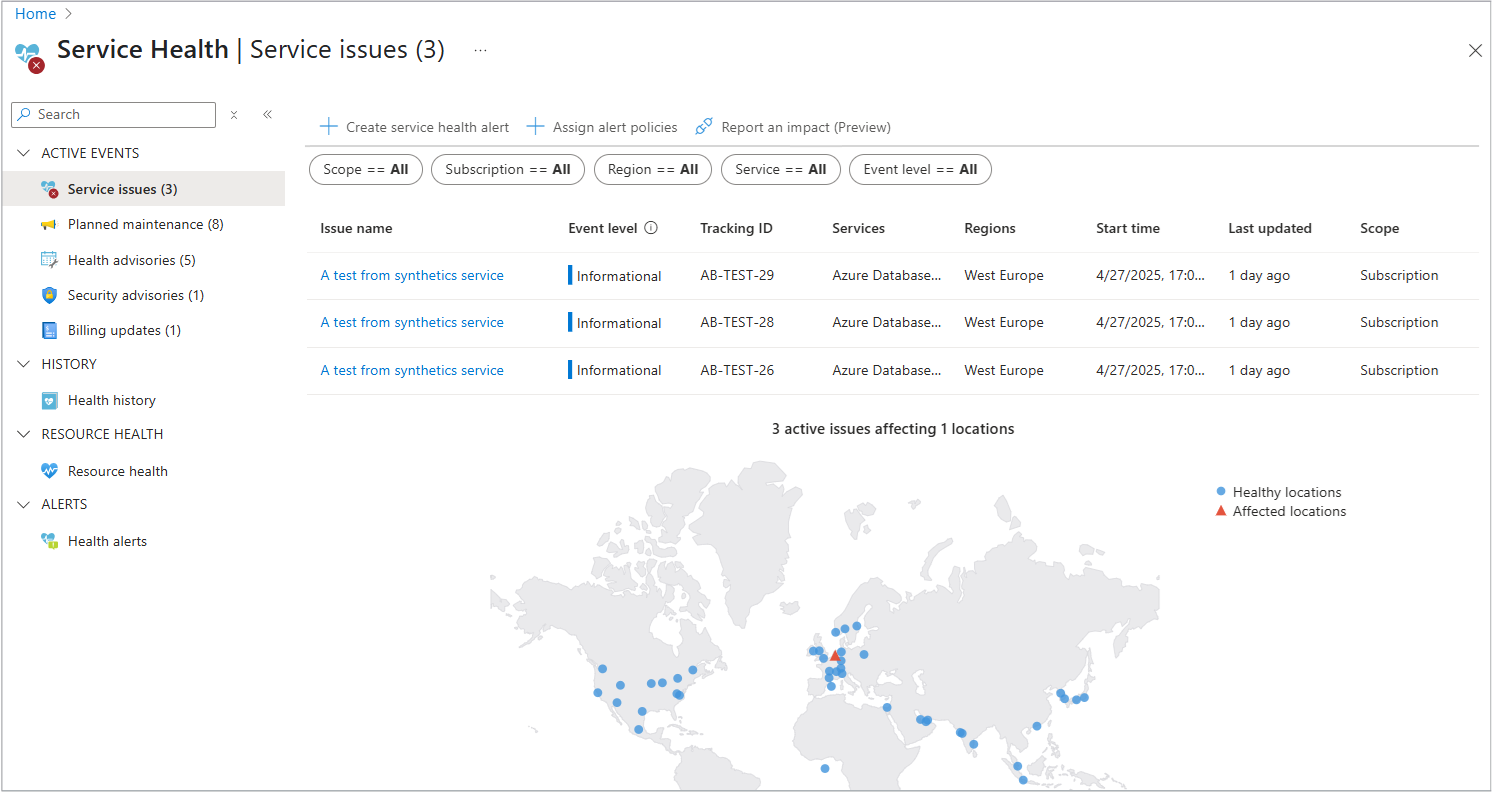
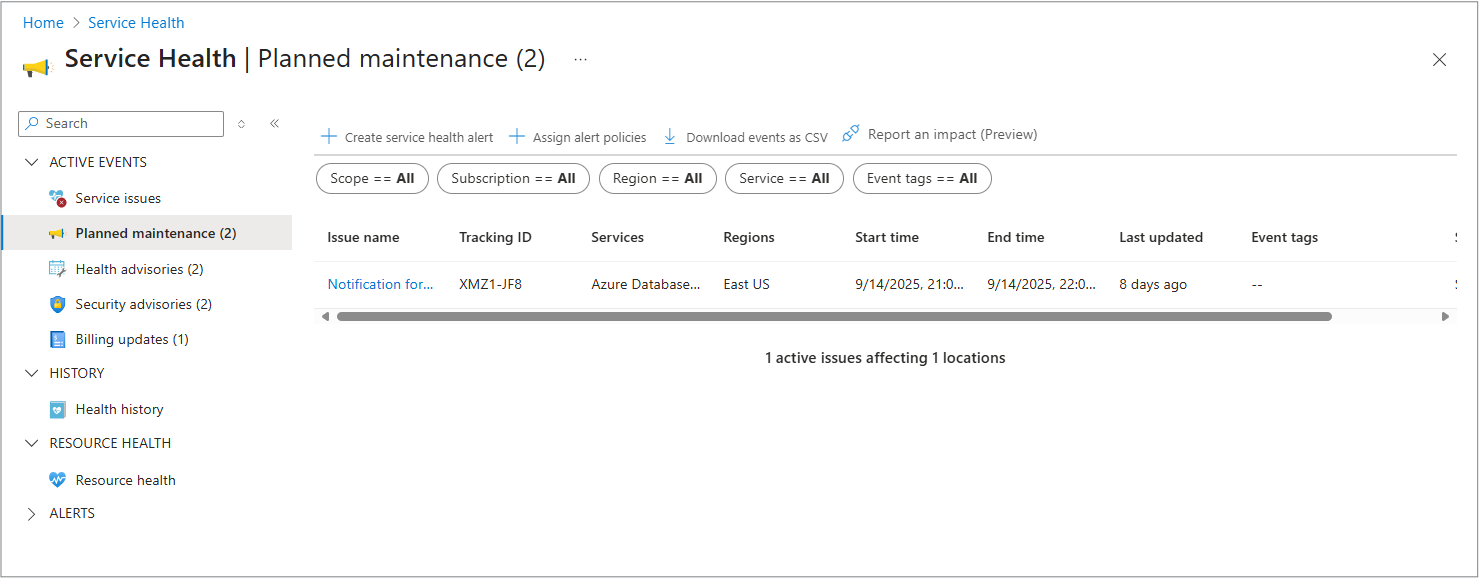
Service Health organizes Azure platform communications around events that can affect a customer's subscriptions or tenant. Microsoft currently lists five main event types in the Service Health portal: active service issues, planned maintenance, health advisories, security advisories and billing updates. The dashboard can be filtered by scope, subscription, region, service and event type so teams can focus on events that are relevant to the Azure environment they operate.
This makes Service Health different from a generic public status page. The public Azure status page gives a broad global view, while Service Health is personalized to the services and regions tied to the customer's Azure access.
How is Service Health different from Azure Status and Resource Health?
Microsoft treats Azure Status, Service Health and Resource Health as related but different experiences. Azure Status is the public global view of Azure service health. Service Health is the personalized subscription or tenant view that includes incidents, maintenance and advisories. Resource Health focuses on the health of individual resources, such as a specific virtual machine.
For incident response, these layers answer different questions. Azure Status helps confirm whether a broad outage exists. Service Health helps determine whether the customer's subscriptions, regions or services are affected. Resource Health helps investigate whether an individual resource is available or degraded.
How do Service Health alerts work?
Service Health integrates with Azure Monitor alerting so teams can create alert rules for relevant service events. Microsoft supports notification and automation paths including email, SMS, Azure app push notifications, webhooks and action-group integrations. Organizations can scope alerts by subscription, service, region and event type so different teams receive only the incidents or maintenance events they own.
Alert design matters because a single all-purpose alert can create noise. A practical approach is to route critical service issues to on-call teams, planned maintenance to service owners, and health or security advisories to platform and security teams. Service Health alert rules are available without a separate Service Health charge, although some notification channels or downstream services can have their own Azure Monitor or integration costs.
What history and incident information is retained?
Microsoft currently retains Service Health events in the portal Health History experience for up to 90 days after events become inactive. Older event records are not shown in the portal after that period, but Microsoft documents that they can remain accessible through the REST API for up to one year. Service issues can appear in history while still active after they have been open for several days.
Service Health also provides incident details, updates and official reports or root cause analyses when Microsoft publishes them. That makes it useful for post-incident review, customer communication and change-management records, but organizations that need longer internal retention should export or forward relevant event data into their own operational systems.
What does Azure Service Health cost?
Pricing was checked on August 27, 2026. Microsoft currently states that Azure Service Health is available to Azure subscribers at no additional cost. The service itself does not have a separate paid tier, and Microsoft notes that it does not carry its own SLA because it is a free service.
Costs can still appear around the workflow. Azure Monitor notification channels, Logic Apps, ServiceNow integrations, webhooks, storage or other services used to process or retain Service Health alerts can have their own billing. Buyers should therefore separate the cost of Service Health itself from the cost of the operational tooling connected to it.
What limits and operational considerations matter?
Service Health is an information and notification service, not a remediation engine. It can tell teams that an Azure platform issue or planned maintenance event may affect them, but application resilience still depends on the architecture of the workload. Multi-zone or multi-region design, backups, failover, retry logic and tested runbooks remain separate engineering responsibilities.
Microsoft also applies notification rate limits through Azure Monitor action groups. Current Azure Monitor documentation lists Service Health notification limits per alert rule and per subscription. Large organizations should design alert routing carefully, especially when many subscriptions are managed centrally.
How should teams use Service Health during incidents?
During an Azure incident, Service Health should be one of the first places an operations team checks. If Microsoft has already identified an incident affecting the customer's services or regions, the portal can provide status updates, scope and recommended actions. Microsoft notes that opening a separate support request for a known incident usually does not provide additional incident information beyond what is published in Service Health.
Teams should still validate their own application symptoms and Resource Health state. A Microsoft platform incident can explain an outage, but a local configuration, quota, deployment or application failure can produce similar symptoms. Mature incident processes combine Service Health with Azure Monitor, Resource Health, application telemetry and internal runbooks.
Who should choose something else?
Service Health is not a replacement for observability, application performance monitoring, synthetic testing or security monitoring. Teams that need logs, metrics, traces and alerts from their own applications should use Azure Monitor and related observability tools. Teams that need automated governance should use Azure Policy, while teams that need resource-level availability details should use Resource Health.
Organizations with no meaningful Azure footprint also gain little from a dedicated Service Health workflow. Its value is highest when Azure services are important enough that platform incidents, maintenance notices and service advisories need to be routed into operational processes.
Reviews
No reviews yet
Nobody has reviewed Azure Service Health here yet.