About Azure Resource Graph
Azure Resource Graph is Microsoft's Azure inventory and governance query service for exploring resources across subscriptions, management groups, and tenants. It is designed for fast, large-scale questions about Azure Resource Manager resources, including what exists, how resources are configured, where they are deployed, and how those properties have changed. Resource Graph is especially useful for cloud operations, governance, security review, inventory reporting, troubleshooting, and CMDB-style discovery where teams need one query surface instead of repeatedly calling individual resource providers.
What is included
Query
| Query language | KQL-based Resource Graph query language |
|---|---|
| Interfaces | Azure portal, Azure CLI, Azure PowerShell, REST API, and supported SDKs |
Scope
| Supported scope | Subscriptions, management groups, and tenant-scale scenarios subject to Azure RBAC |
|---|
Scale
| Maximum rows per query response | 1,000 entries before pagination |
|---|---|
| Resource Graph Explorer CSV export limit | 55,000 records |
| Throttling example | Up to 15 queries per 5-second window per user in Microsoft's documented example; actual quota can vary |
Changes
| Change Analysis retention | 14 days for queryable Resource Graph change data |
|---|
Pricing
| Resource Graph query service | No separate Resource Graph query charge for normal use |
|---|
What is Azure Resource Graph used for?
Azure Resource Graph is built for questions that span many Azure resources at once. Teams can query by resource type, region, tag, subscription, resource group, configuration property, or other indexed resource metadata. Common uses include inventory reporting, finding resources that do not match tagging standards, checking which regions or SKUs are in use, reviewing policy impact, identifying configuration drift, and supporting incident investigation.
The service complements Azure Resource Manager rather than replacing it. Azure Resource Manager is the control plane used to create and manage resources. Resource Graph builds a queryable index of resource information so users can search across large estates more efficiently than issuing separate GET or LIST calls for every subscription and resource type.
How does the query language work?
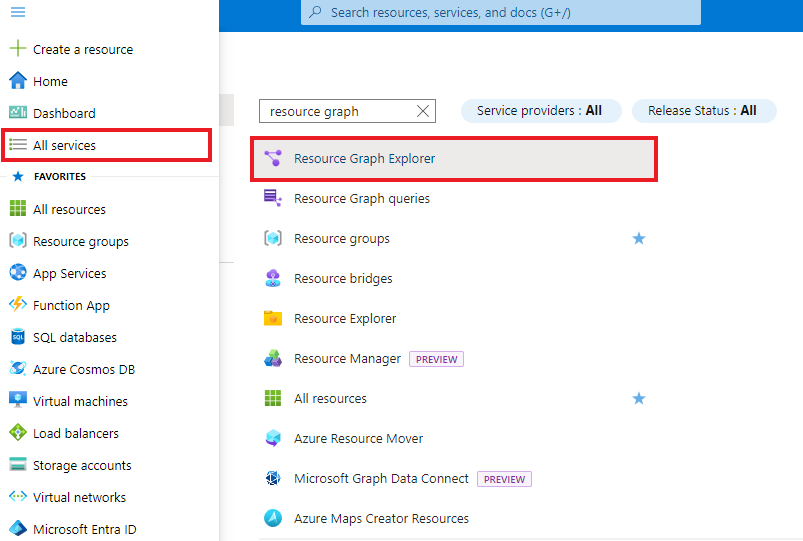
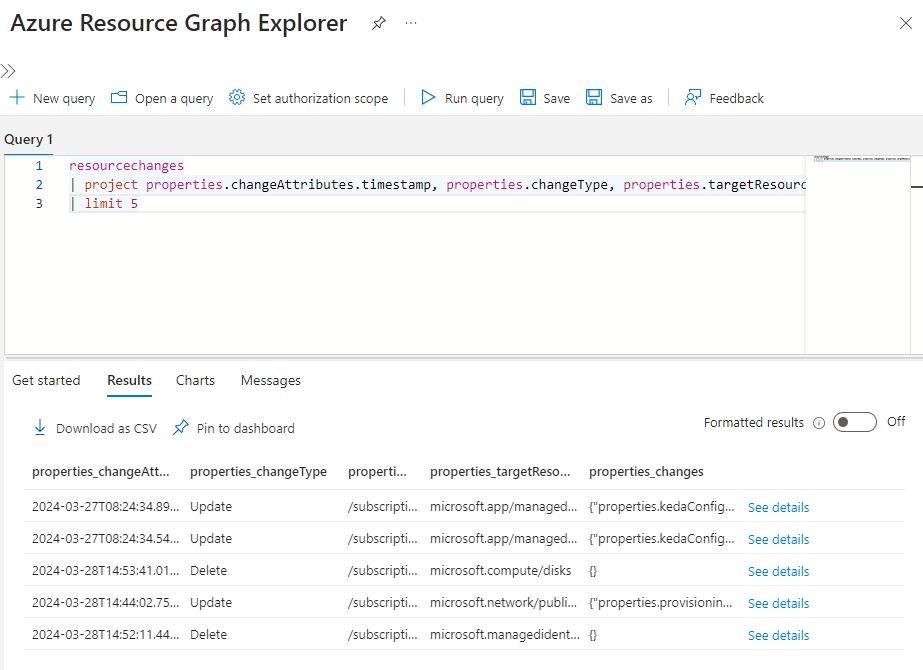
Resource Graph queries use a language based on Kusto Query Language. The query surface includes Resource Graph tables and a supported subset of KQL operators and functions for filtering, projection, grouping, sorting, joins, and aggregation. Resource Graph Explorer in the Azure portal provides a schema browser that helps users discover tables, resource types, and properties before writing a query.
The same query model can be used through Resource Graph Explorer, Azure CLI, Azure PowerShell, REST APIs, and supported SDKs. This makes it practical to start with an interactive investigation in the portal and later move the same logic into scripts, automation, dashboards, or governance tooling.
What can Resource Graph query at scale?
Resource Graph can query across subscriptions and management groups and can also support tenant-scale scenarios where the caller has appropriate access. Results are filtered by Azure RBAC, so users only see resources they are allowed to read. This makes the service useful for central cloud platform teams, but access design still matters because a query cannot return resources outside the caller's authorized scope.
Microsoft also supports Azure Lighthouse scenarios, which allows managed service providers to query resources that customers have delegated to them. For very large environments, teams should design query scope and pagination carefully instead of assuming one response will contain an entire estate.
What are the main limits and throttling considerations?
A single Resource Graph query response returns a maximum of 1,000 entries, so larger result sets need pagination or a client that handles pagination. The Resource Graph Explorer CSV export has a separate platform limit of 55,000 records. Query throughput is also throttled. Microsoft documents an example quota of up to 15 queries in a five-second window for a user, while noting that actual quota can vary.
Microsoft recommends grouping work into broader queries, staggering requests, checking the remaining-quota and reset-after response headers, and avoiding unnecessary bursts of small parallel queries. For automation that repeatedly scans large estates, these controls are important because a design that works interactively can still be inefficient or throttled when scheduled at scale.
How current is Azure Resource Graph data?
Resource Graph is optimized for fast inventory queries, but the index is not strongly consistent. Azure Resource Manager notifies Resource Graph when a resource changes, and Resource Graph also performs regular scans, but Microsoft states that indexed data can have short latency. Buyers should therefore avoid treating Resource Graph as a transactional source of truth for actions that require an immediate read-after-write guarantee.
For inventory, governance, reporting, and operational analysis, this eventual consistency model is usually acceptable. For workflows that must confirm an immediate resource state before taking a critical action, a direct resource-provider or Azure Resource Manager API call may still be the better validation step.
How does Resource Graph help with change analysis?
Resource Graph can query change information for supported Azure Resource Manager resources. Microsoft documents resourcechanges, resourcecontainerchanges, and healthresourcechanges tables for investigating when resources changed, what properties changed, and available change-actor information. Change records are useful for incident response, governance investigations, and keeping external inventories or CMDB systems synchronized with Azure changes.
Microsoft states that change records should normally become available in less than five minutes and that Change Analysis data is queryable for 14 days. Teams that need longer retention should export or persist the information in another Azure data store. Resource Graph change tracking also focuses on Azure Resource Manager control-plane changes and does not capture every possible data-plane or application-level change.
Can Azure Resource Graph be used for alerts and reporting?
Resource Graph results can be used in several reporting and operational workflows. Resource Graph Explorer can turn suitable query results into charts and pin them to Azure dashboards. Microsoft also provides a Power BI connector for tenant-level Resource Graph queries, with scope that can be adjusted to subscriptions or management groups.
Alerting is available through Azure Monitor and Log Analytics integration, which Microsoft currently documents as public preview for Resource Graph alert scenarios. This can be useful for governance or inventory conditions, but buyers should review preview status and the costs of connected services such as Log Analytics and Azure Monitor rather than assuming every downstream workflow is free.
How much does Azure Resource Graph cost?
Microsoft describes Azure Resource Graph as a free service. There is no separate Resource Graph query charge for normal use. Resource Graph Change Analysis is also documented as available at no extra cost.
That does not mean every workflow built around it is cost-free. Azure Monitor alerts, Log Analytics ingestion, Power BI licensing, storage used for long-term exported change data, automation, and other connected services can have their own charges. Cost planning should therefore separate the Resource Graph query service from the services used to store, alert on, or visualize its results.
What are the main limitations?
Resource Graph is not a general-purpose operational database and not a replacement for every Azure API. Data is eventually consistent, the query language supports a Resource Graph-specific subset of KQL, large responses require pagination, and user queries are throttled. Some expected properties can differ because Resource Graph gathers data from resource-provider APIs and may expose different API-version behavior than a direct call.
The service also returns only data that the caller is authorized to read. Change Analysis does not observe every data-plane change, and deleted resources have limitations in available snapshot details. Teams should treat Resource Graph as a high-scale inventory and governance query layer, not as a substitute for transactional application data or all resource-provider APIs.
Who should choose something else?
Choose direct Azure Resource Manager or resource-provider APIs when a workflow needs immediate state confirmation, unsupported properties, or a specific control-plane operation. Choose Azure Monitor Logs when the main requirement is time-series operational telemetry, application logs, or long-term log analytics rather than resource inventory. Choose Azure Data Explorer when the organization needs a general analytics platform for large custom datasets.
Resource Graph is strongest when the question is about the Azure resource estate itself: what exists, how it is configured, what changed, and how to inspect that information across a broad scope. Small environments that only need an occasional portal lookup may not need to build dedicated Resource Graph automation at all.
Reviews
No reviews yet
Nobody has reviewed Azure Resource Graph here yet.