About Azure Quantum
Azure Quantum is Microsoft's cloud service for developing and running quantum workloads through Azure. It combines Azure Quantum workspaces, partner quantum hardware, provider simulators, the Microsoft Quantum Development Kit, Q#, and Microsoft's resource estimation tools. The service is aimed at researchers, developers, universities, and organizations that want controlled access to quantum computing without operating quantum hardware themselves. Buyers should evaluate provider availability, job pricing, quotas, data handling, and whether a quantum approach is justified for the problem before committing production budget.
What is included
Development
| Primary toolkit | Microsoft Quantum Development Kit with Q#, Python, Jupyter, simulators, debugging, and Azure job submission |
|---|
Hardware access
| Current documented providers | IonQ, Pasqal, Quantinuum, and Rigetti |
|---|
Planning
| Resource estimation | Microsoft Quantum resource estimator for future fault-tolerant hardware requirements |
|---|
Management
| Workspace model | Azure Quantum workspace with Azure subscription, region, storage account, providers, jobs, and quotas |
|---|
Cost
| Pricing model | Provider-defined pay-as-you-go and subscription plans, plus applicable Azure infrastructure charges |
|---|
Governance
| Access control | Microsoft Entra ID and Azure role-based access control for workspace access |
|---|
What can you do with Azure Quantum?
Azure Quantum supports several distinct stages of quantum development. Teams can write and test quantum programs locally, use simulators to validate circuits, estimate the resources a future fault-tolerant machine would need, and submit jobs to supported quantum hardware through an Azure Quantum workspace. Microsoft currently documents IonQ, Pasqal, Quantinuum, and Rigetti as available quantum computing providers, each with different hardware approaches, execution models, and commercial terms.
This makes Azure Quantum more of an access and development layer than a single quantum computer. The value is the ability to work with multiple providers through Azure while keeping development workflows tied to common tools such as the Quantum Development Kit and Azure resource management.
How do Azure Quantum workspaces and providers work?
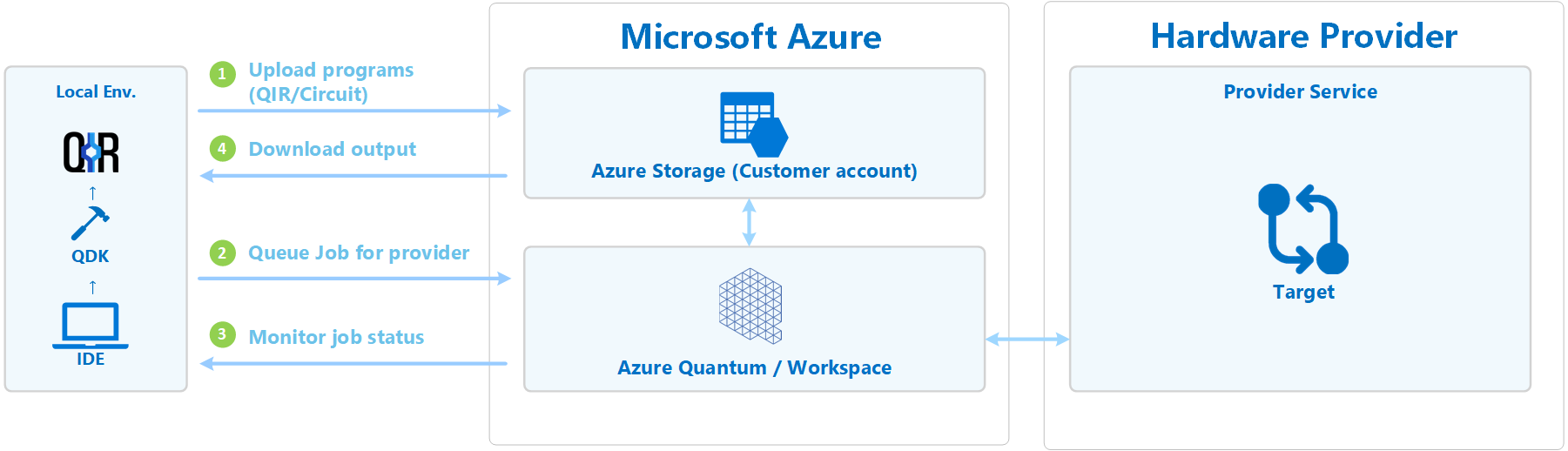
An Azure Quantum workspace groups the resources used to submit and manage quantum jobs. Microsoft requires an active Azure subscription to create a workspace. During workspace creation, teams choose a region and associate a storage account. Microsoft's current quick-create flow automatically includes IonQ, Quantinuum, Rigetti, and Microsoft Quantum Computing providers, while other providers can be added where available.
Provider choice matters because hardware capabilities, supported targets, quotas, queue behavior, and pricing are provider controlled. A workload that fits trapped-ion hardware may not have the same performance or cost profile on a superconducting or neutral-atom system. Buyers should treat provider selection as part of workload design rather than assuming every Azure Quantum target is interchangeable.
How do Q#, Python, and the Quantum Development Kit fit in?
Microsoft's Quantum Development Kit is the primary development toolkit around Azure Quantum. The current QDK supports Q#, Python workflows, Jupyter notebooks, local simulators, circuit visualization, debugging, and submission of jobs to Azure Quantum. Q# is Microsoft's open-source high-level language for quantum programs and is designed to separate algorithms from a particular hardware layout.
The QDK can also be used without an Azure account for local development and simulation. An Azure Quantum workspace becomes necessary when a team wants to submit supported workloads to cloud quantum targets. This distinction is useful for education and early research because developers can learn and test locally before paying for hardware execution.
What is the Microsoft Quantum resource estimator?
The Microsoft Quantum resource estimator helps teams estimate what a quantum application could require on future fault-tolerant hardware. Microsoft documents inputs such as the application model, hardware architecture, error budget, and quantum error correction model. The output can be used to compare architectural assumptions and estimate physical resources after layout.
This is different from running the algorithm on today's hardware. Resource estimation is useful when an organization wants to understand whether a proposed quantum algorithm is plausible at scale, how qubit technology choices affect requirements, or what error-correction overhead may dominate a design. Microsoft currently makes the estimator available through the QDK, and it can be used without an Azure account.
How does Azure Quantum pricing work?
Pricing checked August 28, 2026. Azure Quantum does not have one universal per-user or per-workspace price. Microsoft states that quantum hardware and software providers define and control their own pricing plans. Most providers offer pay-as-you-go usage, while some also offer subscription plans. Azure infrastructure resources associated with the workspace, such as storage, can create separate Azure charges.
Current Microsoft pricing documentation shows that billing dimensions vary materially by provider. IonQ uses an Azure Quantum Token model tied to gates and shots for supported systems. Pasqal charges based on QPU or emulator execution time. Quantinuum uses Hardware Quantum Credits and emulator credits. Rigetti charges by QPU job execution time. Because provider rates, currencies, plans, and available targets can change, buyers should verify the Providers tab in their own Azure Quantum workspace before budgeting a workload.
What quotas and cost controls should buyers understand?
Azure Quantum providers set their own quotas for QPU usage. Microsoft explains that quotas are tied to the selected provider plan and can apply at workspace or subscription scope. Teams can review consumed and remaining quota in the Azure portal or through Azure CLI and the QDK Python package. Quota increases require a support request and may depend on provider policy.
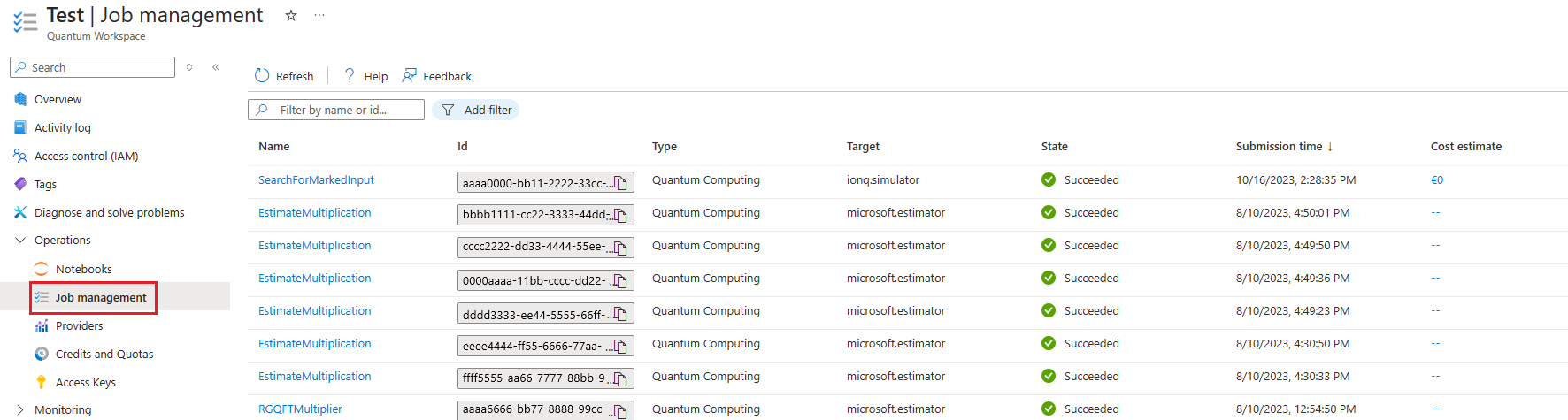
Microsoft also exposes estimated job cost information for providers that support per-job reporting. The estimate shows billing dimensions, unit price, consumed units, billed units, and estimated cost. This is useful for experiments, but organizations should still use final Azure billing data for accounting because taxes, credits, minimum charges, and provider billing rules can affect the amount invoiced.
What deployment and security considerations matter?
Azure Quantum is built around an Azure workspace and associated resources, so normal Azure identity and access design still matters. Microsoft documents Microsoft Entra ID and Azure role-based access control for sharing workspace access. Workspace owners can grant roles such as Contributor or Quantum Workspace Data Contributor to users, groups, or service principals.
The workspace is also associated with Azure Storage for job-related data. Teams handling sensitive research should review where the workspace and storage account are deployed, who can access them, and what provider-specific processing path applies to submitted jobs. Quantum workloads should not be treated as exempt from normal cloud governance simply because the computation is specialized.
What are the practical limitations of Azure Quantum?
The biggest limitation is that current quantum hardware remains specialized and constrained. Queue time, available qubits, fidelity, supported gates, provider quotas, and cost differ across targets. A successful local simulation does not mean the same circuit will be practical or economical on real hardware. Provider availability can also vary by geography and commercial plan.
Azure Quantum is therefore better treated as a research, development, and experimentation platform than as a drop-in replacement for classical compute. Teams should benchmark classical alternatives and define a measurable research goal before spending on QPU execution. Resource estimation, simulators, and small hardware runs can help reduce unnecessary cost before larger experiments.
Who should choose something else?
Organizations that simply need more CPU, GPU, or AI acceleration should usually evaluate Azure Virtual Machines, Azure Batch, Azure Kubernetes Service, or other classical Azure services instead of Azure Quantum. Those services are designed for mature production workloads and have clearer performance and capacity models.
Teams that only want to learn quantum programming can start with the free local QDK, Q#, simulators, and Microsoft learning resources without creating an Azure Quantum workspace. Organizations already committed to a specific quantum hardware vendor may also prefer that vendor's direct tooling if multi-provider access and Azure integration provide little additional value. Azure Quantum makes the most sense when access to several quantum providers, Azure-based governance, and Microsoft's development and resource-estimation tooling are useful parts of the workflow.
Reviews
No reviews yet
Nobody has reviewed Azure Quantum here yet.