About Azure OpenAI
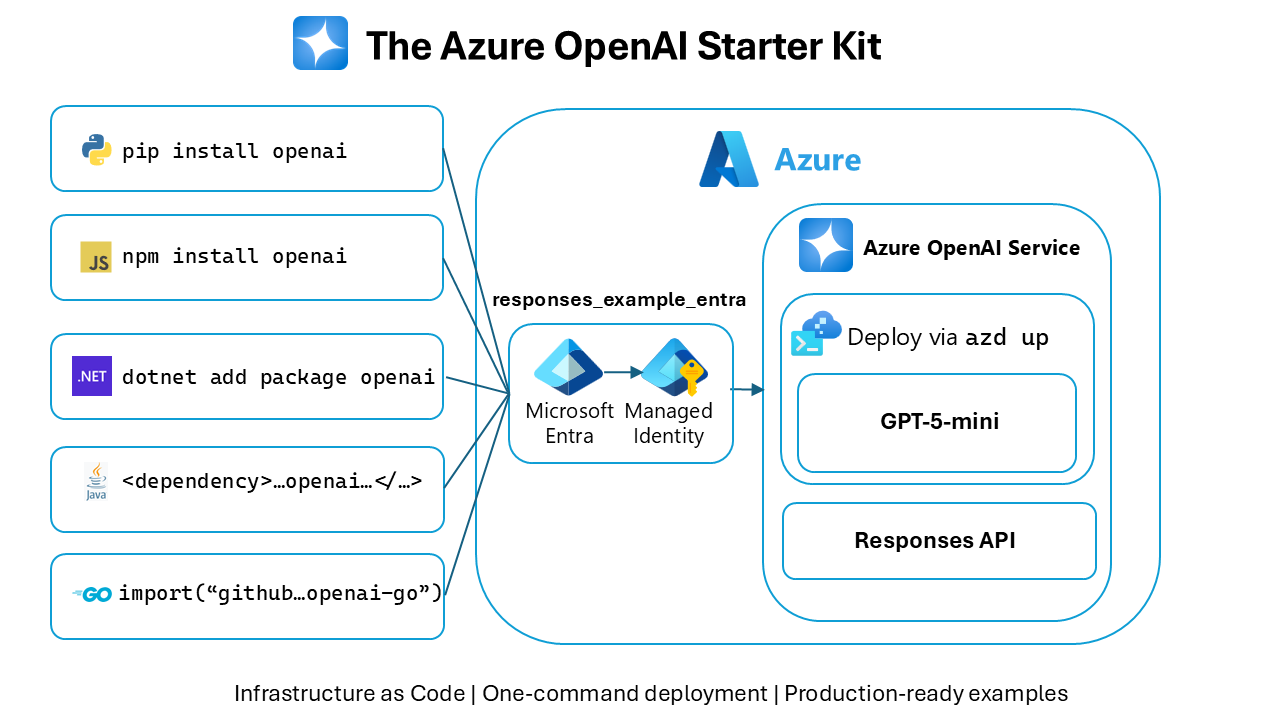
Azure OpenAI is Microsoft's managed Azure service for deploying OpenAI models inside Azure environments. It is aimed at organizations building generative AI applications that need Azure identity, networking, governance, regional deployment choices and enterprise purchasing controls around model access. The service remains a distinct Azure resource, although Microsoft now provides an upgrade path from an Azure OpenAI resource to the broader Microsoft Foundry resource model while preserving the existing Azure OpenAI endpoint, API keys and state.
What is included
Pricing
| Standard | Pay-as-you-go by model usage, typically input and output tokens for language models |
|---|---|
| Provisioned | Provisioned Throughput Units with reserved capacity and eligible monthly or annual reservations |
| Batch | Batch API pricing is available for supported language-model workloads |
Deployment
| Deployment scopes | Global, Data Zone and Regional options are available for supported configurations |
|---|
Limits
| Resources per subscription | Microsoft currently documents up to 30 Azure OpenAI resources per Azure subscription |
|---|---|
| Standard deployments per resource | Microsoft currently documents up to 32 Standard model deployments per resource |
Security
| Identity | Microsoft Entra ID authentication is supported alongside API-key access |
|---|
Safety
| Content filtering | Default safety settings and configurable content filters apply to supported Azure OpenAI deployments |
|---|
What can teams build with Azure OpenAI?
Azure OpenAI provides managed API access to OpenAI model families for text generation, reasoning, code generation, summarization, embeddings, image generation and other supported multimodal workloads. Microsoft manages the Azure hosting layer, while application teams choose models and deployment types that fit their latency, throughput, regional and cost requirements.
It is best treated as a model-serving service rather than a complete application platform. Teams still need to design prompts, retrieval, application logic, evaluation, monitoring, identity, data access and fallback behavior around the model endpoint. For agent workflows, broader model catalogs and project-level tooling, Microsoft is directing new platform investment toward Microsoft Foundry.
How is Azure OpenAI priced?
Pricing was checked on August 29, 2026. Microsoft currently offers Standard on-demand pricing based on model usage, Provisioned Throughput Units for reserved processing capacity, and Batch API pricing for supported language-model workloads. Standard usage is generally metered by input and output tokens, while image, audio and other model types use their own billing units.
There is no single Azure OpenAI price that applies to every model. Cost depends on model, deployment type, region or data-zone choice, input and output volume, cached-token behavior where supported, and any provisioned reservations. Buyers should calculate costs using the exact model and deployment they plan to use instead of quoting one generic per-token rate.
What deployment choices matter?
Microsoft currently offers Global, Data Zone and Regional deployment options for supported Standard and Provisioned configurations. Global deployments can route processing across supported geography, Data Zone deployments constrain processing to a geographic zone such as the United States or European Union, and Regional deployments keep processing within an Azure region where that deployment type is available.
The correct option depends on data-processing requirements, model availability, throughput and cost. Model availability is not identical in every region, and quotas also vary by model, subscription and deployment type. Teams with strict residency requirements should confirm the exact model and deployment type before committing an architecture.
What quotas and limits should teams plan for?
Azure OpenAI capacity is quota controlled. Microsoft's current quota documentation lists up to 30 Azure OpenAI resources per Azure subscription and up to 32 Standard model deployments per resource. Fine-tuned model deployments are separately limited, and rate limits for tokens per minute and requests per minute vary by model and SKU.
This means a successful prototype does not automatically prove production capacity. Before launch, teams should check model-specific quota, request increases where needed, test peak traffic, and design retry behavior for throttling. Capacity planning is especially important for high-volume chat, batch processing, image generation and latency-sensitive workloads.
How do security and content controls work?
Azure OpenAI can use Microsoft Entra ID authentication and Azure networking controls, and it supports content filtering around prompts and model outputs. Microsoft documents configurable filters for categories and severity thresholds, with default safety settings applied to Azure OpenAI model deployments except certain audio APIs. Some reduced-filter configurations require Microsoft approval.
Security controls do not remove application responsibility. Teams should still limit access to model endpoints, use least-privilege roles, protect keys if keys are used, separate development and production resources, log application behavior appropriately, and test how safety controls affect legitimate user requests. A content filter can block input before model inference, so applications should handle those responses cleanly.
How does Azure OpenAI relate to Microsoft Foundry?
Microsoft Foundry is now the broader Azure AI development platform. Microsoft states that a Foundry resource is a superset of the Azure OpenAI resource type and can add access to a wider model catalog, Agent Service, evaluations and other Foundry capabilities. Existing Azure OpenAI resources can be upgraded while preserving the resource name, Azure OpenAI endpoint, API key, network configuration, identity configuration and existing state.
This matters for new architecture decisions. A team that needs only Azure OpenAI model APIs can continue to use the Azure OpenAI resource. A team starting a broader multi-model or agent platform should compare a Foundry resource before building new management layers around an Azure OpenAI-only resource.
What are the main limitations?
Model availability and quotas can vary by region and deployment type, and newer model releases can change the best cost or capability choice quickly. Token-based pricing can also make monthly spend difficult to predict when prompts, retrieval context or generated output grow over time.
Azure OpenAI is also not a substitute for application evaluation. Model responses can still be incorrect, incomplete or unsuitable for a business workflow. Production teams need grounding, validation, monitoring, human review where risk requires it, and explicit handling for rate limits, content-filter responses and model-version changes.
Who should choose Azure OpenAI?
Azure OpenAI is a strong fit for organizations that specifically want OpenAI models through Azure and need Azure identity, networking, governance, enterprise agreements or Azure-aligned deployment choices. It also suits teams already operating workloads in Azure that want model access without introducing a separate cloud control plane.
Buyers should compare actual model requirements rather than selecting it only because their company already uses Microsoft products. The main reasons to choose it are the OpenAI model portfolio plus Azure operating controls, not generic cloud familiarity.
Who should choose something else?
Choose Microsoft Foundry instead when the project needs a broader multi-provider model catalog, hosted or prompt agents, project-level evaluations and the newer unified Foundry control plane. Microsoft is explicitly positioning Foundry as the broader resource model and provides an upgrade path from existing Azure OpenAI resources.
Choose Azure Machine Learning when the central requirement is training, registering and operating custom machine-learning models rather than primarily consuming foundation-model APIs. Choose Azure AI Language, Speech, Vision or other Foundry Tools when a focused prebuilt API solves the workload more simply. Teams that do not need Azure-specific identity, networking or procurement should also compare direct model-provider APIs on capability, latency, geography and total cost before deciding.
Reviews
No reviews yet
Nobody has reviewed Azure OpenAI here yet.