About Azure NetApp Files
Azure NetApp Files is Microsoft Azure's first-party enterprise file storage service for workloads that need managed NFS, SMB or dual-protocol volumes with high performance, predictable throughput and Azure-native operations. It is designed for file-based enterprise applications such as SAP, databases, high-performance computing, virtual desktops, shared application data and migrations where general-purpose cloud file storage may not meet latency, throughput or data-management needs. Buyers should size the service around protocol, service level, volume scale, networking, resilience and cost because Azure NetApp Files is billed from provisioned resources rather than only the amount of data written.
What is included
Protocols
| File access | Supports NFSv3, NFSv4.1, SMB3, and supported dual-protocol volumes using NFS with SMB. |
|---|
Performance
| Service levels | Microsoft currently documents Elastic, Flexible, Standard, Premium and Ultra. Elastic is public preview. |
|---|---|
| Capacity-linked throughput | Standard, Premium and Ultra provide up to 16, 64 and 128 MiB/s per TiB of provisioned capacity. |
| Manual QoS maximums | Microsoft currently documents up to 4,500 MiB/s assigned throughput for regular volumes and 12,800 MiB/s for large volumes. |
Elastic preview
| Zone-redundant pool scale | Elastic capacity pools range from 1 TiB to 128 TiB, with volumes from 1 GiB to 16 TiB and shared throughput of 32 MiB/s per TiB. |
|---|
Scale
| Regular volumes | Regular volumes range from 50 GiB to 100 TiB and currently support a maximum single-file size of 64 TiB. |
|---|---|
| Large volumes | Large volumes start at 50 TiB and support up to 1 PiB by default, with larger configurations available under separate requirements. |
| Resource limits | Default limits include 25 capacity pools per NetApp account, 2,000 volumes per subscription, 500 volumes per pool and 255 snapshots per volume. |
Networking
| VNet integration | Volumes use an Azure subnet delegated to Microsoft.NetApp/volumes and can be accessed through supported Azure and connected networks. |
|---|
Resilience
| Availability zones | Zonal placement is supported, but a normal zonal volume is not automatically replicated across zones. |
|---|
Data protection
| Replication | Supports cross-zone and cross-region replication, including supported designs with both protection relationships on one source volume. |
|---|
Pricing
| Provisioned billing | Billing is hourly from provisioned capacity and performance, with separate charges possible for protection, replication and cool-access capabilities. |
|---|
What is Azure NetApp Files used for?
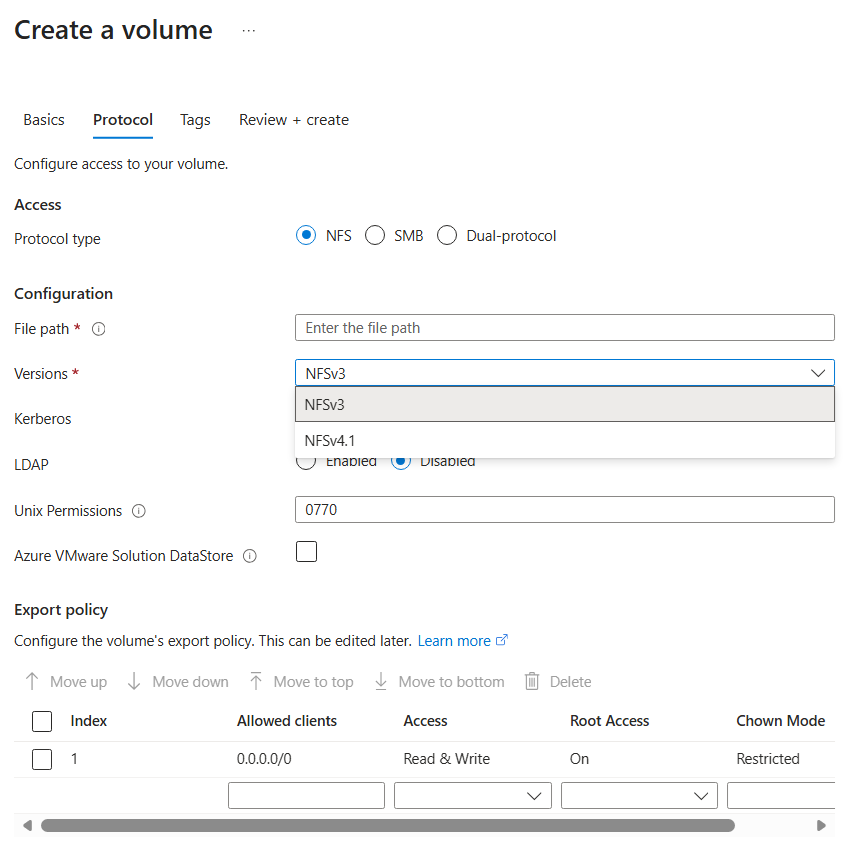
Azure NetApp Files provides managed network file storage through volumes that clients mount over NFS, SMB or dual-protocol configurations. Microsoft currently supports NFSv3, NFSv4.1, SMB3 and dual-protocol volumes using NFSv3 plus SMB or NFSv4.1 plus SMB. This makes the service relevant for applications that expect traditional file-system semantics and cannot be easily refactored to object storage.
Typical workloads include SAP, enterprise databases, high-performance computing, virtual desktop profiles, shared application data and large file migrations. The service is most useful when an application has a measurable latency, throughput, protocol or data-management requirement that general-purpose file storage does not meet.
How do the service levels differ in 2026?
Microsoft currently documents five service levels: Elastic, Flexible, Standard, Premium and Ultra. Standard, Premium and Ultra provide capacity-linked throughput of up to 16 MiB/s, 64 MiB/s and 128 MiB/s per TiB of provisioned capacity. Flexible separates throughput from capacity and provides a 128 MiB/s baseline for a capacity pool, with additional throughput configurable within Microsoft's documented limits.
Elastic is currently public preview and uses Azure infrastructure rather than the bare-metal model used by Flexible, Standard, Premium and Ultra. It provides built-in zone redundancy, capacity pools from 1 TiB to 128 TiB, volumes from 1 GiB to 16 TiB, and shared throughput of 32 MiB/s per TiB. Buyers should treat Elastic as a distinct preview architecture and confirm region and feature support before using it for production design.
What scale and performance limits should buyers check?
For Flexible, Standard, Premium and Ultra, Microsoft currently documents 100 TiB as the default regional capacity quota per subscription, 100 NetApp accounts per Azure region per subscription, 25 capacity pools per NetApp account, 2,000 volumes per subscription, 500 volumes per capacity pool and 255 snapshots per volume. Some of these limits can be raised through support, while others are fixed.
Regular volumes range from 50 GiB to 100 TiB. Large volumes start at 50 TiB and support up to 1 PiB by default, with larger sizes available in specific configurations or by request. Microsoft also documents extra-large volume options up to 7.2 PiB with cool access and breakthrough-mode options with separate requirements. Regular volumes support a maximum single-file size of 64 TiB, while large volumes currently document a 16 TiB single-file maximum.
Manual QoS regular volumes support up to 4,500 MiB/s assigned throughput, while large volumes support up to 12,800 MiB/s. Microsoft notes that breakthrough mode can exceed the normal large-volume throughput ceiling for qualifying workloads, but performance depends on workload characteristics and should not be treated as a guaranteed per-volume rate.
How do capacity pools and pricing work?
Azure NetApp Files is billed from provisioned resources rather than only consumed bytes. Microsoft prices the service hourly based on provisioned Azure NetApp Files capacity. Standard, Premium and Ultra combine capacity with their service-level performance model, while Flexible separates provisioned capacity and throughput. Additional services such as backup, cross-region replication, cross-zone replication and cool access can introduce separate billing dimensions.
Pricing was checked on September 5, 2026. Microsoft also offers reserved capacity for eligible Standard, Premium and Ultra storage in one-year and three-year commitments, currently sold in 100 TiB and 1 PiB increments and limited to Single Encryption. Buyers should compare reserved capacity only after they understand stable long-term usage because a commitment can reduce flexibility if data or architecture changes.
How does Azure NetApp Files compare with Azure Files?
Azure Files and Azure NetApp Files solve different file-storage needs. Azure Files is the broader managed file-share service for common SMB and NFS workloads and is often the simpler choice for general-purpose shares, lift-and-shift file servers and Azure File Sync scenarios.
Azure NetApp Files is more specialized for enterprise workloads that need higher throughput, lower latency, advanced volume operations or NetApp-oriented data services. The more specialized service is not automatically the better choice. If Azure Files meets the workload's scale, performance and protocol requirements, it can be simpler to operate and more cost effective.
What networking and availability design matters?
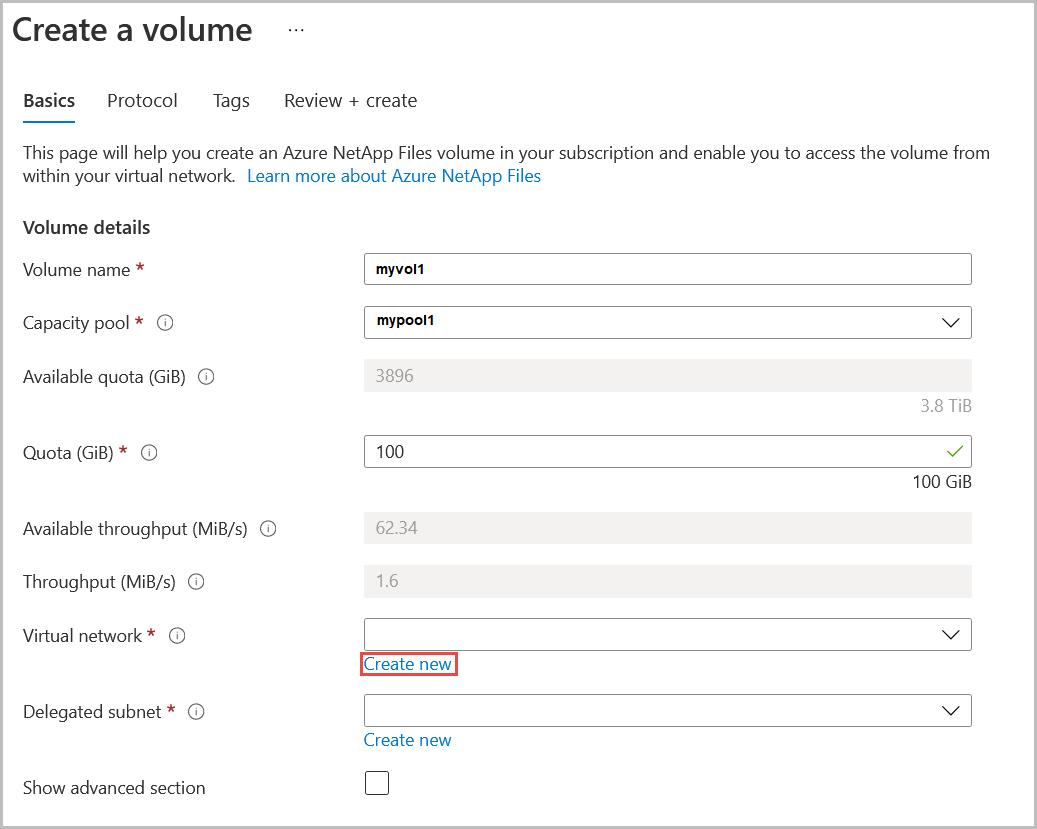
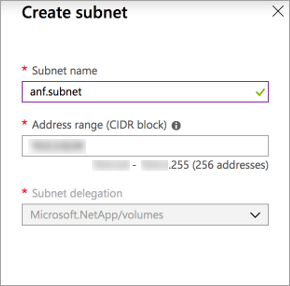
Azure NetApp Files volumes integrate with Azure virtual networking and use a subnet delegated to Microsoft.NetApp/volumes. Clients can access supported volumes from the same virtual network, peered networks or connected on-premises networks depending on the design. Availability zone volume placement lets teams place a volume in a specific supported zone close to compute resources.
A normal zonal volume is still a single-zone resource. Microsoft states that availability-zone placement does not itself replicate data between zones. Cross-zone replication must be configured separately when a workload needs an asynchronous copy in another availability zone. Buyers should also account for brief I/O pauses during maintenance and tune applications where their retry behavior is not resilient enough.
How should backup and disaster recovery be planned?
Azure NetApp Files provides several protection mechanisms with different purposes. Snapshots provide fast point-in-time recovery. Azure NetApp Files backup stores protected snapshot data separately within the region. Cross-zone replication can place an asynchronous replica in another availability zone, and cross-region replication can protect against a regional outage.
Microsoft also supports using cross-zone and cross-region replication together on the same source volume, with up to two destination relationships in supported designs. During normal operation, replication destination volumes are read-only. Teams should test failover, resync and application recovery rather than assuming replication alone guarantees the required recovery time or recovery point.
What limitations and cost tradeoffs matter most?
Azure NetApp Files requires more planning than general-purpose file storage. Service-level choice, capacity-pool sizing, throughput, delegated networking, identity, regional capacity and data-protection design can all affect both cost and operability. Overprovisioning capacity or a higher performance level creates avoidable spend, while underprovisioning throughput can constrain the application.
Large volumes have separate rules from regular volumes. Microsoft states that a regular volume cannot be converted into a large volume, and large volumes cannot be resized below 50 TiB. Microsoft also advises that large volumes are not currently suited to database data and log volumes such as HANA, Oracle and SQL Server when those workloads require higher single-volume throughput; multiple regular volumes can be more appropriate.
Who should choose something else?
Choose Azure Files when the primary requirement is a general-purpose managed SMB or NFS share and its performance and scale limits are sufficient. Choose Azure Blob Storage when the application can use object APIs instead of file-system semantics. Choose Azure Managed Disks when storage belongs to a virtual machine as block storage rather than shared network file storage.
Azure NetApp Files is strongest when a business can justify the premium through measurable requirements such as enterprise NAS compatibility, low latency, high throughput, SAP or database design, HPC, large-scale shared file access or advanced protection needs. Small or lightly used file shares usually do not need this level of specialization.
Reviews
No reviews yet
Nobody has reviewed Azure NetApp Files here yet.