About Azure NAT Gateway
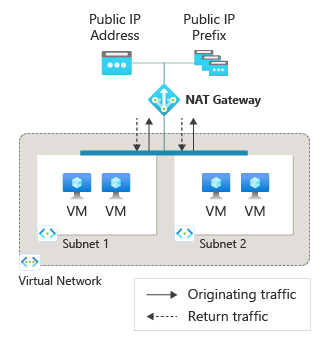
Azure NAT Gateway is Microsoft's managed outbound connectivity service for Azure virtual network subnets. It gives private workloads a predictable way to reach internet destinations without assigning a public IP address to every virtual machine or service instance. Microsoft now recommends an explicit outbound method such as NAT Gateway because, as of March 31, 2026, new virtual networks use private subnets by default and no longer receive default outbound access automatically. NAT Gateway sits at the subnet level, performs source network address translation for outbound connections, and allows return traffic only for flows that originated from inside the virtual network.
What is included
SKU
| Current SKUs | Standard and StandardV2 |
|---|
Connectivity
| Primary use | Explicit outbound internet connectivity for Azure virtual network subnets |
|---|
Addressing
| Standard public IP support | Up to 16 IPv4 public IP addresses |
|---|---|
| StandardV2 public IP support | Up to 16 IPv4 and 16 IPv6 public IP addresses |
Performance
| Standard throughput | Up to 50 Gbps per NAT gateway |
|---|---|
| StandardV2 throughput | Up to 100 Gbps per NAT gateway |
Scale
| SNAT ports per public IP | 64,512 |
|---|---|
| Maximum active connections | Up to 2 million per NAT gateway resource |
Reliability
| StandardV2 availability model | Zone redundant by default in supported regions |
|---|
Timeouts
| TCP idle timeout | Configurable from 4 to 120 minutes |
|---|---|
| UDP idle timeout | 4 minutes, not configurable |
What problem does Azure NAT Gateway solve?
Azure NAT Gateway is designed for workloads that need controlled outbound internet connectivity from private Azure subnets. After a NAT gateway is associated with a subnet, new outbound flows use the gateway's public IP address or public IP prefix. This gives administrators a stable outbound identity that can be allowlisted by external services and avoids assigning internet-facing addresses directly to each workload. Microsoft also documents NAT Gateway as taking precedence over several other outbound methods for new connections, including load balancer outbound rules and instance-level public IP addresses, unless a user-defined route directs traffic to a virtual appliance or virtual network gateway instead.
How do Standard and StandardV2 NAT Gateway differ?
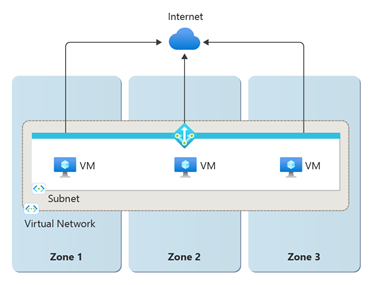
Microsoft currently offers Standard and StandardV2 NAT Gateway. Standard is a zonal resource and supports IPv4 public IP addresses and prefixes. StandardV2 is zone redundant by default, supports both IPv4 and IPv6 public IPs and prefixes, and adds NAT64 for IPv6 workloads that need to reach IPv4-only internet destinations when a compatible DNS64 design is in place. Microsoft also documents higher throughput for StandardV2. Standard supports up to 50 Gbps per gateway, while StandardV2 supports up to 100 Gbps. StandardV2 is not available in every Azure region, so regional availability should be checked before a migration or new design is finalized.
How does NAT Gateway scale outbound connections?
A NAT gateway can use multiple public IP addresses to increase its source network address translation port inventory. Microsoft documents 64,512 SNAT ports per attached public IP address, and a NAT gateway can scale to more than one million SNAT ports when multiple addresses are used. Standard supports up to 16 IPv4 public IP addresses. StandardV2 supports up to 16 IPv4 and 16 IPv6 public IP addresses. Both SKUs currently support up to 50,000 concurrent connections per public IP to the same destination endpoint and up to two million active connections per NAT gateway resource. These limits matter for high-connection workloads that repeatedly contact the same external service.
What are the main networking and subnet limits?
NAT Gateway is scoped to a virtual network and can be associated with multiple subnets in that virtual network. A subnet can have only one NAT gateway, and a NAT gateway cannot span multiple virtual networks. Microsoft documents support for up to 800 subnets per NAT gateway in the current SKU comparison. NAT Gateway cannot be deployed in a gateway subnet, and Microsoft also documents restrictions for secured Virtual WAN hub architectures. StandardV2 requires StandardV2 public IP resources and cannot use Standard public IP addresses. A Standard gateway cannot be upgraded in place to StandardV2, so moving to the newer SKU requires replacing the gateway and its public IP design.
How does Azure NAT Gateway pricing work?
Pricing was checked on August 27, 2026. Microsoft currently bills NAT Gateway from the time the resource exists, even if no subnet or public IP is attached. Billing includes an hourly gateway charge plus data processing for outbound traffic and the return traffic associated with those outbound connections. Azure data transfer out can also be billed separately, so NAT Gateway data processing is not the only networking cost to model. Microsoft currently states that Standard and StandardV2 use the same NAT Gateway price model. Exact rates depend on billing region, currency, agreement, public IP resources, traffic volume and optional StandardV2 flow-log use, so BrandLigo does not present one universal monthly price.
How reliable is Azure NAT Gateway?
NAT Gateway is a managed software-defined networking service and does not depend on a customer-managed virtual appliance. For zone failure resilience, Microsoft recommends StandardV2 because it is zone redundant across availability zones in a supported region. Standard can be deployed into a specific availability zone, but if that zone becomes unavailable the outbound path for attached subnets is affected. Microsoft also notes that zone selection for a Standard NAT gateway cannot be changed after deployment. Teams with strict availability requirements should therefore choose the SKU and zone model before production rollout rather than treating the gateway as an interchangeable outbound component.
What connection and timeout behavior should teams understand?
NAT Gateway supports TCP and UDP, while StandardV2 also supports outbound ICMP Echo Request and Echo Reply for IPv4 and IPv6. TCP idle timeout is configurable from 4 to 120 minutes, with 4 minutes as the default. UDP idle timeout is fixed at 4 minutes. Microsoft warns that unnecessarily long TCP idle timeouts can increase the chance of SNAT port exhaustion, so applications with long-lived connections should use appropriate keepalive behavior instead of simply extending the timeout. NAT Gateway does not accept unsolicited inbound internet connections. Return packets are allowed only when they correspond to a connection that originated from the attached subnet.
How does NAT Gateway compare with Load Balancer, Firewall and other outbound choices?
NAT Gateway is focused on scalable outbound source NAT and predictable egress IP addresses. Azure Load Balancer distributes network traffic and can provide outbound rules, but Microsoft recommends NAT Gateway as the preferred explicit outbound method for many subnet designs. Azure Firewall adds stateful filtering, policy, threat intelligence and other security controls that NAT Gateway does not provide. A user-defined route to a firewall, virtual appliance, VPN Gateway or ExpressRoute path can also override the normal internet route. Teams should choose NAT Gateway when they primarily need managed outbound translation and stable egress identity, not when the requirement is inbound load balancing, application-layer routing or deep traffic inspection.
What limitations should buyers check before deployment?
NAT Gateway has important design constraints. It does not provide unsolicited inbound connectivity, IP fragmentation is not supported, and StandardV2 cannot use Standard public IP addresses or custom IP prefixes. Microsoft also documents that public IPs with DDoS protection enabled are not supported on NAT Gateway. StandardV2 has regional availability restrictions and cannot replace Standard through an in-place SKU upgrade. NAT Gateway also does not remove the need to design route tables, firewalls, private endpoints and DNS correctly in more complex networks. Buyers should test high-connection destinations, long-lived sessions, hybrid routing and external allowlists before moving production egress behind a new gateway.
Who should choose something else?
Choose a different Azure networking service when the requirement is broader than outbound source NAT. Use Azure Firewall when centralized traffic inspection and network policy are the primary goals. Use Azure Load Balancer when distributing TCP or UDP traffic across backend instances is the main requirement. Use Application Gateway or Azure Front Door for Layer 7 web routing and application delivery. Use VPN Gateway, ExpressRoute or Virtual WAN for private hybrid connectivity. Very small workloads with no need for predictable egress may not justify an additional NAT Gateway resource, but Microsoft now expects explicit outbound connectivity for new private-subnet designs, so teams should still choose a supported outbound method rather than relying on legacy default outbound access.
Reviews
No reviews yet
Nobody has reviewed Azure NAT Gateway here yet.