About Azure Managed Lustre
Azure Managed Lustre is Microsoft's managed Lustre parallel file system for workloads that need very high shared file throughput, especially high-performance computing, AI training, simulation and large-scale analytics. It provides native Lustre behavior without requiring customers to build and maintain the storage servers themselves, and it can integrate with Azure Blob Storage so teams can keep durable data in object storage while using Lustre as a high-performance working tier. It is best evaluated as specialized HPC and AI storage rather than as a general replacement for Azure Files, Azure NetApp Files or Azure Managed Disks.
What is included
Performance
| Published performance tiers | 40, 125, 250, and 500 MB/s per TiB |
|---|
Storage
| File system type | Managed Lustre parallel file system on durable SSD storage |
|---|
Integration
| Blob Storage integration | Import, restore, export, and supported auto-import workflows |
|---|
Networking
| IP support | IPv4 only |
|---|---|
| Subnet planning | Dedicated subnet sizing depends on provisioned file-system capacity |
Containers
| AKS integration | Supported through the Azure Managed Lustre CSI driver |
|---|
Clients
| Primary client model | Supported Linux Lustre clients |
|---|
Security
| Secure Boot | Supported with current prebuilt client modules on supported Trusted Launch configurations |
|---|
What workloads is Azure Managed Lustre designed for?
Azure Managed Lustre is designed for workloads that read and write large amounts of shared file data in parallel. Microsoft positions it for HPC and AI use cases such as simulation, scientific computing, large model training, analytics pipelines and other jobs where storage throughput can become the bottleneck for expensive compute. Microsoft states that the service can deliver hundreds of GB/s of storage bandwidth at large scale, while keeping native Lustre semantics for applications that already expect a Lustre file system.
This makes it a strong fit when many compute nodes need simultaneous access to one high-performance POSIX-style namespace. It is a more specialized choice than general enterprise file storage. A team that mainly needs ordinary departmental shares, Windows SMB access or a small application file system should usually compare Azure Files or Azure NetApp Files before choosing a Lustre-based design.
How do the performance tiers and pricing model work?
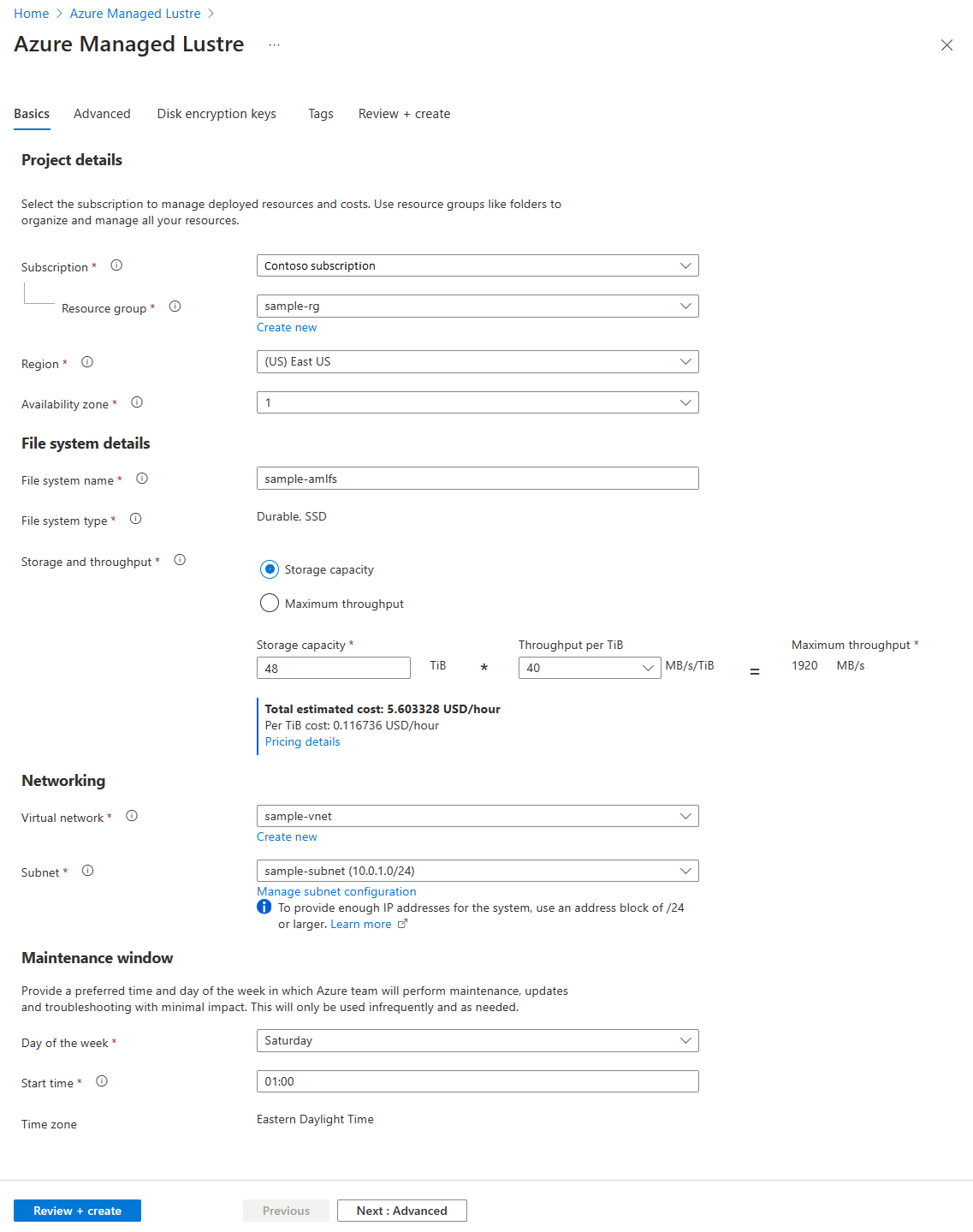
Microsoft currently publishes four Azure Managed Lustre performance points: 40, 125, 250 and 500 MB/s per TiB. Pricing is pay-as-you-go and is based on the file-system performance tier and provisioned capacity, with rates varying by Azure region, agreement and currency. Microsoft does not present one universal monthly product price, so buyers should price the intended region and capacity rather than extrapolating from one example.
The important tradeoff is that performance and storage sizing are linked. Higher MB/s-per-TiB tiers are intended for more demanding jobs and cost more than lower-throughput configurations. For bursty HPC or AI projects, teams should compare the cost of keeping the file system provisioned against recreating it for active compute windows and using Blob Storage as the longer-term data tier.
How does Azure Blob Storage integration work?
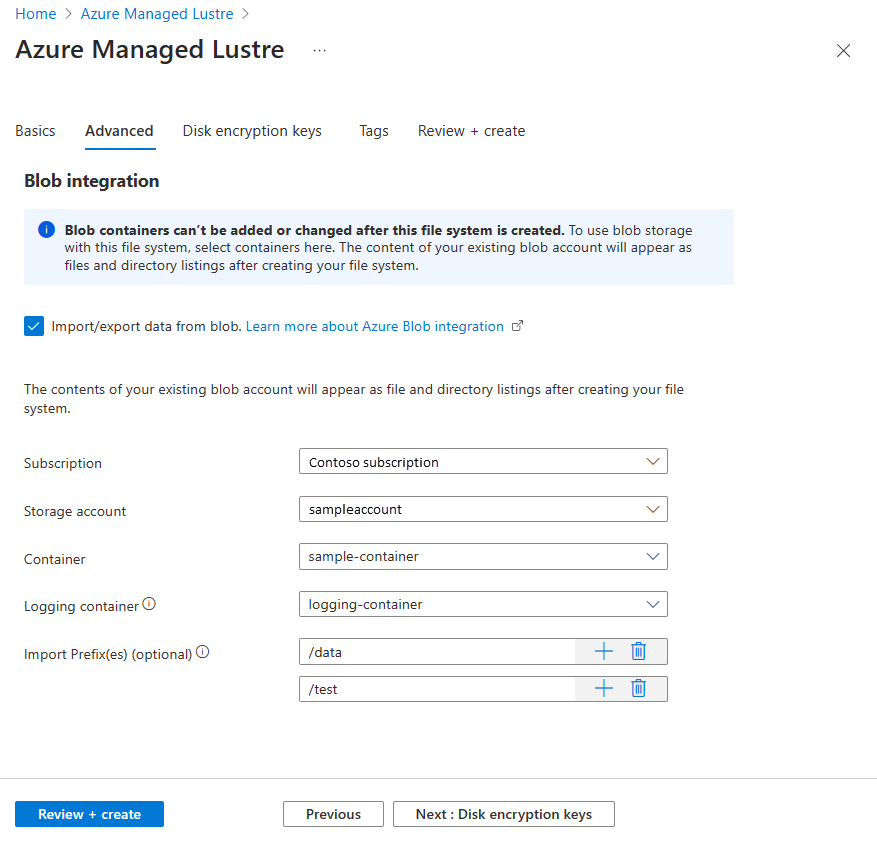
Azure Managed Lustre can integrate with Azure Blob Storage during file-system creation and through later import and export jobs. Microsoft explains that an import can first populate the Lustre namespace and metadata while the actual blob content is pulled into the file system when a client accesses the file for the first time. Teams can also prefetch data when they want to avoid that first-access delay.
Export jobs copy new or modified file contents back to Blob Storage for longer-term storage. Microsoft currently allows only one import or export action at a time. This integration is useful when Blob Storage is the durable lower-cost data layer and Lustre is the hot performance tier used while compute jobs are active. It also means architects need to understand how file metadata, hard links, naming rules and synchronization behavior translate between POSIX Lustre and object storage.
What networking and client requirements should teams plan for?
Azure Managed Lustre uses a customer-provided Azure virtual network and subnet. Microsoft states that the subnet size depends on file-system capacity, and current guidance ranges from a /27 or larger for smaller 4-16 TiB configurations through a /23 or larger for 200-400 TiB configurations. Azure Managed Lustre and Azure NetApp Files cannot share the same subnet.
Lustre clients must use supported Linux configurations and need network access to the Lustre ports documented by Microsoft. Current client guidance also distinguishes prebuilt kernel modules from DKMS-compiled modules. Prebuilt modules are the simpler production choice when supported, especially for Trusted Launch and Secure Boot scenarios, while DKMS can be useful when kernel versions change frequently but can require additional Secure Boot key handling.
How does Azure Managed Lustre fit with AKS and Azure Machine Learning?
Microsoft explicitly positions Azure Managed Lustre for use with services such as Azure Kubernetes Service, Azure Machine Learning and Azure HPC compute environments. For Kubernetes, Microsoft provides an Azure Managed Lustre CSI driver so containerized workloads can mount the file system through standard storage integrations rather than treating Lustre as an external unmanaged appliance.
For AI training, the attraction is feeding expensive GPU or accelerator clusters quickly enough that storage does not become the main source of idle time. Microsoft's July 2026 checkpoint guidance uses the 500 MB/s-per-TiB tier to illustrate very high checkpoint write throughput and also describes Blob Storage as a slower durable archive tier behind the active Lustre layer.
What should teams know about Blob import and export limits?
Blob integration is useful but it is not a transparent bidirectional database synchronization system. Microsoft currently permits only one import or export action at a time. Export jobs copy new or content-modified files, while metadata-only changes are not treated the same way and file deletions in Lustre do not automatically delete the original blob during an export job.
Microsoft currently documents Blob restore throughput of about 7.5 GiB/s by default. Teams with very large data sets should therefore plan staging and restore time separately from the much higher aggregate throughput available once data is resident in the Lustre file system. Active workloads can also change files while an export job is running, which may require retries to reach a clean final archive state.
What are the main operational limitations?
Azure Managed Lustre is specialized infrastructure and carries more workload constraints than a general managed file-share service. It is Linux and Lustre oriented, requires a planned subnet, and depends on supported client operating systems and kernels. Microsoft also states that Azure Managed Lustre accepts IPv4 addresses only. Current prerequisites require explicit outbound connectivity from the subnet under Azure's newer private-subnet defaults.
Blob integration also has storage-account prerequisites, access-role requirements and network-access requirements. If a workload needs Windows-native SMB, broad mixed-client support, built-in enterprise file-management features or a simple low-throughput shared file system, another Azure storage service may require substantially less operational planning.
How does Azure Managed Lustre compare with Azure NetApp Files and Azure Files?
Azure Managed Lustre should be compared with Azure NetApp Files and Azure Files based on workload behavior rather than assuming all three are interchangeable file services. Managed Lustre is optimized for massively parallel HPC and AI I/O and native Lustre applications. Azure NetApp Files is aimed at enterprise NFS, SMB and dual-protocol workloads that need advanced data-management and low-latency file services. Azure Files is the more general-purpose managed SMB and NFS option for application shares, lift-and-shift file servers and broad platform integration.
If the workload's main requirement is maximum parallel throughput for many compute nodes, Lustre can be the better fit. If the priority is enterprise file-service features, Windows access, easier mixed-protocol use or simpler general-purpose shared storage, the alternatives often make more sense.
Who should choose something else?
Choose something else if the workload does not genuinely need Lustre-scale parallel file throughput. Azure Files is usually simpler for SMB-based applications, user shares and many lift-and-shift workloads. Azure NetApp Files is often a better fit for enterprise NFS or SMB applications that need advanced file-management capabilities. Azure Blob Storage is more economical for durable object data that does not require a mounted POSIX file system, while Azure Managed Disks fit block-storage requirements attached to virtual machines.
Teams should also avoid choosing Managed Lustre only because it is fast on paper. The file system should be matched to an HPC, AI or analytics application that can exploit parallel I/O and whose compute cost justifies the storage architecture. Client support, subnet design, capacity, active lifetime and Blob staging strategy should all be reviewed before committing.
Reviews
No reviews yet
Nobody has reviewed Azure Managed Lustre here yet.