About Azure Managed Instance for Apache Cassandra
Azure Managed Instance for Apache Cassandra is Microsoft's managed Azure service for running native open-source Apache Cassandra clusters while Microsoft operates the underlying Azure infrastructure and many routine database operations. It is aimed at teams that need real Cassandra behavior, familiar drivers and operational compatibility, including hybrid rings that extend existing Cassandra environments into Azure. It is different from Azure Cosmos DB for Apache Cassandra, which exposes Cassandra-compatible APIs on the Cosmos DB platform rather than running a native Cassandra cluster.
What is included
Platform
| Database engine | Native open-source Apache Cassandra |
|---|---|
| Current documented Cassandra support | Apache Cassandra versions through 5.0 |
Availability
| Availability zones | Supported in eligible regions; zone deployment depends on regional VM capacity |
|---|---|
| SLA scope | Production datacenters; OS, Cassandra process and hardware failures within Microsoft's stated scope |
Operations
| Default snapshot backup schedule | Every 24 hours with up to 2 days retention; policy can be adjusted |
|---|---|
| Restore workflow | Support-assisted restore from an existing backup |
Security
| Customer-managed keys | Supported for managed disks and backup storage through Azure Key Vault |
|---|
Deployment
| Hybrid support | Azure datacenters can join supported on-premises or externally hosted Cassandra rings |
|---|
Pricing
| Model | Instance-based compute plus storage; no separate Cassandra licensing fee |
|---|---|
| Backup storage | First two stored backup copies included; additional copies may incur storage charges |
Preview
| Write-through caching | Public preview on supported L-series tiers; no SLA and not recommended for production |
|---|
What is Azure Managed Instance for Apache Cassandra used for?
The service is designed for organizations already using Apache Cassandra or applications that depend on Cassandra's distributed wide-column model, replication behavior and native tooling. Microsoft manages cluster and datacenter provisioning, node scaling, operating system maintenance, Cassandra patching, node health monitoring, certificate rotation, vulnerability scanning, virus scanning and snapshot backups.
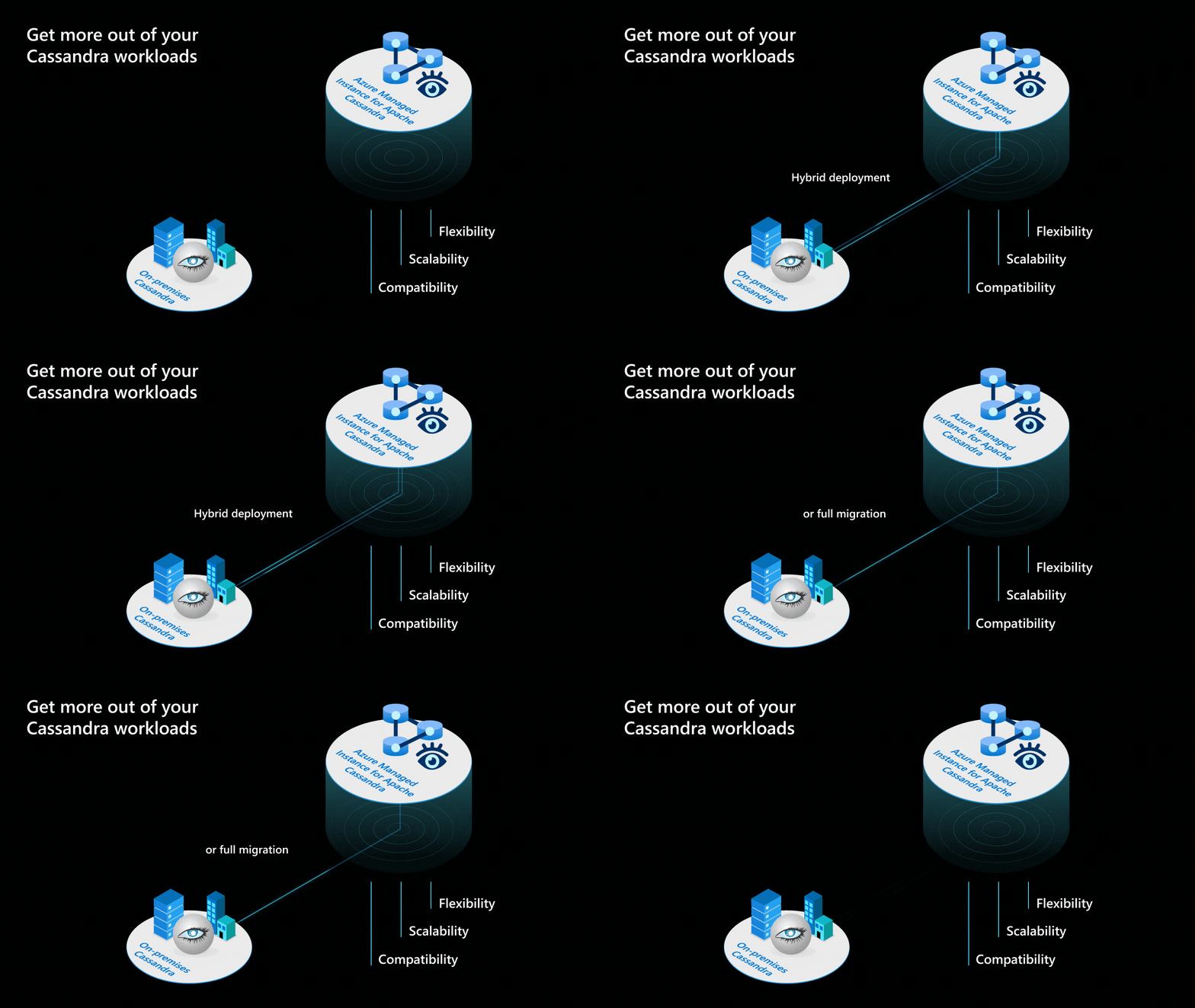
It can also support migration and hybrid designs. Azure-hosted Cassandra datacenters can join an existing ring that includes Cassandra running on-premises or in another cloud, provided the required network connectivity and permissions are configured. This lets teams extend capacity into Azure or migrate gradually instead of rebuilding the whole data layer in one step.
Which Cassandra versions and VM choices are supported?
Microsoft's current documentation states that the service supports Apache Cassandra versions through 5.0. The exact VM sizes available depend on the deployment path and region. Microsoft's current CLI quickstart lists E-series v5 sizes such as Standard_E8s_v5, Standard_E16s_v5, Standard_E20s_v5 and Standard_E32s_v5 for new datacenter deployments.
Microsoft also documents L-series VM product tiers with locally attached NVMe storage for write-through caching in public preview. Microsoft does not provide an SLA for that preview capability and does not recommend it for production workloads. Buyers should treat preview performance features separately from generally available production commitments.
How does deployment, scaling and availability work?
Managed Cassandra datacenters are deployed into Azure virtual networks and use private networking rather than public node IP addresses. Microsoft supports horizontal scaling by changing node count and vertical scaling by changing the VM SKU. Additional datacenters can be deployed in other Azure regions when network connectivity and permissions are prepared.
Availability zones can be enabled in supported regions, and Microsoft states that using availability zones increases the availability SLA. However, zone-enabled deployment also depends on the selected VM capacity being available across all required zones. A deployment can fail if the region or VM size does not support the requested zone configuration.
What does Microsoft's SLA actually cover?
Microsoft's June 2026 shared-responsibility guidance makes the boundary clearer than a generic uptime statement. Microsoft provides SLA-backed availability for production datacenters and covers the operating system, Cassandra process and hardware failures within that scope.
The SLA does not cover workload problems caused by CPU, disk, memory or network saturation, and it does not guarantee application-level query latency or API performance. Non-production or deallocated clusters and datacenters are not covered by the production SLA. Buyers therefore still need capacity planning, monitoring and application resilience even though the infrastructure is managed.
How do backups and restores work?
Snapshot backups are enabled by default. Microsoft currently documents a default schedule of every 24 hours with retention for up to two days. The backup interval and retention policy can be changed in the Azure portal. The first two stored backup copies are included without an additional backup-storage charge, while extra retained copies can add storage cost.
Restores are support-assisted rather than self-service. To restore from an existing backup, the customer files an Azure support request and supplies the backup ID and other required details. Microsoft also warns that these snapshots are intended for accidental-deletion recovery and should not be treated as a complete regional disaster-recovery strategy. Multi-region Cassandra design is still needed for regional resilience.
How are customer-managed keys handled?
Microsoft supports customer-managed keys for both managed disks and backup storage through Azure Key Vault. Current Microsoft documentation shows separate parameters for managed-disk and backup-storage customer key URIs when creating or updating a datacenter, so the older claim that customer-managed keys are not supported for backups is no longer accurate.
The key vault must be configured correctly, including required access for the managed Cassandra identity and purge protection. Buyers using customer-managed encryption should test deployment and key-rotation procedures before production because key access is part of the service's ability to read encrypted data and backups.
How does networking and hybrid connectivity work?
The service is designed around Azure virtual networks. Cassandra nodes do not require public IP addresses, and hybrid clusters can connect Azure-hosted datacenters with Cassandra running elsewhere. Microsoft documents Azure ExpressRoute as one connectivity option for hybrid deployments, along with other supported private networking approaches.
Customers remain responsible for external or on-premises Cassandra datacenters in a hybrid ring. Microsoft operates the Azure-hosted managed datacenters, but it does not take over the health, patching or capacity of Cassandra nodes outside the managed service. That shared-responsibility line matters when planning incidents, repairs and upgrades across a mixed environment.
How does pricing work?
Pricing was checked on August 31, 2026. Microsoft describes Azure Managed Instance for Apache Cassandra as instance-based with no separate Cassandra licensing fee. Cost is driven by the VM SKU, node count, attached disk resources and related Azure networking or infrastructure services.
Microsoft's current pricing page lists E-series and L-series VM families and bills disk storage separately from compute. Premium SSD resources are priced separately, and the first two stored backup copies are included while additional copies can incur backup-storage charges. Because regional prices, contracts and currency conversion vary, a single global monthly figure would be misleading.
How does it compare with Azure Cosmos DB for Apache Cassandra?
Azure Managed Instance for Apache Cassandra runs native open-source Cassandra. Azure Cosmos DB for Apache Cassandra provides Cassandra-compatible APIs on top of the Cosmos DB platform. That architectural difference affects operations, compatibility and how much of the Cassandra platform the customer expects to preserve.
Managed Instance is the stronger fit when teams need native Cassandra behavior, hybrid ring support or familiar Cassandra administration patterns. Cosmos DB for Apache Cassandra can be a better fit when the priority is a more abstracted globally distributed database service and the application can accept the differences between Cosmos DB and native Cassandra.
What are the main limitations and operational tradeoffs?
Managed does not mean fully hands-off. Customers still own schema design, partition-key choices, replication design, client behavior, capacity planning, query performance and application resilience. Microsoft explicitly excludes resource saturation and application-level failures from the SLA, so poor workload design can still create outages or latency even when the managed platform is healthy.
Backups are support-restored rather than self-service, default retention is short, and region or VM availability can constrain design choices. Hybrid environments add operational coordination because Microsoft manages only the Azure-hosted Cassandra datacenters. Preview features such as write-through caching should also be kept out of critical production paths unless the team accepts preview support terms.
Who should choose something else?
Choose Azure Cosmos DB for Apache Cassandra when a more fully abstracted managed database is more important than native Cassandra behavior. Choose self-managed Apache Cassandra on Azure Virtual Machines when the team requires operating-system access, unrestricted server configuration, custom patch timing or full control over every part of the database stack.
Choose another database model when the workload does not benefit from Cassandra's distributed wide-column design. Relational applications may fit Azure SQL Database or Azure Database for PostgreSQL better, while other globally distributed document or key-value workloads may align with different Cosmos DB APIs. The right choice depends on compatibility, operational control, resilience requirements and the skills available to run the system.
Reviews
No reviews yet
Nobody has reviewed Azure Managed Instance for Apache Cassandra here yet.