About Azure Managed Disks
Azure Managed Disks is Microsoft Azure's managed block storage service for Azure Virtual Machines. Instead of creating and maintaining storage accounts for individual virtual hard disks, teams choose a disk type, capacity, performance profile and redundancy model while Azure manages the underlying storage placement. Managed Disks are used for operating system disks, persistent data disks and selected shared-disk scenarios. The main buying decision is which disk type, performance level, redundancy and protection model fits the workload without paying for unused capacity or I/O.
What is included
Disk types
| Managed disk options | Ultra Disk, Premium SSD v2, Premium SSD, Standard SSD and Standard HDD. |
|---|
Performance
| Ultra Disk maximums | Up to 64 TiB, 400,000 IOPS and 10,000 MB/s per disk in supported configurations. |
|---|---|
| Premium SSD v2 maximums | Up to 64 TiB, 80,000 IOPS and 2,000 MB/s per disk in supported configurations. |
| Performance tuning | Ultra Disk and Premium SSD v2 performance can be adjusted up to four times in a 24-hour period. |
| Performance plus | Eligible Premium SSD, Standard SSD and Standard HDD disks of 513 GiB or larger can use performance plus without an extra feature charge. |
Availability
| Managed availability | Microsoft states managed disks are designed for 99.999% availability. |
|---|
Redundancy
| ZRS support | ZRS is supported with Premium SSD and Standard SSD managed disks, but not Premium SSD v2 or Ultra Disk. |
|---|
Recovery
| Snapshots and Azure protection | Supports managed disk snapshots, incremental snapshots, Azure Backup, restore points and Azure Site Recovery in supported scenarios. |
|---|
Security
| Encryption at rest | Managed disks are encrypted at rest by default and can use customer-managed keys through disk encryption sets. |
|---|
Clustering
| Shared managed disks | Ultra Disk, Premium SSD v2, Premium SSD and Standard SSD support shared-disk scenarios, subject to disk-specific limits. |
|---|
Lifecycle
| Standard HDD OS disks | Standard HDD OS disk support retires September 8, 2028. |
|---|
Pricing
| Disk and performance billing | Pricing depends on disk type, provisioned capacity and, for selected disk types, provisioned IOPS and throughput plus related usage meters. |
|---|
What are Azure Managed Disks used for?
Azure Managed Disks provide persistent block storage for Azure virtual machines and related IaaS workloads. Microsoft describes them as virtualized disks that behave like physical disks attached to a server while Azure handles the underlying storage account management. Teams use managed disks for VM operating systems, application data, databases, development environments and workloads that need direct block storage rather than a file share or object store.
Managed disks are tightly connected to Azure Virtual Machines, but they are a separate product decision because disk type and performance can materially affect application responsiveness and cost. A VM that is sized correctly for CPU and memory can still perform poorly if the attached disk cannot deliver the required IOPS or throughput.
Which Azure Managed Disk types should buyers compare?
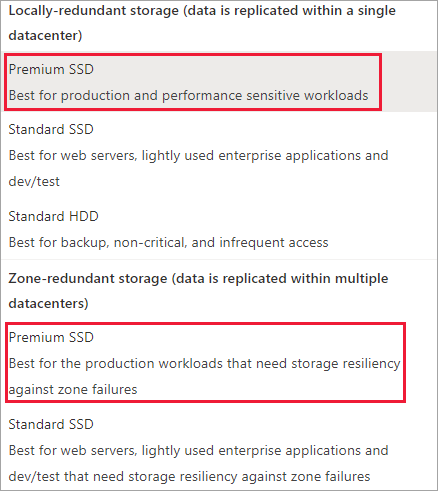
Microsoft currently documents five managed disk types: Ultra Disk, Premium SSD v2, Premium SSD, Standard SSD and Standard HDD. Ultra Disk targets the most demanding I/O-intensive workloads, including top-tier databases and other transaction-heavy systems. Premium SSD v2 is designed for production and performance-sensitive workloads where capacity, IOPS and throughput need to be tuned independently.
Premium SSD uses predefined size and performance tiers and remains a common production choice. Standard SSD is aimed at lighter production, web, enterprise application and development workloads that benefit from SSD latency without Premium pricing. Standard HDD is the lowest-cost option for latency-tolerant, infrequently accessed or sequential workloads. Standard HDD OS disk support retires on September 8, 2028, so new long-lived VM designs should plan for SSD-based OS disks.
How much performance can Ultra Disk and Premium SSD v2 provide?
Microsoft's current disk-type documentation lists Ultra Disk at up to 64 TiB per disk, 400,000 IOPS and 10,000 MB/s throughput. Ultra Disk performance scales with provisioned IOPS, and Microsoft states the maximum throughput is 0.25 MB/s for each provisioned IOPS up to the 10,000 MB/s ceiling. Ultra Disk cannot be used as an operating system disk.
Premium SSD v2 also supports up to 64 TiB per disk, with up to 80,000 IOPS and 2,000 MB/s throughput. It includes 3,000 baseline IOPS and 125 MB/s baseline throughput, with additional provisioned performance billed separately. Buyers should still check the selected VM's own storage IOPS and throughput limits because the VM can become the bottleneck before the disk reaches its maximum.
How often can disk performance be changed?
Ultra Disk and Premium SSD v2 let teams adjust provisioned performance without moving to a different fixed size tier. Microsoft currently allows up to four performance adjustments during a 24-hour period. Creating a new disk counts as one of those operations, so during the first 24 hours a newly created disk can normally be adjusted only three additional times.
Microsoft notes that an Ultra Disk performance change can take up to an hour to take effect and can fail if sufficient performance bandwidth capacity is unavailable. This means dynamic tuning is useful, but it should not be treated as an instantaneous autoscaling mechanism for unpredictable bursts.
What does performance plus change for Standard and Premium disks?
Microsoft offers performance plus for eligible Premium SSD, Standard SSD and Standard HDD managed disks of 513 GiB or larger. It raises eligible IOPS and throughput ceilings without an additional feature charge. This can help workloads that outgrow the normal limits of a fixed disk tier but do not require Ultra Disk or Premium SSD v2.
For Standard HDD, Microsoft's current tables show expanded IOPS of up to 3,000 on eligible larger disks, compared with lower base limits. Performance plus should still be evaluated with the VM-level storage ceiling because enabling higher disk limits does not raise the attached VM's own I/O capacity.
How do pricing and billing work?
Managed Disks do not have one fixed monthly price. Microsoft bills according to disk type, provisioned capacity and, for selected products, separately provisioned IOPS and throughput. Premium SSD and Standard tiers commonly use size-based SKUs, while Premium SSD v2 and Ultra Disk expose more independent performance configuration. Standard SSD and Standard HDD can also include transaction-related charges, and shared-disk mounts or snapshots can create additional meters.
Pricing was rechecked against Microsoft's Managed Disks pricing page on September 4, 2026. Ultra Disk is billed for provisioned size, IOPS and throughput. Premium SSD v2 is also priced from provisioned capacity, IOPS above the included baseline and throughput above the included baseline. Buyers should model snapshots, data transfer, shared mounts and bursting where relevant instead of comparing only the disk's base capacity price.
What availability and redundancy options are available?
Microsoft states that managed disks are designed for 99.999 percent availability. Azure also provides locally redundant and zone-redundant choices for supported disk types. ZRS synchronously replicates data across three availability zones and Microsoft documents at least twelve nines of annual durability for ZRS managed disks.
The redundancy choice is not available on every disk type. ZRS for managed disks is currently supported with Premium SSD and Standard SSD, but not with Premium SSD v2 or Ultra Disk. ZRS can add write latency compared with LRS, so teams should benchmark latency-sensitive workloads instead of assuming the more resilient option has no performance tradeoff. Force detach for ZRS recovery supports data disks only.
How do snapshots, backup and disaster recovery fit together?
Managed disk snapshots are read-only point-in-time copies that exist independently from the source disk and can be used to create new managed disks. Microsoft also supports incremental snapshots, Azure Backup, restore points and Azure Site Recovery in supported scenarios. These tools solve different recovery problems and should not be treated as interchangeable.
Snapshots are useful for disk-level recovery and operational workflows, but they do not automatically coordinate application consistency across multiple striped disks. Azure Backup adds policy-driven protection and retention, while Site Recovery addresses replicated disaster-recovery scenarios. Teams should define recovery point and recovery time objectives first, then choose the protection method.
How are managed disks encrypted and secured?
Azure Managed Disks are encrypted at rest by default with Azure Storage server-side encryption. Microsoft also supports customer-managed keys through disk encryption sets for organizations that need more control over encryption keys. Encryption at host is another VM-level option that extends protection to temporary disks and disk caches and keeps data encrypted as it moves from the host into Azure Storage.
Export and import operations, snapshot access, role assignments and customer-managed key permissions still require careful control. Microsoft has announced Azure Disk Encryption retirement for September 15, 2028 and recommends planning newer encryption approaches such as encryption at host where they meet the workload's requirements.
When should teams use shared managed disks?
Azure shared disks allow one managed disk to be attached to multiple virtual machines at the same time for clustered applications that expect shared block storage. Microsoft currently supports shared-disk scenarios on Ultra Disk, Premium SSD v2, Premium SSD and Standard SSD. The application still needs cluster software such as Windows Server Failover Cluster or Pacemaker to coordinate access.
Shared managed disks are not a managed SMB or NFS file service. Host caching and write accelerator are not supported on shared disks. Microsoft also states that shared disks can attach to individual Virtual Machine Scale Set instances but cannot be defined in a scale set model for automatic deployment. Premium SSD shared disks can add a per-mount charge, while shared Ultra Disk and Premium SSD v2 are billed from their configured performance rather than an extra per-VM mount fee.
What are the main limitations and migration tradeoffs?
Managed Disks simplify storage administration, but teams still need to understand VM-level throughput ceilings, regional availability, attachment limits, caching behavior, redundancy restrictions and disk-type feature differences. Ultra Disk and Premium SSD v2 cannot be OS disks, and neither currently supports ZRS. A disk capable of very high IOPS will not deliver that performance if the selected VM size has a lower storage limit.
Migration planning should include disk sizing, OS disk requirements, encryption, snapshots, availability zones and application downtime. Moving a legacy server to Azure without measuring its actual storage workload can lead to overspending or poor performance. Teams should benchmark representative reads and writes and use Azure Monitor after migration to right-size both VM and disk performance.
Who should choose something else?
Choose Azure Files when applications need a managed SMB or NFS file share rather than block storage attached to a VM. Choose Azure Blob Storage for object data, media, archives or application content accessed through object APIs. Large environments that want pooled SAN-style block storage across many workloads should also compare Azure Elastic SAN where its regional availability and architecture fit.
Azure Managed Disks are strongest when a workload runs on Azure Virtual Machines and needs persistent block storage with clear capacity, performance and resilience choices. Teams operating mostly container-native or platform-managed services may not need to manage VM disks directly, while applications requiring shared file semantics should use a file service instead of building around shared block devices.
Reviews
No reviews yet
Nobody has reviewed Azure Managed Disks here yet.