About Azure Logic Apps
Azure Logic Apps is Microsoft's managed workflow and integration service for connecting applications, APIs, data, events and business processes. It is designed for orchestration rather than general-purpose application hosting: teams build workflows from triggers, actions, connectors, control flow, optional custom code and, in newer scenarios, AI agent loops. Microsoft currently offers multitenant Consumption workflows and single-tenant Standard workflows, with Standard also available through App Service Environment v3 and a hybrid deployment model. The right model depends on execution pattern, isolation, networking, connector requirements, infrastructure ownership, AI requirements and cost predictability.
What is included
Hosting
| Consumption | Multitenant workflow model with pay-per-execution billing. |
|---|---|
| Standard | Single-tenant runtime supporting multiple stateful or stateless workflows in one logic app resource. |
Integration
| Connectors | Microsoft documents more than 1,400 prebuilt connectors across Microsoft, Azure and third-party services. |
|---|
AI
| Agentic workflows | Supports agent loops that combine LLM reasoning with Logic Apps tools; Consumption agentic workflows are currently preview. |
|---|
AI integration
| Remote MCP server | Standard Logic Apps can expose workflows as remote MCP tools in preview. |
|---|
Enterprise integration
| B2B and EDI | Integration Accounts support schemas, maps, certificates and trading-partner agreements. |
|---|
Deployment
| Hybrid option | Standard workflows can run on customer-controlled infrastructure through an Azure Container Apps extension on Azure Arc-enabled AKS. |
|---|
Limits
| Actions per workflow | Up to 500 actions per workflow. |
|---|---|
| Action nesting depth | Up to 8 nested actions. |
| Single trigger or action payload | Up to 105 MB input or output; 210 MB combined input and output for a single action. |
Runtime
| Run duration | Multitenant: 90 days; Standard stateful: 90 days by default; Standard stateless: 5 minutes by default. |
|---|---|
| Run-history retention | 90 days by default. |
What is Azure Logic Apps used for?
Azure Logic Apps is aimed at integration and process automation that spans more than one system. Common patterns include moving data between SaaS applications, reacting to events, coordinating approvals and notifications, calling APIs, processing files, connecting cloud applications to on-premises systems and orchestrating longer business processes.
Microsoft documents more than 1,400 prebuilt connectors across Azure, Microsoft and third-party services. Connector availability and behavior still vary by plan, region and connector type, so production designs should verify the exact operations, authentication method, network path and throttling limits they depend on.
How do Consumption and Standard Logic Apps differ?
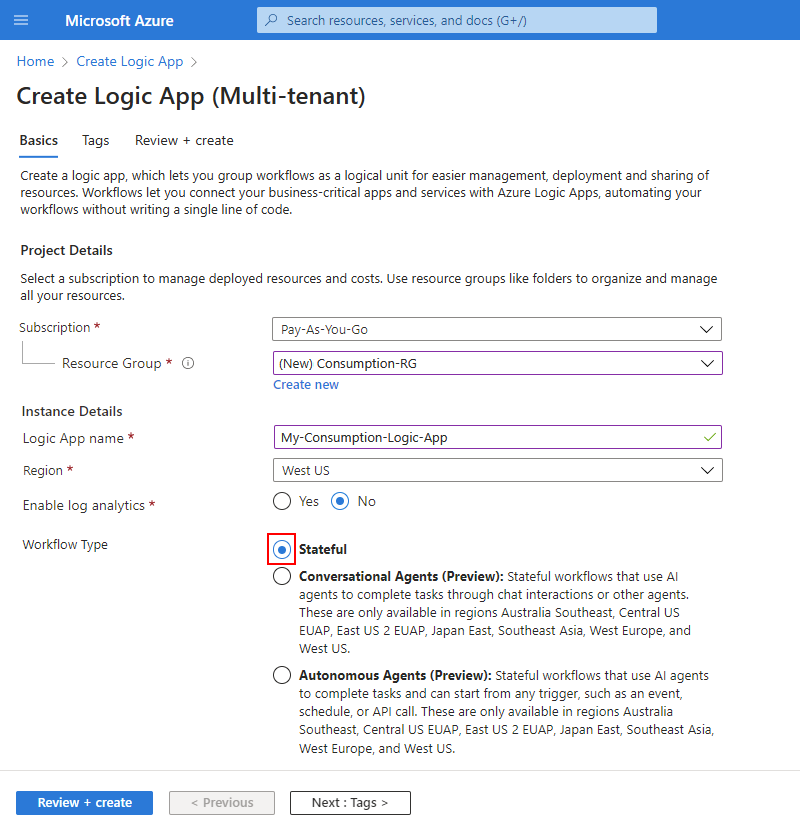
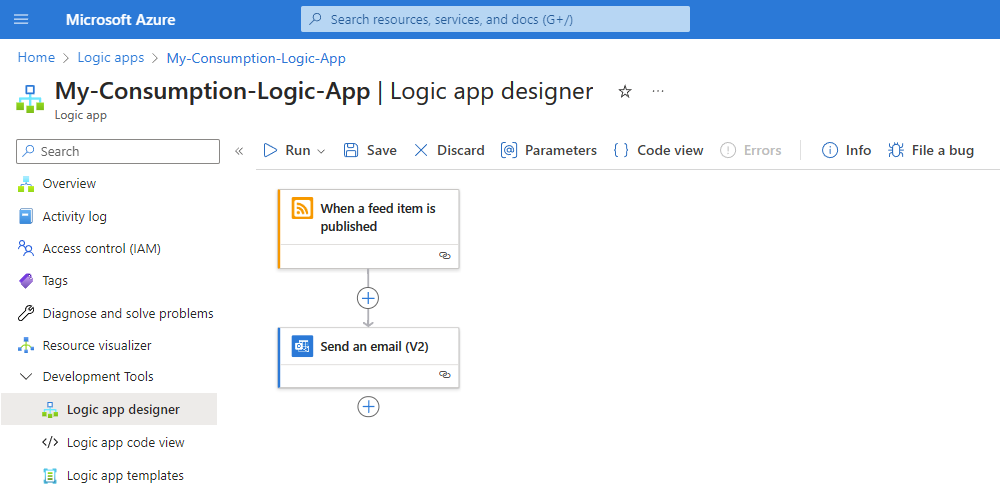
Consumption workflows run in multitenant Azure Logic Apps and use pay-per-execution billing. A Consumption logic app resource contains one workflow and suits event-driven or intermittent automation where teams want Azure to operate the runtime without reserving dedicated workflow compute.
Standard Logic Apps run in the single-tenant runtime and can contain multiple stateful and stateless workflows in one resource. Standard supports Workflow Service Plan hosting, App Service Environment v3 on Windows plans, and hybrid deployment. Microsoft also documents stronger virtual-network integration, private endpoints, custom built-in connectors and more runtime tuning for Standard than for the multitenant model.
What are agentic workflows in Azure Logic Apps?
Microsoft documents AI agentic workflows in Azure Logic Apps. An agent loop can use a large language model to interpret a request, choose tools, take actions, evaluate results and continue through multiple steps. Microsoft supports both autonomous and conversational patterns, allowing workflows to combine deterministic Logic Apps actions with model-driven decisions.
Agentic workflows can use the Logic Apps connector ecosystem as tools, which gives agents access to business systems without requiring every integration to be coded from scratch. Microsoft states that the Consumption agentic workflow capability is currently in preview. Buyers should therefore treat preview status, model availability, governance, security and cost controls as design requirements rather than assuming agentic behavior is equivalent to a mature deterministic workflow.
How does Logic Apps work with Microsoft Foundry agents?
Microsoft's August 2026 documentation describes a preview integration between Standard Logic Apps and Microsoft Foundry agents. A workflow can invoke a Foundry agent from a trigger, expose connector actions as tools for the agent, or expose an entire request-response workflow as a tool that the agent can call.
This is useful when a business process needs both model reasoning and durable workflow behavior. For example, an agent can interpret a request while Logic Apps handles approvals, webhooks, long-running orchestration, retries and integration with enterprise systems. The capability is still preview, so production teams should validate supported regions, model requirements, authentication, observability and change risk before depending on it for critical workflows.
Can Azure Logic Apps expose workflows as MCP tools?
Standard Logic Apps can currently be configured as remote Model Context Protocol servers in preview. Microsoft documents a model where one Standard logic app can expose one or more workflows as MCP tools that external AI agents, LLM applications and MCP clients can discover and call.
The setup uses authentication through App Service Easy Auth and can generate API keys for MCP access. This provides a structured way to expose existing workflow actions to agent systems, but it is still a preview feature. Organizations should apply least-privilege access, protect secrets and endpoints, and keep preview compatibility risk in mind rather than exposing sensitive enterprise operations without governance.
How does Azure Logic Apps pricing work in September 2026?
Pricing was checked against Microsoft's current Azure pricing page on September 5, 2026. Consumption remains pay-as-you-go: trigger, action and connector executions are metered, and Microsoft currently includes the first 4,000 action executions before additional action charges apply. Connector calls are metered separately according to connector type and call volume, so the number of connector calls can differ from the number of workflow actions.
Standard is capacity-based through its hosting plan rather than a pure per-action model. The pricing page also lists a separate vCPU meter for the Logic Apps Hybrid Deployment Model. Microsoft currently lists agentic capabilities with usage-based token pricing of $1.80 per 1 million input tokens and $14 per 1 million output tokens. These token charges are separate from workflow, connector, hosting, storage, networking and related Azure service charges, so teams should model both workflow activity and model usage for agentic designs.
What does the current hybrid deployment model require?
Microsoft's July 9, 2026 hybrid deployment documentation says Standard workflows can run on customer-controlled infrastructure through the Azure Logic Apps runtime hosted as part of an Azure Container Apps extension. The infrastructure can be on-premises, in a private cloud or in a public cloud, which is useful when local processing, storage or network access is required.
The documented prerequisites include an Azure Kubernetes Service cluster connected to Azure Arc, a SQL database for local workflow run history, inputs and outputs, and an SMB file share for workflow artifacts. Those dependencies mean hybrid Logic Apps is not a serverless escape from infrastructure ownership. The customer still operates the underlying Kubernetes, database, storage and connectivity components.
What are the current limitations of hybrid Logic Apps?
Microsoft currently lists hybrid support in nine Azure regions: Central US, East Asia, East US, North Central US, Southeast Asia, Sweden Central, UK South, West Europe and West US. In partially connected mode, Microsoft says the runtime can remain disconnected for up to 24 hours while retaining data logs; logging data beyond that period might be lost.
The hybrid model also does not currently provide every capability available in hosted single-tenant Standard. Microsoft's current limitations include deployment slots, Azure Business Process Tracking and Azure portal Resource Health. Managed identity authentication for managed API connector operations is also not supported because Azure Arc-enabled Kubernetes clusters do not currently support that authentication path for those connections.
What B2B and EDI capabilities are available?
Logic Apps supports enterprise integration through Integration Accounts and related B2B and EDI capabilities. These can hold schemas, maps, certificates and trading-partner agreements used by workflows.
Microsoft's current pricing page distinguishes Basic, Standard and Premium bring-your-own-storage Integration Account tiers. It currently lists one EDI agreement and two trading partners for Basic, up to 1,000 agreements and 1,000 partners for Standard, and no stated limit for those two items in Premium. Buyers replacing legacy integration middleware should still verify protocol, message-size, throughput and mapping requirements rather than assume every older pattern maps directly to a low-code workflow.
What workflow and runtime limits matter in production?
Microsoft's current limits documentation sets several practical boundaries that should be checked before moving a workflow into production. A workflow can contain up to 500 actions, with an action nesting depth of 8. A single trigger or action has a documented maximum input or output size of 105 MB, while the maximum combined input and output size for a single action is 210 MB. Standard can change some defaults through host and app settings, but Microsoft still documents hard upper limits for several values.
Run duration also differs by model. Multitenant workflows have a 90-day run-duration limit. Standard stateful workflows default to 90 days, while Standard stateless workflows default to 5 minutes. Run-history retention defaults to 90 days. Microsoft warns that retention is calculated from the run start time and that run duration should not exceed the retention period, otherwise run history can disappear before related work completes. These limits matter for long-running approvals, very large payloads and deeply nested orchestration.
What are the main operational limitations?
Logic Apps reduces runtime administration but does not remove integration engineering. Connector throttling, workflow limits, payload size, concurrency, retry behavior and downstream API limits can all affect production reliability. Large workflows should be split deliberately rather than treating the 500-action ceiling as a design target, and teams should test connector-specific throttling and authentication behavior under expected production load.
Agentic workflows add another operational layer. Model outputs can vary, tools can be invoked unexpectedly if permissions are too broad, and model usage introduces token cost. Microsoft recommends authentication and authorization controls for conversational agentic workflows, including Easy Auth with Microsoft Entra ID for Standard scenarios. Teams should keep deterministic guardrails around sensitive actions and use least-privilege permissions for agent tools.
How does Logic Apps differ from Functions and Power Automate?
Azure Functions is a better fit when the core problem is custom code that should execute on demand or in response to events. Logic Apps is stronger when the primary requirement is orchestration across connectors, APIs and systems with a workflow model. The two can be combined, with a Logic App calling a Function for code-heavy steps.
Power Automate targets business-user and Microsoft 365 automation more directly, while Logic Apps is positioned for developers and integration teams working in Azure with networking, source control, deployment and enterprise integration requirements. Organizations using both should define ownership boundaries so the same automation is not rebuilt twice.
Who should choose something else?
Choose another service when the workload is mainly application hosting, container execution or custom compute. Azure App Service, Container Apps, AKS and Functions are more natural runtimes for application code. Event Hubs is better for high-volume retained event streams, while Service Bus is better for durable brokered messaging when a workflow engine is not required.
A small team automating only Microsoft 365 user tasks may find Power Automate simpler. A team with heavy transformation or domain logic may prefer code-first services. Organizations that need hybrid execution but do not want to operate Arc-enabled Kubernetes, SQL storage and file-share dependencies should compare a hosted Standard deployment. Teams that require a fully mature, non-preview agent platform should also account for the current preview status of several Logic Apps agentic and MCP capabilities.
Reviews
No reviews yet
Nobody has reviewed Azure Logic Apps here yet.