About Azure Load Testing
Azure Load Testing is Microsoft's managed service for application performance and scalability testing. It can create URL-based tests without scripting and can also run Apache JMeter and Locust test plans for more advanced scenarios. The service is designed for development, QA and platform teams that want repeatable load tests without building their own test-engine infrastructure.
What is included
Testing
| Quick test | URL-based HTTP load tests without writing a script |
|---|---|
| Script frameworks | Apache JMeter and Locust |
Operations
| CI/CD | Azure Pipelines, GitHub Actions and Azure CLI integration |
|---|
Monitoring
| Azure metrics | Azure Monitor integrations including Application Insights and Container insights where supported |
|---|
Networking
| Private targets | Supports private endpoints through virtual network connectivity |
|---|
Pricing
| Primary meter | Virtual User Hours (VUH) |
|---|---|
| Minimum usage rule | From March 1, 2026: at least 10 virtual users per engine, with a 10-minute minimum duration for shorter tests |
Data
| Residency | Microsoft states customer data is not stored or processed outside the region where the Load Testing resource is deployed |
|---|
What is Azure Load Testing used for?
Azure Load Testing is used to understand how an application behaves when many users or requests arrive at the same time. Teams can use it before a release, during capacity planning, after infrastructure changes, or as part of a regular performance engineering process. Microsoft documents support for web applications, REST APIs, JDBC database scenarios and TCP-based endpoints through the supported JMeter and Locust frameworks.
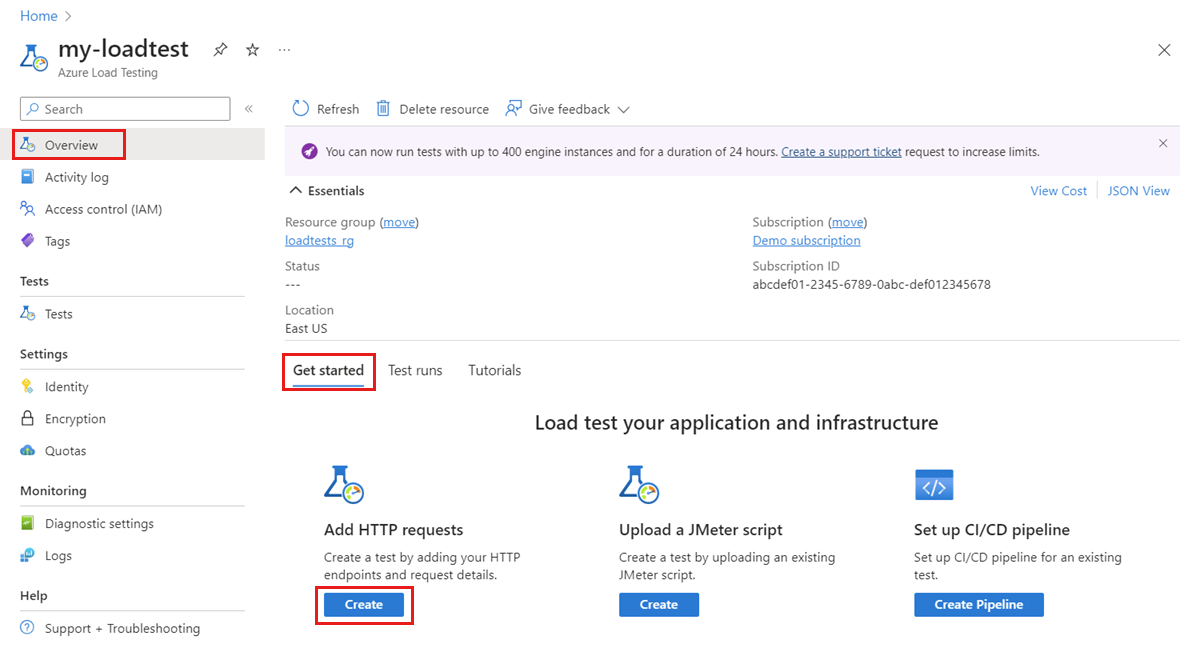
A simple URL-based test can be created directly in the Azure portal without writing a test script. For more complex flows, teams can upload JMeter or Locust tests, use test data and parameters, or rely on framework extensions where appropriate. That makes the service useful for both teams new to load testing and teams that already maintain mature performance-test assets.
How does Azure Load Testing run tests at scale?
Azure Load Testing provisions managed test-engine instances for the duration of a test. Each engine runs the configured workload and simulates virtual users against the target application. Teams can scale a test by increasing the number of engines and virtual users rather than provisioning and maintaining their own load-generation VMs.
The practical maximum request rate depends on the number of virtual users, application latency, the selected test framework and the test script itself. Microsoft therefore recommends monitoring engine health and test results rather than assuming one fixed requests-per-second figure applies to every workload. High-scale tests should be sized from measured behavior and increased gradually so the test harness itself does not become the bottleneck.
Which test types and frameworks are supported?
Azure Load Testing currently supports URL-based tests plus Apache JMeter and Locust for script-based testing. JMeter supports a wide range of protocols and can be extended with plugins. Locust uses Python and can also be extended with libraries and plugins. Microsoft currently states that Azure Load Testing does not support other test frameworks directly.
That limitation matters for teams standardized on another performance-test framework. They may need to translate tests to JMeter or Locust, keep their existing tooling, or use Azure Load Testing only for selected workloads. The managed service is most useful when its supported frameworks align with the team's existing engineering practices.
How does monitoring and bottleneck analysis work?
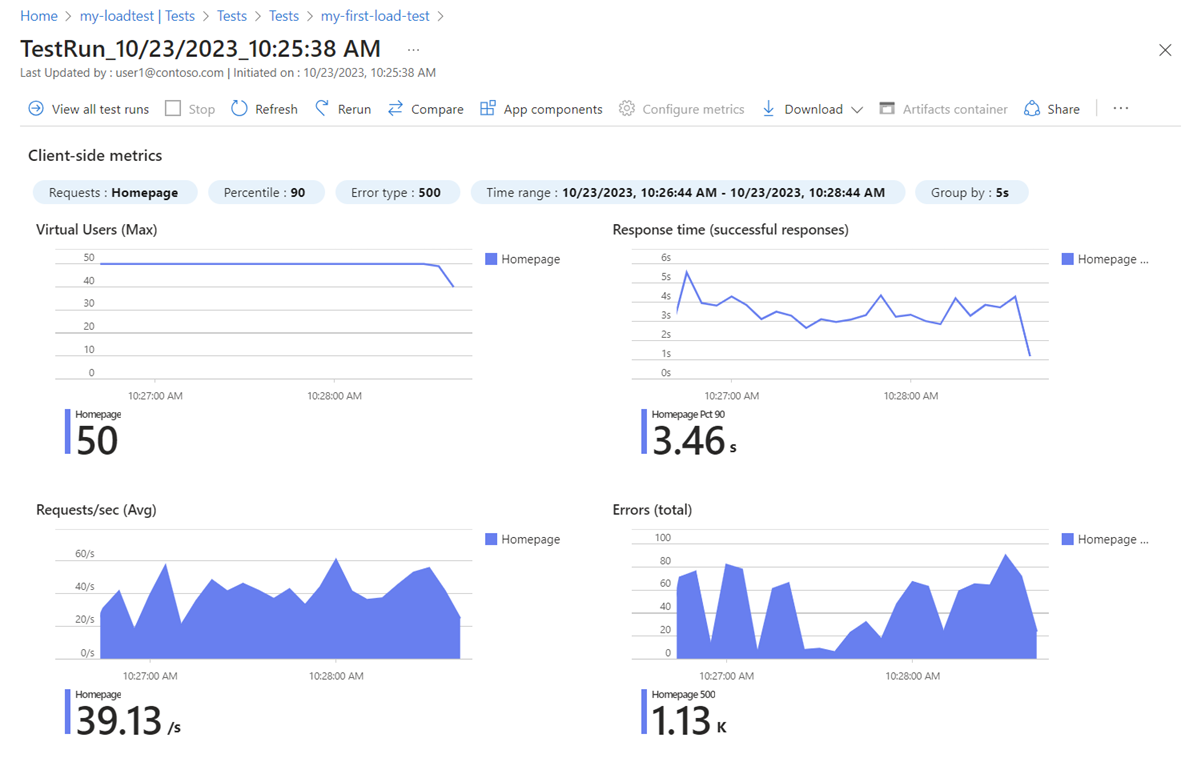
During a test, Azure Load Testing shows client-side metrics such as virtual users, response time, request rate and errors. For Azure-hosted applications, it can also collect server-side resource metrics through Azure Monitor integrations, including Application Insights and Container insights where supported.
This helps teams connect a slow request or error spike with resource behavior in the Azure components behind the application. Test history can also be compared across runs to identify regressions after code, configuration or infrastructure changes. The service can export test results for additional analysis outside the portal.
Can Azure Load Testing run in CI/CD?
Yes. Microsoft supports running Azure Load Testing from Azure Pipelines and GitHub Actions, and the Azure CLI can be used with other automation systems. Teams can define test fail criteria so a pipeline can detect performance or stability regressions before a release moves forward.
Microsoft also provides automatic stop behavior for selected error conditions, and JMeter tests can use an AutoStop listener. This is useful for controlling unnecessary cost when a test is clearly failing because of a bad endpoint, throttling or another configuration problem. Performance gates should still be tuned carefully so normal variance does not block healthy deployments.
Can it test private or non-Azure applications?
Azure Load Testing can target applications hosted in Azure, on premises or in other clouds. For targets without a public endpoint, Microsoft supports deploying the load-testing setup with virtual network connectivity so the managed engines can reach private application endpoints.
This is important for internal APIs, private platform services and preproduction systems that should not be exposed to the public internet only for testing. Network design, name resolution, routing and permissions still need to be configured correctly, so a private test can require more setup than a public URL-based test.
How is Azure Load Testing priced?
Pricing was checked on August 27, 2026. Microsoft currently bills Azure Load Testing primarily through Virtual User Hours, or VUH. One VUH represents one virtual user running for one hour, with fractional usage calculated from the number of active virtual users and test duration.
Microsoft introduced minimum usage rules from March 1, 2026. A test run is billed for at least 10 virtual users per engine for the test duration, and tests shorter than 10 minutes are billed using a minimum 10-minute duration for that rule. Actual paid rates vary by billing region, currency and agreement, so buyers should use the current Azure pricing page or calculator rather than relying on one universal dollar figure.
What are the main limitations and risks?
The most important limitation is framework support: Azure Load Testing currently centers on URL-based tests, Apache JMeter and Locust. Teams using other frameworks may face migration or duplication work. Test results can also be misleading when scripts, data, network paths or engine sizing do not represent real production behavior.
Load tests can create real downstream impact. A poorly scoped test might overload a shared staging dependency, trigger rate limits, consume paid resources, or create unexpected data. Teams should test only systems they own or are authorized to test, use isolated environments where appropriate, define stopping conditions and confirm that external dependencies can safely receive the planned traffic.
How does Azure Load Testing compare with self-hosted JMeter or Locust?
Self-hosting JMeter or Locust can give teams more control over the test infrastructure and may be economical when a mature internal platform already exists. The tradeoff is that teams must provision engines, coordinate distributed execution, collect results, secure the environment and maintain the supporting automation themselves.
Azure Load Testing removes much of that infrastructure work and adds Azure-native monitoring and CI/CD integration. It is a stronger fit when managed execution and Azure integration are more valuable than complete control over the test fleet. Teams with specialized protocols, custom network requirements or established performance labs should compare both approaches before standardizing.
Who should choose something else?
Choose another approach if your team relies on a performance-testing framework that Azure Load Testing does not support, needs complete control over test-engine hosts, or already operates a mature internal load-testing platform at lower cost. A lightweight local JMeter or Locust setup can also be enough for small tests that do not require managed scale or Azure integrations.
Azure Load Testing is most useful for teams that want repeatable managed performance tests, scalable test engines, Azure Monitor visibility, CI/CD integration and support for private or hybrid targets without maintaining a separate load-generation platform.
Reviews
No reviews yet
Nobody has reviewed Azure Load Testing here yet.