About Azure Load Balancer
Azure Load Balancer is Microsoft's Layer 4 load-balancing service for distributing TCP and UDP traffic across Azure virtual machines and virtual machine scale sets. It supports public and internal frontends, regional and global Standard Load Balancer scenarios, and Gateway Load Balancer for transparent network virtual appliance chains. Basic Load Balancer retired on September 30, 2025 and is no longer a supported foundation for new designs. Azure Load Balancer is best suited to low-latency network traffic distribution, not application-layer URL routing, TLS termination, or web application firewall functions.
What is included
Traffic
| OSI layer | Layer 4 load balancing for TCP and UDP traffic. |
|---|
Deployment
| Frontends | Supports public and internal load balancer scenarios. |
|---|
Availability
| Health probes | Standard supports TCP, HTTP and HTTPS probes; IPv4 probe traffic originates from 168.63.129.16. |
|---|---|
| IPv6 probe source | IPv6 health probes use the link-local source fe80::1234:5678:9abc and require appropriate NSG handling for dual-stack deployments. |
SKUs
| Current options | Standard Load Balancer and Gateway Load Balancer; Basic Load Balancer retired September 30, 2025. |
|---|
Networking
| HA ports | One HA-ports rule per internal frontend; public Load Balancers do not support HA ports. |
|---|---|
| Outbound access | Explicit outbound connectivity can use Load Balancer outbound rules, NAT Gateway, instance-level Standard public IP, or a firewall/NVA path. |
Scale
| Backend pool size | Up to 5,000 backend entries for Standard Load Balancer; Azure global Load Balancer backend pools support up to 300. |
|---|---|
| Frontend IP configurations | Up to 600 frontend IP configurations per Standard Load Balancer. |
| Rules per resource | Up to 1,500 combined load-balancing and inbound NAT rules per Standard Load Balancer resource. |
| SNAT capacity | Up to 64,000 usable ephemeral ports per frontend IP address for outbound rules. |
Lifecycle
| Inbound NAT Pools | VM Scale Sets inbound NAT Pools stop new creation November 15, 2026 and retire September 30, 2027. |
|---|---|
| Probe property | numberOfProbes support ends September 1, 2027; Microsoft directs customers to probeThreshold with API 2022-05-01 or later. |
What is Azure Load Balancer used for?
Azure Load Balancer is used when an application needs to distribute TCP or UDP flows across multiple backend instances while keeping network latency low. Common scenarios include internet-facing services behind a public frontend, private services behind an internal frontend, highly available virtual machine applications, and controlled outbound connectivity for backend instances.
The service works at Layer 4 of the OSI model. It does not inspect URLs, cookies, or application content. New flows are sent to healthy backend instances according to configured load-balancing rules and health probes. That makes it a better fit for raw TCP or UDP traffic than Azure Application Gateway or Azure Front Door, which operate at the HTTP and HTTPS application layer.
How does Azure Load Balancer distribute traffic?
Microsoft documents a tuple-based hashing algorithm for inbound flow distribution. By default, the service uses a five-tuple made from source IP, source port, destination IP, destination port, and protocol. Health probes determine which backend instances are eligible to receive new flows.
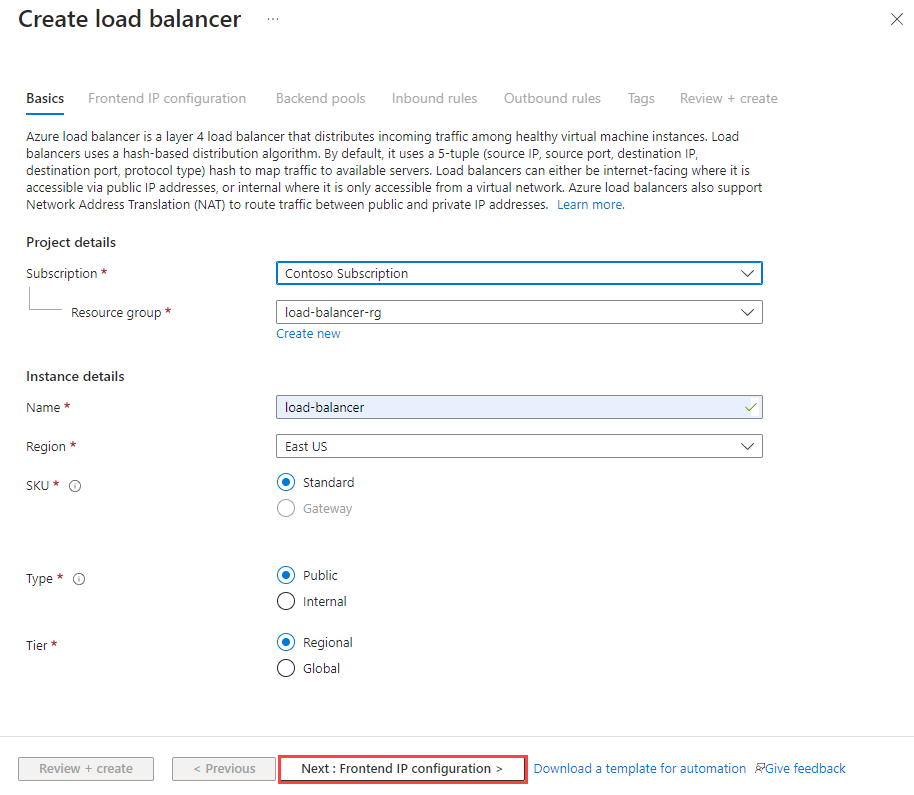
The main building blocks are frontend IP configurations, backend pools, health probes, load-balancing rules, inbound NAT rules, outbound rules, and high-availability ports. A public load balancer exposes an internet-facing frontend, while an internal load balancer keeps the frontend inside a virtual network for private or hybrid access.
Which Azure Load Balancer SKUs are current?
Microsoft currently documents Standard Load Balancer and Gateway Load Balancer as the active SKUs. Basic Load Balancer retired on September 30, 2025. Existing Basic Load Balancers can continue operating, but Microsoft states that they are unsupported and are not covered by SLA guarantees, so they should be upgraded instead of used for new architecture.
Standard Load Balancer is the general-purpose option for regional and global Layer 4 distribution. Gateway Load Balancer is intended for chaining third-party network virtual appliances such as firewalls, packet-inspection systems, intrusion-detection systems, VPN devices, or SD-WAN appliances. Gateway Load Balancer is not a replacement for Standard Load Balancer in ordinary application traffic scenarios.
What changed for outbound internet access in 2026?
Outbound design now needs to be explicit. Microsoft states that for Azure Resource Manager API versions released after March 31, 2026, new virtual networks default to private subnets. Virtual machines in those subnets do not receive default outbound access and need an explicit outbound method to reach the public internet or Microsoft endpoints. Existing virtual networks are not automatically changed.
Microsoft documents options including Azure NAT Gateway, a Standard Load Balancer frontend with outbound rules, an instance-level Standard public IP address, or a firewall or network virtual appliance reached through a user-defined route. NAT Gateway is Microsoft's recommended method for most outbound-only scenarios, while Load Balancer outbound rules remain useful when a workload already relies on Standard Load Balancer and needs controlled SNAT behavior.
How do outbound rules and SNAT limits work?
Outbound rules define how backend virtual machines use a Standard Load Balancer frontend for source network address translation. Teams can control which frontend public IP addresses are used, how SNAT ports are allocated, whether TCP or UDP is enabled, and how long idle outbound connections remain open.
Microsoft currently documents up to 64,000 usable ephemeral ports per frontend IP address. Additional frontend addresses can increase available SNAT capacity. Configurable outbound idle timeout ranges from 4 to 120 minutes. Outbound rules do not support ICMP, and they apply only when the backend virtual machine does not already have an instance-level public IP address. Connection-heavy workloads should size SNAT deliberately and use manual port allocation where appropriate rather than waiting for port exhaustion.
What should teams know about health probes in 2026?
Standard Load Balancer supports TCP, HTTP, and HTTPS health probes. Microsoft states that all IPv4 Load Balancer health probes originate from 168.63.129.16. Network security groups and local firewall policies must allow this source, and the AzureLoadBalancer service tag can be used in network security groups. IPv6 probes use the link-local source fe80::1234:5678:9abc. Dual-stack load balancers therefore also need network security group configuration that permits the IPv6 health probe.
Probe behavior also has limitations. HTTPS probes do not support mutual client-certificate authentication. HTTP probes do not support hostnames for backend probing and cannot probe several restricted ports, including 19, 21, 25, 70, 110, 119, 143, 220, and 993. Microsoft also warns against translating or proxying a health probe through one backend instance to another because a response from a downstream system can incorrectly determine the health of the appliance receiving the probe.
How do unhealthy backends affect existing traffic?
When a backend instance fails its probe, Standard Load Balancer stops sending new connections to that instance. Established TCP connections to that instance can continue until the application closes the flow, an idle timeout occurs, or the virtual machine shuts down. If a single instance is unhealthy, existing UDP flows can move to another healthy instance; if every backend becomes unhealthy, existing UDP flows terminate.
This matters for stateful applications because a passing health probe only says the configured probe endpoint is responding. It does not automatically guarantee that every dependency behind that application instance is healthy. Probe design should reflect the actual readiness condition the load balancer needs to use.
What are HA ports and when should they be used?
A high-availability ports rule is designed for workloads that need to load-balance many or all TCP and UDP ports through an internal Standard Load Balancer. Microsoft highlights network virtual appliances such as firewalls, VPNs, and SD-WAN devices as common examples. HA ports use one rule across all ports instead of requiring a separate rule for every service port.
Microsoft currently states that public load balancers do not support HA ports, and retired Basic Load Balancer does not support them either. HA ports are also not intended for ordinary web or application workloads that need port-specific routing rules. Azure service limits currently allow one HA-ports rule per internal frontend.
What scale limits should buyers check?
Microsoft's current Standard Load Balancer limits include up to 1,000 load balancers, 600 frontend IP configurations, 1,500 combined load-balancing and inbound NAT rules per resource, 300 combined rules per NIC, 600 outbound rules per load balancer, and up to 5,000 entries in a backend pool. Microsoft also documents up to 20,000 IP configurations per load balancer across backend pools.
For Azure global Load Balancer, Microsoft currently documents a backend pool size of 300. It also lists up to 10,000 backend IP configurations per frontend and 500,000 backend IP configurations across all frontends. Load Balancer does not impose its own throughput ceiling, but virtual machine and virtual network throughput limits still apply. Gateway Load Balancer can chain up to 100 combined frontend or virtual-machine NIC resources per gateway frontend, and Standard Load Balancer limits also apply to Gateway Load Balancer.
Which Azure Load Balancer retirements require action next?
Two upcoming retirement items remain important. Microsoft states that support for the Azure Load Balancer numberOfProbes property ends on September 1, 2027. Applications and templates should use API version 2022-05-01 or later and the probeThreshold property instead.
Microsoft also states that inbound NAT Pools for Azure Virtual Machine Scale Sets retire on September 30, 2027. New inbound NAT Pools cannot be created starting November 15, 2026. Teams still using this virtual-machine-scale-set-specific form of inbound NAT rules should migrate to inbound NAT rule V2 before the creation cutoff and complete migration before retirement. Single-VM inbound NAT rules V1 are not part of this retirement.
How does Azure Load Balancer pricing work?
Pricing was checked against Microsoft's current Azure pricing page on September 4, 2026. Microsoft does not present one universal flat price because cost depends on SKU, configured rules, processed data, Gateway Load Balancer usage, and bandwidth. Standard Load Balancer pricing is based on configured load-balancing and outbound rules plus data processed. Inbound NAT rules do not count toward the priced rule total.
Microsoft also states that data-processing charges are separate from Azure bandwidth charges. Standard Load Balancer has no hourly charge when no load-balancing or outbound rules are configured. Gateway Load Balancer uses gateway-hour, chain-hour, and data-processed meters. Actual currency amounts vary by region and commercial agreement, so buyers should use the Azure pricing page and pricing calculator for their own deployment.
How does Azure Load Balancer handle availability and security?
Standard Load Balancer can distribute traffic within and across availability zones and carries a 99.99 percent availability SLA. Microsoft also describes Standard Load Balancer as secure by default for inbound traffic: external inbound flows are closed unless network security group rules allow them. Health probes then determine which eligible backend endpoints can receive new traffic.
The load balancer does not make an application resilient by itself. Designers still need enough healthy backend instances and must decide how those instances span zones or regions. A single shared dependency can still make every backend fail at the same time, so availability architecture needs to consider the full application path rather than only the load balancer resource.
Azure Load Balancer vs Application Gateway vs Front Door
Azure Load Balancer is the right starting point for Layer 4 TCP or UDP distribution, especially for virtual machines and scale sets. Azure Application Gateway is a regional Layer 7 option for HTTP and HTTPS workloads that need host-based routing, URL-path routing, TLS termination, or Web Application Firewall. Azure Front Door is a global edge service for HTTP and HTTPS routing, acceleration, caching, failover, and web application firewall scenarios.
These services can be complementary. A larger architecture can use Front Door for global edge routing, Application Gateway for regional web routing and WAF, and Load Balancer for lower-level TCP or UDP traffic behind the application layer.
What are the main limitations?
The main limitation is intentional: Azure Load Balancer is a Layer 4 service. It does not provide URL routing, application-layer cookie affinity, built-in web application firewall functions, or HTTP-specific optimization. Those needs point toward Application Gateway or Front Door.
Operationally, teams also need to design outbound connectivity, SNAT capacity, health probe access, network security group rules, and backend readiness correctly. HA ports only work with internal Standard Load Balancer. Probe limitations can also matter for applications that require mutual TLS or hostname-specific health checks. High data volumes can create meaningful cost because data-processing and bandwidth charges are separate.
Who should choose something else?
Choose Azure Application Gateway when the main requirement is HTTP or HTTPS routing based on hosts or URL paths, TLS offload, or regional web application firewall protection. Choose Azure Front Door when traffic must be accelerated and routed globally at Microsoft's edge, especially for multi-region web applications and CDN scenarios.
Choose Azure NAT Gateway when the requirement is primarily scalable outbound connectivity for private resources rather than inbound load balancing. Teams running Kubernetes or Azure Container Apps should also evaluate the native ingress and service constructs of those platforms before adding another load-balancing layer. Azure Load Balancer is strongest when the requirement is clear Layer 4 distribution for TCP or UDP workloads.
Reviews
No reviews yet
Nobody has reviewed Azure Load Balancer here yet.