About Azure Front Door
Azure Front Door is Microsoft's global application delivery and cloud CDN service for internet-facing websites, APIs and applications. It uses Microsoft's global edge network to route users to healthy origins, accelerate static and dynamic content, cache eligible responses, terminate TLS at the edge and apply security controls before requests reach application backends. Front Door is offered in Standard and Premium tiers. Standard focuses on global delivery and acceleration, while Premium adds stronger security and private-origin capabilities. Buyers should evaluate traffic geography, origin architecture, security requirements, service limits and data-transfer patterns because the service combines fixed profile fees with request and bandwidth charges.
What is included
Delivery
| Global CDN and routing | Uses Microsoft's global edge network for static and dynamic delivery, global routing and origin health-based traffic distribution. |
|---|
Tiers
| Standard and Premium | Standard focuses on delivery and acceleration; Premium adds advanced WAF capabilities and Private Link support for supported origins. |
|---|
Scale
| Standard profile limits | Up to 10 endpoints, 100 custom domains, 100 origin groups, 100 origins and 100 routes per Standard profile. |
|---|---|
| Premium profile limits | Up to 25 endpoints, 500 custom domains, 200 origin groups, 200 origins and 200 routes per Premium profile. |
| Per-profile traffic limits | Microsoft documents up to 75 Gbps, 100,000 requests per second and 3,000 concurrent WebSocket connections per profile. |
Routing
| Composite route metric | The composite metric across routes, domains, protocols and paths cannot exceed 5,000 per Front Door profile. |
|---|
TLS
| TLS versions | Front Door Standard and Premium support TLS 1.2 and TLS 1.3 for custom-domain TLS policies; client or mutual TLS is not currently supported. |
|---|
Networking
| Private Link scaling | Private Link traffic has a 7,200 requests-per-second platform protection limit per Front Door regional cluster and profile. |
|---|
Pricing
| Profile and usage billing | Current US list pricing includes $35/month Standard and $330/month Premium base fees plus request and data-transfer meters. |
|---|
Lifecycle
| Classic retirement | Azure Front Door Classic retires March 31, 2027; Microsoft-managed certificates for Classic are no longer available and migration is required. |
|---|
What is Azure Front Door used for?
Azure Front Door is used as a global entry point for public web applications, APIs and content. It can route users to origins in different regions based on health and routing configuration, cache content at Microsoft's edge locations, accelerate dynamic requests through the Microsoft network and manage custom domains and TLS certificates. Common scenarios include global websites, ecommerce platforms, SaaS applications, API endpoints, media delivery and multi-region applications that need one public endpoint.
Front Door does not host the application itself. Origins can include Azure services and supported custom endpoints, so Front Door complements App Service, AKS, Container Apps and Virtual Machines rather than replacing those runtimes.
How do Standard and Premium tiers differ?
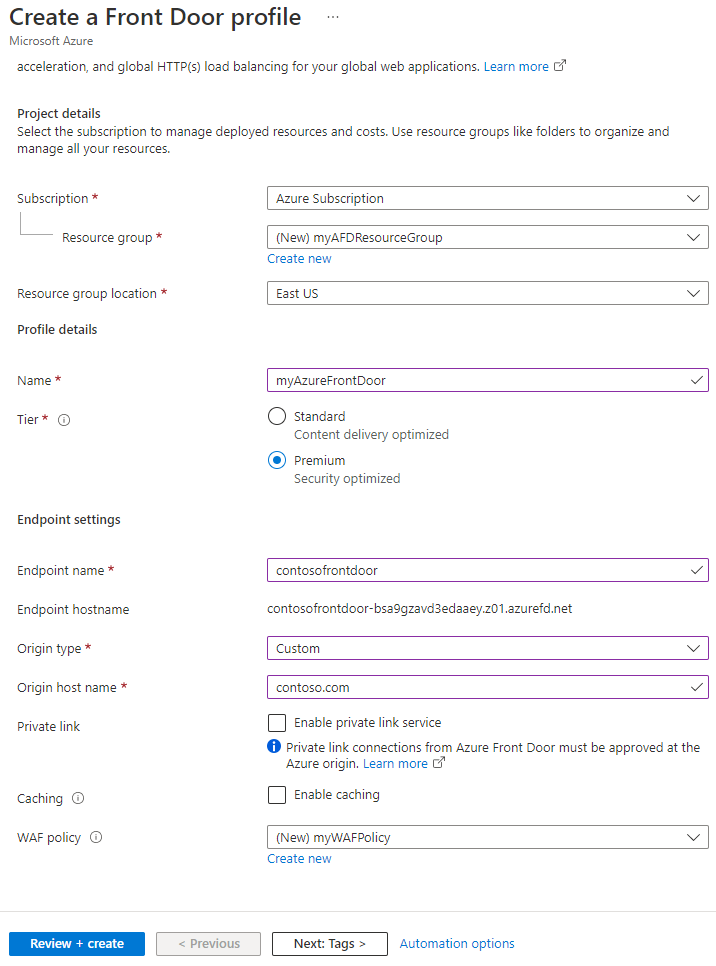
Microsoft currently offers Azure Front Door Standard and Premium. Standard is optimized for content delivery and includes static and dynamic acceleration, global load balancing, TLS offload, domain and certificate management, traffic analytics and core security capabilities. Premium builds on Standard and adds managed Web Application Firewall rule sets, bot protection, integration with Microsoft Threat Intelligence, security analytics and Azure Private Link support for supported origins.
The choice should be driven by origin exposure and security requirements, not only traffic volume. A public application that mainly needs global routing and caching may fit Standard. An application that needs private origin connectivity or the full Premium security set should evaluate Premium.
What service limits matter for large Front Door profiles?
Microsoft currently documents a maximum of 500 total Standard and Premium profiles per Azure subscription. A Standard profile can have up to 10 endpoints, 100 custom domains, 100 origin groups, 100 origins and 100 routes. Premium raises those profile-level limits to 25 endpoints, 500 custom domains, 200 origin groups, 200 origins and 200 routes. Both tiers allow up to 50 origins in an origin group and an origin response timeout between 16 and 240 seconds.
Microsoft also documents up to 75 Gbps and 100,000 requests per second per profile for both tiers, plus up to 3,000 concurrent WebSocket connections per profile. These values are service limits rather than a promise that every architecture will sustain them under every condition. Buyers planning unusually large profiles should validate quotas, origin capacity, caching behavior and traffic shape before assuming the edge layer is the only scaling constraint.
How does the composite route limit work?
Azure Front Door has a separate composite route metric that can become important before a profile reaches its raw route count. Microsoft caps the composite route metric at 5,000 per profile. The calculation depends on the routes plus the domains, protocols and paths associated with each route. A design with many hostnames and path patterns can therefore hit the limit while still being well below the headline route count.
Microsoft recommends splitting traffic across multiple Front Door profiles when necessary, using wildcard domains where appropriate and requiring HTTPS so duplicate HTTP and HTTPS route combinations do not consume unnecessary routing capacity. Teams managing large multi-tenant or multi-brand estates should calculate this metric during design rather than discovering it during deployment.
What should teams know about TLS and origin security?
For Azure Front Door Standard and Premium custom domains, Microsoft currently supports TLS 1.2 and TLS 1.3. The service supports predefined and custom TLS policies, but Microsoft states that client or mutual TLS authentication is not currently supported by Front Door. Front Door terminates the client TLS session at the edge and can establish a new encrypted connection to the origin for end-to-end TLS.
Origins should still be protected from direct bypass. Depending on the origin type and tier, teams can use Private Link, managed identity origin authentication, service-tag filtering and Front Door header validation. Premium is the tier to evaluate when a supported Azure origin must stay private behind Azure Private Link.
How do routing, origins and Private Link behave at scale?
Front Door routes incoming requests through endpoints, routes and origin groups. Health probes help Front Door determine which origins are available, while priority and weight settings support active-active and active-standby patterns. High availability still depends on the origins themselves. A global edge service cannot compensate for a single-region application or database dependency that has no failover path.
Private Link adds another scaling consideration. Microsoft documents a platform protection limit of 7,200 requests per second per Front Door profile for each Front Door regional cluster used by Private Link traffic. Requests beyond that regional cluster limit can be rate limited with HTTP 429. Microsoft recommends using multiple origins with different Private Link regions when workloads expect higher traffic so requests can be distributed across regional clusters.
How does Azure Front Door pricing work?
Microsoft's current Azure pricing page lists a base fee of $35 per month for Standard and $330 per month for Premium, with the charge calculated from hourly usage. Additional billing dimensions include outbound data transfer from the Front Door edge to clients, outbound data transfer from the edge to origins and incoming requests at Front Door edge locations. Premium includes managed WAF capabilities and Private Link pricing in the tier, while request and data-transfer costs still depend on usage and geography.
Pricing was rechecked on September 5, 2026. Buyers should model request volume, response size, cache hit ratio, origin traffic, user geography and the security tier instead of comparing only the base fee. Microsoft notes that published Azure prices are estimates and actual charges can vary by agreement, date of purchase, currency and offer.
What does the Azure Front Door Classic retirement mean now?
Azure Front Door Classic is a legacy tier and should not be selected for a new design. Microsoft states that Front Door Classic retires on March 31, 2027. New Classic profile creation has already stopped, new domain onboarding is no longer supported, and Microsoft-managed certificates are no longer available for Classic. Existing managed certificates that had renewed before the cutoff were only valid until April 14, 2026, a date that has already passed.
Microsoft provides a migration path to Front Door Standard or Premium and states that the migration is control-plane only, so normal traffic delivery is not expected to incur downtime. However, a completed migration cannot be rolled back to Classic. Teams should review custom domains, certificates, WAF policies, routing behavior, automation and origin configuration before completing the move.
Who should choose something else?
Teams serving traffic only inside one Azure region or virtual network may not need a global edge service. Azure Application Gateway can be a better fit for regional layer-7 load balancing and WAF scenarios close to the application. Azure Load Balancer is more appropriate for layer-4 TCP or UDP balancing. A simpler CDN can be sufficient when the requirement is static content delivery without global application routing or advanced security controls.
Azure Front Door is strongest when an application has users across regions, needs one global entry point, benefits from edge caching and acceleration, or requires global failover and edge security. Buyers should choose it because the application delivery architecture benefits from Microsoft's global edge network, not simply because the workload already runs in Azure.
Reviews
No reviews yet
Nobody has reviewed Azure Front Door here yet.