About Azure Files
Azure Files is Microsoft's fully managed cloud file-share service for workloads that need familiar SMB or NFS access without operating a traditional file server. It is designed for shared application data, lift-and-shift workloads, hybrid file services, user data, and other cases where software expects directories, file locks, mounted shares, and standard file-system semantics. Buyers should evaluate protocol, identity model, performance tier, redundancy, backup design, network path, and billing model before deployment because Azure Files capabilities differ materially between SMB and NFS.
What is included
Protocols
| SMB | Supports SMB file shares for Windows, Linux, and macOS clients in supported configurations. |
|---|---|
| NFS | Supports NFS 4.1 file shares for Linux-oriented workloads. |
Identity
| SMB identity | Supports Microsoft Entra and Active Directory-based identity options for SMB shares in supported configurations. |
|---|---|
| Managed identities | Supports managed-identity access for SMB Azure file shares in supported Windows, Linux, and AKS scenarios. |
Management
| Microsoft.FileShares | Generally available for NFS 4.1 share-centric deployments, with up to 10,000 shares per subscription per region. |
|---|
Security
| NFS encryption in transit | Provides a dedicated Require Encryption in Transit for NFS setting, with portal-created storage accounts enabling it by default. |
|---|
Storage
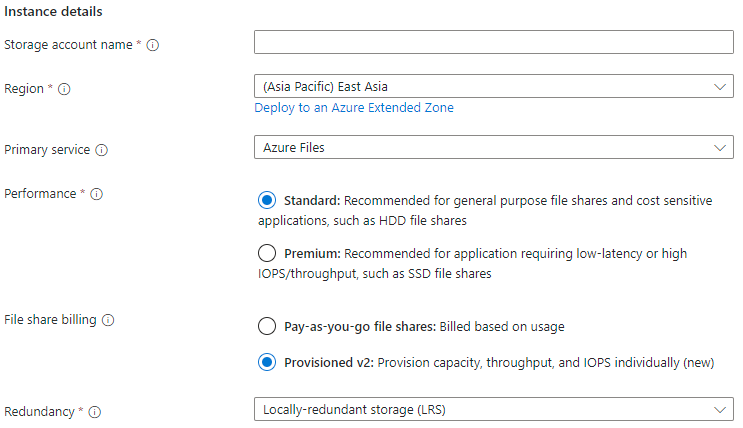
| Media tiers | Supports SSD and HDD file-share options, depending on protocol and billing model. |
|---|
Billing
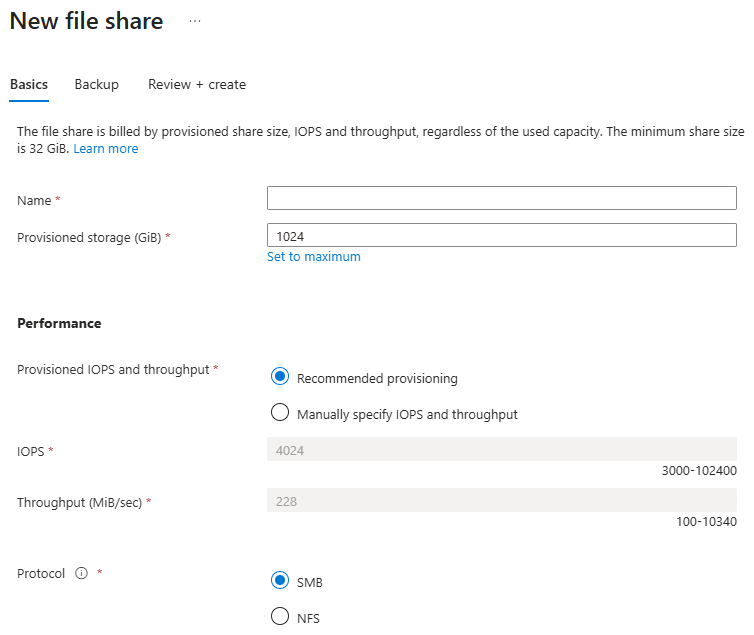
| Provisioned v2 | Allows storage, IOPS, and throughput to be provisioned independently for supported Azure file shares. |
|---|
Scale
| SSD provisioned v2 | Up to 256 TiB provisioned storage, 102,400 IOPS, and 10,340 MiB/s throughput. |
|---|---|
| HDD provisioned v2 | Up to 256 TiB provisioned storage, 50,000 IOPS, and 5,120 MiB/s throughput. |
Hybrid
| Azure File Sync | Can cache SMB Azure file shares on Windows Server for hybrid file-server scenarios. |
|---|
Protection
| Vaulted backup | Supports vaulted backup for HDD and SSD Azure file shares with long-term retention options. |
|---|
Resilience
| Redundancy | Supports LRS and ZRS broadly, with geo-redundant options available for supported SMB HDD configurations. |
|---|
What is Azure Files best used for?
Azure Files is strongest when an application or user workflow needs a real shared file system rather than object storage. SMB shares can serve Windows, Linux, and macOS clients in supported configurations, while NFS 4.1 is aimed at Linux-oriented workloads. Common uses include replacing or reducing traditional file servers, sharing content across virtual machines, providing persistent storage for applications, and supporting hybrid file access through Azure File Sync.
Azure File Sync can cache SMB Azure file shares on Windows Server. That gives branch offices or on-premises workloads a local cache while the Azure file share remains the centralized cloud endpoint. This can reduce the need to maintain separate file-server data silos, but network latency, cache design, and server sizing still matter.
How do SMB and NFS differ?
SMB and NFS are separate choices with different capabilities. Azure Files supports SMB for Windows, Linux, and macOS clients in supported configurations. NFS uses NFS 4.1 and is focused on Linux workloads. The protocols cannot be enabled together on the same individual file share, although separate SMB and NFS shares can exist in the same storage account.
NFS does not currently support identity-based authentication. Microsoft documents network-based security for NFS shares, so secure designs normally use private endpoints, service endpoints, VPN, or ExpressRoute according to the access pattern. SMB supports a broader set of identity options and hybrid scenarios. Buyers should choose the protocol first, then validate identity, backup, redundancy, and network requirements for that protocol instead of assuming every Azure Files feature applies equally to both.
What changed for Azure Files identity in 2026?
Identity is one of the biggest Azure Files changes in 2026. Microsoft now documents Microsoft Entra-only identity support for SMB Azure file shares as generally available. This allows cloud-only identities to access SMB shares without requiring on-premises Active Directory, hybrid synchronization, or managed domain controllers for the authentication architecture.
Microsoft also made managed identity support for SMB Azure file shares generally available. Windows and Linux virtual machines can use managed identities to access SMB shares without distributing storage account keys or passwords. Microsoft documents support for AKS workload identity and for application identities and end-user identities to coexist on the same storage account.
For macOS, Microsoft Entra ID-based authentication for Azure Files is in public preview in 2026. Preview status matters for production planning because preview capabilities can have support, SLA, or compatibility differences compared with generally available functionality.
What changed for the Microsoft.FileShares resource model?
Microsoft now marks the share-centric Microsoft.FileShares resource model as generally available for NFS 4.1 Azure file shares. This is a major change from the earlier preview state. The model lets a file share exist as a top-level Azure resource instead of being managed only through the traditional storage-account resource model.
Microsoft states that the share-centric model gives each share dedicated performance, security, networking, and billing controls and supports up to 10,000 shares per subscription per region. It is currently available for NFS 4.1, so buyers should not assume that every SMB deployment can move to this model yet. Existing storage-account based Azure Files deployments remain valid, and migration planning should be based on protocol and management requirements rather than novelty alone.
How should access and NFS encryption be secured?
For SMB, Microsoft recommends identity-based authentication rather than using the storage account key as the normal data-plane credential. Account keys provide broad access and are not scoped to an individual user, share, directory, or file. Share-level Azure RBAC and file or directory permissions can then be combined according to the chosen identity model.
For NFS, Microsoft currently documents network security rather than user-based identity authentication. A private endpoint provides a private IP address for the storage account and keeps traffic inside supported virtual-network paths. Service endpoints can also restrict access to selected subnets. On-premises NFS access normally requires VPN or ExpressRoute in addition to the Azure network configuration.
Microsoft also documents a dedicated Require Encryption in Transit for NFS setting. For new storage accounts created through the Azure portal, this setting is enabled by default. PowerShell, Azure CLI, and FileREST creation paths may leave it unselected for backward compatibility. Existing accounts continue to use the older Secure transfer required behavior until the per-protocol NFS setting is explicitly configured. Teams should therefore audit how each storage account was created rather than assuming NFS encryption is enforced consistently everywhere.
How does Azure Files pricing work in September 2026?
Azure Files has no single fixed monthly price. Microsoft currently offers SSD and HDD media tiers plus multiple billing models. Its live pricing page recommends provisioned v2 for new Azure Files deployments.
With provisioned v2, storage capacity, IOPS, and throughput are provisioned separately and billed based on the levels configured rather than actual use. This makes cost more predictable for known workloads and avoids forcing buyers to provision extra storage only to obtain more performance. Microsoft bills provisioned v2 shares hourly.
Pay-as-you-go is available only for HDD file shares. It bills used storage, transactions, and data transfer, with transaction optimized, hot, and cool access tiers. Microsoft currently recommends provisioned v2 for new HDD deployments as well. Reservations can reduce eligible pay-as-you-go storage cost through one-year or three-year commitments. Buyers should model capacity, transaction volume, snapshots, network transfer, and backup requirements instead of comparing storage price alone.
What scale limits matter for provisioned v2?
Microsoft's current provisioned v2 limits are materially higher than many older Azure Files references. For SSD shares, provisioned storage can range from 32 GiB to 256 TiB, provisioned IOPS can reach 102,400, and provisioned throughput can reach 10,340 MiB per second. For HDD provisioned v2 shares, the current ceilings are 256 TiB, 50,000 IOPS, and 5,120 MiB per second.
Individual files are still subject to separate limits. Microsoft documents a 4 TiB maximum individual file size and up to 12,000 data IOPS per file on SSD. The maximum concurrent handles for the root directory are 10,000, while the normal per-file or per-directory concurrent handle limit is 2,000. Metadata-heavy workloads should be tested separately because metadata IOPS have their own ceiling even when the share has much higher provisioned data IOPS.
How do backup and recovery work?
Azure Files supports snapshots, soft delete, and Azure Backup options, but the protection model should be planned separately from redundancy. Microsoft recommends vaulted backup for stronger protection against source loss and ransomware scenarios.
Vaulted backup is generally available for HDD and SSD Azure file shares. Microsoft documents retention in the Backup vault for up to 10 years, and the backup copy is stored separately from the source account so data can be restored to an alternate account if required. This gives buyers a different recovery layer from snapshots that remain tied more closely to the source service.
NFS also supports share snapshots and soft delete. Even with these controls, teams should define recovery point and recovery time objectives, test restore procedures, and confirm that the selected protection feature supports the protocol and share type they actually use.
What redundancy and performance choices matter?
Azure Files supports different redundancy choices depending on media tier and protocol. LRS and ZRS are common options across current configurations. Supported SMB HDD configurations can also use geo-redundant options such as GRS or GZRS. Buyers should confirm region and protocol support before choosing a redundancy model.
SSD is intended for workloads that need lower latency and more consistent performance. HDD is generally a better economic fit for general-purpose file workloads where extreme performance is not required. Microsoft also documents metadata caching for SSD SMB shares as generally available, which is intended to reduce metadata latency and improve available IOPS and throughput for metadata-heavy workloads.
How does Azure Files compare with Blob Storage and Azure NetApp Files?
Azure Files and Blob Storage should not be treated as interchangeable. Azure Files exposes a mounted file system through SMB or NFS, which suits applications that expect directories, file locks, and file-system operations. Blob Storage is object storage and is usually a better fit for application objects, media, archives, data lakes, and workloads designed around object APIs.
Azure NetApp Files is aimed at more specialized enterprise NAS workloads that need advanced performance or protocol capabilities. Managed Disks are a better fit for block storage attached to virtual machines. The right service depends on whether the workload requires shared file semantics, object access, block storage, or specialized NAS behavior.
What are the main limitations and migration risks?
Azure Files removes file-server infrastructure, but it does not remove the need for migration testing. File count, directory depth, metadata behavior, application locking, throughput, IOPS, latency, identity dependencies, and backup requirements can all affect migration outcomes.
NFS lacks identity-based authentication and several SMB-oriented hybrid features. Long-distance mounts can also behave differently from a local file server because file protocols are sensitive to latency. Teams should test representative file sizes, metadata-heavy operations, concurrency, authentication flows, encryption settings, and restore procedures before moving a production workload.
Who should choose something else?
Choose Blob Storage when the application does not need a shared file system and can work with object APIs. Choose Managed Disks for VM-attached block storage. Choose Azure NetApp Files when enterprise NAS requirements exceed what Azure Files provides, especially where specialized performance or protocol behavior is central to the workload.
A self-managed Windows or Linux file server can still be the better choice when the application depends on unsupported services, custom file-server software, full operating-system control, or migration constraints that cannot be met by Azure Files. Azure Files is strongest when the goal is to preserve standard SMB or NFS semantics while reducing responsibility for operating the underlying file-server infrastructure.
Reviews
No reviews yet
Nobody has reviewed Azure Files here yet.