About Azure Event Hubs
Azure Event Hubs is Microsoft Azure's fully managed real-time event streaming and ingestion service for workloads that need to receive, retain and process large volumes of telemetry, logs, clickstreams and application events. It uses partitioned event streams so producers and consumers can scale independently, and it supports native Event Hubs clients plus Apache Kafka protocol compatibility. Event Hubs is strongest when the requirement is high-throughput event ingestion and replay rather than durable command queues or simple event notification.
What is included
Streaming
| High-throughput ingestion | Fully managed event streaming designed to ingest millions of events per second with low latency. |
|---|
Architecture
| Partitions | Up to 32 partitions per event hub in Basic and Standard, 100 in Premium, and 1,024 in Dedicated. |
|---|---|
| Consumer groups | 1 per event hub in Basic, 20 in Standard, 100 in Premium, and 1,000 in Dedicated. |
Protocols
| Kafka, AMQP and HTTPS | Supports native Event Hubs clients, Apache Kafka protocol compatibility, AMQP 1.0 and HTTPS. |
|---|
Retention
| Maximum retention | Up to 1 day in Basic, 7 days in Standard, and 90 days in Premium and Dedicated. |
|---|
Capacity
| Retention storage | 84 GB per TU in Basic and Standard, 1 TB per PU in Premium, and 10 TB per CU in Dedicated. |
|---|
Limits
| Brokered connections | 100 per Basic namespace, 5,000 in Standard, 10,000 per PU in Premium, and 100,000 per CU in Dedicated. |
|---|---|
| Maximum publication size | 256 KB in Basic, 1 MB in Standard and Premium, and 20 MB in Dedicated. |
Capture
| Blob Storage and Data Lake capture | Unavailable in Basic, billed separately in Standard, and included in Premium and Dedicated. |
|---|
Schema Registry
| Schema versions | Up to 25 versions in Standard, 1,000 in Premium, and 10,000 in Dedicated across schema groups. |
|---|
What is Azure Event Hubs used for?
Azure Event Hubs is designed for high-volume event ingestion. Common scenarios include IoT telemetry, application logs, clickstream analytics, security events, financial event streams, operational monitoring and real-time data pipelines. Microsoft describes the service as capable of ingesting millions of events per second with low latency, while consumers can process the stream independently through partitions and consumer groups.
The service acts as a time-retained event buffer rather than a traditional message queue. Producers send events continuously and consumers read from the retained stream at their own pace. This makes Event Hubs useful when several analytics or processing applications need the same stream, when consumers need to replay retained events, or when the ingestion rate is much higher than a downstream system can process immediately.
How do partitions and consumer groups work?
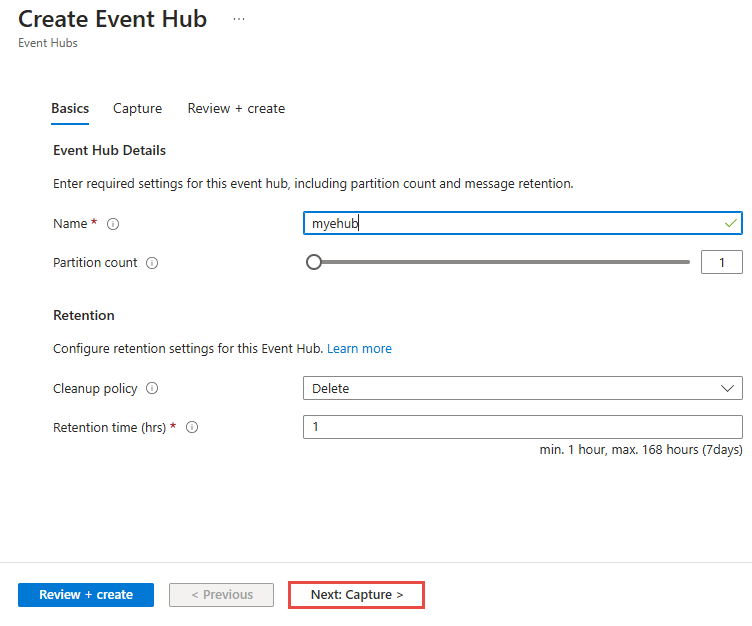
An event hub is split into partitions. Each partition is an ordered append-only sequence of events, and producers can use partition keys when events with the same key need to stay together. Ordering is guaranteed only within a partition, so partition-key design affects both correctness and scale.
Consumer groups give different applications independent views of the same event stream. Each consumer application can track its own position in every partition without blocking another application from reading the same events. Microsoft currently lists up to 32 partitions per event hub in Basic and Standard, up to 100 per event hub in Premium, and up to 1,024 per event hub in Dedicated. Premium also has a namespace-wide limit of 200 partitions per processing unit, while Dedicated lists 2,000 partitions per capacity unit.
How do Basic, Standard, Premium and Dedicated tiers differ?
Microsoft currently documents Basic, Standard, Premium and Dedicated Event Hubs tiers. Basic is the most limited option and does not support Apache Kafka workloads or Capture. Standard adds Kafka compatibility, more consumer groups and longer retention. Premium provides reserved processing capacity, resource isolation, customer-managed keys, dynamic partition scale-out, runtime audit logs and geo-replication. Dedicated provides exclusive single-tenant capacity for the highest-scale streaming workloads.
Retention also varies by tier. Basic supports one day, Standard up to seven days, and Premium and Dedicated up to 90 days. Microsoft lists retained event storage of 84 GB per throughput unit in Basic and Standard, 1 TB per processing unit in Premium, and 10 TB per capacity unit in Dedicated.
What are the current connection, event and namespace limits?
Microsoft's current quota table lists 100 brokered connections per Basic namespace and 5,000 per Standard namespace. Premium supports 10,000 brokered connections per processing unit, while Dedicated supports 100,000 per capacity unit. Maximum publication size is 256 KB in Basic, 1 MB in Standard and Premium, and 20 MB in Dedicated.
Consumer-group limits are also tier specific. Basic supports 1 consumer group per event hub, Standard 20, Premium 100 and Dedicated 1,000. Kafka consumer groups are listed at up to 1,000 per namespace in Standard, Premium and Dedicated. Microsoft also lists a maximum of 10 event hubs per Basic or Standard namespace, 100 per processing unit in Premium and 1,000 in Dedicated. Buyers should validate these limits against expected producer counts, consumer concurrency, partitioning and failover behavior before choosing a tier.
How does Event Hubs pricing and capacity work?
Event Hubs does not have one fixed monthly price. Microsoft prices the service according to the selected tier and capacity model. Basic and Standard use throughput units, Premium uses processing units, and Dedicated uses capacity units. Additional meters can apply to features such as Capture in Standard, while Capture is included in Premium and Dedicated. Pricing was checked against Microsoft's current Event Hubs pricing information on September 4, 2026.
For Basic and Standard, Microsoft currently documents each throughput unit with up to 1 MB per second or 1,000 events per second of ingress and up to 2 MB per second or 4,096 events per second of egress. Premium and Dedicated do not publish the same fixed per-unit throughput ceiling because performance depends on factors such as resource allocation, partitions and storage. Teams should estimate event size, event rate, egress, retention, partitions, connection counts and Capture requirements together.
What does Apache Kafka compatibility mean?
Event Hubs exposes an Apache Kafka endpoint so many Kafka producer and consumer applications can connect without running a Kafka cluster. Microsoft documents support for Kafka protocol clients and positions this as a way to keep familiar Kafka APIs while Azure manages the streaming infrastructure.
Kafka compatibility should still be tested against the application's exact features. Event Hubs and self-managed Apache Kafka are conceptually similar but not identical. Teams should verify protocol versions, authentication, partition behavior, consumer-group semantics and any broker-specific features their application relies on. Organizations that need full control of Kafka brokers, storage layout or Kafka-specific platform behavior may prefer a managed Kafka service or their own Kafka deployment.
How do Capture, compaction and Schema Registry fit in?
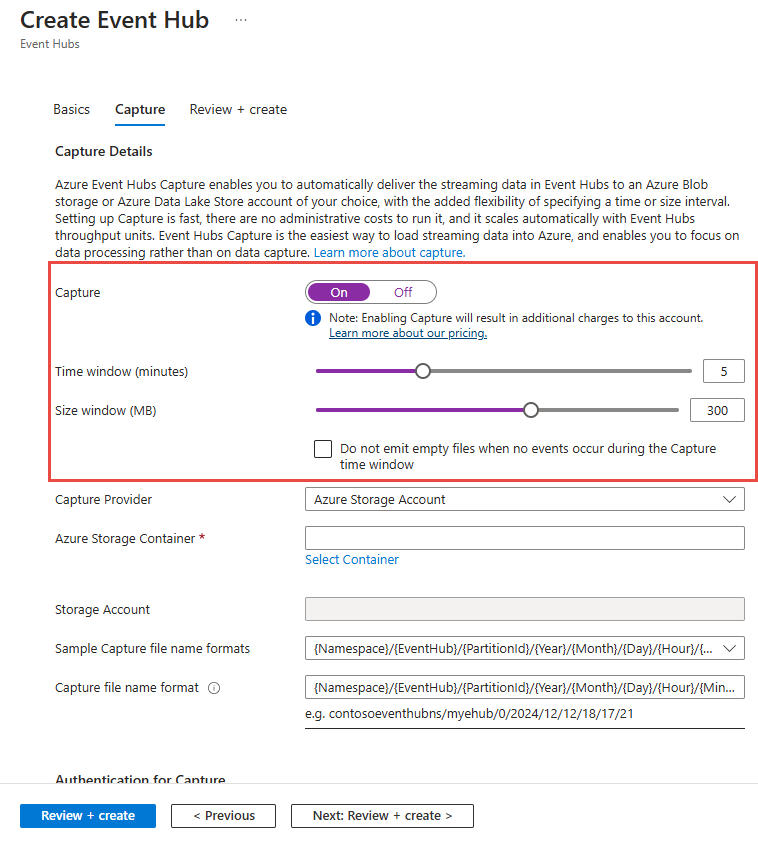
Event Hubs Capture automatically writes streaming events to Azure Blob Storage or Azure Data Lake Storage for long-term retention and batch processing. Capture is unavailable in Basic, billed separately in Standard, and included in Premium and Dedicated. It complements Event Hubs retention rather than replacing it.
Microsoft's current quotas also document compacted event hubs and Schema Registry limits. Compacted event hubs are not available in Basic; Microsoft lists up to 1 GB per partition in Standard and 250 GB per partition in Premium and Dedicated. Schema Registry namespace capacity is listed as 25 MB in Standard, 100 MB in Premium and 1,024 MB in Dedicated. Standard supports 25 schema versions across all groups, Premium 1,000 and Dedicated 10,000. Teams using schema-governed event contracts should include those limits in capacity planning instead of treating Schema Registry as unbounded metadata storage.
How does Event Hubs compare with Service Bus and Event Grid?
Azure Event Hubs is optimized for high-throughput streams of events that consumers may replay. Azure Service Bus is designed for durable business messaging, commands, queues, transactions, sessions and brokered delivery semantics. Azure Event Grid is designed for event notification and routing, where publishers emit discrete events and subscribers react to them.
A useful rule is to start with the communication pattern. Telemetry, logs and clickstreams usually point toward Event Hubs. Reliable work queues and business commands usually point toward Service Bus. Lightweight notifications that trigger handlers across Azure services often fit Event Grid. These services can be combined, but buyers should not use Event Hubs as a generic replacement for every messaging requirement.
What are the main limitations and tradeoffs?
Event Hubs gives teams a managed streaming platform, but application architecture still matters. Poor partition-key choices can create uneven load, too few partitions can restrict parallelism, and connection, consumer-group or publication-size limits can become bottlenecks at scale. Retention is finite, so applications that need durable historical storage should use Capture or another storage pipeline.
The service also does not process or analyze events by itself. Teams still need consumers such as Azure Functions, Stream Analytics, Azure Data Explorer, Spark or custom applications. Monitoring consumer lag, checkpointing, authentication, network access and replay behavior remains an application responsibility. Premium or Dedicated can improve isolation and scale, but they increase cost and may be unnecessary for smaller streams.
Who should choose something else?
Teams that mainly need reliable business commands, transactions, ordered work queues or dead-letter handling should compare Azure Service Bus. Applications that only need event notification and routing may find Event Grid simpler. Organizations that require deep control of Kafka brokers or Kafka-specific platform features should compare a managed Kafka platform or self-managed Kafka rather than assuming Event Hubs is identical.
Azure Event Hubs is strongest when the workload genuinely needs sustained high-throughput ingestion, partitioned event streams, multiple independent consumers, replay within a retention window and Azure-native integration. Buyers should choose it because the streaming model fits the workload, not simply because events are involved.
Reviews
No reviews yet
Nobody has reviewed Azure Event Hubs here yet.