About Azure Database Migration Service
Azure Database Migration Service is Microsoft's managed Azure service for moving supported database workloads to Azure data platforms. The current service is intended for organizations that want a guided migration path for SQL Server and other supported source-target pairs, including online migrations where minimal downtime is supported. It is available through the Azure portal, PowerShell, and Azure CLI. Buyers should treat Azure DMS as the migration orchestration layer, not as the destination database itself: the target service, storage, networking, security, and application cutover still need to be designed and billed separately. Microsoft retired the classic SQL scenarios on March 15, 2026, so current SQL migration planning should use the current Azure DMS portal or automation experience rather than a new classic SQL resource.
What is included
Service
| Service type | Fully managed Azure database migration service |
|---|
Access
| Management interfaces | Azure portal, PowerShell, and Azure CLI |
|---|
Lifecycle
| Classic SQL scenarios | Retired March 15, 2026; use the current Azure DMS experience for SQL migrations |
|---|
Planning
| Discovery and assessment | Portal dashboards available for SQL Server estate discovery, assessment status, target suggestions, and migration readiness |
|---|---|
| Tracking resource | Optional SQL Server instance Azure resource available for migration tracking |
Migration
| Azure SQL Database | Offline migration supported in current DMS comparison |
|---|---|
| Azure SQL Managed Instance | Online and offline migration supported |
| SQL Server on Azure Virtual Machines | Online and offline migration supported |
Networking
| Private connectivity | Private endpoints supported for current DMS scenarios |
|---|
Automation
| Self-hosted integration runtime | Used in supported scenarios that need access to on-premises SQL Server or backup locations |
|---|
Limitations
| Login migration | Not supported in current DMS comparison |
|---|---|
| TDE migration | Not supported in current DMS comparison |
Pricing
| Pricing checked | August 31, 2026; classic and current migration pricing surfaces must be distinguished |
|---|
What does Azure Database Migration Service do?
Azure Database Migration Service coordinates supported database migrations from source systems to Azure targets. Microsoft describes the current service as fully managed and designed to support both offline moves and minimal-downtime online migrations where the selected source-target scenario allows them. Azure DMS is available in the Azure portal and can also be automated with PowerShell and Azure CLI.
The service is strongest when the source-target pair is explicitly supported and the migration team wants a Microsoft-managed workflow for data movement, migration status, and cutover preparation. It does not remove the need to assess compatibility, size the target, validate networking, test application behavior, or prepare rollback procedures.
What changed after the retirement of Database Migration Service classic SQL scenarios?
Microsoft states that Database Migration Service classic SQL scenarios retired for all customers on March 15, 2026. Microsoft had already blocked creation of new classic DMS resources for SQL Server scenarios in the Azure portal from August 1, 2023. Existing classic SQL resources were supported only through the March 15, 2026 retirement date.
For current SQL Server migrations, Microsoft directs customers to the current Azure Database Migration Service experience through the Azure portal or to supported automation flows. This distinction matters because Microsoft's standalone pricing page is still labeled Database Migration Service classic and should not be read as evidence that a new classic SQL migration deployment is the current path. Teams should verify that any runbook, script, or internal documentation references the current DMS workflow rather than retired classic SQL resources.
Which SQL Server targets are supported in the current DMS comparison?
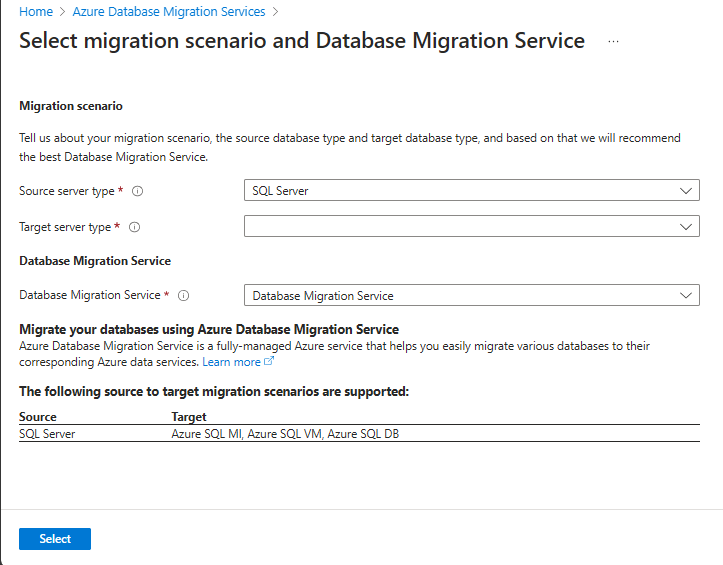
Microsoft's current DMS overview lists Azure SQL Database, Azure SQL Managed Instance, and SQL Server on Azure Virtual Machines as supported SQL Server targets in the current comparison. Azure SQL Database is shown with offline migration support. Azure SQL Managed Instance and SQL Server on Azure Virtual Machines are shown with both online and offline migration support.
Online support is scenario-specific. A migration team should never assume that every source-target pair supports continuous synchronization simply because Azure DMS supports online migration in other scenarios. Microsoft maintains a supported-scenarios matrix that identifies current source-target pairs and whether each is generally available or preview.
How do online and offline migrations differ?
Offline migration requires a planned outage because application writes must stop while the final data movement and cutover are completed. Microsoft recommends testing migration duration before production so the outage estimate is based on real throughput, database size, object count, and target performance rather than a theoretical network calculation.
Online migration is intended for supported targets where downtime needs to be minimized. The source remains available during most of the move, then the team stops incoming transactions, confirms final synchronization, changes application connectivity, validates the target, and completes cutover. The business still needs a rollback threshold and a clear point after which returning to the source is no longer safe.
What discovery and assessment information is available now?
Microsoft's current Azure DMS portal documentation includes Discovery and Assessment dashboards for SQL Server estates. Discovery can show SQL Server version distribution, connection mode, and source platform. Assessment can show assessment state, suggested Azure targets, and migration readiness.
These planning views do not mean that every migration execution path includes a built-in assessment step. Microsoft's current DMS comparison table still marks Assessment and SKU recommendation as unavailable in the migration version comparison itself. Buyers should use the available estate and readiness information for planning, then separately confirm the exact supported migration scenario and target sizing before scheduling production work.
What deployment, network, and automation requirements should teams plan for?
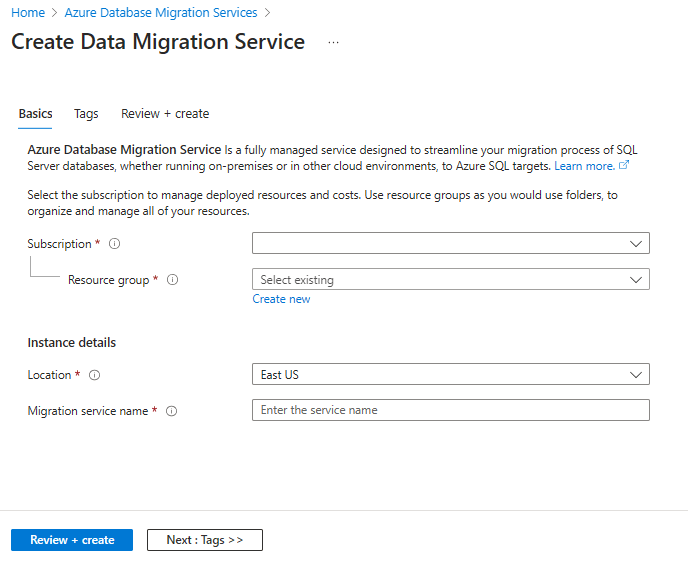
Azure DMS requires the appropriate Azure permissions and resource-provider registrations for the features being used. Microsoft documents an optional free SQL Server instance Azure tracking resource that uses the Microsoft.AzureArcData resource provider to improve migration tracking.
Some migration paths require a self-hosted integration runtime so Azure DMS can reach an on-premises SQL Server or backup location. Microsoft's automation guidance also documents outbound connectivity requirements for the machine hosting that runtime. Private endpoints are supported in the current DMS experience for supported source and target scenarios. Before cutover, teams should validate DNS, firewall rules, private connectivity, storage access, region placement, bandwidth, integration-runtime capacity, and the target database network configuration.
What are the current migration limitations?
Azure DMS does not migrate every dependency around a SQL Server workload. Microsoft's current comparison shows login migration as unsupported and TDE migration as unsupported in that comparison, while schema migration is supported. That means server-level dependencies such as logins, jobs, certificates, encryption configuration, and other instance objects may need separate handling depending on the target and migration method.
Scenario-specific limitations also apply. Large table counts, unsupported object names, complex schemas, large objects, CDC usage, backup layout, and target-specific restrictions can affect migration design. Teams should read the current scenario documentation for the exact source and target instead of copying a generic checklist from another DMS migration.
How should buyers interpret Azure DMS pricing in 2026?
Pricing was checked on August 31, 2026. Microsoft's standalone Azure Database Migration Service pricing page is explicitly labeled Database Migration Service classic. It lists classic Standard compute for offline migration as free and classic Premium 4-vCore compute as free for the first 183 days before hourly charges. Those figures describe the classic service and should not be presented as universal pricing for the current SQL migration experience after classic SQL retirement.
Microsoft's Azure Migrate pricing page separately states that Database Migration Service is free for the first 180 days in the database assessment and migration context. Because Microsoft currently exposes different pricing descriptions across these surfaces, BrandLigo does not present one fixed universal DMS price. Buyers should confirm the exact resource type and migration path in the Azure pricing calculator or their Microsoft agreement. Target database compute, storage, networking, data transfer, and related Azure services can still generate separate charges.
How should a production migration be planned?
A production plan should start with source discovery, compatibility assessment, target selection, target sizing, network validation, permissions, backup strategy, test migration, rollback criteria, and an application cutover runbook. Teams should measure migration duration and target performance with representative data before choosing the production window.
For online migrations, application owners need to know exactly when writes stop, how final synchronization is confirmed, how connection strings or endpoints change, and what validation must pass before the source is retired. For offline migrations, the same planning applies but the outage begins earlier, so test results are especially important for setting a realistic maintenance window.
How does Azure DMS compare with Azure Migrate and native database tools?
Azure Database Migration Service focuses on supported database migration execution and related database planning experiences. Azure Migrate has a broader role across server, application, infrastructure, and data migration programs. The two can be used together rather than treated as direct replacements.
Native backup and restore, database replication, Managed Instance link, SQL tooling, or custom data pipelines can be better choices when a workload falls outside DMS support, needs a specialized transformation path, or has a migration mechanism already built into the source and target platforms. The decision should be based on supported downtime, operational risk, compatibility, and the amount of orchestration the team wants Azure to manage.
Who should choose something else?
Choose another migration method when the source-target combination is unsupported, when the workload depends on features the selected DMS scenario does not migrate, or when a different replication technology provides the required recovery or cutover behavior. A small database with a generous maintenance window may be faster and simpler to move with native backup and restore.
Teams running broad datacenter transformation programs should evaluate Azure Migrate as the umbrella planning platform instead of treating DMS as a complete infrastructure migration product. Organizations that require near-zero downtime to a target for which DMS currently supports only offline migration should evaluate another supported replication or migration design before committing to the cutover.
Reviews
No reviews yet
Nobody has reviewed Azure Database Migration Service here yet.