About Azure Database for MySQL
Azure Database for MySQL is Microsoft's fully managed MySQL service for teams that want relational MySQL workloads on Azure without maintaining the database host, operating system, routine patching, or backup infrastructure themselves. Flexible Server is the current deployment model. As of September 6, 2026, Microsoft lists MySQL 8.0.45 and 8.4.8 as generally available, MySQL 5.7.44 as retired and in Azure Extended Support, and MySQL 9.5.0 as a Public Preview innovation release. For new production deployments, MySQL 8.4 is the strongest long-lived GA choice unless an application has a compatibility reason to remain on 8.0 temporarily.
What is included
Engine
| Current GA versions | MySQL 8.0.45 and MySQL 8.4.8 as of September 6, 2026 |
|---|
Preview
| Innovation release | MySQL 9.5.0 is Public Preview and intended for early access and experimentation |
|---|---|
| Premium SSD v2 | Private Preview for supported regions and compute SKUs, with independent storage, IOPS, and throughput scaling |
Compute
| Compute tiers | Burstable, General Purpose, and Memory Optimized |
|---|
Storage
| Provisioned storage | 20 GiB to 16 TiB on Burstable and General Purpose; up to 32 TiB on Memory Optimized |
|---|
Backup
| Automated retention | 1 to 35 days |
|---|---|
| Snapshot interval | 24 hours by default; 12 or 6 hours supported on General Purpose and Memory Optimized |
| On-demand backups | Up to 50 on-demand backups from the Azure portal within the server retention policy |
Availability
| High availability | Local-redundant or zone-redundant on eligible configurations; Burstable does not support HA |
|---|
Scaling
| Read replicas | Up to 10 asynchronous replicas on General Purpose or Memory Optimized; replicas of replicas are not supported |
|---|
Operations
| Compute resize interruption | Commonly 60 to 120 seconds because compute changes require a restart |
|---|---|
| Maximum stopped duration | A stopped server is automatically started after 30 continuous days |
Lifecycle
| Extended Support pricing | $0.07 per vCore per hour on Microsoft's public pricing page; additional HA and replica vCores also count |
|---|
Migration
| MySQL 8.4 migration | Azure Database Migration Service supports migration to MySQL 8.4 as of June 2026 |
|---|
What workloads fit Azure Database for MySQL?
Azure Database for MySQL fits applications that already depend on MySQL and benefit from a managed database layer. Typical workloads include web applications, SaaS products, ecommerce platforms, content systems, line-of-business applications, and migration projects where teams want familiar MySQL behavior without operating the server host themselves.
Microsoft offers Burstable, General Purpose, and Memory Optimized compute tiers. Burstable is designed for workloads that stay idle or below baseline much of the time. Microsoft describes it as a nonproduction choice for development, staging, or testing and states that it does not qualify for 24/7 support or root cause analysis. General Purpose is the more typical production tier for balanced workloads, while Memory Optimized provides more memory per vCore for higher concurrency or larger working sets.
The managed model reduces infrastructure administration, but it does not provide the same host-level control as self-managed MySQL on Azure Virtual Machines.
Which MySQL versions should buyers use in 2026?
Microsoft's current version policy lists MySQL 5.7.44 as GA but retired, MySQL 8.0.45 as GA, MySQL 8.4.8 as GA, and MySQL 9.5.0 as a Public Preview innovation release.
MySQL 5.7 entered Azure Extended Support after Standard Support ended. MySQL 8.0 remains available, but its lifecycle is now shorter than MySQL 8.4. For greenfield production deployments, MySQL 8.4 is the clearer long-term GA choice because it is the current long-term-support release in the service.
MySQL 9.5 should be treated as an experimentation path rather than a normal production upgrade target because Microsoft classifies it as an innovation release in Public Preview.
What does Azure Extended Support mean for older MySQL versions?
Azure Extended Support starts after Standard Support ends for an affected MySQL major version. Microsoft automatically enrolls servers that remain on an unsupported version and begins billing after the applicable grace period. Extended Support focuses on critical security updates and technical assistance rather than new feature releases, performance improvements, or normal minor-version advancement.
Microsoft currently lists Extended Support at $0.07 per vCore per hour on the public pricing page. High availability and read replicas can increase the charge because additional provisioned vCores are billed. Stopped servers are not charged for Extended Support.
The practical exit path is a major-version upgrade to a version that is still inside Standard Support. Teams should test application compatibility before that support window closes instead of treating Extended Support as a permanent operating model.
How do compute and storage choices affect cost and performance?
Flexible Server separates compute, storage, IOPS, backup, replica, and network consumption, so the bill changes with the actual architecture. Microsoft currently documents storage from 20 GiB to 16 TiB on Burstable and General Purpose tiers and up to 32 TiB on Memory Optimized. Storage can be increased after creation but cannot be reduced.
Compute tier or compute-size changes require a server restart. Microsoft says the interruption is commonly around 60 to 120 seconds, during which new connections cannot be established and uncommitted transactions are rolled back. Storage scaling does not require the same restart path.
Burstable workloads depend on CPU credits. Sustained use near or above baseline can exhaust credits and degrade service, which is another reason to avoid treating Burstable as the default production tier.
Premium SSD v2 remains a Private Preview option announced in July 2026 for supported compute SKUs and regions. Microsoft says it allows independent scaling of storage capacity, IOPS, and throughput and introduces newer General Purpose and Memory Optimized V6 SKU families. Buyers should verify preview eligibility before designing around it.
How do high availability, backups, and replicas work?
Azure Database for MySQL Flexible Server supports local-redundant and zone-redundant high availability in eligible configurations. High availability provisions a standby and automatic failover behavior. Zone-redundant HA can be configured only during server creation, and the Burstable tier does not support HA.
Microsoft also documents a MySQL replication caveat for HA on MySQL 8.0 and later: multitable DELETE operations that rely on foreign keys with ON DELETE CASCADE can trigger a known community replication problem. Teams using that pattern should test carefully before enabling HA for affected workloads.
Automated backup retention is configurable from 1 to 35 days. Snapshot backups are taken daily by default and transaction logs every five minutes. General Purpose and Memory Optimized servers can change the snapshot interval to 12 or 6 hours to reduce replay work during point-in-time restore. Burstable does not support that backup-interval control. The portal also supports up to 50 on-demand backups within the server's retention policy.
Read replicas are available only on General Purpose and Memory Optimized. Microsoft supports up to 10 asynchronous replicas using native MySQL binary-log replication. Replicas are separately billed resources and can introduce replication lag. Creating a replica of a replica is not supported.
What changed for migration in 2026?
In June 2026, Microsoft added Azure Database Migration Service support for migrating workloads to Azure Database for MySQL 8.4. That matters for teams moving from self-managed or older MySQL environments because they can target the current long-term-support version instead of landing on 8.0 first and upgrading again later.
Migration still requires application-level validation. Teams should test SQL behavior, character sets, authentication, server parameters, plugins, connection strings, replication assumptions, maintenance windows, and the target network design. Managed migration tooling can move data and reduce manual work, but it does not remove application compatibility risk.
What networking and security choices matter?
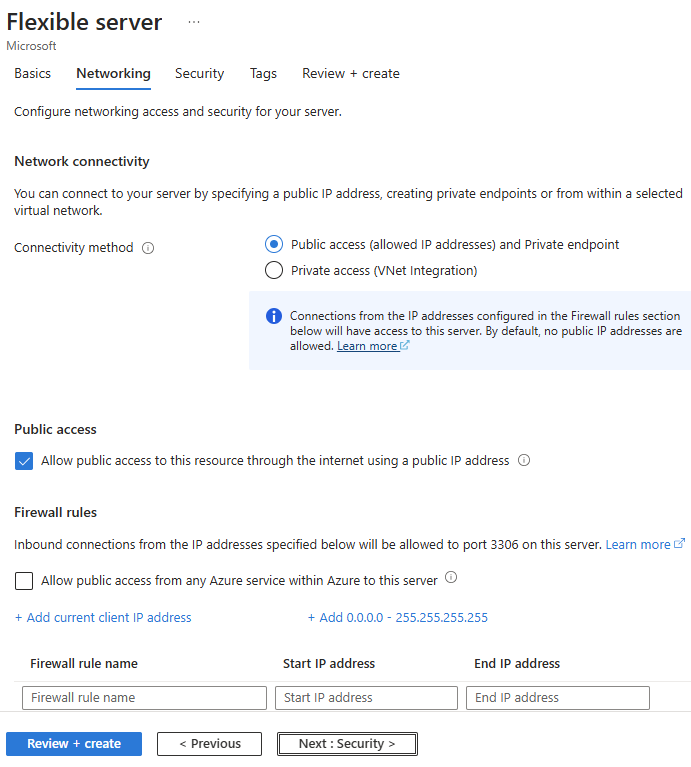
Flexible Server supports public access with firewall rules and private connectivity options for more isolated deployments. Network architecture should be decided early because connectivity choices affect private DNS, VPN or ExpressRoute access, administration, application placement, and future migration work.
The service supports encrypted connections, Microsoft Entra authentication in supported configurations, Azure monitoring, and Azure-native security controls. These features do not remove application responsibility for database users, schema permissions, secret handling, data classification, and least-privilege access.
Private connectivity is a strong default for many production workloads when the application can operate inside Azure networking, but external administration and cross-environment dependencies still need explicit design.
What should buyers know about stop, start, and cost control?
A Flexible Server can be stopped to reduce compute cost, but provisioned storage, provisioned IOPS, and retained backup storage can continue to generate charges. Microsoft automatically restarts a server that remains stopped for 30 continuous days, after which normal billing resumes.
A server with read replicas cannot be stopped until the replicas are dropped or promoted. This makes stop and start more useful for development, test, or temporary workloads than for production architectures that rely on read scaling.
Pricing was rechecked on September 6, 2026. Microsoft charges separately for compute, storage, additional or consumed IOPS depending on the storage model, backup storage beyond included allowances, read replicas, and Extended Support where applicable. Commitment discounts can reduce compute cost for stable workloads, but buyers should size the complete architecture rather than compare only the primary server's headline compute rate.
Who should choose something else?
Choose Azure SQL Database when the application depends on SQL Server or Transact-SQL features. Choose Azure Database for PostgreSQL when the application or engineering team depends on PostgreSQL-specific extensions, behavior, or tooling. Choose Azure Cosmos DB when the workload needs a distributed NoSQL model instead of relational MySQL semantics.
Run MySQL on Azure Virtual Machines when the workload requires operating-system access, unsupported plugins, custom server software, or configuration that Flexible Server does not expose. That flexibility returns responsibility for patching, backup, failover, recovery, and host security to the customer.
Teams should also choose something else if their plan depends on MySQL 9.5 preview capabilities for normal production availability, or if they require a database service whose operational model allows deeper engine and host customization than Flexible Server provides.
Reviews
No reviews yet
Nobody has reviewed Azure Database for MySQL here yet.