About Azure Cosmos DB
Azure Cosmos DB is Microsoft Azure's fully managed distributed database service for applications that need low-latency access, elastic horizontal scaling and global distribution. The service is strongest for high-scale operational workloads that fit its distributed data model and can be designed around partitioning, request-unit economics and a deliberate consistency choice. Buyers should not treat Cosmos DB as a generic replacement for every relational database because the application architecture, API model, partition key, throughput mode and access patterns materially affect performance, cost and operational fit.
What is included
Partitioning
| Logical partition storage | A logical partition stores up to 20 GB by default; Microsoft recommends hierarchical partition keys or redesign for larger business groupings. |
|---|---|
| Logical partition throughput | A logical partition is limited to 10,000 RU/s because it maps to one physical partition. |
| Physical partition capacity | Each physical partition can provide up to 10,000 RU/s and store up to 50 GB. |
| Hierarchical partition keys | Up to three partition-key levels can be configured to improve distribution for large tenant, customer or workload groupings. |
Serverless
| Single-partition throughput ceiling | A serverless container can provide up to 5,000 RU/s when its data fits within one physical partition. |
|---|---|
| Regional model | Serverless accounts are limited to one Azure region and do not provide predictable throughput or latency guarantees. |
Throughput
| Provisioned minimum | Standard provisioned throughput currently starts at 400 RU/s for a database or container. |
|---|
Consistency
| Five consistency levels | Strong, Bounded Staleness, Session, Consistent Prefix and Eventual are documented options, subject to API and topology considerations. |
|---|
Global distribution
| Multi-region replication | Provisioned-throughput accounts can replicate across multiple Azure regions and can use multi-region writes in supported configurations. |
|---|
Pricing
| Free tier | Eligible new free-tier accounts can receive 1,000 RU/s provisioned throughput and 25 GB storage per month for one account per Azure subscription. |
|---|
What is Azure Cosmos DB used for?
Azure Cosmos DB is designed for modern applications that need to serve operational data quickly at large scale or across multiple geographic regions. Common scenarios include gaming, e-commerce, IoT ingestion, personalization, user profiles, event-driven applications, catalog data, session data and AI applications that need flexible JSON documents, vector search or globally distributed data access.
Microsoft positions Cosmos DB as a distributed NoSQL engine with automatic indexing, elastic horizontal scale and multi-region replication. That makes it useful when an application needs to grow beyond one database server or serve users from several regions. It is less appropriate when the primary requirement is complex relational reporting, heavy cross-table joins or SQL Server instance compatibility, because those workloads can fit Azure SQL Database or another relational service better.
Which APIs and data models does Azure Cosmos DB support?
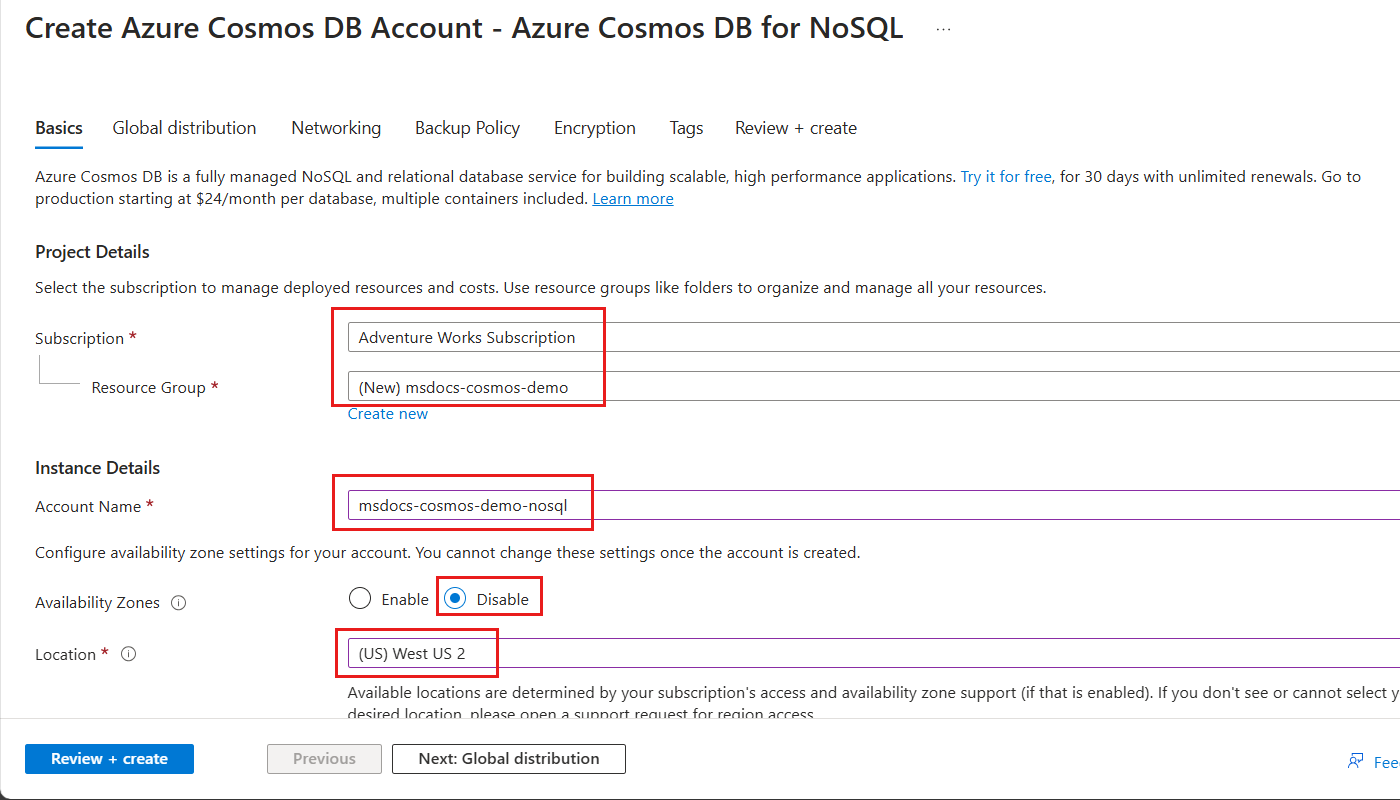
Microsoft documents Azure Cosmos DB APIs for NoSQL, MongoDB, Apache Cassandra, Apache Gremlin and Table for request-unit based accounts. These APIs provide different developer interfaces over the Cosmos DB distributed platform, while the exact feature set and compatibility details vary by API. Microsoft also sells vCore-based database services under the wider Cosmos DB commercial family, so buyers should distinguish request-unit based Cosmos DB from vCore offerings when comparing pricing and migration paths.
Choosing the API is an architectural decision, not a cosmetic setting. Teams should verify the wire protocol, driver compatibility, indexing behavior, transaction model, migration requirements and features they depend on before creating the account. Production migrations should be tested against the exact API capabilities rather than assuming compatibility with MongoDB, Cassandra, Gremlin or Table is identical to the original database.
How do request units, provisioned throughput, autoscale and serverless work?
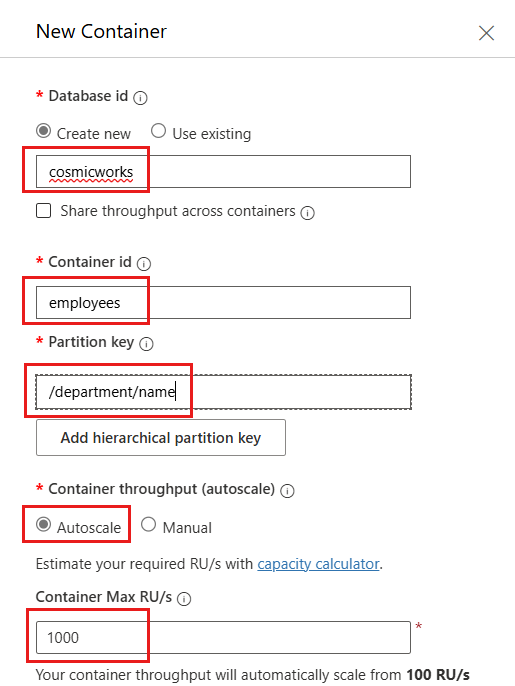
For the main request-unit based APIs, Azure Cosmos DB measures database work in Request Units. Reads, writes, updates and queries consume RU according to the CPU, memory and I/O required. Standard provisioned throughput reserves a configured amount of RU per second. Microsoft currently requires at least 400 RU/s for a provisioned database or container. Autoscale provisioned throughput adjusts within a configured maximum and bills according to the highest throughput used during the billing interval.
Serverless removes the need to pre-provision RU/s and charges for request units actually consumed. Microsoft positions serverless for intermittent or unpredictable workloads with lower average utilization. Provisioned throughput is usually a better fit for sustained traffic or workloads that require predictable throughput and latency. Serverless also has architectural differences, including single-region operation.
What scale limits matter for partition design?
Partitioning is central to Cosmos DB performance and scalability. Microsoft currently documents a default maximum of 20 GB for the data in one logical partition. A logical partition is all items that share the same partition-key value, and it is also the scope for transactions implemented through stored procedures or triggers. There is no limit to the number of logical partitions in a container.
A physical partition can provide up to 10,000 RU/s and can store up to 50 GB. Because a single logical partition maps to one physical partition, an individual logical partition is also limited to 10,000 RU/s. Provisioned throughput is distributed across physical partitions, so a poor partition key can create hot partitions that throttle while other partitions have unused capacity.
Microsoft recommends partition keys with high cardinality and an even spread of storage and request volume. When a business grouping such as tenant or customer can grow beyond 20 GB, hierarchical partition keys can use up to three levels to distribute the data more effectively. Microsoft also documents a pattern that uses a unique final level such as id to prevent earlier hierarchy levels from concentrating all data in one logical partition.
How does serverless throughput scale?
Microsoft's current serverless performance guidance states that a serverless container can provide up to 5,000 RU/s when its data fits within a single physical partition. As the container grows across additional physical partitions, maximum available throughput scales linearly at 5,000 RU/s per partition.
This is a capacity ceiling, not a performance guarantee. Microsoft explicitly states that serverless does not provide predictable throughput or latency guarantees. Teams that need sustained performance targets, multi-region deployment or more deterministic capacity planning should compare provisioned throughput instead of choosing serverless only because it avoids pre-provisioning.
How does Azure Cosmos DB pricing work?
Azure Cosmos DB does not have one fixed monthly price. Microsoft bills across compute, storage and bandwidth, with the compute meter depending on the chosen model. Request-unit accounts can use standard provisioned throughput, autoscale provisioned throughput or serverless. Storage is billed for consumed data and indexes, and replicated regions can multiply both throughput and storage charges. Cross-region replication and outbound data transfer can also add cost.
Microsoft's current pricing material states that standard provisioned throughput starts at a minimum of 400 RU/s. It also offers a free tier for eligible new accounts that provides 1,000 RU/s of provisioned throughput and 25 GB of storage per month for the lifetime of one qualifying free-tier account per Azure subscription. Microsoft also documents reserved-capacity options and a one-year flexible savings plan for eligible database spend. Pricing was rechecked on September 4, 2026. Buyers should model real RU consumption because query shape, indexing, item size, partitioning and region count can materially change the bill.
Which consistency level should you choose?
Azure Cosmos DB offers five documented consistency levels: Strong, Bounded Staleness, Session, Consistent Prefix and Eventual. Strong gives the strongest read guarantee but can increase latency or reduce throughput in some distributed configurations. Session is widely used because it provides read-your-writes behavior within a client session while retaining performance and availability characteristics closer to weaker consistency models.
The correct choice depends on business semantics. Financial or state-machine workflows can require stronger guarantees, while feeds, telemetry and other distributed experiences may tolerate weaker consistency for lower latency or greater availability. Teams should test application behavior carefully because consistency choices affect correctness, latency, failover behavior and request-unit consumption.
How does global distribution and availability work?
Provisioned-throughput Cosmos DB accounts can replicate data across multiple Azure regions. Microsoft documents automatic routing and failover capabilities, and multi-region write configurations allow applications to write in more than one selected region. Serverless accounts are limited to one Azure region, so global distribution is one of the clearest architecture differences between serverless and provisioned throughput.
Global distribution is not free resilience. Additional regions increase throughput, storage and network costs, and consistency settings affect latency and failover behavior. Teams should decide where writes occur, how applications discover endpoints, which regions are required for data residency and how the system behaves during a regional outage. A globally distributed database should be tested with real failover scenarios rather than treated as automatically disaster-proof.
What are the main limitations and tradeoffs?
Cosmos DB can become expensive when applications use inefficient queries, oversized indexes, poor partition keys or too many replicated regions. Request-unit pricing rewards predictable access patterns, but teams unfamiliar with RU consumption can underestimate cost. Hot partitions can also cause throttling even when the total account has unused capacity elsewhere.
The service does not remove data-model responsibility. Developers still need to choose partition keys, indexes, consistency, API model, retention and security correctly. Applications migrated from relational databases can require significant redesign if they depend heavily on joins, multi-table transactions or procedures spanning many entities. Compatibility layers should be validated against the exact features the application uses rather than assumed to be identical to the original database.
Who should choose something else?
Teams that need SQL Server compatibility, relational joins, mature T-SQL tooling or traditional relational transactions should compare Azure SQL Database. Applications with simple object-storage needs may be better served by Azure Blob Storage, while workloads that only need a cache or messaging layer should use the relevant Azure service instead of forcing the requirement into a database.
Teams that need predictable sustained throughput but do not want to manage serverless variability should compare Cosmos DB provisioned throughput before choosing serverless. Buyers with workloads centered on another database engine should also compare a managed service built specifically for that engine. Azure Cosmos DB is strongest when horizontal partitioning, globally distributed access, low-latency operational reads and flexible NoSQL models solve a real workload requirement.
Reviews
No reviews yet
Nobody has reviewed Azure Cosmos DB here yet.