About Azure Content Understanding
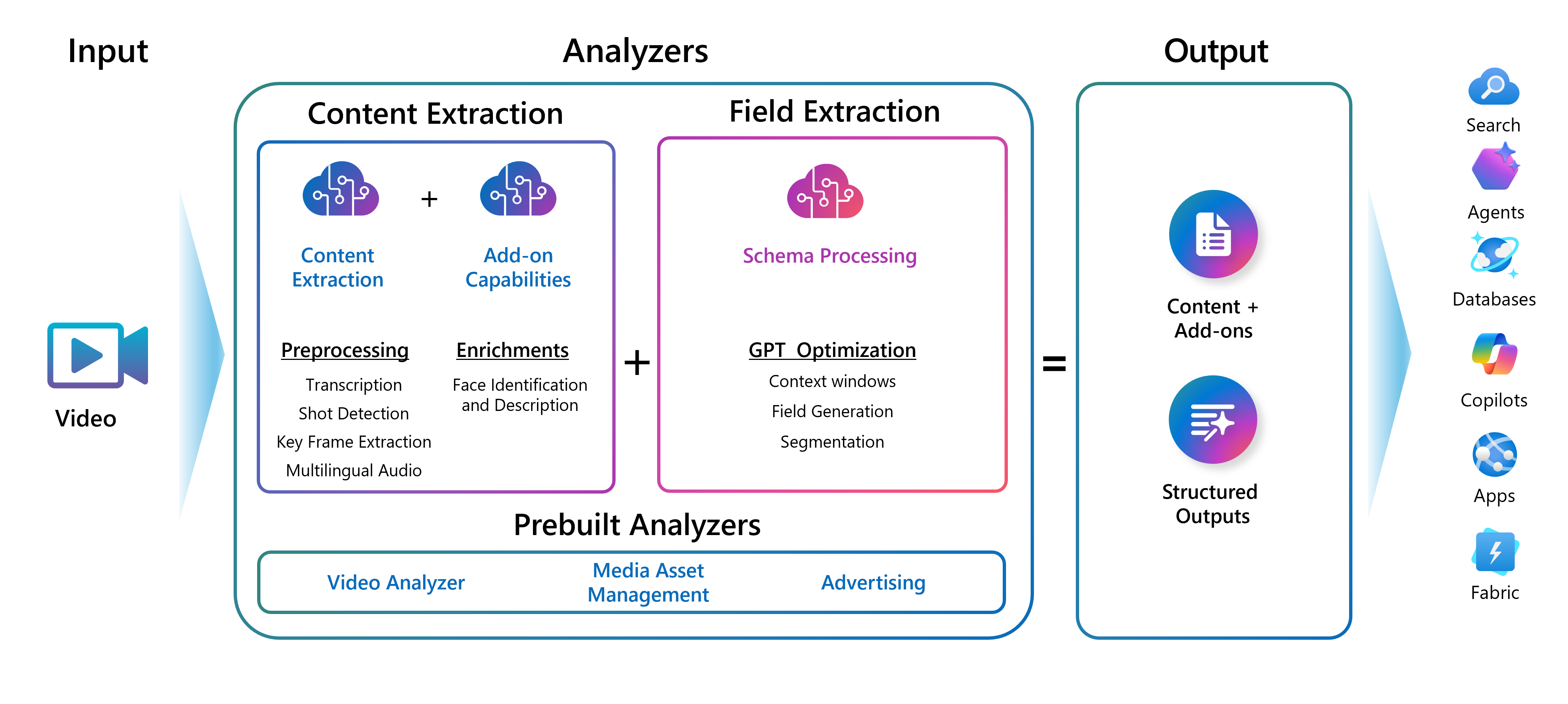
Azure Content Understanding is Microsoft's multimodal content processing service within Foundry Tools. It is designed to turn documents, images, audio and video into structured output that applications, search systems, agents and business workflows can use. Rather than treating every file type as a separate pipeline, Content Understanding lets teams define analyzers that extract, classify or generate fields against a user-defined schema, with confidence and grounding information available to support review and automation decisions.
What is included
Availability
| Production API | 2025-11-01 GA |
|---|---|
| Preview API | 2026-06-01-preview |
Modalities
| Supported content | Documents, images, audio and video |
|---|
Limits
| Standard analyzers | Up to 100,000 analyzers per Standard resource |
|---|---|
| Analysis throughput | Up to 1,000 pages/images per minute; four hours audio or video per minute |
Security
| Authentication | Microsoft Entra ID, managed identities or API keys |
|---|---|
| Private networking | VNet restrictions and Azure Private Link private endpoints |
What does Azure Content Understanding do?
Content Understanding combines content extraction, classification and generative reasoning across several media types. Microsoft documents intelligent document processing, search and RAG preparation, agentic application inputs, robotic process automation, analytics, call-center analysis and media workflows as current use cases. Prebuilt and custom analyzers can return structured fields from otherwise unstructured content.
The service is especially relevant when a workflow needs more than OCR or speech transcription. For example, a team can extract fields from a contract, classify the document type, reason over relationships between values and produce schema-aligned output that downstream software can validate or route.
Which API version should production teams use?
Microsoft currently identifies the 2025-11-01 API as the generally available version for production workloads. The newer 2026-06-01-preview API contains additional preview capabilities such as more advanced document reasoning and other Build 2026 additions, but Microsoft explicitly states that preview APIs are not recommended for production workloads and do not carry a service-level agreement.
Buyers should therefore separate production requirements from experimentation. A feature that exists only in the preview API should not be treated as equivalent to a generally available capability when planning a regulated or mission-critical deployment.
How does pricing work?
Pricing was checked on August 29, 2026. Microsoft prices Content Understanding as a pay-as-you-go service rather than a fixed monthly subscription. Charges depend on what is analyzed and which capabilities are used. Document content extraction is metered by pages, while image processing is metered by image. Audio and video processing are measured by media duration. Field extraction can also incur model-related input and output token charges, depending on the analyzer and model configuration.
Microsoft's pricing surface does not present one universal price that applies to every region, agreement and workload, so BrandLigo does not publish a fabricated flat amount. Teams should estimate document volume, media duration, analyzer type, model usage and any connected Foundry model costs before forecasting production spend.
What service limits matter in production?
Microsoft's current quotas list up to 100,000 analyzers for a Standard resource, with up to 1,000 pages or images analyzed per minute and up to four hours of audio or four hours of video analyzed per minute. The service also lists up to 3,000 operations per minute for the resource.
For document and text workloads, asynchronous uploads can be much larger than synchronous requests. Current limits include up to 200 MB for many asynchronous document inputs, while synchronous file size is generally limited to 10 MB. PDF and image-based asynchronous document analysis supports up to 300 pages, while synchronous analysis supports up to five pages. These limits should be checked again before designing high-volume ingestion because Microsoft can change service quotas over time.
How does Content Understanding handle video, audio and images?
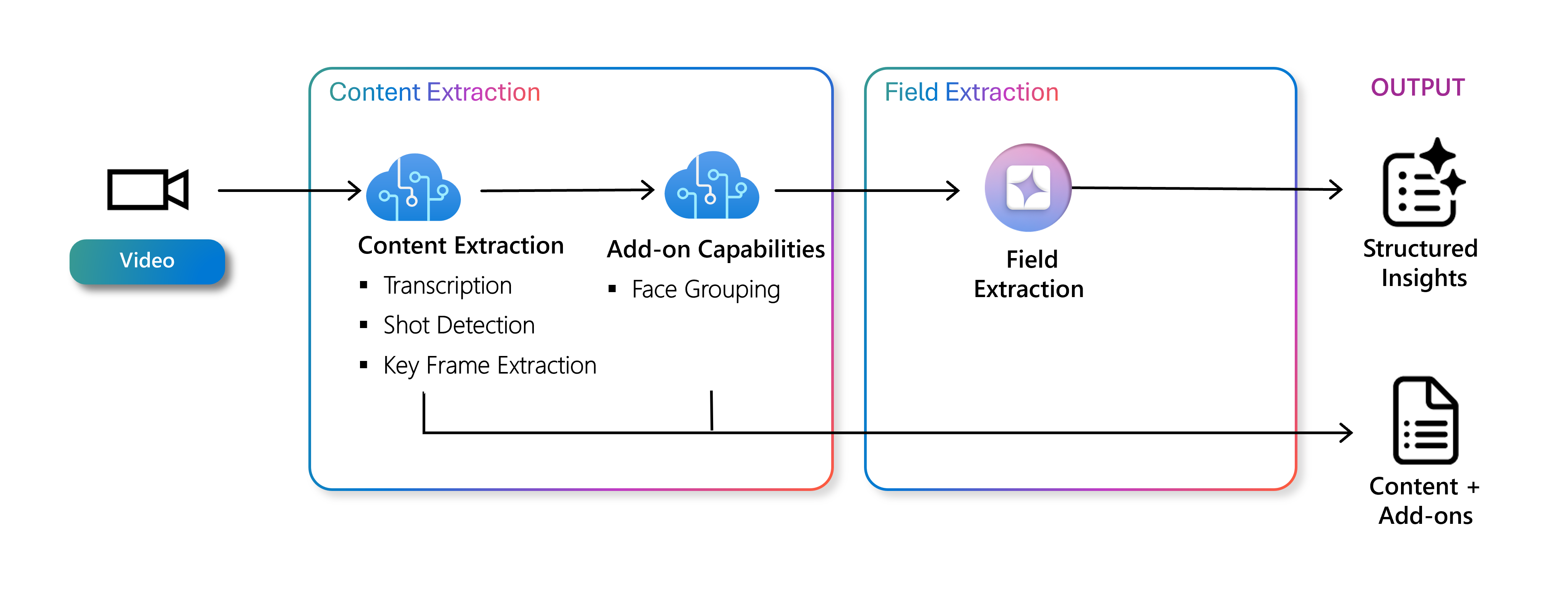
Content Understanding is built for multimodal pipelines, but buyers should account for media-specific constraints. Microsoft currently documents video support for common formats including MP4, MOV, MKV, AVI and WMV. Direct video uploads through analyzeBinary are limited to 200 MB and 30 minutes, while URL-based analysis can reference videos up to 4 GB and two hours.
Microsoft also notes that video analysis samples roughly one frame per second and scales frames to 512 by 512 pixels for analysis. That can matter when the workflow depends on very fast visual events, small distant objects or frame-level precision. Teams that require specialized computer vision behavior should test against representative footage rather than assuming broad multimodal support guarantees task-specific accuracy.
How secure is Azure Content Understanding?
Content Understanding uses Microsoft Foundry security controls. Microsoft documents Microsoft Entra ID authentication, managed identities, API keys, Azure role-based access control, virtual network restrictions and private endpoints through Azure Private Link. Data persisted to the service is encrypted, and Foundry endpoints use HTTPS for data in transit.
For enterprise deployments, managed identity and Entra-based access are generally preferable to distributing static keys through application code. Private networking can also reduce public internet exposure when the surrounding architecture is designed for it. Buyers should still map their own data residency, retention, access-control and compliance requirements before processing sensitive business content.
How is this different from Azure AI Document Intelligence?
Microsoft now positions the two services as complementary rather than interchangeable. Document Intelligence remains a strong fit for structured document scenarios where deterministic extraction, common forms, proven latency and established prebuilt models matter. Content Understanding adds generative and multimodal analyzers for unstructured documents, images, audio and video, including inferred fields and more complex reasoning.
Microsoft states that existing Document Intelligence production APIs, endpoints, SDKs and billing do not need to migrate simply because Content Understanding exists. Teams should choose based on workload requirements rather than treating Content Understanding as a forced replacement.
Where does Content Understanding fit with RAG and agents?
For RAG pipelines, Content Understanding can prepare multimodal content for indexing by preserving structure, describing figures and producing cleaner structured outputs than raw file ingestion. For agentic workflows, it can convert inconsistent files into standardized markdown or schema-aligned fields that downstream agents can reason over more reliably.
That can reduce custom preprocessing, but it does not remove the need for retrieval design, evaluation, permission filtering or application-level validation. Teams should still test whether the extracted content is complete enough for the downstream model or search index and whether confidence thresholds require human review.
What are the main limitations?
The biggest limitation is that the service spans both generally available and preview capabilities, so feature maturity is not uniform. Generative extraction can also introduce different latency, cost and evaluation requirements than deterministic parsing. Media sampling and file limits can affect video scenarios, while model-linked field extraction can add token costs beyond the base content extraction meter.
Organizations should also avoid using the service as an unquestioned source of truth for high-impact decisions. Confidence scores, grounding and review workflows help, but business rules and human checks may still be required for financial, legal, medical or compliance-sensitive processing.
Who should choose something else?
Choose Azure AI Document Intelligence when the core problem is structured forms or deterministic document extraction and you value mature document-specific behavior over broad multimodal reasoning. Choose Azure Speech when the workload is mainly transcription, speech synthesis or speech translation. Choose Azure Vision when the need is image-focused computer vision rather than cross-modal extraction. Choose direct Foundry model APIs when your team wants full control over prompts, orchestration, model selection and custom application logic instead of a managed analyzer layer.
Content Understanding is a better fit when one workflow must normalize and reason over mixed unstructured content and produce consistent structured output without building a separate parsing stack for every modality.
Reviews
No reviews yet
Nobody has reviewed Azure Content Understanding here yet.