About Azure Container Registry
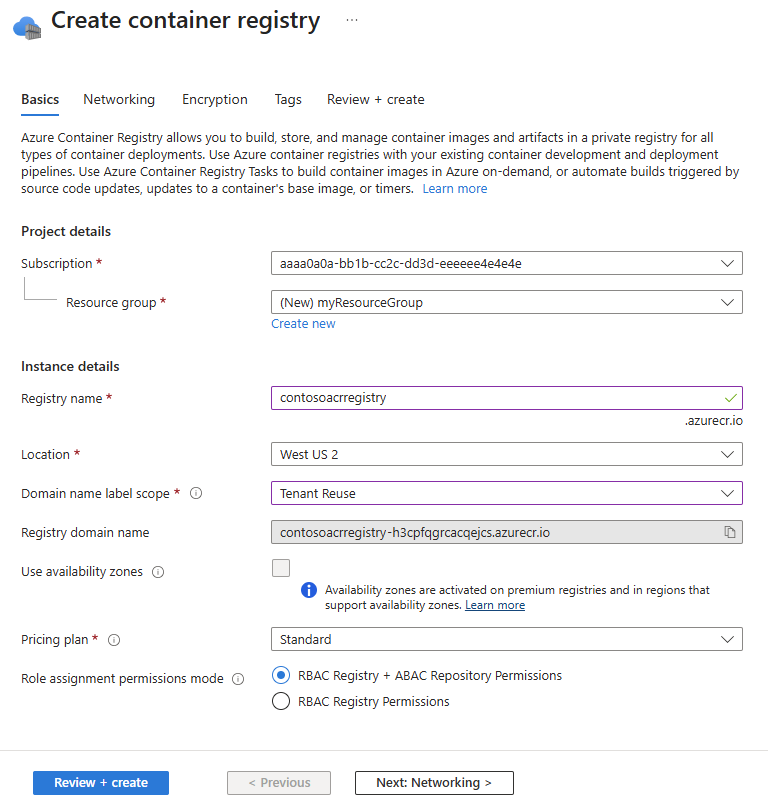
Azure Container Registry is Microsoft Azure's managed private registry for storing and distributing container images and OCI artifacts. It is designed for teams that build containerized applications and need a registry that integrates with Azure Kubernetes Service, Azure Container Apps, App Service, CI/CD pipelines, Microsoft Entra identity, private networking, and regional deployment patterns. ACR is not a container runtime: it stores and delivers the images and artifacts that other platforms run. Buyers should choose a tier based on storage, pull and push performance, networking, replication, automation, access control, security, and expected request volume rather than treating every registry as equivalent.
What is included
Registry
| Private container registry | Managed private storage and distribution for Docker-compatible container images and OCI artifacts. |
|---|
Tiers
| Basic, Standard and Premium | Three service tiers with different included storage, throughput, networking and replication capabilities. |
|---|
Storage
| Included storage | 10 GiB Basic, 100 GiB Standard, and 500 GiB Premium; documented storage ceilings are 40 TiB, 40 TiB, and 100 TiB. |
|---|
Limits
| Artifact size | Maximum image layer size 195 GiB and maximum manifest size 4 MiB across Basic, Standard, and Premium. |
|---|---|
| Data-plane read rate | Approximate per-registry maximum is 10,000 requests/minute for Basic and Standard and 20,000 for Premium. |
| Data-plane write rate | Approximate per-registry maximum is 2,000 requests/minute for Basic and Standard and 4,000 for Premium. |
| Per-identity read rate | Approximate per-identity per-registry maximum is 5,000 requests/minute for Basic and Standard and 10,000 for Premium. |
Security
| RBAC plus ABAC repository permissions | Supports repository-scoped Microsoft Entra role assignments with ABAC conditions and dedicated repository roles. |
|---|
Networking
| Private endpoints | Premium supports private endpoints, with Microsoft currently documenting up to 200 private endpoints per registry. |
|---|
Distribution
| Geo-replication | Premium supports geo-replication across Azure regions for network-close image distribution. |
|---|
Automation
| ACR Tasks | Supports cloud-based image build and maintenance workflows, including Quick Tasks and trigger-based automation. |
|---|
Signing
| Docker Content Trust retirement | DCT cannot be newly enabled from May 31, 2026 and is scheduled for complete removal on March 31, 2028. |
|---|
What is Azure Container Registry used for?
Azure Container Registry is used as a private distribution point for Docker-compatible container images and related OCI artifacts. Development teams can push images from local tools or CI/CD pipelines, then pull those images into Azure Kubernetes Service, Azure Container Apps, App Service, virtual machines, or other environments that can authenticate to the registry. Microsoft also documents support for Windows and Linux images plus related OCI artifact workflows.
The main value is control over the software supply path. Organizations can keep application images inside their Azure environment, use Azure identities and role assignments, place registries near deployment regions, and integrate image build or maintenance workflows with ACR Tasks. ACR does not replace the build pipeline, vulnerability management program, signing strategy, or runtime platform, but it can become the central image source those systems rely on.
How do Basic, Standard, and Premium tiers differ?
Microsoft currently offers Basic, Standard, and Premium Azure Container Registry tiers. All three provide the core private-registry experience. Microsoft's current SKU documentation lists included storage of 10 GiB for Basic, 100 GiB for Standard, and 500 GiB for Premium. The documented storage ceiling is 40 TiB for Basic and Standard and 100 TiB for Premium, with a maximum image layer size of 195 GiB and maximum manifest size of 4 MiB across all three tiers.
Premium is the tier for advanced network isolation and multi-region distribution. Microsoft's current limits page lists private endpoint support only on Premium, along with up to 200 private endpoints, up to 200 public IP network rules, and geo-replication. Standard remains a practical default for many production registries that do not need those Premium-only controls. Buyers should choose based on operational requirements, not only on included storage.
What API request limits matter for production deployments?
Azure Container Registry enforces data-plane request-rate limits by SKU and by identity. Microsoft currently lists Basic and Standard at about 10,000 data-plane read requests per minute per registry and 5,000 per identity per registry. Premium doubles those figures to about 20,000 per registry and 10,000 per identity. Data-plane writes are listed at 2,000 requests per minute per Basic or Standard registry and 1,000 per identity, while Premium lists 4,000 per registry and 2,000 per identity. Delete limits are 1,000 per minute per Basic or Standard registry and 500 per identity, versus 4,000 per Premium registry and 2,000 per identity.
Microsoft also lists ListReferrers limits of 500 per minute per Basic or Standard registry and 250 per identity, rising to 2,000 and 1,000 for Premium. OAuth authentication and authorization requests are limited to 10,000 per minute per Basic or Standard registry and 20,000 per Premium registry. These are best-effort approximate maximums rather than SLA-backed guarantees. When a limit is exceeded, ACR can return HTTP 429 with Retry-After. Production clients should honor that header, use exponential backoff with jitter, and avoid large synchronized pull storms when many nodes start at once.
How do geo-replication and reliability work?
Premium registries can use geo-replication to place registry replicas in multiple Azure regions. Microsoft routes clients through one registry endpoint and synchronizes pushed image content and metadata across configured replicas. This can keep image pulls closer to deployment regions and reduce dependence on a single region for global deployment workflows.
Geo-replication is not a substitute for reproducible builds or source recovery. Teams should still keep source repositories, build definitions, deployment manifests, retention policies, and recovery procedures so the registry is not the only copy of critical application artifacts. Buyers should also account for replication and networking charges when estimating a multi-region design.
How do identity, repository permissions, and networking work?
Azure Container Registry supports Microsoft Entra based access through Azure role-based access control. Microsoft documents an RBAC Registry + ABAC Repository Permissions mode for repository-level access decisions. ABAC-enabled built-in roles include Container Registry Repository Reader, Writer, and Contributor. The separate Container Registry Repository Catalog Lister role is needed when an identity must list repositories.
This permissions model changes migration planning. Microsoft maps legacy AcrPull to Repository Reader plus Catalog Lister, AcrPush to Repository Writer, and AcrDelete to Repository Contributor. Microsoft also warns that changing an existing registry's role assignment mode can affect current role assignments and ACR Tasks, so teams should prepare equivalent assignments before switching modes. Cached client credentials can continue failing after a switch until they are refreshed, so the transition should be rehearsed before production.
Premium supports private endpoints. Microsoft recommends private endpoints instead of service endpoints for most private-network scenarios. Service endpoint access remains preview and cannot be enabled at the same time as Private Link on the same registry.
What can ACR Tasks automate?
Azure Container Registry Tasks can build container images in Azure and automate build, test, and maintenance workflows. Microsoft documents on-demand builds plus triggers such as source-code commits and base-image updates. This can be useful for rebuilding images when a base operating system or framework image changes, or for moving container-build work out of developer machines and into an Azure-managed workflow.
Teams using the RBAC plus ABAC repository-permissions mode should review task authentication carefully. Microsoft states that new and existing ACR Tasks no longer have default data-plane access to an ABAC-enabled source registry unless an identity is explicitly attached and granted the appropriate repository role. Quick Builds and Quick Runs can use the caller identity when that identity has the required access. ACR Tasks should still be viewed as build automation rather than a replacement for a complete CI/CD platform.
How does Azure Container Registry pricing work?
Azure Container Registry pricing varies by Basic, Standard, and Premium tier. Microsoft's current pricing page lists included storage of 10 GB for Basic, 100 GB for Standard, and 500 GB for Premium. Additional stored data is billed separately, standard Azure networking charges apply, geo-replicated Premium regions add their own charge, connected registries have a separate meter, and ACR Tasks are billed according to task compute usage.
Pricing was rechecked against Microsoft's Azure Container Registry pricing page on September 4, 2026. The public pricing table exposes rates dynamically and does not provide one universal static monthly total for every region and usage pattern, so Brandligo does not invent a fixed monthly price. Buyers should estimate registry tier, retained storage, image churn, build-task usage, replication, connected registries, and network egress for the regions they actually plan to use.
What is changing with Docker Content Trust?
Docker Content Trust is now a legacy path rather than the default recommendation for a new Azure Container Registry signing design. Microsoft states that DCT deprecation began on March 31, 2025. Starting May 31, 2026, DCT cannot be enabled on new registries or on registries where it was not already enabled.
Microsoft plans to remove Docker Content Trust completely from Azure Container Registry on March 31, 2028. Teams that still depend on DCT should plan a controlled migration rather than assuming the feature will remain available. Microsoft directs customers toward Notary Project based signing and verification. Existing DCT users should inventory signing keys, pipeline dependencies, policy checks, and consumers before disabling DCT because changing trust configuration can affect how signed tags are handled.
What limitations and migration issues should buyers consider?
Container registries can accumulate old tags, untagged manifests, and duplicate layers. Teams should define retention and cleanup rules instead of assuming storage will remain small. Deleting old content must be handled carefully because a deployment may still reference an older tag or digest.
Request throttling also matters at scale. A large deployment that causes many nodes to authenticate and pull images simultaneously can consume both OAuth and data-plane limits. Per-identity limits mean a single shared identity, admin account, scanner, or automation process can become a bottleneck even when the registry-wide bucket still has capacity. Microsoft notes that some performance and throttling limits can be reviewed for increase through Azure Support, but several networking and token limits are fixed.
Access-control migrations deserve testing. Moving an existing registry from legacy RBAC-only permissions to RBAC plus ABAC can affect repository access, cached credentials, and task behavior. Private networking can also restrict portal, CLI, Azure DevOps, and trusted-service behavior unless the required network path and exceptions are configured. Migration from another registry should account for image names, tags, digests, credentials, pull secrets, automation, signing, policy enforcement, and downstream deployment references.
Who should choose something else?
Teams that only need a public image catalog may prefer a public registry rather than paying for and operating a private Azure registry. Organizations standardized on another cloud or a multicloud artifact platform may prefer a registry that is already integrated with their existing build, policy, signing, and deployment tooling. Very small development projects may also find a simpler hosted registry sufficient if Azure identity, private networking, geo-replication, and ACR Tasks provide little value.
Azure Container Registry is strongest when Azure is already part of the application platform and teams need private artifact storage, Microsoft Entra access, Azure-native deployment integration, regional replication options, and centralized container distribution. Buyers should choose ACR because it improves the software delivery path and governance around container artifacts, not simply because the runtime also happens to be in Azure.
Reviews
No reviews yet
Nobody has reviewed Azure Container Registry here yet.