About Azure Container Instances
Azure Container Instances is Microsoft's managed serverless container service for running Linux or Windows containers without provisioning virtual machines. ACI is designed for workloads that need fast startup and direct control over a container image, requested CPU and memory, networking, restart behavior, and identity without adopting a full orchestration platform. It fits short-lived jobs, build and test tasks, automation workers, burst workloads, data processing, and relatively self-contained services. In 2026, buyers should also distinguish basic container groups from newer preview management options such as NGroups and standby pools, which can improve multi-instance management or startup latency but do not turn ACI into a full Kubernetes or application platform.
What is included
Runtime
| Operating systems | Linux and Windows container groups |
|---|---|
| Deployment unit | Container group |
Compute
| Standard hard maximum | Up to 31 vCPU and 240 GB memory in Microsoft's July 25, 2026 resource limits |
|---|---|
| Containers per group | Hard limit of 60 containers per container group |
Storage
| Volumes per group | Hard limit of 20 volumes per container group |
|---|
Networking
| Ports per IP | Hard limit of 5 ports per IP |
|---|
Management
| NGroups | Preview multi-instance management with desired count, rolling upgrades, load balancing, and multi-zone support |
|---|---|
| Standby pool size | Up to 2,000 container groups per standby pool in current Microsoft documentation |
Reliability
| Zone-resilient design | Microsoft recommends at least two manual groups across two zones, or a multi-zone NGroup for zone redundancy |
|---|
Identity
| Managed identity | System-assigned and user-assigned identities supported; identity changes restart an existing group |
|---|
Security
| Confidential containers | Hardware-backed data-in-use protection for selected Linux workloads with separate limits |
|---|
Cost
| Billing model | Per-second group billing based on requested vCPU and memory; Windows adds software-duration charges |
|---|---|
| Spot containers | Preview interruptible option advertised up to 70 percent lower cost, with 4 vCPU and 16 GB hard maximum |
Lifecycle
| GPU container resources | Retired July 14, 2025 |
|---|
What is Azure Container Instances best used for?
ACI is a strong fit when a team already has a container image and wants to run it quickly without creating or operating a VM cluster. Common use cases include scheduled or event-driven jobs, rendering, build agents, test environments, automation workers, temporary APIs, data processing, and isolated web workloads. Linux multi-container groups can place related containers on the same host so they share lifecycle and selected networking and storage resources.
For applications that need built-in revision management, traffic splitting, service discovery, richer autoscaling, or long-running application lifecycle features, Azure Container Apps is usually the more complete managed platform. AKS is the better fit when Kubernetes APIs, controllers, policies, scheduling, or ecosystem tooling are requirements.
How do container groups and current resource limits work?
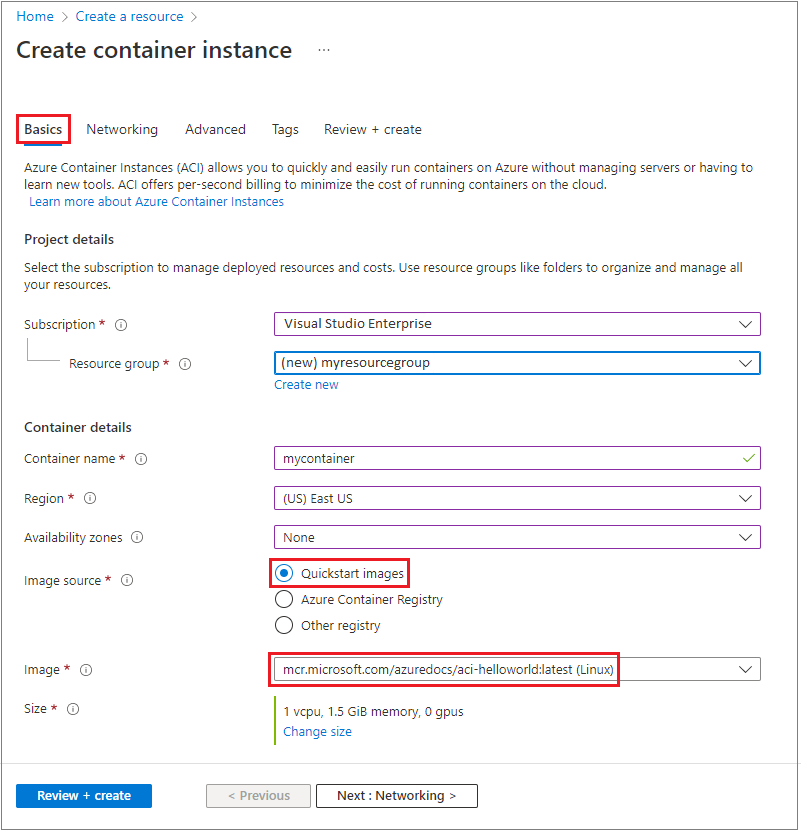
The basic ACI deployment unit is a container group. One group can contain one or more containers that share lifecycle and selected network or storage resources. Microsoft schedules the requested vCPU and memory on managed Azure infrastructure.
Microsoft's resource and quota documentation, last updated July 25, 2026, lists hard limits of 60 containers per group, 20 volumes per group, 5 ports per IP, 4 MB of logs for a running container instance, and 16 KB or 1,000 lines for a stopped instance. Those hard limits cannot be raised through quota requests.
The same documentation lists standard container-group maximums up to 31 vCPU and 240 GB of memory. Confidential groups have separate limits, including up to 31 vCPU and 180 GB in general deployments and up to 32 vCPU and 180 GB in virtual network deployments. Spot groups remain much smaller at up to 4 vCPU and 16 GB. Regional capacity can still prevent a large request from deploying even when the documented hard maximum is higher.
What do NGroups add to Azure Container Instances?
NGroups is a preview ACI capability for managing multiple related container groups as one higher-level resource. Instead of creating and updating each container group separately, a team defines a container group profile and an NGroup with a desired instance count. Microsoft currently documents support for maintaining multiple instances, rolling upgrades, availability-zone placement, managed identity, confidential containers, load balancing, and zone rebalancing.
NGroups can also be configured across multiple availability zones. Microsoft's reliability guidance describes a multi-zone NGroup as zone redundant because a failure in one zone affects only the container groups in that zone while groups in healthy zones continue running. Scale-in can randomly remove instances and may temporarily reduce even zone spread, while scale-out attempts to rebalance distribution. NGroups is still preview, so production adoption should include validation of regional availability, API maturity, operational behavior, and support expectations.
When are standby pools useful?
ACI standby pools keep pre-provisioned container groups ready so a workload can obtain an already-running group instead of waiting for a completely new deployment. Microsoft documents a maxReadyCapacity setting that controls the number of ready groups and an Always refill policy that replenishes the pool after an instance is consumed. If no ready instance is available, ACI falls back to creating a new container group.
Microsoft's current standby-pool FAQ documents a maximum of 2,000 container groups in one standby pool. Standby pools require the Microsoft.StandbyPool resource provider and explicit permissions for the resource provider to create and manage required Azure resources. They are not currently managed through the Azure portal. They can span configured availability zones, but Microsoft explicitly says they are not zone resilient because the platform does not guarantee an even spread across zones. Teams that require zone-failure resilience should use separate zonal designs or NGroups rather than assuming a standby pool provides high availability.
How does Azure Container Instances pricing work?
Pricing was checked on September 6, 2026 against Microsoft's current Azure Container Instances pricing page. ACI bills at the container-group level based on requested vCPU and memory for the duration the group is running. vCPU requests are rounded up to the nearest whole number for billing, while memory requests are rounded up to the nearest tenth of a GB. Windows groups also add a Windows software-duration charge.
Microsoft offers pay-as-you-go pricing, one-year and three-year Azure savings plan options for eligible usage, Spot pricing, and separate confidential-container pricing. Actual rates vary by region, operating system, agreement, and workload configuration. Microsoft's pricing page still contains an older 4 vCPU allocation example even though the current resource-limit documentation permits larger standard groups. Buyers should therefore use the current resource-limit page for platform ceilings and the pricing calculator for actual cost modeling.
How should production teams design for availability zones and region failures?
A manually created ACI container group is zonal when a zone is selected, and every container in that group runs in the same zone. Microsoft recommends at least two container groups across two availability zones when an application must continue through a single-zone outage. A group created without an explicit zone is nonzonal and can still experience downtime during a zone failure.
Zonal deployment is supported for Standard SKU container groups in regions that have availability zones and is available for Linux and Windows Server 2019 container groups. Confidential SKU groups and Spot containers do not support zonal deployment. Existing nonzonal manual groups cannot simply be converted in place; they must be recreated in a selected zone.
ACI remains a single-region service. Region-wide resilience requires separate deployments in multiple regions plus customer-managed traffic routing, data synchronization, failover, and failback. Microsoft cites services such as Azure Front Door or Traffic Manager for routing, but the workload team remains responsible for the multi-region architecture.
What networking, storage, and identity choices matter?
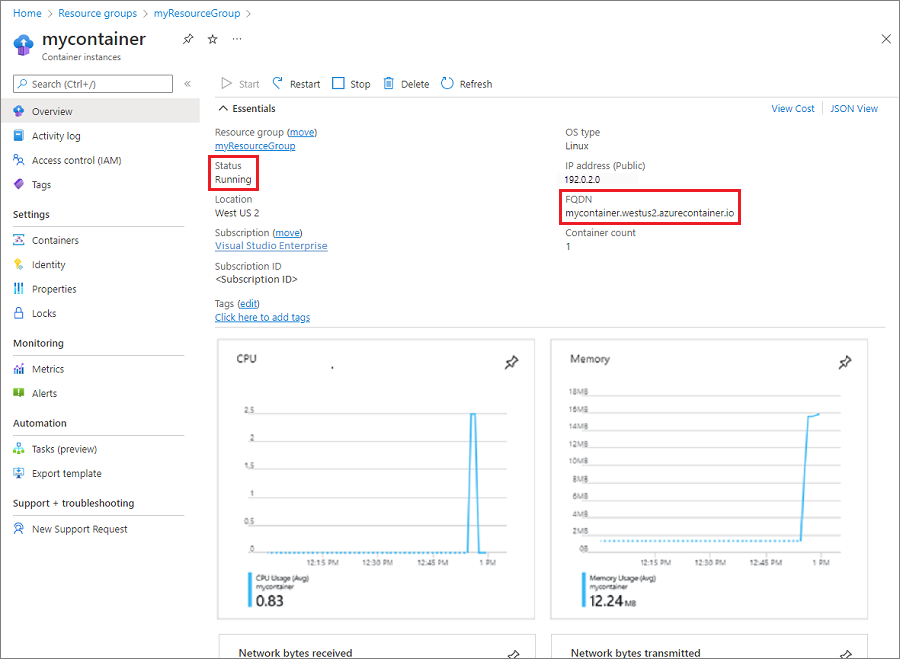
ACI can expose a group with a public IP and fully qualified domain name or deploy the group into an Azure virtual network for private connectivity. Microsoft currently requires NAT Gateway as the supported outbound connectivity pattern for container groups inside a virtual network. Older network-profile guidance should be treated as legacy for API version 2021-07-01 and later.
Azure Files can be mounted when persistent shared files are needed. Local container filesystem state should not be treated as durable because a restart or replacement can remove local data. Managed identity supports both system-assigned and user-assigned identities. A running container can use that identity to access Azure services that support Microsoft Entra authentication, and identity changes on an existing group cause the group to restart.
How do Spot and confidential containers differ?
Spot containers are a preview option for interruptible workloads with no strict availability requirement. Microsoft says they can provide discounts of up to 70 percent compared with regular-priority ACI containers. Current resource documentation limits Spot groups to East US 2, West Europe, and West US, with a hard maximum of 4 vCPU and 16 GB memory.
Spot containers do not support public IP deployment, custom virtual-network deployment with private IP, availability zones, or GPU ACI. Microsoft explicitly says Spot containers are preview and not recommended for production scenarios that require dependable availability.
Confidential containers target selected Linux workloads that need hardware-backed protection for data in use. They use trusted execution environments but have separate resource limits and do not support availability-zone deployment. Buyers should verify workload compatibility and regional support before selecting Confidential instead of Standard.
What changed with GPU support?
GPU resources for Azure Container Instances were retired on July 14, 2025. Microsoft still hosts documentation and historical pricing tables for the former GPU preview, but the current resource-limit documentation marks the capability as retired. New ACI designs should not depend on V100, K80, P100, or other legacy GPU container configurations.
Workloads that require GPUs should instead evaluate currently supported Azure compute services based on orchestration, VM management, scaling, and accelerator requirements. This is a good example of why buyers should check current Learn documentation rather than relying on an old ACI tutorial or pricing table that remains indexed.
What limitations should teams plan around?
ACI is not a complete application platform or Kubernetes replacement. Microsoft currently documents x64 AMD64 container-image support rather than ARM64. Several capabilities remain Linux-specific, and changing properties such as OS type, CPU or memory resources, restart policy, network profile, or availability zone can require group recreation.
Public IP addresses can change after restart, platform maintenance can restart container groups, and regional quota or capacity can constrain deployments. NGroups and standby pools add useful management options but remain distinct from AKS scheduling and Container Apps application lifecycle features. Teams should also plan monitoring, retry behavior, persistent state, image security, secrets management, routing, and failure recovery rather than assuming serverless execution removes those responsibilities.
Who should choose something else?
Choose Azure Container Apps when you want serverless containers plus built-in ingress, service discovery, revisions, traffic splitting, scaling rules, and a managed application lifecycle. Choose AKS when Kubernetes compatibility, custom controllers, policy, advanced scheduling, or a broad Kubernetes ecosystem is required. Choose Azure Batch when the main problem is scheduling and managing large numbers of compute jobs.
Choose Azure Virtual Machines when software requires operating-system control, privileged access, custom kernel behavior, or a non-containerized deployment model. ACI is strongest when the workload is already containerized, comparatively self-contained, and benefits from fast execution without the operational weight of a larger platform.
Reviews
No reviews yet
Nobody has reviewed Azure Container Instances here yet.