About Azure Bastion
Azure Bastion is Microsoft Azure's fully managed service for secure RDP and SSH access to virtual machines without exposing the target virtual machines' management ports directly to the public internet. It supports browser-based access through the Azure portal and, on Standard and Premium, native client connections and additional administration features. Azure Bastion is best suited to organizations that want a centrally managed Azure-native access path for administrators while reducing reliance on public IP addresses and self-managed jump servers. Buyers should compare Developer, Basic, Standard, and Premium carefully because deployment model, scaling, client options, recording, private-only access, availability-zone support, and pricing differ by tier.
What is included
Access
| Protocols | Secure RDP and SSH access to Azure virtual machines without requiring public management ports on the target VMs. |
|---|
SKUs
| Developer, Basic, Standard, Premium | Developer is free shared infrastructure; Basic is dedicated browser access; Standard adds scaling and native-client features; Premium adds session recording and private-only deployment. |
|---|
Networking
| Dedicated subnet | Basic, Standard, and Premium require an AzureBastionSubnet with a /26 or larger prefix. |
|---|
Resilience
| Availability Zones | Customer-selected Availability Zones are in public preview in selected regions and must be chosen at deployment time. |
|---|
Clients
| Browser and native access | Browser RDP and SSH are available on dedicated tiers; Standard and Premium support selected native-client workflows through Azure CLI. |
|---|
Native client
| Session recording limit | Azure Bastion session recording is not currently available for native-client sessions. |
|---|
Scaling
| Scale units | Basic uses two fixed instances; Standard and Premium can scale from two through 50 instances. |
|---|
Security
| Premium controls | Premium adds graphical session recording for supported Bastion sessions and private-only deployment. |
|---|
Pricing
| Hourly dedicated billing | Developer is free; dedicated tiers are billed hourly while deployed, with additional scale units and outbound data transfer billed where applicable. |
|---|
What is Azure Bastion used for?
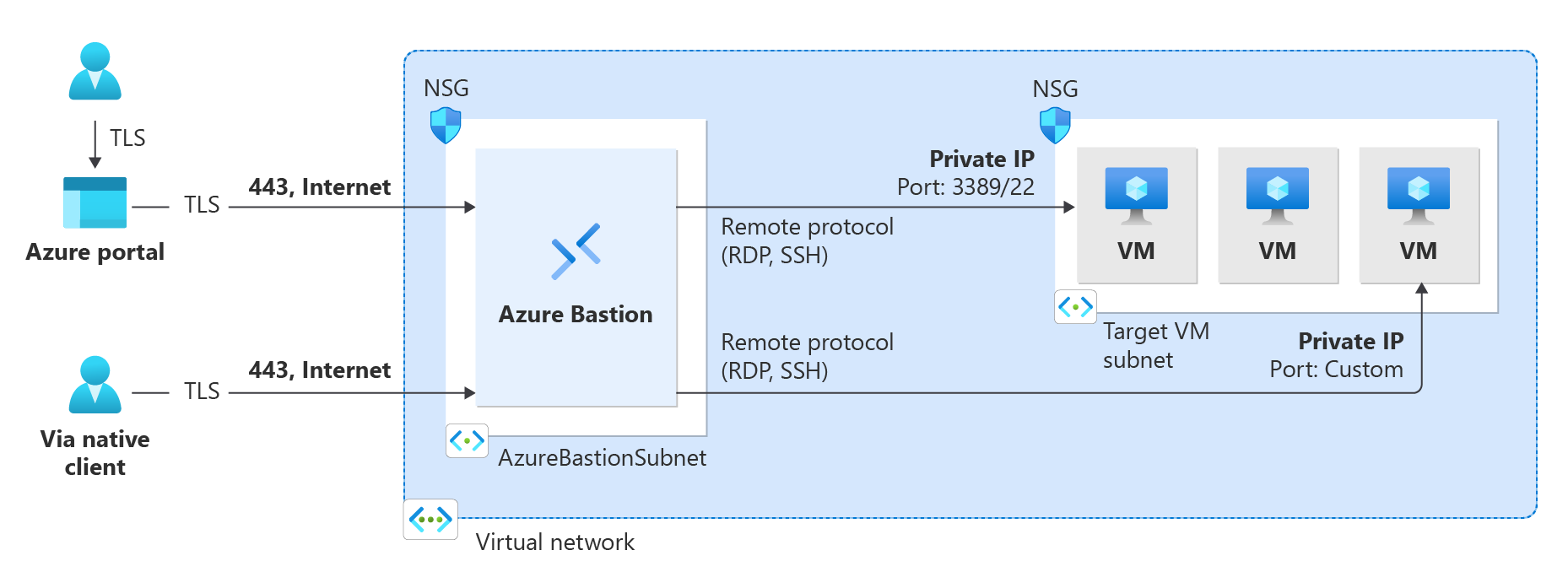
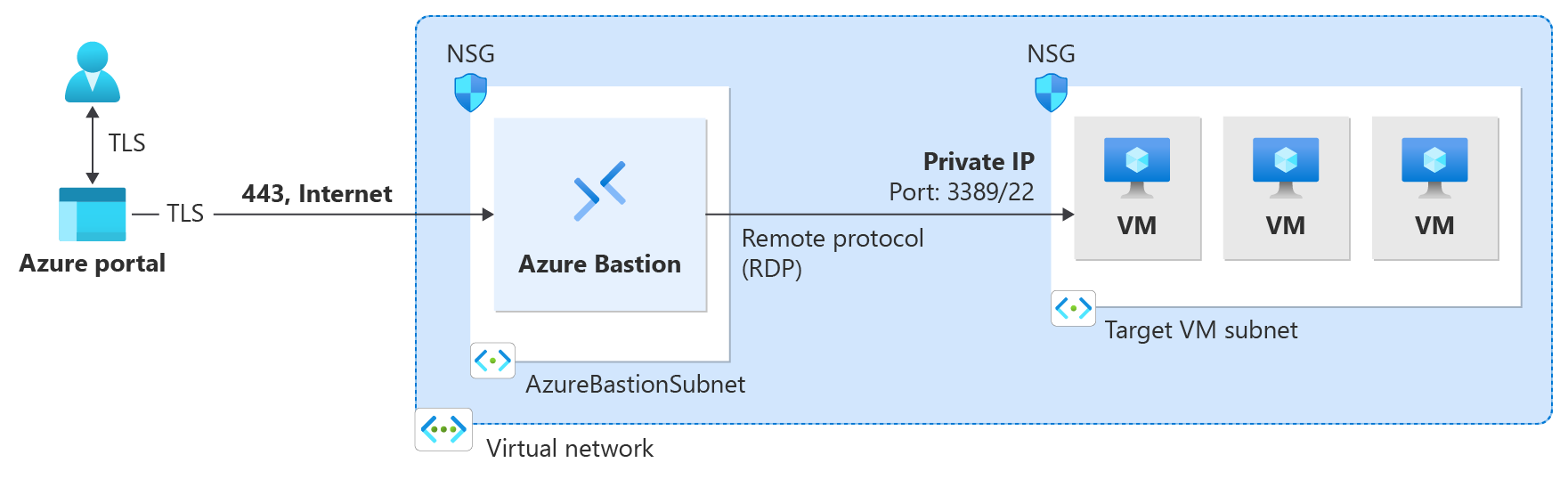
Azure Bastion is used to administer Azure virtual machines over RDP or SSH while keeping the target virtual machines on private IP addresses. A user can connect through the Azure portal without exposing TCP port 3389 or 22 on each virtual machine. Standard and Premium also support selected native-client workflows through Azure CLI.
Bastion reduces one common attack surface, but it does not replace identity controls, endpoint security, operating system hardening, patching, network segmentation, privileged-access governance, or logging. The service provides a managed path to the virtual machine. The organization still decides who can connect, which authentication methods are allowed, and how administrator activity is governed.
How do Developer, Basic, Standard, and Premium differ?
Microsoft currently offers four Bastion options. Developer is a free shared-infrastructure capability intended for development and testing in supported regions and allows one virtual machine connection at a time. Basic uses dedicated Bastion infrastructure and provides browser-based RDP and SSH for production scenarios with fixed capacity.
Standard adds native client support, file-transfer scenarios, shareable links, IP-based connections, custom inbound ports, and scale-out from two to 50 instances. Premium includes Standard capabilities and adds session recording plus private-only deployment. Microsoft also recommends evaluating Premium for production when session controls and private-only access matter, rather than treating it only as a higher-capacity tier.
How does a dedicated Bastion deployment connect to virtual machines?
For Basic, Standard, and Premium deployments, Microsoft requires an AzureBastionSubnet with a /26 or larger prefix. The Bastion resource is deployed into the virtual network and reaches target virtual machines through private addresses. A normal dedicated deployment uses a public IP on the Bastion host, while Premium supports private-only deployment for organizations that do not want a public Bastion endpoint.
The target virtual machines do not need their own public IP addresses for Bastion access. Bastion can also connect to supported virtual machines across peered virtual networks, which can support a centralized administration pattern for hub-and-spoke environments.
What changed for Availability Zones in Azure Bastion?
Microsoft currently offers customer-selected Availability Zones for Azure Bastion in public preview in selected regions. The feature allows a Bastion deployment to be placed in one or more supported zones for improved resiliency planning.
Zone selection must be specified when the Bastion resource is created through manual settings. Microsoft states that the Availability Zone configuration cannot be changed after deployment. Because the feature remains preview and region-limited, teams should verify region support before using it as a production resilience dependency.
When do browser access and native clients make sense?
Browser-based RDP and SSH are available through the Azure portal on Basic and higher dedicated tiers. Standard and Premium add native-client support through Azure CLI, which can be useful when administrators need familiar desktop clients, Microsoft Entra authentication in supported combinations, custom ports, tunneling, or supported file transfers.
Microsoft's current native-client documentation also lists important limits. Session recording is not available for native-client sessions. An SSH private key stored in Azure Key Vault cannot be used directly with the native-client feature; the private key must be downloaded to a local file first. Native-client connections are also not supported from Azure Cloud Shell.
How do file transfer and authentication differ by connection method?
Native-client behavior varies by local operating system, target operating system, and connection method. Microsoft documents Microsoft Entra authentication for supported Windows RDP and Linux SSH native-client paths. File transfer is available in selected RDP and tunnel-based workflows, but it is not identical across every SSH and RDP combination.
This means a buyer should validate the exact workflow before standardizing on Bastion for administrator file movement. If the requirement depends on concurrent sessions, custom ports, file transfer, or Entra sign-in, the supported combination should be checked against Microsoft's current native-client matrix rather than assumed from the presence of Standard or Premium alone.
How do scaling and concurrent connections work?
Basic uses two fixed Bastion instances. Standard and Premium can scale from two through 50 instances. Microsoft's documented guidance gives approximate capacity of about 40 RDP or 80 SSH sessions for Basic across its two instances, while fully scaled Standard or Premium deployments can reach approximately 1,000 RDP or 2,000 SSH sessions.
These are planning figures rather than guaranteed throughput for every environment. Session protocol, virtual machine responsiveness, file transfer, client behavior, and network conditions can affect practical capacity. Organizations with many simultaneous administrators should monitor usage and scale deliberately.
How does Azure Bastion pricing work?
Azure Bastion pricing depends on SKU and deployment model rather than one universal subscription price. Microsoft currently lists Bastion Developer as free. Basic, Standard, and Premium dedicated deployments are billed hourly from the time the Bastion resource is deployed until it is deleted, even when nobody is actively connected.
Standard and Premium base pricing includes two instances, and additional configured instances are billed separately. Outbound data transfer is also metered, with the first 5 GB per month currently included at no charge before standard outbound transfer charges apply. Pricing was checked on September 5, 2026. Buyers should model always-on deployment time, configured scale units, and expected outbound administration traffic.
What security features are available in Azure Bastion Premium?
Premium is the security-focused Bastion tier for organizations that need stronger controls around privileged sessions. Microsoft documents graphical session recording for browser-based Bastion connections, with recordings stored in a customer-designated Azure Blob Storage container through a SAS URL. Premium also supports private-only Bastion deployment so the Bastion host itself does not require a public IP address.
Session recordings contain sensitive administrative activity and should be governed with retention, storage access, and incident-response controls. Teams should also note that session recording does not currently cover native-client sessions, so organizations requiring complete session capture across all administrator connection methods need to account for that gap.
What are the main limitations and operational tradeoffs?
Dedicated Bastion is an always-provisioned service, so Basic, Standard, and Premium can generate hourly cost even when administrator use is infrequent. Dedicated deployments also consume an AzureBastionSubnet and require network planning. Developer avoids dedicated infrastructure cost but is limited to supported regions, shared infrastructure, and one connection at a time.
Microsoft supports upgrading Bastion to higher SKUs but does not support downgrading an existing deployment. Moving to a lower tier requires deleting and recreating the Bastion resource. Availability Zone selection also cannot be changed after deployment. Native-client session recording is unavailable, and some authentication and file-transfer capabilities vary by connection method.
Who should choose something else?
Teams that already have secure private administrative connectivity through a tightly controlled VPN, zero-trust private access platform, or enterprise privileged-access system may not need Bastion in every network. Organizations that need one vendor-neutral platform for privileged access across large fleets outside Azure may also prefer a broader PAM or remote-access product.
Azure Bastion is strongest when Azure virtual machines need RDP or SSH administration and the organization wants to remove direct public management ports, avoid operating jump servers, and keep the access path integrated with Azure networking. Buyers should choose something else when cross-cloud fleet access, universal session recording, or broader privileged workflow management is more important than Azure-native simplicity.
Reviews
No reviews yet
Nobody has reviewed Azure Bastion here yet.