About Azure Arc
Azure Arc extends Azure management and selected Azure services to infrastructure that runs outside Azure, including Windows and Linux servers, Kubernetes clusters, SQL Server, and selected data services across datacenters, edge locations, and other public clouds. Connected resources receive Azure Resource Manager identities so teams can apply familiar inventory, tagging, governance, monitoring, security, and automation patterns without first moving the workload into Azure. Arc is most useful when an organization needs one Azure-centered control plane for hybrid or multicloud operations while keeping the underlying workload where it already runs.
What is included
Scope
| Primary use | Hybrid, multicloud and edge management through Azure Resource Manager |
|---|
Servers
| Arc-enabled server scale | No Azure Arc limit on registered servers per resource group, subscription or tenant; Microsoft Entra directory quotas still apply |
|---|---|
| Private Link Scope limit | 800 Azure Arc Private Link Scope resources per resource group |
| Connected Machine agent | Version 1.67 released August 2026; Microsoft supports agent versions released within the previous year |
Kubernetes
| Cluster support | CNCF-certified Kubernetes clusters connected through Azure Arc agents |
|---|---|
| Agent support policy | Latest Arc-enabled Kubernetes agent version plus the two previous versions (N-2) |
| July 2026 agent | Version 1.36.1 with security fixes, FIPS updates and Pod Security Standards improvements |
Identity
| Workload identity federation | Generally available for Arc-enabled Kubernetes since February 2026 |
|---|
Connectivity
| Azure Arc gateway for Kubernetes | Generally available since February 2026 |
|---|
Pricing
| Basic control plane | Inventory and selected Arc management capabilities have no separate Arc charge; paid Azure add-ons are billed separately |
|---|---|
| Kubernetes Configuration | GitOps billed by cluster vCPU after the current included allowance; first 6 vCPUs per Azure subscription are included at no charge |
Preview
| Essential Machine Management | Public preview for Azure VMs and Arc-enabled servers; initial preview capabilities have no additional EMM charge, related logs can still incur cost |
|---|
Security
| Certificate change | From February 2027 the Connected Machine agent will no longer accept certificates with negative serial numbers |
|---|
What can Azure Arc manage in 2026?
Microsoft currently positions Azure Arc as a family of hybrid and multicloud management capabilities rather than a migration product. Arc-enabled servers connect Windows and Linux physical servers and virtual machines hosted outside Azure. Arc-enabled Kubernetes connects CNCF-certified Kubernetes clusters running on premises, at the edge, or in other clouds. Azure Arc also supports SQL Server enabled by Azure Arc and selected Arc-enabled data services.
The connected resource remains on its existing infrastructure. Arc adds an Azure resource identity and supported Azure management capabilities, but it does not convert an external server into an Azure virtual machine or make Microsoft responsible for the underlying hardware, local network, hypervisor, operating system, or Kubernetes platform.
How do Arc-enabled servers work?
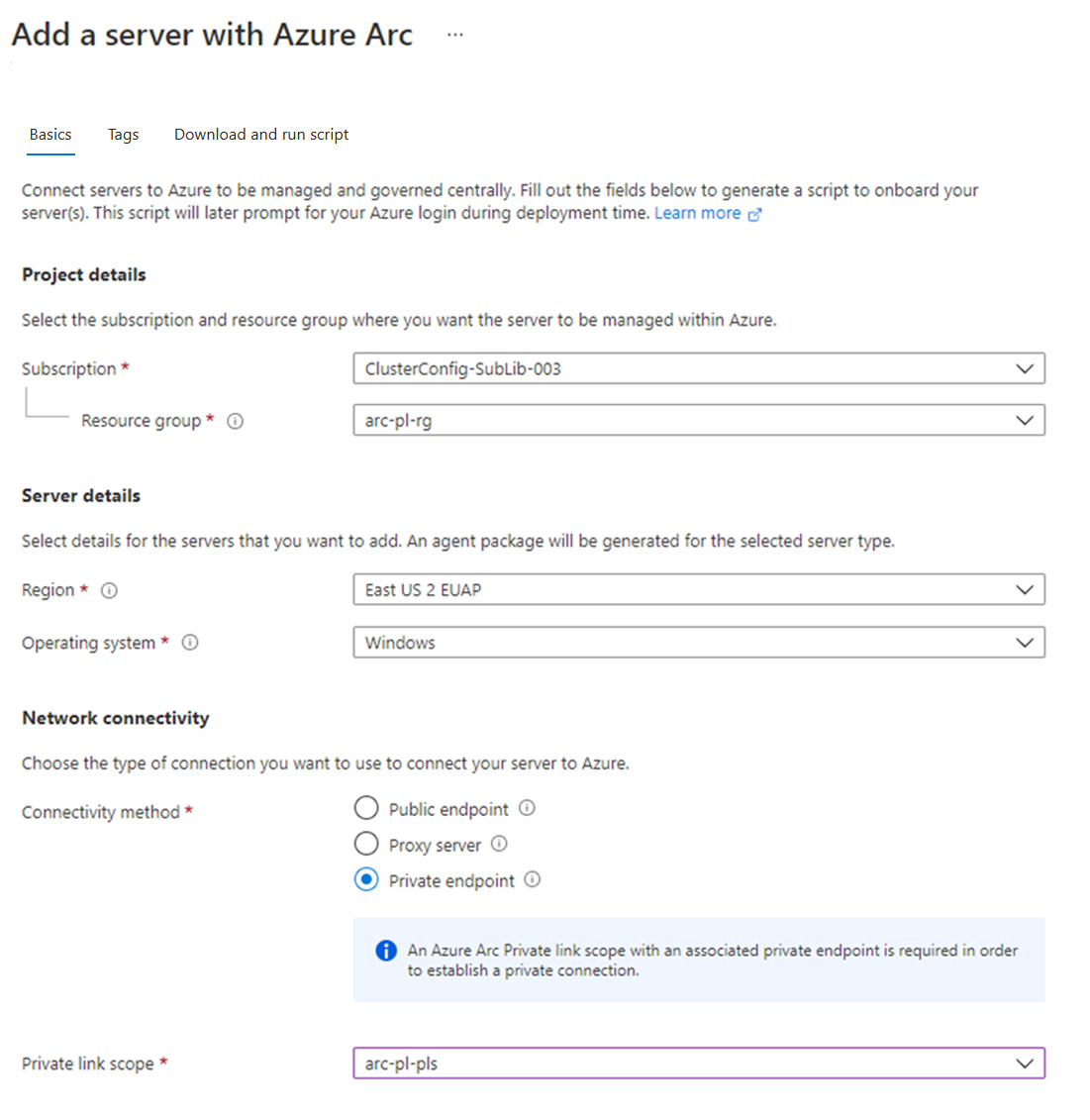
Arc-enabled servers use the Azure Connected Machine agent. After onboarding, a server appears in Azure Resource Manager and can participate in supported Azure services such as Azure Policy, Azure Monitor, Defender for Cloud, Update Manager, Machine Configuration, and extensions. The server needs outbound connectivity to Azure directly or through a supported proxy or Arc gateway design.
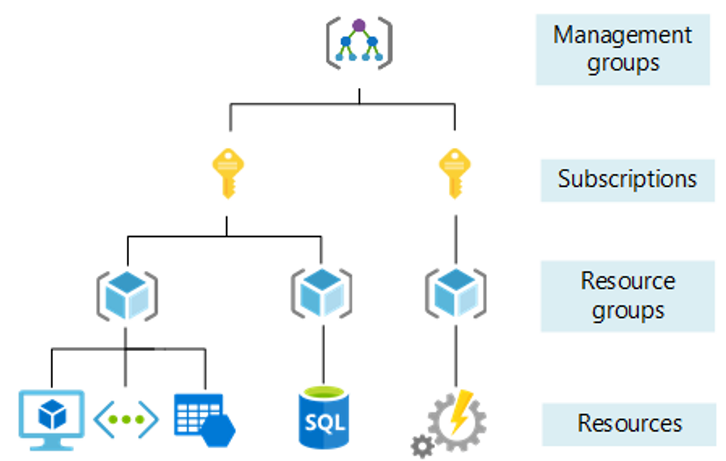
Microsoft states that there is no Azure Arc service limit on the number of Arc-enabled servers that can be registered in a resource group, subscription, or tenant. Each connected server is associated with a Microsoft Entra object, so directory object quotas still matter. The standard Azure limit of 800 instances per resource group applies to the Azure Arc Private Link Scope resource type.
What should teams know about the Connected Machine agent lifecycle?
The Connected Machine agent is an operational dependency and should be treated like other managed infrastructure software. Microsoft currently supports only agent versions released within the previous year and recommends keeping machines on a supported recent release. Version 1.67 was released in August 2026 and added security and reliability improvements, Azure Local cloud-name support, Ubuntu 26.04 x86-64 support, and fixes related to automatic upgrades.
Automatic Connected Machine agent upgrades remain preview. Organizations that do not use automatic upgrades should maintain their own tested rollout process. Microsoft also states that from February 2027 the agent will no longer accept certificates with negative serial numbers, so environments with privately issued certificates should validate their certificate authority behavior before that change becomes effective.
How does Azure Arc-enabled Kubernetes work?
Arc-enabled Kubernetes installs agents in the cluster that establish a secure outbound connection to Azure. Each connected cluster becomes an Azure Resource Manager resource that can be grouped and tagged with other Azure resources. Microsoft supports CNCF-certified Kubernetes distributions, including clusters hosted in datacenters and on other public cloud providers.
Supported management scenarios include GitOps configuration, Azure Policy, Azure Monitor, Defender for Containers, Azure RBAC connectivity, marketplace extensions, and selected Azure services. The exact capability set depends on the cluster, extension, region, and service, so buyers should validate each required integration instead of assuming parity with Azure Kubernetes Service.
What changed for Arc-enabled Kubernetes in 2026?
Microsoft's current Arc-enabled Kubernetes release notes list agent version 1.36.1 from July 2026. That release includes security fixes, FIPS compliance updates, reliability improvements, and improved Pod Security Standards compliance. Microsoft currently supports the latest Arc-enabled Kubernetes agent version and the two previous versions, so cluster agent maintenance should be part of normal platform operations.
Workload identity federation for Arc-enabled Kubernetes and Azure Arc gateway for Kubernetes reached general availability in February 2026. Workload identity federation lets applications in connected clusters exchange trusted Kubernetes service-account tokens for Microsoft Entra access tokens, reducing dependence on long-lived application secrets. Teams still need to design service accounts, managed identities, federated credentials, and access policies correctly.
What does Azure Arc cost?
Pricing was checked on September 6, 2026. Microsoft states that connecting and organizing Arc-enabled Kubernetes clusters in Azure is available at no additional Arc control-plane charge, and Azure Arc provides inventory and selected management capabilities without a separate Arc fee. Charges appear when organizations enable paid Azure services or licensing options on connected resources.
Examples include Defender for Cloud, Azure Monitor data ingestion, Azure Update Manager, Azure Policy Machine Configuration and Change Tracking and Inventory, Microsoft Sentinel, Windows Server pay-as-you-go licensing through Arc, SQL Server pay-as-you-go licensing, and other connected services. For Arc-enabled Kubernetes, Kubernetes Configuration with GitOps is billed by cluster vCPU after Microsoft's included allowance, with the first six vCPUs per Azure subscription included at no charge under the current pricing model. Buyers should model the control plane and each enabled add-on separately rather than treating Azure Arc as one fixed subscription price.
What is Essential Machine Management?
Microsoft is currently previewing Essential Machine Management for Azure virtual machines and Azure Arc-enabled servers. Enabling it at subscription scope automatically enrolls eligible machines into a curated management configuration intended to improve consistency for monitoring, security, and machine management.
During the initial public preview, Microsoft states that Essential Machine Management capabilities are provided without an additional charge, although related log ingestion can still create costs. Microsoft has also published future pricing guidance for some Arc-enabled servers once billing starts. Because the capability remains preview, production buyers should treat pricing and feature scope as subject to change and verify the current terms before broad rollout.
How should organizations design security and connectivity?
Arc extends the Azure management plane into environments that the customer still operates. Teams remain responsible for local network security, operating system hardening, patching strategy, Kubernetes security, extension permissions, identity design, and availability of the underlying infrastructure. Outbound network paths should be deliberately controlled, and private connectivity or gateway options should be evaluated where direct internet access is not acceptable.
For servers, Microsoft stores connected-machine metadata in the Azure region selected for the Arc resource. For regulated workloads, teams should validate data residency, extension behavior, diagnostic data, and any additional Azure service that receives telemetry. For Kubernetes, teams should also review cluster RBAC, workload identity, GitOps permissions, extension privileges, and how Azure Policy interacts with cluster-native controls.
How is Azure Arc different from Azure Migrate?
Azure Arc is for ongoing management of distributed infrastructure. Azure Migrate is for assessing and moving workloads toward Azure destinations. Arc can be useful before, during, or after a migration program because it can standardize inventory and governance for systems that remain outside Azure, but it does not move applications or data by itself.
An organization that intends to retire a datacenter should evaluate Azure Migrate plus target services such as Azure Virtual Machines, Azure Kubernetes Service, Azure App Service, or managed databases. An organization that expects servers or clusters to remain in factories, branches, sovereign environments, other clouds, or private datacenters may get more value from Arc as a long-term management layer.
What are the main limitations and tradeoffs?
Azure Arc does not provide complete feature parity with native Azure resources. Capabilities differ by connected resource type, region, operating system, Kubernetes distribution, extension, and Azure service. Agents and extensions also create lifecycle work, and a large estate can become dependent on Azure identity, policy, monitoring, networking, and APIs even when workloads run elsewhere.
Cost can also become less obvious as more add-on services are enabled. Inventory may be free while monitoring, security, update management, licensing, configuration, or log ingestion create separate meters. Organizations should define a small set of required management outcomes first, measure the operational benefit, and expand Arc integrations only where they justify the added dependency and cost.
Who should choose something else?
Organizations that run almost everything natively in Azure usually do not need Arc for those native resources. Small teams with only a few external servers may find local management simpler if they do not need centralized Azure governance, security, or inventory.
Teams whose main objective is migration should evaluate Azure Migrate and the destination Azure services. Organizations that require a cloud-neutral control plane with minimal dependence on one hyperscaler should compare dedicated multicloud management platforms. Arc is strongest when Azure governance and management are already strategic and the organization still expects important infrastructure to remain outside Azure for the long term.
Reviews
No reviews yet
Nobody has reviewed Azure Arc here yet.