About Azure Application Gateway
Azure Application Gateway is Microsoft Azure's regional application delivery service for web traffic. It is designed for HTTP and HTTPS routing, backend health, TLS handling, autoscaling and optional Web Application Firewall protection, and current v2 also supports TCP and TLS proxy scenarios. Application Gateway v2 is the current production generation after v1 retired on April 28, 2026. It is a strong fit when an application needs regional Layer 7 routing close to Azure workloads, while Azure Front Door is usually the better fit for global edge delivery and Azure Load Balancer for general Layer 4 distribution without application-aware routing.
What is included
Traffic
| Application layer | Regional application delivery for HTTP and HTTPS workloads with host and URL path routing. |
|---|
Layer 4
| TCP and TLS proxy | Application Gateway v2 supports TCP and TLS proxy scenarios in addition to HTTP, HTTPS, WebSocket and HTTP/2. |
|---|
Private deployment
| Private-only frontend | Application Gateway v2 supports private-only frontend configurations; private deployments require subnet delegation to Microsoft.Network/applicationGateways. |
|---|
Scale
| Backend targets per pool | Microsoft documents up to 1,200 backend targets per backend address pool. |
|---|---|
| HTTP listeners | Microsoft documents up to 200 HTTP listeners, with up to 100 active listeners routing traffic. |
| v2 instances | Application Gateway v2 supports up to 125 instances per gateway. |
Security
| Web Application Firewall | WAF_v2 supports managed and custom rules for regional web application protection. |
|---|
TLS
| Minimum current protocol | TLS 1.0 and TLS 1.1 support ended August 31, 2025; clients and backends should use TLS 1.2 or higher. |
|---|
Availability
| Zone redundancy | Application Gateway v2 supports zone-redundant deployment in supported Azure regions. |
|---|
Lifecycle
| v1 retirement | Application Gateway v1 retired on April 28, 2026 and is no longer supported. |
|---|
Pricing
| Gateway and capacity billing | Application Gateway v2 pricing combines a fixed gateway-hour component with capacity-unit usage; outbound transfer is billed separately. |
|---|
What is Azure Application Gateway used for?
Azure Application Gateway sits in front of web applications and distributes incoming requests across healthy backend targets. Microsoft documents support for Azure virtual machines, virtual machine scale sets, Azure App Service and reachable on-premises or external servers. The service can use public or private frontend addresses, so it can protect internet-facing applications or serve internal application traffic inside a virtual network.
Its main advantage over a traditional network load balancer is application-aware routing. Application Gateway can route by host name or URL path, redirect requests, terminate TLS, preserve end-to-end TLS to backends and use cookie-based session affinity. These capabilities make it useful for regional websites, APIs, multi-site hosting and applications that need a web-aware routing layer before the backend.
What is the current Application Gateway generation?
Application Gateway v2 is the current production generation. Microsoft states that Application Gateway v1 retired on April 28, 2026 and is no longer supported. Existing v1 deployments should migrate to v2 rather than extending a retired architecture.
The v2 generation adds autoscaling, zone redundancy, static virtual IP addresses, faster provisioning and configuration updates, header rewrite support and current Web Application Firewall capabilities. Microsoft also now documents TCP and TLS proxy support in v2 for non-HTTP scenarios, so buyers should use current v2 documentation rather than older v1 sizing, policy or pricing guidance.
How do listeners, routing rules and backend pools work?
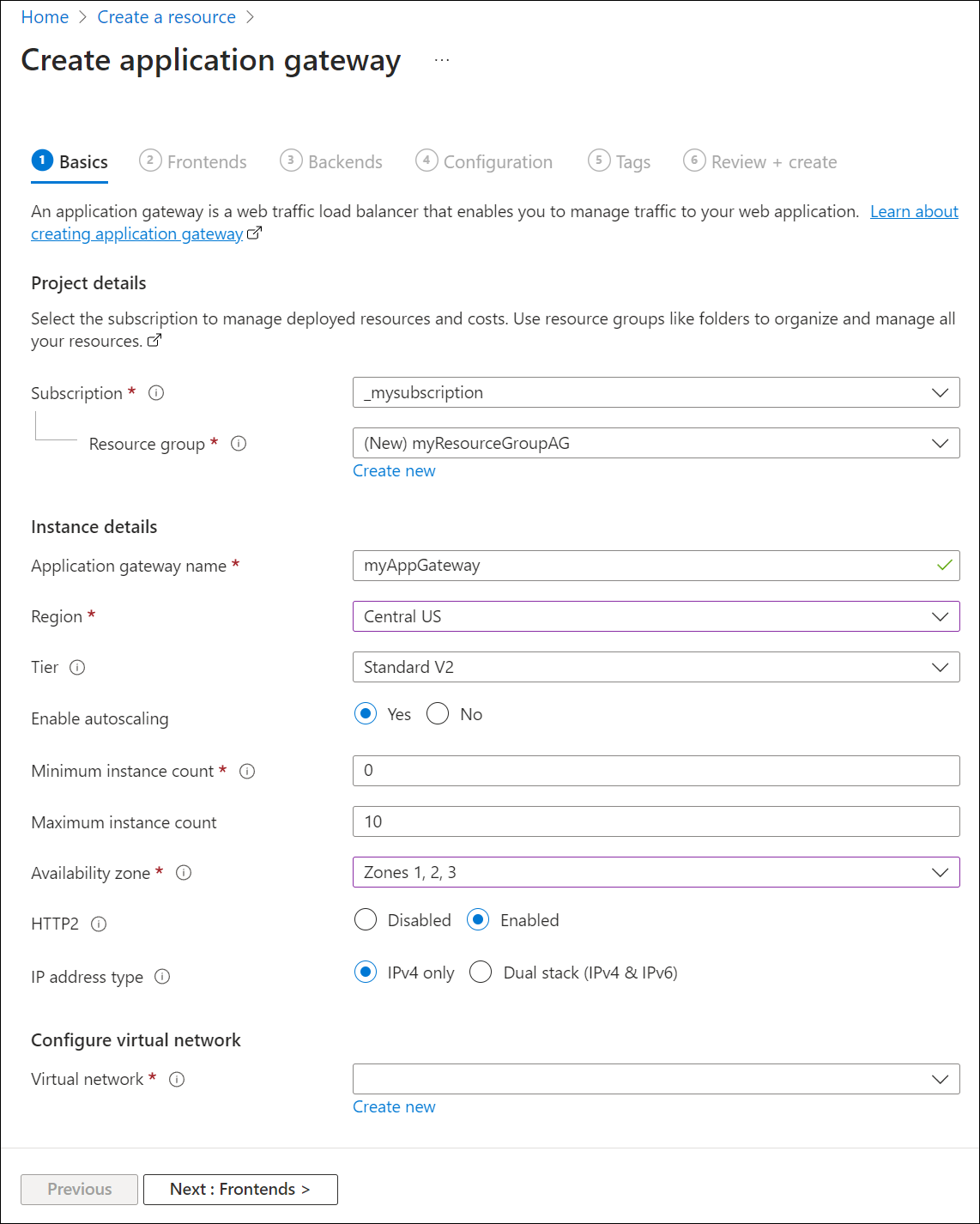
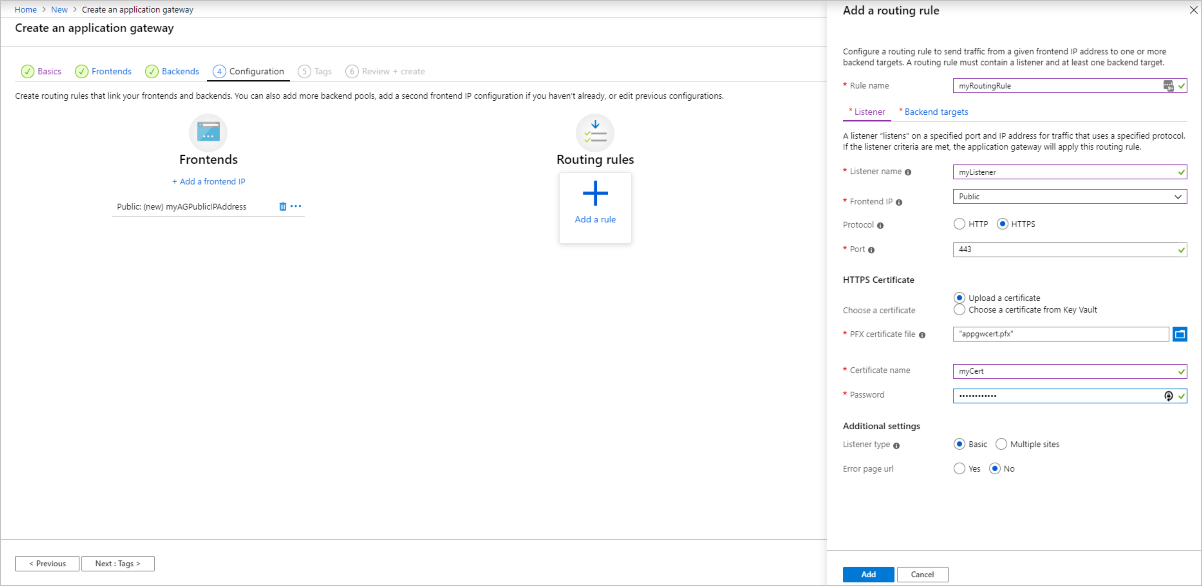
An Application Gateway configuration connects a frontend address to listeners, routing rules, backend pools, backend settings and health probes. A listener accepts traffic for a defined protocol, port and optional host name. Routing rules then decide which backend pool should receive the request. URL path routing can send different parts of one site to different backends, while multisite hosting can route several host names through one gateway.
Health probes determine whether a backend is available for new requests. Microsoft recommends custom probes when the application needs a meaningful health endpoint because custom probes can define hostname, path, interval, failure threshold, accepted status codes and response-body matching. Production teams should monitor application health, not only whether a port answers.
What limits matter when sizing Application Gateway?
Microsoft's current Azure limits documentation lists up to 1,000 Application Gateway resources per region per subscription, four frontend IP configurations, 100 frontend ports, 100 backend address pools and 1,200 backend targets per pool. It also lists 200 HTTP listeners, with up to 100 active listeners routing traffic, 400 HTTP load-balancing rules and 100 backend HTTP settings.
For v2, Microsoft lists up to 125 instances per gateway and up to 100 SSL certificates. These are platform ceilings rather than recommended operating targets. A design that consolidates many sites, certificates, listeners and backend pools behind one gateway should leave capacity for growth and operational changes.
How do TLS termination and current TLS policies work?
Application Gateway can terminate TLS at the gateway and send traffic to backends over HTTP or HTTPS according to the design. It also supports end-to-end TLS so traffic can remain encrypted between the gateway and backend. This can simplify frontend certificate management while preserving encrypted backend communication where required.
Microsoft retired TLS 1.0 and TLS 1.1 support for Application Gateway on August 31, 2025. Current clients and backend servers should use TLS 1.2 or higher. Operators should still review explicit SSL policy and SSL profile configuration instead of assuming older customer-selected settings were automatically replaced.
What should buyers know about private-only Application Gateway v2?
Application Gateway v2 supports public-only, public-and-private, and private-only frontend configurations. Microsoft states that private-only deployments require subnet delegation to Microsoft.Network/applicationGateways for new and existing private Application Gateway deployments. This requirement matters for infrastructure-as-code templates and older network designs that were created before private-only support matured.
A private-only gateway does not have direct internet egress for internet-facing backend targets. Microsoft documents Virtual Network NAT or a virtual appliance with internet access as ways to provide outbound connectivity when a private-only Application Gateway must reach a public backend. Buyers should therefore validate backend reachability and subnet design before assuming that removing the public frontend has no effect on outbound paths.
How does Web Application Firewall fit into Application Gateway?
The WAF_v2 option integrates Azure Web Application Firewall with Application Gateway. Microsoft documents managed rules, custom rules and protection for common web attacks, while current pricing documentation states that WAF Policy and WAF rules do not add a separate charge when using the WAF or WAF_v2 Application Gateway SKU.
WAF still requires policy tuning, monitoring and application testing. Teams should review blocked requests and false positives rather than assume the default rule set needs no ownership. Security policy should also be separated from routing logic in operational procedures so a routing change does not unintentionally weaken application protection.
How do autoscaling and zone redundancy work?
Application Gateway v2 supports autoscaling so gateway capacity can expand and contract with traffic instead of requiring a fixed deployment size. Microsoft also documents zone redundancy in supported regions. For v2 infrastructure, Microsoft recommends planning enough subnet address space for scale and documents a minimum /24 recommendation when a deployment might reach the 125-instance maximum.
Autoscaling reduces manual capacity planning but does not remove performance planning. Backend capacity, connection patterns, TLS workload, WAF processing and sudden traffic changes can still affect application behavior. Teams should monitor gateway and backend metrics together because a successfully scaling gateway can still overwhelm an undersized backend.
What does TCP and TLS proxy support add?
Application Gateway v2 can also proxy TCP and TLS traffic, extending the service beyond its traditional HTTP, HTTPS, WebSocket and HTTP/2 use cases. Microsoft documents Standard_v2 and WAF_v2 support for these Layer 4 proxy scenarios, including configurations with public or private frontends.
There are important limitations. WAF does not inspect traffic that uses TCP or TLS listeners, the default backend connection-draining timeout is 30 seconds and is not currently user-configurable for these Layer 4 scenarios, and a configuration update can terminate active connections after that drain period. Microsoft also states that Application Gateway Ingress Controller does not support the Layer 4 proxy path and remains focused on Layer 7 HTTP(S) listeners. Database protocols can also have TLS-ordering or server-name constraints, so teams should test the exact protocol before using the gateway as a database proxy.
How does Azure Application Gateway pricing work?
Azure Application Gateway does not have one universal monthly price. Microsoft's current pricing page bills Application Gateway v2 using a fixed gateway-hour component plus capacity-unit usage. Capacity units reflect compute, persistent connections and throughput. Outbound data transfer from Azure is charged separately under standard data-transfer rates, while inbound transfer is listed as free.
Pricing was checked on September 4, 2026. Microsoft also lists Application Gateway Basic preview and Application Gateway for Containers as separate options with different billing models. Because rates vary by region, agreement, traffic profile, WAF choice and capacity consumption, buyers should estimate the exact architecture in the Azure pricing calculator rather than use one sample monthly amount.
How does Application Gateway compare with Load Balancer and Front Door?
Azure Load Balancer is the better starting point for regional Layer 4 TCP or UDP distribution when the application does not need HTTP-aware routing, TLS termination or web application firewall functions. Azure Application Gateway is the regional application-delivery option for web applications that need host routing, URL path routing, TLS handling, session affinity or WAF close to the workload, with additional TCP and TLS proxy support for selected non-HTTP scenarios.
Azure Front Door is a global edge service designed for geographically distributed HTTP and HTTPS applications that benefit from edge routing, CDN caching, acceleration, global failover and edge security. Large architectures can use these services together, but buyers should avoid layering them without a clear requirement because every additional hop adds cost, configuration and troubleshooting complexity.
What are the main limitations and migration considerations?
Application Gateway is a dedicated deployment in an Azure virtual network and requires a dedicated subnet. Teams need to plan frontend addresses, DNS, subnet capacity, backend reachability, certificates, probes, routing rules, WAF policy, logging and application behavior. Private-only deployments add subnet-delegation and outbound-connectivity considerations, while TCP and TLS proxy scenarios add limitations that differ from normal HTTP routing.
Organizations that still have references to v1 should treat the change as a completed retirement issue rather than a future roadmap item because v1 retired on April 28, 2026. Older TLS assumptions also need to be removed because TLS 1.0 and TLS 1.1 support ended on August 31, 2025.
Who should choose something else?
Choose Azure Load Balancer when the main requirement is high-performance TCP or UDP distribution without application-layer routing. Choose Azure Front Door when users are geographically distributed and the application needs a global edge entry point, CDN caching or global failover. Teams running Kubernetes should also evaluate whether native ingress, Gateway API options or Application Gateway for Containers better match their platform architecture.
Azure Application Gateway is strongest for regional applications that need application-aware routing, TLS termination, autoscaling, zone redundancy and optional WAF protection near the workload. Buyers should choose it when those regional controls solve a concrete delivery problem rather than because every Azure application needs an additional gateway.
Reviews
No reviews yet
Nobody has reviewed Azure Application Gateway here yet.