About Azure App Service
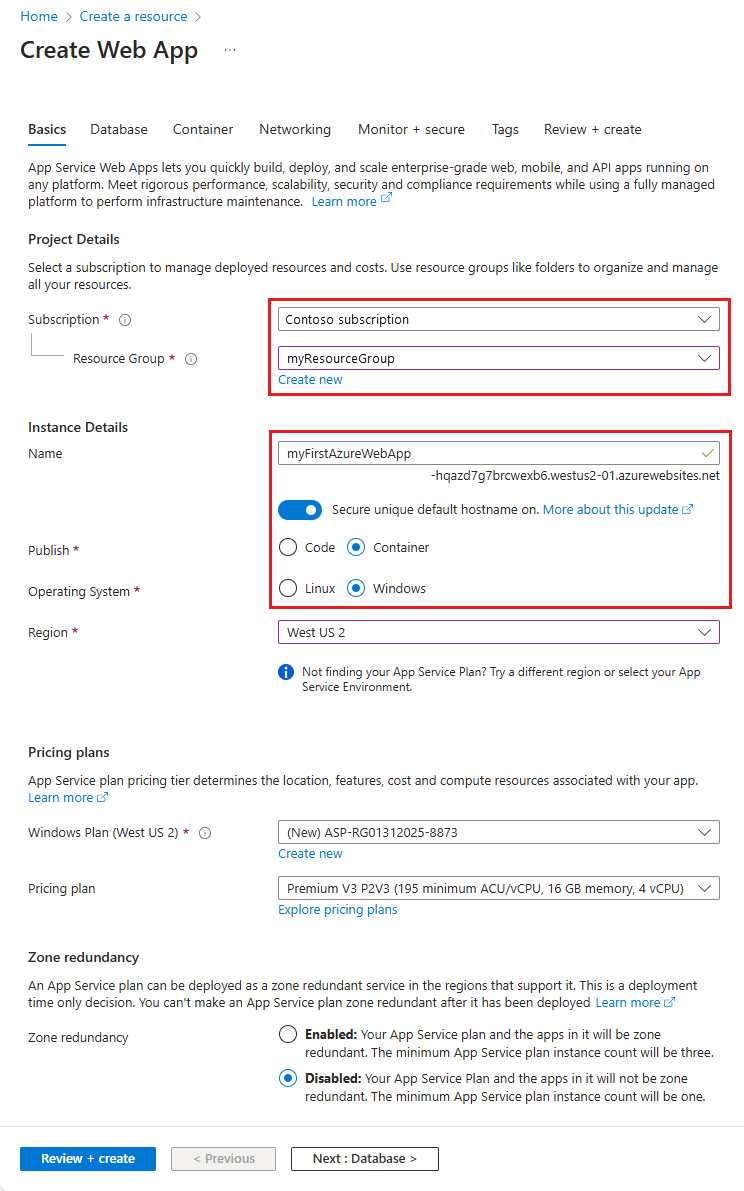
Azure App Service is Microsoft's fully managed platform-as-a-service for hosting web applications, mobile back ends, REST APIs, and supported custom containers without operating the underlying virtual machines. It supports common application stacks including .NET, Java, Node.js, Python, and PHP on Windows or Linux, while custom containers provide another deployment path for supported workloads. App Service is best suited to teams that want managed web hosting with more application control than a function platform but less infrastructure responsibility than Azure Virtual Machines or Kubernetes.
What is included
Hosting
| Workloads | Managed hosting for web applications, mobile back ends, REST APIs, and supported custom containers. |
|---|
Runtimes
| Supported stacks | Microsoft documents .NET, Java, Node.js, Python, and PHP support across Windows or Linux options depending on the workload. |
|---|
Deployment
| Deployment slots | Supported paid tiers can use staging deployment slots and swaps for safer production releases. |
|---|
Scaling
| Tier scale-out limits | Basic supports up to 3 instances, Standard 10, Premium v1 20, Premium v2-v4 30, and Isolated up to 100 dedicated instances. |
|---|
Capacity
| Storage limits | Microsoft lists 1 GB for Free and Shared, 10 GB for Basic, 50 GB for Standard, 250 GB for Premium, and 1 TB for Isolated. |
|---|
Premium v4
| Outbound networking | Premium v4 does not provide stable outbound IP addresses by default; predictable outbound addressing requires a supported network design such as Azure NAT Gateway. |
|---|
Managed Instance
| Current scope | Windows-only plan-scoped hosting on Premium v4 and memory-optimized Premium v4 in supported regions; Linux and containers are not supported. |
|---|
Isolated v4
| App Service Environment | Runs in App Service Environment v3, supports Windows and Linux code plus supported containers, and has region and capacity constraints that should be checked before migration. |
|---|
Security
| TLS lifecycle | Inbound TLS 1.0 and 1.1 are scheduled for retirement on May 31, 2027; Microsoft recommends TLS 1.2 or later. |
|---|
What is Azure App Service used for?
Azure App Service is designed for web applications and APIs that need managed hosting, custom domains, TLS, deployment automation, scaling, identity integration, and connectivity to other Azure services. Common scenarios include public websites, internal business applications, REST APIs, mobile back ends, and applications being migrated from traditional Windows or Linux servers.
Microsoft operates the hosting platform, patching, and underlying infrastructure, while customers remain responsible for application code, configuration, dependencies, identity, data, secrets, and application-level security. App Service is usually most attractive when a workload fits a supported runtime or container model and the organization wants to reduce server administration.
Which runtimes and deployment models does App Service support?
Microsoft currently documents support for .NET, Java, Node.js, Python, and PHP across Windows or Linux options depending on the runtime and workload. Teams can deploy source code directly or use supported custom containers. Deployment automation can use GitHub Actions, Azure Pipelines, Azure CLI, Azure PowerShell, and common developer tooling.
Paid tiers can also support deployment slots for safer releases. A team can deploy to a staging slot, validate the build, and then swap it into production. Slots share the same App Service plan compute, so they should be included in capacity planning rather than treated as free separate environments.
How do App Service plans and pricing work?
App Service pricing is based on the App Service plan that provides compute resources for one or more apps. Microsoft's current pricing and hosting-plan documentation lists shared compute, dedicated compute, and isolated options. Free and Shared are intended for trials, experimentation, and learning rather than supported production use and do not carry a production SLA.
Dedicated tiers charge for the plan capacity rather than for each app separately. Multiple apps in the same plan share the same worker instances, which can improve utilization but also means those apps share CPU and memory. Pricing was rechecked against Microsoft's App Service pricing page on September 4, 2026. Exact rates vary by operating system, region, SKU, reservation or savings commitment, and customer agreement, so buyers should validate the intended deployment in the Azure pricing calculator rather than treating a single public rate as universal.
What is Premium v4 and what should buyers know?
Microsoft documents Premium v4 as the newest Premium App Service generation for higher performance and modernized hosting. Premium v4 is available in select Azure regions. It supports source-code apps on Windows and both source-code apps and custom containers on Linux, but Microsoft currently does not support Windows containers on Premium v4.
One important networking difference is that Premium v4 does not provide stable outbound IP addresses by default. Microsoft states that the portal shows outbound addresses as Dynamic and API or CLI calls can return empty outbound address values. Applications that need a predictable outbound source IP should use Azure NAT Gateway or another supported network design instead of assuming a fixed platform outbound address.
What is Managed Instance on Azure App Service?
Managed Instance on App Service is Microsoft's plan-scoped hosting option for Windows web applications that need deeper operating-system customization while retaining the App Service management model. Microsoft lists it for select regions on Premium v4 and memory-optimized Premium v4 plans.
It targets legacy or infrastructure-dependent Windows web applications that rely on components such as COM, registry settings, MSI installers, drive mappings, Windows features, or diagnostic RDP access. Persistent configuration must be scripted because changes made through an RDP session are not retained across restart or platform maintenance. Managed Instance does not support Linux, containers, App Service Environment, WebJobs, TCP or NetPipes workloads, and it is not a replacement for a full virtual machine when administrator-level host control is required.
What App Service limits matter for sizing?
Microsoft's current App Service limits show important differences by tier. Free supports up to 10 apps per App Service plan and Shared supports up to 100. Dedicated Basic, Standard, Premium, and Isolated plans are listed as unlimited for apps per plan, but Microsoft notes that practical density depends on the workload and shared resource use.
Scale-out limits also differ. Basic supports up to 3 dedicated instances, Standard up to 10, Premium v1 up to 20, Premium v2 through v4 up to 30, and Isolated up to 100 dedicated instances. Storage limits are listed as 1 GB for Free and Shared, 10 GB for Basic, 50 GB for Standard, 250 GB for Premium, and 1 TB for Isolated, with the Isolated available storage quota documented as 999 GB. Buyers should treat these as platform limits, not recommended steady-state targets, and should load test applications before choosing plan density or instance counts.
What is Isolated v4 and when is it relevant?
Microsoft documents Isolated v4 as the newer App Service Environment v3 tier for workloads that need dedicated network isolation together with current-generation compute. It supports Windows code apps, Linux code apps, Linux custom containers, and Windows containers in supported regions and deployment units.
Isolated v4 is capacity constrained in some regions and subscriptions. Microsoft warns that scale-out or deployment requests can fail when capacity is not pre-provisioned and may require an Azure support request. Availability-zone support also varies by region. Buyers considering Isolated v4 should verify SKU and zone availability before migration, especially when an existing App Service Environment must be redeployed because its underlying deployment does not support the requested v4 SKU.
How does scaling work in Azure App Service?
App Service can scale vertically by moving to a larger plan and horizontally by increasing worker instances on supported tiers. Microsoft also provides automatic scaling based on incoming HTTP traffic and autoscale rules based on metrics or schedules. These are different mechanisms and should not be configured as though they are the same feature.
Microsoft currently documents a maximum burst of up to 30 instances for Premium v2, Premium v3, and Premium v4 automatic scaling. Apps in the same App Service plan normally share the plan's worker pool, while per-app automatic scaling can provide more independent behavior for supported web apps. Application state, startup time, downstream database limits, and session affinity still affect whether scaling works well in practice.
What security and networking changes should buyers plan for?
App Service supports Microsoft Entra authentication scenarios, managed identities, TLS, access restrictions, virtual network integration, and private connectivity options in supported configurations. Microsoft manages the platform, but customers still control application code, secrets, dependency security, data access, and network policy.
A current lifecycle item is the planned retirement of inbound TLS 1.0 and TLS 1.1 on May 31, 2027. Microsoft states that App Service, Azure Functions, Logic Apps Standard, and App Service Environment will stop accepting inbound TLS 1.0 and 1.1 handshakes on both application and SCM endpoints after that date. New App Service apps default to TLS 1.2. Organizations with legacy clients should identify older TLS traffic and move both application and SCM minimum TLS settings to 1.2 or later before the retirement date.
What are the main limitations and tradeoffs?
App Service removes much of the server operating burden, but that convenience comes with platform boundaries. Standard App Service does not provide the same host control as Azure Virtual Machines, and specialized agents, legacy installers, kernel-level dependencies, or unusual operating-system requirements can still force a different architecture. Managed Instance expands the Windows compatibility envelope but remains constrained to supported Premium v4 plans, regions, and workload types.
Costs can also surprise teams that size dedicated plans for rare peaks or leave lightly used plans running continuously. Apps and deployment slots sharing a plan consume the same worker resources. Premium and Isolated configurations can become expensive, so teams should compare managed convenience with actual utilization, networking requirements, resilience needs, and the skills available to operate a lower-level platform.
How does App Service compare with AKS, Functions, and Virtual Machines?
Azure App Service is usually the simpler choice for standard web applications and APIs that fit its managed runtime or container model. Azure Kubernetes Service is better when the organization intentionally needs Kubernetes APIs, cluster scheduling, service meshes, operators, or broader container orchestration. Azure Functions is a stronger fit for event-driven code and function-oriented workloads. Azure Virtual Machines are more appropriate when server-level control or unsupported legacy dependencies are mandatory.
Managed Instance gives App Service a stronger migration path for some legacy Windows web apps, but it does not eliminate the need to compare virtual machines when full OS administration is required. The decision should start with the lowest operational layer that still satisfies the application's runtime, networking, customization, security, and scaling requirements.
Who should choose something else?
Teams that need full administrator control of the operating system, custom kernel-level software, unsupported Windows services, domain-joined server behavior, or infrastructure-bound commercial applications should compare Azure Virtual Machines. Organizations that need Kubernetes-native scheduling and portable cluster tooling should compare AKS. Event-driven workloads made up of short independent executions may fit Azure Functions better.
App Service remains strongest for teams that want managed web and API hosting, common runtime support, deployment automation, scaling, and Azure integration without owning servers or a Kubernetes control plane. Managed Instance improves the fit for selected legacy Windows migrations, but buyers should confirm region, Premium v4 availability, networking, and workload restrictions before treating it as a drop-in replacement for a traditional server.
Reviews
No reviews yet
Nobody has reviewed Azure App Service here yet.